How to Write Better AI Prompts
Quick Overview Video
AI prompts are the instructions you give AI when asking it to do something for you. For example, if you want AI to summarize a document for you, your prompt might be: “Summarize this document.”
While it might be faster to just type ‘summarize this’, the AI’s response would be better if you provided more information.
That is true for all AI prompts: the more detail you provide, the better the output generated by the AI will be.
Read on to learn more about using prompts with AI Blaze and how to write better, more effective prompts.
How to Save and Re-Use Prompts With AI Blaze
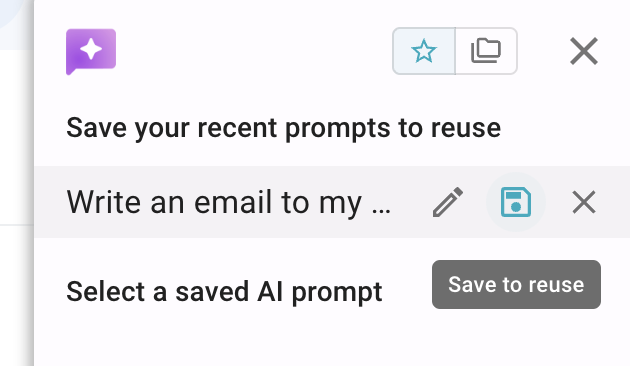
With AI Blaze, you can save prompts to re-use them whenever you need them. You can do this by:
Opening the AI Blaze sidebar
Clicking the ‘Save to reuse’ button that appears next to a previously used prompt
Save the prompt in a folder in your AI Blaze dashboard
When you’re ready to use it, open the sidebar and click it under ‘Saved prompts’. You can also insert prompts by typing the shortcut assigned to them.
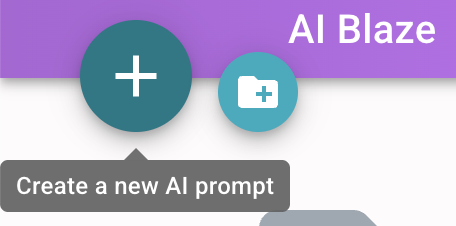
You can also create new prompts that you can re-use by:
Going to your AI Blaze dashboard
Clicking the plus button
Giving your prompt a name & shortcut
Typing your prompt in the large text box
Go to any website, open the sidebar, and click it under ‘Saved prompts’, or type the shortcut associated with your prompt.
Learn more about getting started with AI Blaze here.
How to Write Better AI Prompts
Here are a few tips that you can implement to write better AI prompts:
Use the PTCF format (persona, task, context, format)
Giving your prompts more structure is a great way to improve output. The PTCF format is a simple way to do that.
It stands for:
Persona - who/what the AI should act like
Task - what you want the AI to do
Context - what information the AI needs to consider
Format - how the AI’s output should look.
Using the PTCF format (or any other universal prompt format) gives the AI clearer instructions and leads to better results.
Here’s an example of a prompt that uses this format:
You are a clear and concise research assistant.
Summarize the PDF and extract the most important information.
This may be a report, article, or document. Focus on clarity and usefulness.
Format:
- 2–3 sentence summary - Bullet list of important insights or takeaways
Be specific about the output
One of the biggest mistakes people make is being too vague about the output. The more specific you are about the structure, the better the result.
In your prompts, be very clear about what you want the output to look like, how it should be formatted, and what should be included.
You can do that by adding a 'Sample output' section in your prompt where you can provide a format or example output that the AI can use to form its response.
Here's an example:
Format the response to match this sample output:
Sample output:
Summary: Customer is having trouble accessing their account after setup.
Main Issue: - Login access is not working for some users.
Urgency: - Medium — customer needs access soon, but there is no immediate deadline mentioned.
Next Action: - Check the affected users’ access permissions and send updated login instructions.
Guidelines: - Keep the response concise and easy to scan. - Use a clear, professional, and neutral tone. - Focus only on the relevant details from the ticket. - Do not add information that is not included in the ticket. - Focus on actionable information
Add positive and negative examples
Another way to upgrade your prompts is by adding positive and negative examples to them. This is especially useful for writing tasks (like asking the AI to rewrite something for you) since you’re showing what good output looks like and what to avoid.
Here’s an example of a prompt with positive & negative examples:
Rewrite the message to be clear, concise, and empathetic.
Use the context of the message to understand the situation and respond appropriately.
Format: - Keep it short and easy to read - Use a friendly, natural tone - Include clear next steps when relevant
Positive examples: - "Thanks for your patience I understand this has been frustrating." - "Here’s where things stand and what you can expect next." - "I’ll keep you updated and make sure you have everything you need."
Negative examples: - "We are currently working on it and will update you soon" - doesn't acknowledge the customer's frustration. Instead write: "I understand this is urgent. We're actively looking into it and will have an update for you by end of day." - "This is still in progress" - too vague and not setting clear expectations. Instead write: "We expect to have it ready by Thursday." - "Please wait for further updates" - too passive and leaves the customer feeling ignored. Instead write: "I'll personally follow up with you tomorrow morning with a status update."
Using positive & negative examples makes it much easier for the AI to match the tone, style, and quality you’re looking for in its output.
Have AI ask questions before answering
Another useful trick is to have the AI ask clarifying questions before it responds to your initial prompt. This can help the AI fill in missing details instead of guessing with it’s output.
To do this, you can add a line to your prompt (potentially near the end), saying something like: “Ask clarifying questions before doing [task] if needed.”
Here’s an example of how this can be useful:
This example shows how AI Blaze asks clarifying questions before summarizing the meeting notes. This helps it understand the format, audience, and level of detail you want before creating the final response.
Quick note about improving responses with AI Blaze
You can improve AI Blaze’s responses by giving it access to page context or even uploading files. Learn more about using page context with AI Blaze here.
With AI Blaze, you can also add placeholders, logic, and data read from other pages to your prompts. You can do this by going to your AI Blaze dashboard, clicking a prompt, and adding commands from the right-hand sidebar. Let us know if you need help with this.
General AI Prompt Template
Need help writing prompts? Here’s a universal template that you can save and customize to use in any situation:
Your task is to [what you want the AI to do].
Context: [Include any relevant background information, input, or details the AI should consider]
Format: - [Describe how the output should be structured] - [e.g., bullet points, short paragraphs, sections, etc.] - [include specific requirements like length, tone, or sections]
Sample output: - [Show an example of the output you want]
Positive examples: - [Example of a strong sentence, response, or output] - [Another example of what good looks like]
Negative examples: - [Example of something vague or low quality to avoid] - [Another example of what not to do]
Before completing the task, ask clarifying questions if needed.