AutoHotkey vs Text Blaze: Which is Better?
Compare AutoHotkey vs Text Blaze for text expansion, setup, portability, and team use cases so you can choose the right tool for your workflow.

Choosing between AutoHotKey and Text Blaze can be confusing, especially if your goal is to save time with text expansion. One tool focuses on scripting and deep automation, while the other is built for fast, no-code workflows.
If you're asking yourself which one is best for you, the right choice depends on how you work and how much setup you're willing to handle.
In this article, you’ll get a clear comparison of AutoHotKey vs Text Blaze, including features, ease of use, portability, and real-world use cases.
AutoHotKey vs Text Blaze
Before diving into each tool, here’s a quick side-by-side comparison of AutoHotKey and Text Blaze across the key areas that matter most for text expansion and automation.
| Category | AutoHotKey | Text Blaze |
|---|---|---|
| Overview | Script-based automation tool for Windows | No-code text expansion and workflow automation |
| Pricing | Free and open-source | Free forever |
| Advanced features | Full scripting control, macros, system automation | Dynamic templates, forms, automation, and workflow logic |
| Portability | Windows only, local setup required | Works anywhere (Chrome, Edge, Windows and Mac) |
| Team collaboration | Manual script sharing | Built-in snippet sharing and team management |
At a high level, AutoHotKey gives you more control through scripting, while Text Blaze focuses on helping you move faster with structured templates and less setup.
What is AutoHotKey?
Overview
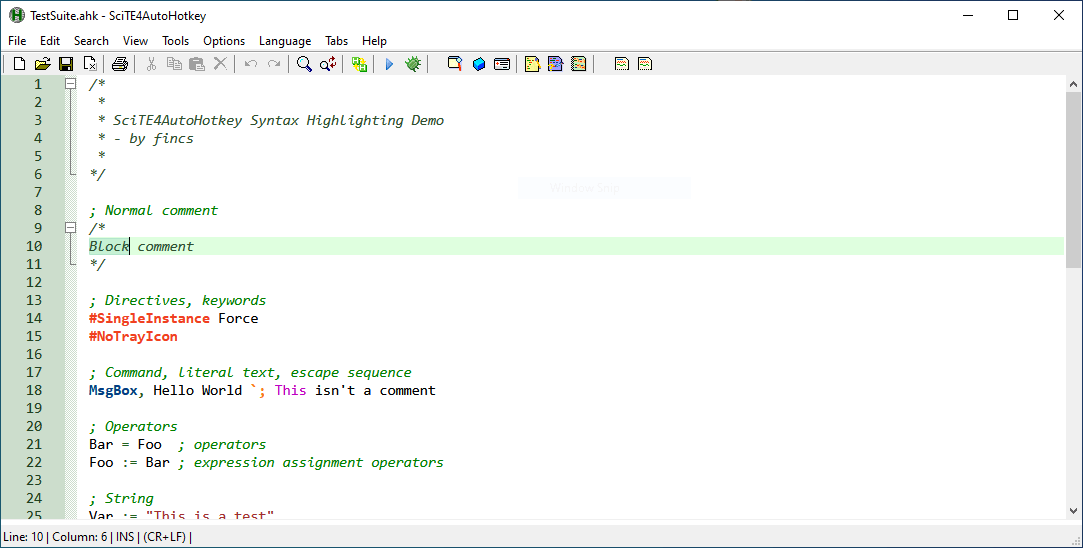
AutoHotKey is a free, open-source scripting language designed for automating tasks on Windows. It allows you to create custom scripts that control keyboard inputs, mouse actions, and system behavior. Many people use it for advanced automation, including macros and hotkeys.
While it can handle text expansion, that is only one part of what it does. Getting started with tools like AutoHotKey typically requires writing and managing scripts, which can take time to learn.
Pricing
AutoHotKey is completely free to use. Since it is open-source, there are no paid plans or feature tiers, and you can use all of its functionality without restrictions.
Advanced Features
AutoHotKey gives you full control over automation through scripting. It can handle a wide range of tasks beyond text expansion, including system-level actions and custom workflows.
Here are a few of its most popular advanced features:
Scripting flexibility - Build custom automation using your own code and logic.
Hotkey control - Assign complex actions to keyboard shortcuts.
System automation - Interact with files, apps, and windows directly.
Conditional logic - Create workflows that respond to specific inputs or conditions.
This flexibility makes it powerful, but it also requires ongoing setup and maintenance.
Portability
AutoHotKey is limited to Windows and runs locally on your machine. Scripts need to be stored and managed manually, and moving them between devices requires transferring files and setting them up again.
This setup works well for personal use but can become harder to manage across multiple environments.
Want a free text expander that works anywhere?
Join 700,000+ who are using Text Blaze templates.
Team Collaboration
AutoHotKey does not include built-in collaboration features. If you want to share scripts with others, you need to distribute the files manually and ensure each person sets them up correctly.
There is no centralized way to manage updates or maintain consistency across a team, which can make collaboration more difficult.
What is Text Blaze?
Overview
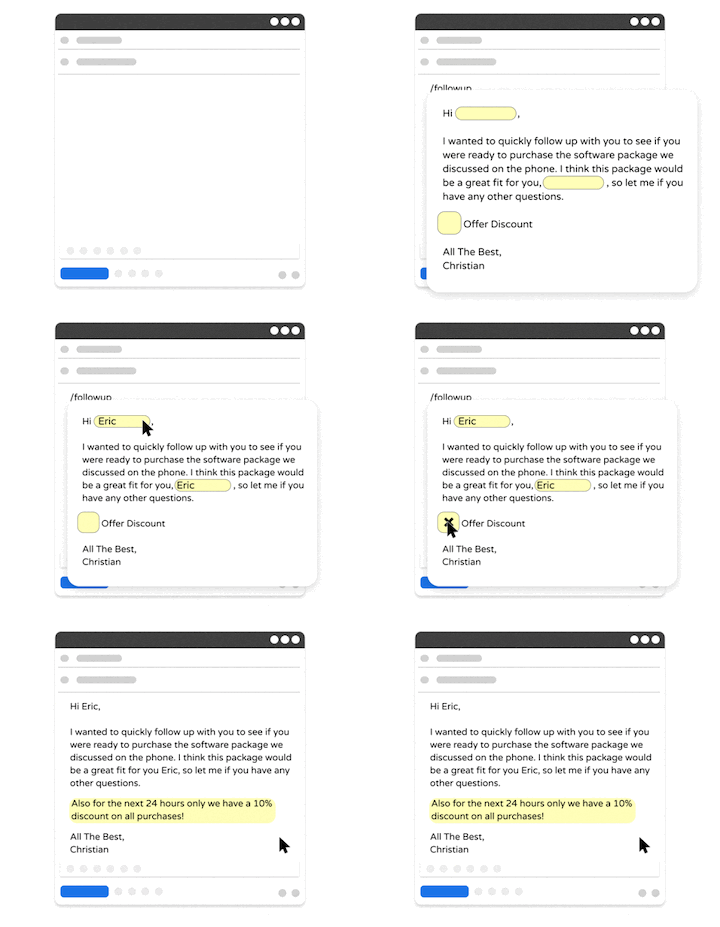
Text Blaze is a text expansion and workflow automation tool that helps you automate repetitive typing with smart templates.
Instead of writing scripts, you create snippets with dynamic fields, forms, and logic. This makes it faster to set up and easier to use for everyday tasks.
Text Blaze has 700,000+ users and a 4.9 rating on the Chrome Web Store, making it one of the highest rated and most loved productivity tools out there.
Pricing
Text Blaze is free forever. Text Blaze's free plan allows you to create 20 snippets with basic features. You can use these 20 snippets an unlimited amount of times. Plus, on the free plan, you can try out dynamic features like placeholders up to 5 times per day for free.
Text Blaze's Pro plan gives you full access to dynamic features, sharing templates with others, and creating many more snippets.
You can read more about Text Blaze's plans to learn more.
Advanced Features
Text Blaze has a ton of powerful features that you can use to save time and automate workflows. Here are some of its advanced features:
Portability
Text Blaze works in your browser on Chrome or Edge, and outside of the browser with desktop apps.
Text Blaze is available on:
Team Collaboration
Text Blaze is perfect for teams. With Text Blaze Business, you can:
Ensure effective communication by sharing templates with your team.
Unify your team's processes with logic and dynamic decision trees.
Make your data available for everyone on the team and interact with it from anywhere in seconds.
Create internal teams & share default folders.
Create user properties that everyone can update & use in snippets.
See analytics to learn how your team is using Text Blaze.
Much more.
You can read more about Text Blaze Business to see if it works for your team.
Want a free text expander that works anywhere?
Join 700,000+ who are using Text Blaze templates.
AutoHotkey vs Text Blaze: Key Differences
AutoHotKey and Text Blaze solve different types of problems, even though they can both be used for text expansion.
Here's an overview of their key differences:
Setup - AutoHotKey requires writing scripts, while Text Blaze uses a simplified dashboard with shortcuts.
Ease of use - AutoHotKey has a steeper learning curve; Text Blaze is designed for quick setup and daily use.
Primary use case - AutoHotKey is built for advanced system scripts, while Text Blaze focuses on text expansion and desktop automation.
Platform - AutoHotKey is limited to Windows, while Text Blaze works across Chrome on both Windows and Mac.
Speed to value - AutoHotKey takes time to configure; Text Blaze can be used almost immediately.
Maintenance - AutoHotKey scripts need to be updated manually, while Text Blaze snippets are easier to manage and edit.
In simple terms, AutoHotKey offers more technical control, while Text Blaze focuses on helping you save time with less setup.
Which is Better? AutoHotKey or Text Blaze?
The better tool depends on how you plan to use it, as each focuses on different features and works on different devices.
Use AutoHotKey if - You want deep control over your system, are comfortable writing scripts, and need advanced automation beyond text expansion.
Use Text Blaze if - You want to save time typing, create reusable templates, share them, and automate workflows without writing code.
For most people focused on text expansion, speed and simplicity matter more than full system control. Setting up scripts can take time, and maintaining them adds overhead.
If your goal is to respond faster, reduce repetitive typing, and keep your communication consistent, Text Blaze is the more practical choice. It helps you get results quickly without needing to learn scripting or manage complex setups.