How to Build a Marketing Tech (MarTech) Stack in 2026
Learn what marketing tech (MarTech) is and how to build an effective marketing tech stack in 2026.

Marketing today often means managing more tools, more channels, and higher expectations than ever before. One minute you're planning campaigns, the next you're digging through analytics, coordinating content marketing efforts, or trying to understand what is actually driving results.
When your tools are disconnected or your processes feel scattered, it becomes harder to stay focused on the work that moves your strategy forward.
Building the right marketing tech stack can bring structure back into your day. With the right MarTech tools in place, you can streamline workflows, reduce manual work, and make more confident decisions across digital marketing and B2B initiatives.
Instead of constantly reacting, you can create a system that supports how you and your team actually work.
In this guide, we'll cover what marketing tech (Martech) is, how to build a marketing tech stack, and some tools you should try out in 2026.
What is Marketing Tech (MarTech)?
Marketing tech, often called MarTech, refers to the software and platforms marketers use to plan, execute, manage, and measure their campaigns. These tools support everything from email marketing and social media scheduling to analytics, automation, and customer relationship management.
Martech plays an important role across several areas of modern marketing:
B2B marketing - Helps teams manage longer sales cycles, track leads, and maintain consistent communication with prospects.
Digital marketing - Supports campaign execution across channels like search, social media, and email while providing performance data.
Content marketing - Makes it easier to plan, create, distribute, and analyze content so teams can understand what resonates.
As marketing becomes more data-driven, having the right MarTech tools helps teams move faster while maintaining consistency. Rather than relying on manual processes, marketers can build & automate workflows that improve collaboration and reduce errors.
What is a Marketing Tech Stack?
A marketing tech stack is the collection of tools your team uses to run marketing activities from start to finish. It typically includes platforms for content creation, communication, analytics, customer management, and automation.
Think of your stack as the foundation of your marketing operations. When the tools fit your needs and integrate well, your campaigns become easier to manage and scale. If the stack is disorganized, even strong strategies can struggle to perform.
Put simply, a marketing tech stack is simply the collection of tools you use to run your marketing and keep everything organized.
In 2026 with the evolution of AI tools, marketers are re-evaluating their tech stacks to make sure they are efficient and effective.
How to Pick the Right MarTech Tool For You
Choosing MarTech tools can feel overwhelming, especially with how the field of marketing is changing so rapidly. Focus on tools that support your workflow rather than adding complexity.
Here's how to pick the right MarTech tool for you (or your tech stack):
Start with your goals - Identify what you are trying to improve, whether that is generating leads, improving content marketing, or strengthening B2B relationships. Your tools should directly support those outcomes.
Prioritize ease of use - If a tool requires heavy training or constant troubleshooting, adoption will suffer. Look for platforms your team can confidently use without friction.
Check integrations - Disconnected tools create extra work and increase the risk of data gaps. Choose tools that connect with your CRM, analytics platforms, and communication channels.
Evaluate scalability - Your marketing needs will grow. Select tools that can support larger campaigns, additional users, and more complex workflows over time.
Balance cost with value - Expensive does not always mean better. Focus on whether the tool helps your team save time, improve results, or reduce manual work.
Once you focus on fit instead of features alone, building your stack becomes much more manageable.
Want to streamline your team's communication & workflows?
Join over 700,000+ others who are using Text Blaze templates.
How to Build a Marketing Tech Stack
Building a marketing tech stack does not have to feel overwhelming. When you break it into clear phases, it becomes much easier to create a system that supports your team without adding unnecessary complexity.
Follow these steps to build an effective marketing tech stack in 2026:
Phase 1: Audit what you already have
Before adding new tools, take time to understand what is currently in your stack. Many teams discover overlapping tools, unused subscriptions, or platforms that no longer support their goals.
To get started, you should:
List every tool - Document the platforms your team uses across digital marketing, content marketing, analytics, and business communication.
Identify overlaps - Look for tools that perform similar functions so you can reduce redundancy.
Evaluate usage - Determine which tools your team relies on and which ones are rarely touched.
Review costs - Compare pricing against actual value to spot opportunities to consolidate.
Example: A marketing team realizes they are paying for two social media schedulers but only actively using one. Removing the duplicate tool immediately cuts costs without affecting productivity.
Phase 2: Map your workflow
Understanding how work moves through your team helps you choose tools that support real processes rather than ideal ones.
Next, you should:
Outline campaign steps - Document how campaigns go from planning to execution to reporting.
Track handoffs - Identify where work moves between team members to prevent bottlenecks.
Spot friction points - Look for repetitive manual tasks that could be automated.
Clarify responsibilities - Ensure each stage of the workflow has clear ownership.
Example: After mapping their workflow, a B2B team notices that lead data is manually copied from forms into their CRM. Adding an automation removes hours of repetitive work each week.
Phase 3: Define your core categories
Your stack should cover the essentials before expanding into specialized tools.
For example, MarTech tools can focus on:
Customer management - Choose a CRM to track leads, customers, and interactions.
Content creation - Select tools that help your team produce marketing assets efficiently.
Campaign execution - Adopt platforms for email, social media, and digital marketing.
Analytics - Ensure you can measure performance and adjust strategy.
Automation - Reduce repetitive work so your team can focus on higher-impact tasks.
Example: A growing company prioritizes a CRM, email platform, and analytics tool first. Once those are stable, they introduce automation to support lead nurturing.
Phase 4: Focus on integration
Even strong tools can create problems if they do not work well together.
Now, you should:
Check native integrations - Confirm your tools connect without requiring complicated setups.
Create a single source of truth - Align data so teams are not working from conflicting information.
Reduce manual transfers - Limit the need to export and import data between platforms.
Test workflows early - Validate that information flows correctly before fully rolling out a tool.
Example: Connecting the CRM to the email platform allows campaign engagement data to automatically update contact records, giving marketers better visibility into performance.
Phase 5: Document and train
A well-built stack only works if your team knows how to use it.
Next, you should:
Create simple guidelines - Document when and why each tool should be used.
Standardize processes - Establish repeatable workflows to maintain consistency.
Train your team - Provide quick onboarding so new hires can ramp up faster.
Encourage feedback - Ask team members where the stack helps and where it slows them down.
Example: A content marketing team builds a short internal playbook that outlines how campaigns are created, approved, and published. This reduces confusion and keeps projects moving.
Phase 6: Review and optimize regularly
Your marketing strategy will evolve, and your stack should evolve with it.
Finally, make sure to:
Schedule regular reviews - Reassess tools quarterly or biannually.
Measure impact - Look at whether tools are saving time or improving results.
Retire outdated platforms - Remove tools that no longer match your needs.
Stay adaptable - Be open to adjusting your stack as your team grows.
Example: After expanding into new digital marketing channels, a company upgrades its analytics platform to gain deeper insight into cross-channel performance.
Marketing Tech Stack Examples
No two marketing teams build their stacks the same way. The right setup depends on your size, goals, and whether you focus heavily on B2B, digital marketing, or content marketing.
Example 1: Lean startup stack
A small team might rely on an all-in-one CRM, a design tool for quick visuals, a scheduling platform for social posts, and a reporting dashboard. The focus is speed and affordability while covering essential marketing activities.
Example 2: Content-driven team
Organizations that prioritize content marketing often invest more in writing, design, SEO, and collaboration tools. Automation supports distribution so marketers can spend more time creating high-quality content.
Example 3: B2B growth stack
B2B teams typically emphasize lead tracking, email nurturing, analytics, and CRM integrations. Clear data helps align marketing with sales and improves visibility into the pipeline.
Example 4: Enterprise stack
Larger companies often use specialized tools for segmentation, personalization, attribution, and advanced analytics. Governance and integrations become especially important at this level.
Your goal should not be to match someone else’s stack. It should be to build one that supports how your team works.
Best MarTech Tools to Add to Your Stack
If you want better visibility, smoother workflows, or less manual work, the tools we've listed below offer a great place to start while building your own MarTech stack.
Text Blaze
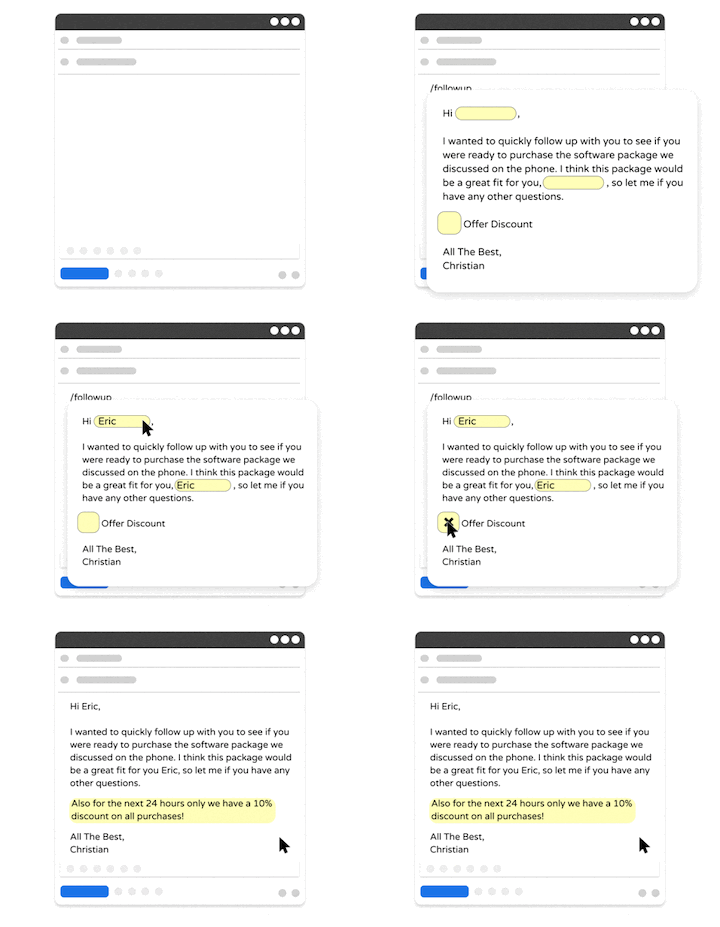
Text Blaze is #1 on this list because it is the highest rated productivity app on the Chrome Web Store, with a 4.9 rating and 1,000+ 5-star reviews.
With Text Blaze, you can automate repetitive typing with keyboard shortcuts & dynamic text templates that work on any site or app.
How it helps with marketing:
Automate repetitive typing & communications anywhere! Text Blaze works on Chrome, Windows, and Mac.
Streamline repetitive marketing workflows - Text Blaze can automate: transferring data, filling out forms, sending an email, or any other repetitive workflow.
Get the right message every time - Text Blaze helps marketing teams stay on-brand, consistent, and get the right message in every interaction.
Personalization at scale - With Text Blaze, you can use placeholders and logic to create dynamic templates that help you personalize your communication for any situation.
Text Blaze is free forever! Give Text Blaze a try for free and start saving time at no cost.
How it fits into your MarTech stack: Text Blaze works alongside your existing tools rather than replacing them, making it easy to adopt without disrupting workflows. It supports communication across digital marketing and B2B initiatives while helping your team operate more efficiently.
Want to streamline your team's communication & workflows?
Join over 700,000+ others who are using Text Blaze templates.
HubSpot
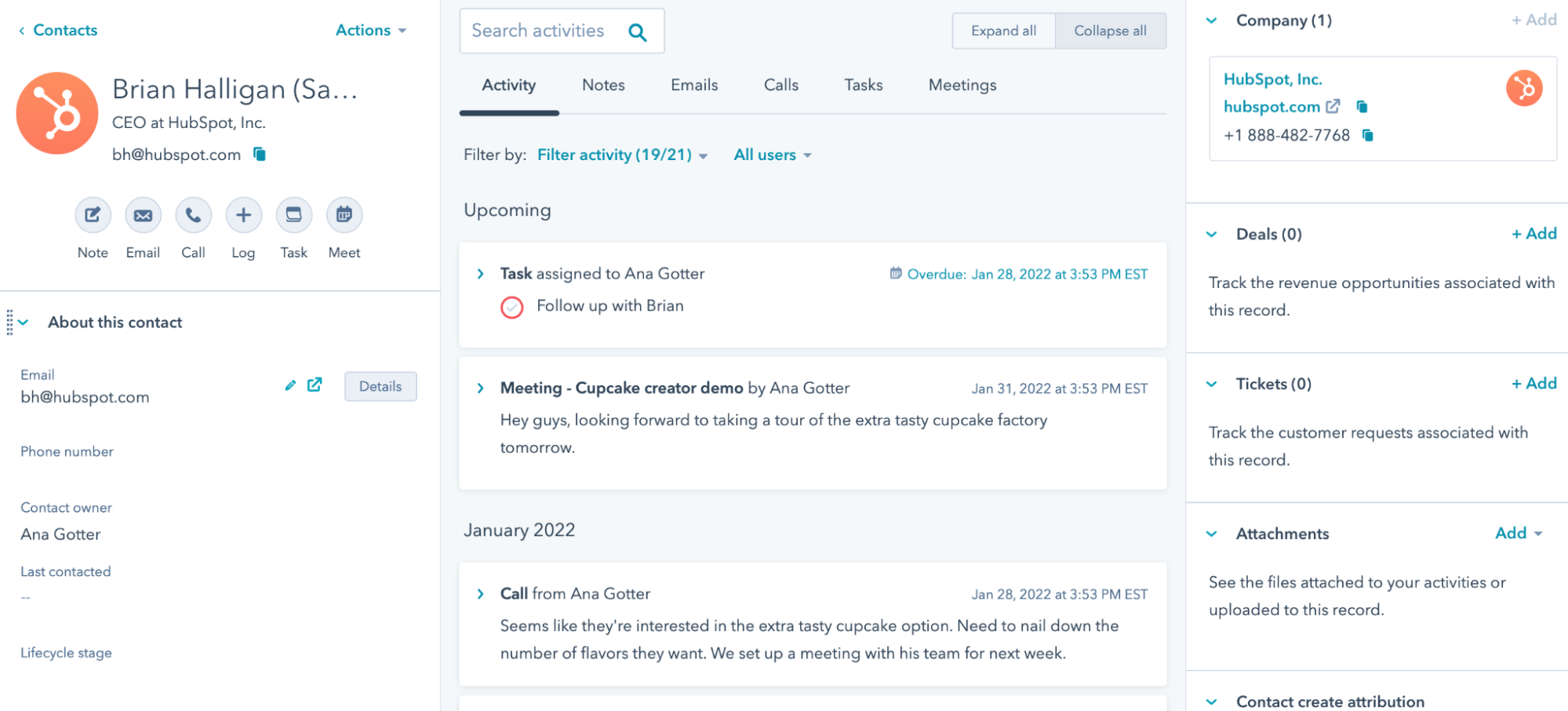
HubSpot's is a platform that combines CRM functionality with tools for email marketing, lead tracking, automation, and reporting. Marketers can manage contacts, build campaigns, and monitor engagement from a single dashboard.
How it helps with marketing:
Organize customer data so your team always knows the status of each contact.
Build automated sequences that guide prospects through the funnel.
Track campaign performance to better understand what drives conversions.
Keep marketing and sales aligned with shared data.
Access dashboards that highlight key metrics.
How it fits into your MarTech stack: HubSpot often acts as a foundational system because it connects multiple marketing activities. When integrated with your other tools, it becomes a reliable source of truth for campaign performance and customer data.
Canva
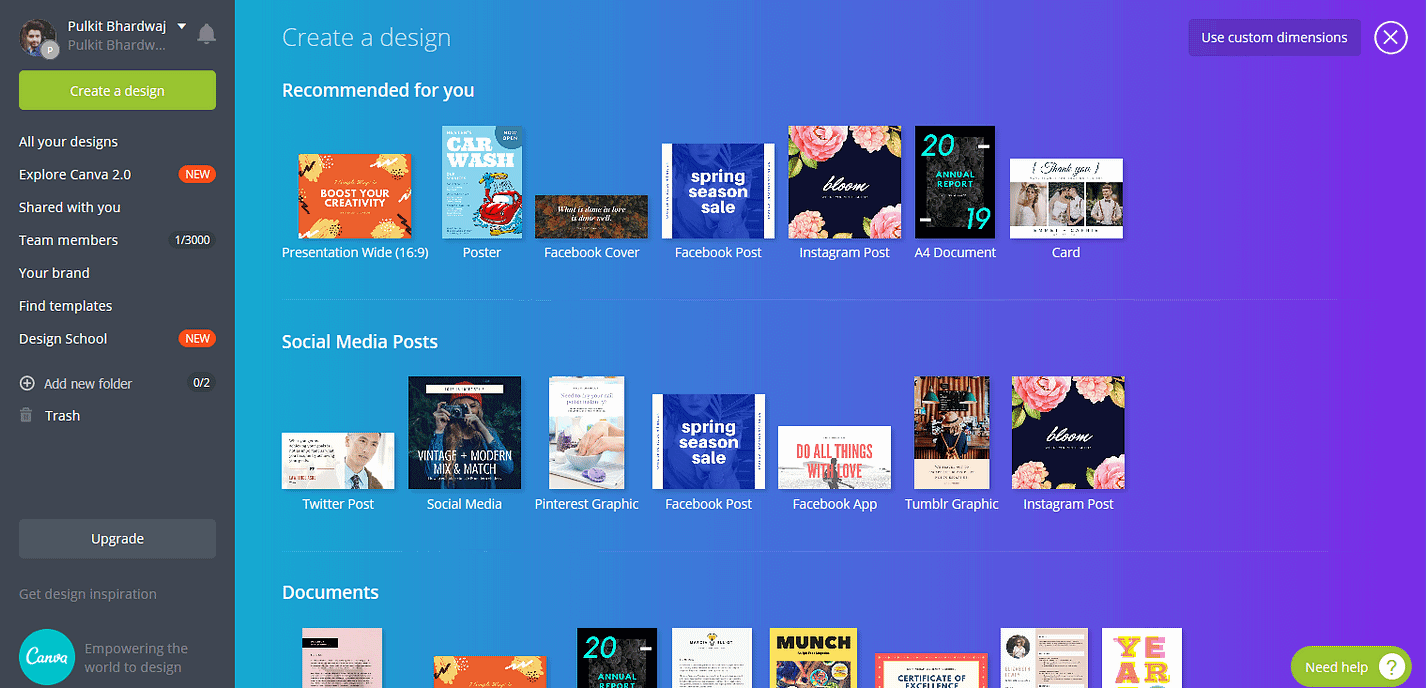
Canva is a design platform that allows marketers to create professional visuals without advanced design skills. It supports everything from social media graphics to presentations and campaign assets, making it a practical choice for fast-moving teams.
How it helps with marketing:
Create visuals quickly for digital marketing campaigns.
Maintain consistent branding with reusable brand kits.
Collaborate with team members through shared designs and comments.
Handle everyday design needs without relying heavily on designers.
Produce assets for social media, email, web pages, and more.
How it fits into your MarTech stack: Canva strengthens the content creation layer of your stack. It pairs well with scheduling and campaign tools, helping your team move from idea to published asset with fewer delays.
Hootsuite
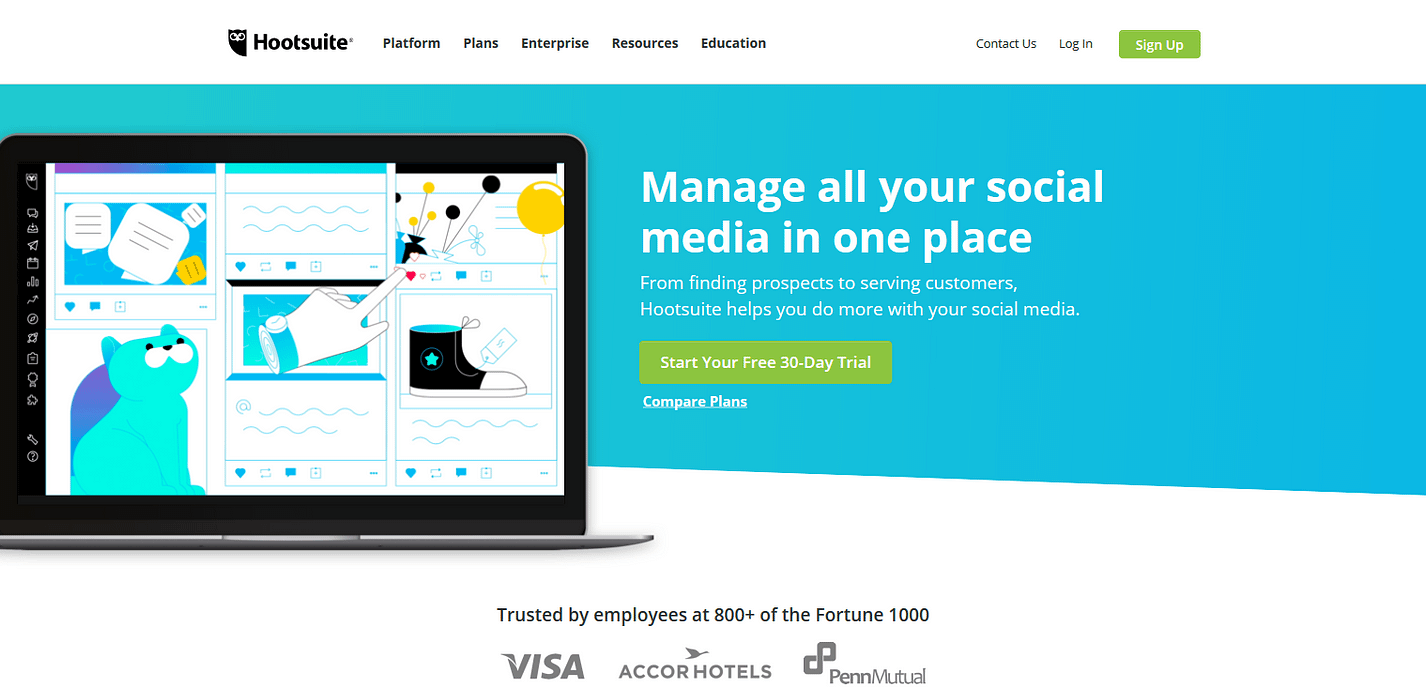
Hootsuite is a social media management platform designed to help marketers plan, schedule, and analyze posts across multiple networks. Instead of switching between platforms, teams can manage everything from a centralized workspace.
How it helps with marketing:
Manage multiple social media channels from one dashboard.
Schedule content in advance to maintain a consistent presence.
Understand which posts resonate through performance analytics.
Coordinate work by assigning tasks and approvals.
Reduce manual posting and day-to-day operational effort.
How it fits into your MarTech stack: Hootsuite supports the distribution side of your marketing efforts. When connected with your content and analytics tools, it helps create a smoother workflow from creation to performance tracking.
Want to streamline your team's communication & workflows?
Join over 700,000+ others who are using Text Blaze templates.
Campaign Monitor

Campaign Monitor is an email marketing platform focused on helping teams design campaigns, segment audiences, and track engagement. Its interface makes it easier to build emails while maintaining a professional look.
How it helps with marketing:
Build targeted email campaigns for specific audience segments.
Trigger automated emails based on subscriber actions.
Monitor opens, clicks, and conversions to measure engagement.
Deliver more relevant content through audience personalization.
Use reporting insights to improve future campaigns.
How it fits into your MarTech stack: Campaign Monitor reinforces the team communication layer of your stack. Integrated with your CRM and analytics platforms, it helps ensure your messaging stays timely, relevant, and measurable.
What is the Best MarTech Tool?
Finding the right MarTech tool often starts with identifying what is slowing your campaigns down. When you focus on the bottleneck instead of chasing new productivity software, your decisions become much clearer.
Your priorities should guide your stack. A team heavily invested in content marketing will need tools that support planning, creation, and distribution, while marketers focused on email may look for stronger segmentation and automation.
The goal should not be to build the biggest stack, but the one that supports how your team works best. When your tools align with your workflow, marketing starts to feel more manageable and far less reactive.
The right stack helps make your workflows efficient, giving you more time and energy to focus on the campaigns that truly move your business forward.
To recap, our suggestion for the best free MarTech tool is Text Blaze. Text Blaze is the highest-rated productivity tool on the Chrome Web Store (4.9 rating) that helps marketing teams automate repetitive typing and workflows anywhere you work (even on Windows and Mac).
Give Text Blaze a try for free today!