How to Improve Employee Productivity in 2026 (10 Tips)
Learn how to improve employee productivity with practical strategies, measurement tips, common causes, software, and AI in 2026.

Improving employee productivity is a common challenge for many businesses. Teams often deal with repetitive tasks, unclear processes, and constant interruptions that slow down progress and reduce output.
If you're trying to improve employee productivity, the goal is not to make employees work more. It is to help them work more efficiently by reducing manual work, improving workflows, and using the right tools.
In this guide, we'll cover what employee productivity means, how to measure it, and practical ways to improve it using better processes, productivity software, and AI in 2026.
What Is Employee Productivity?
Employee productivity refers to how efficiently employees use their time and resources to complete work. It measures the relationship between output and the effort required to produce that output.
In practical terms, a productive employee completes meaningful work in less time, with fewer errors, and without unnecessary effort. Productivity is not just about speed. It also includes quality, consistency, and the ability to focus on high-value tasks.
Common Causes of Low Employee Productivity
Several common issues can reduce employee productivity, especially when work is repetitive, unclear, or constantly interrupted.
Here are a few common ones that can cause low employee productivity:
Too many repetitive tasks - Employees often spend hours rewriting the same emails, entering the same data, or completing routine steps. This reduces time for more important work and lowers motivation over time.
Poor communication across teams - When information is unclear or scattered, employees waste time searching for answers or clarifying tasks. Miscommunication can also lead to rework and delays.
Lack of clear processes - Without defined workflows, employees have to figure things out on their own. This leads to inconsistent results and slows down execution.
Constant context switching - Switching between tasks, tools, and conversations makes it harder to stay focused. Productivity drops when employees cannot complete work in a single flow.
Unclear goals and priorities - If employees are not sure what matters most, they may spend time on low-impact tasks. Clear priorities help teams focus on the right work.
Inefficient tools and workflows - Using too many tools or outdated systems creates friction. Employees spend more time navigating tools than completing tasks.
Lack of training or onboarding - When employees are not properly trained, tasks take longer and mistakes increase. Clear onboarding improves efficiency early on.
Employee burnout and low motivation - When employees are overworked or disengaged, productivity drops. Sustainable workloads are important for consistent performance.
Addressing these issues is the first step toward improving employee productivity and creating more efficient workflows.
How to Measure Employee Productivity
Measuring employee productivity helps you understand where time is going and where improvements can be made. The goal is not to track every action, but to identify patterns and outcomes.
Some common ways to measure productivity include:
- Output per employee - The amount of work completed within a specific time period.
- Task completion rate - The percentage of assigned tasks that are completed on time.
- Time per task - How long it takes to complete specific types of work.
- Error rate - The frequency of mistakes or rework required.
- Revenue per employee - The amount of revenue generated relative to team size.
These metrics provide a clearer view of efficiency and help identify bottlenecks. When used correctly, they guide improvements without creating unnecessary pressure.
Want to streamline your team's communication & workflows?
Join over 800,000+ others who are using Text Blaze templates.
How to Improve Employee Productivity
Improving employee productivity starts with removing friction from everyday work and implementing strategies that make it easier to get things done.
Here are 10 strategies you can use to improve employee productivity across your team:
1. Set clear goals and priorities
When employees are not sure what matters most, they tend to focus on whatever is in front of them. This often leads to time being spent on low-impact work instead of meaningful tasks.
Clear goals help employees understand what to prioritize and where to focus their efforts. Managers should regularly communicate expectations and align work with business outcomes. This creates direction and reduces wasted effort.
In fact, research shows that employees who have clear expectations are 2.8x more likely to be engaged at work.
2. Define and document repeatable processes
Many teams lose time because employees handle the same tasks in different ways. Without documented processes, work becomes inconsistent and harder to complete efficiently. Creating simple, repeatable workflows helps employees move faster and reduces decision-making overhead.
It also makes onboarding easier and ensures consistency across the team. Even small improvements to processes can lead to noticeable productivity gains.
Standardizing and automating workflows can increase productivity by up to 20–30%.
3. Reduce unnecessary meetings and protect focus time
Meetings can quickly take over the workday, especially when they are not clearly structured or necessary. Reducing meeting volume helps employees reclaim time for meaningful work.
Plus, focus time is critical for completing complex tasks without interruptions.
Here are some actionable things you can do to make meetings more efficient:
Replace status meetings with shared updates when possible
Set clear agendas and time limits for every meeting
Block dedicated focus time on calendars
Limit attendees to only those who need to be involved
Small changes to how meetings are handled can free up hours of productive time each week.
4. Improve communication clarity and consistency
Unclear communication slows teams down and leads to unnecessary back-and-forth. Employees often spend time trying to interpret instructions or searching for missing information.
Standardizing how information is shared helps reduce confusion. Clear team communication also reduces mistakes and improves collaboration across teams.
Using consistent formats for updates and requests can make a noticeable difference in day-to-day productivity.
5. Eliminate or delegate low-value tasks
Not all tasks contribute equally to business outcomes. Employees often spend time on work that does not require their level of expertise. Identifying and removing low-value tasks helps teams focus on what actually drives results.
Delegation and workflow automation can reduce the workload without sacrificing output. Over time, this creates a more efficient use of time across the team.
Focus your team’s time on work that directly contributes to business goals.
Want to streamline your team's communication & workflows?
Join over 800,000+ others who are using Text Blaze templates.
6. Provide better training and onboarding
Employees work more efficiently when they understand how to do their jobs well. Poor onboarding often leads to confusion, mistakes, and slower performance. Investing in training helps employees build confidence and complete tasks more effectively.
Clear documentation and examples can speed up the learning process. Ongoing training also helps teams boost productivity and adapt to new tools and processes.
94% of employees say they would stay longer at a company that invests in their learning.
7. Encourage deep work and limit distractions
Constant interruptions make it difficult for employees to stay focused. Even small distractions can break concentration and reduce output. Encouraging deep work helps employees complete tasks more efficiently and with better quality.
Here are some things you can do to encourage deep work:
Limit unnecessary notifications and interruptions
Encourage dedicated blocks of uninterrupted work time
Set expectations around response times for messages
Reduce multitasking where possible
Fewer distractions lead to more consistent and higher-quality work.
8. Use the right tools to reduce manual work
The tools and software your team uses have a direct impact on productivity. When employees rely on manual processes, simple tasks take longer than they should.
The right tools help automate repetitive work and reduce friction across workflows. This includes tools for communication, task management, and writing. Choosing tools that simplify work, rather than add complexity, is important.
9. Give regular feedback and performance visibility
Employees perform better when they understand how they are doing. Regular feedback helps identify areas for improvement and reinforces what is working well. Visibility into performance also keeps employees aligned with expectations.
Managers should create a consistent feedback loop that supports growth and accountability. This helps teams stay on track and improve over time.
10. Review workflows and continuously optimize processes
Productivity improvements do not happen once and stay fixed. Workflows should be reviewed regularly to identify inefficiencies. Small adjustments can lead to meaningful gains over time.
Look for patterns, bottlenecks, and unnecessary steps in your employees' processes and find solutions that reduce them.
Continuous improvement helps maintain efficiency as the business evolves.
Organizations that actively optimize workflows can improve operational efficiency by up to 30%.
Best Employee Productivity Software
Many teams turn to productivity software when manual work, poor visibility, or business communication gaps start to slow things down. The right tools help reduce repetitive tasks, track performance, and keep teams aligned so employees can focus on meaningful work.
Here are a few employee productivity software you can use to improve employee productivity:
1. Text Blaze
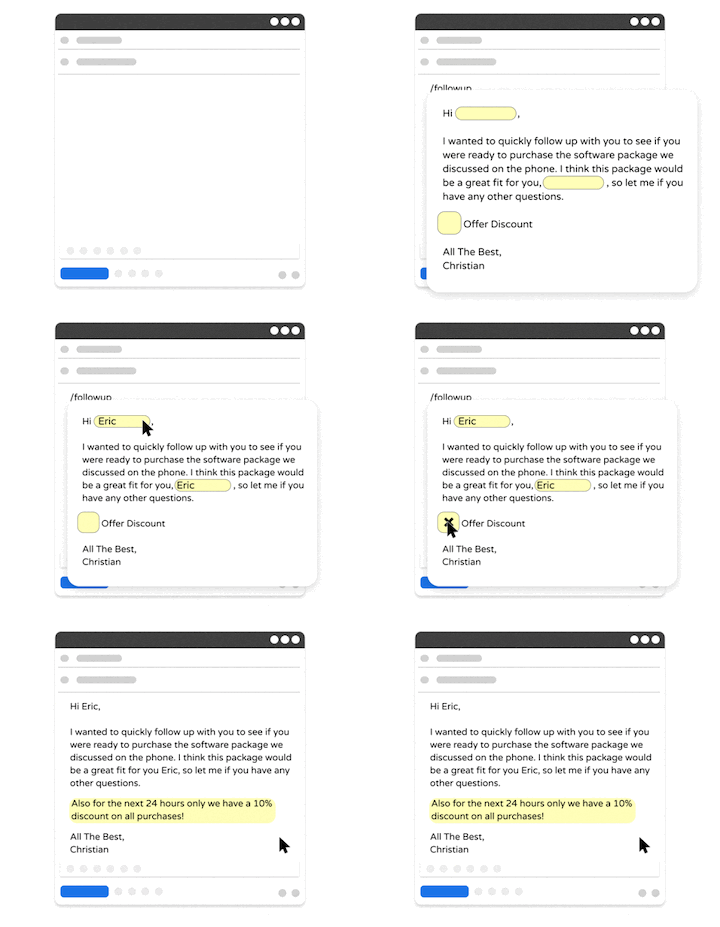
Text Blaze is a productivity and automation tool that helps you automate repetitive typing with keyboard shortcuts & smart text templates that work on any site or app.
Text Blaze is perfect for individuals or teams who want to automate repetitive typing or workflows. You can create text templates and share them with your team to get to the right message quickly, every time, and on any website.
How Text Blaze helps improve employee productivity:
Automate repetitive typing & boost productivity - Use keyboard shortcuts & dynamic text templates that work anywhere.
Guide your team's communication anywhere you work - Text Blaze works on Chrome, Windows, and Mac.
Streamline repetitive workflows - Text Blaze can automate: transferring data, filling out forms, sending an email, or any other repetitive workflow.
Get the right message every time - Text Blaze helps teams stay on-brand, consistent, and get the right message in every interaction.
Personalization at scale - With Text Blaze, you can use placeholders and logic to create dynamic templates that help you personalize your communication for any situation.
Text Blaze is perfect for teams! Learn more about using Text Blaze for teams to supercharge your team's communication and productivity!
Want to streamline your team's communication & workflows?
Join over 800,000+ others who are using Text Blaze templates.
2. ActivTrak
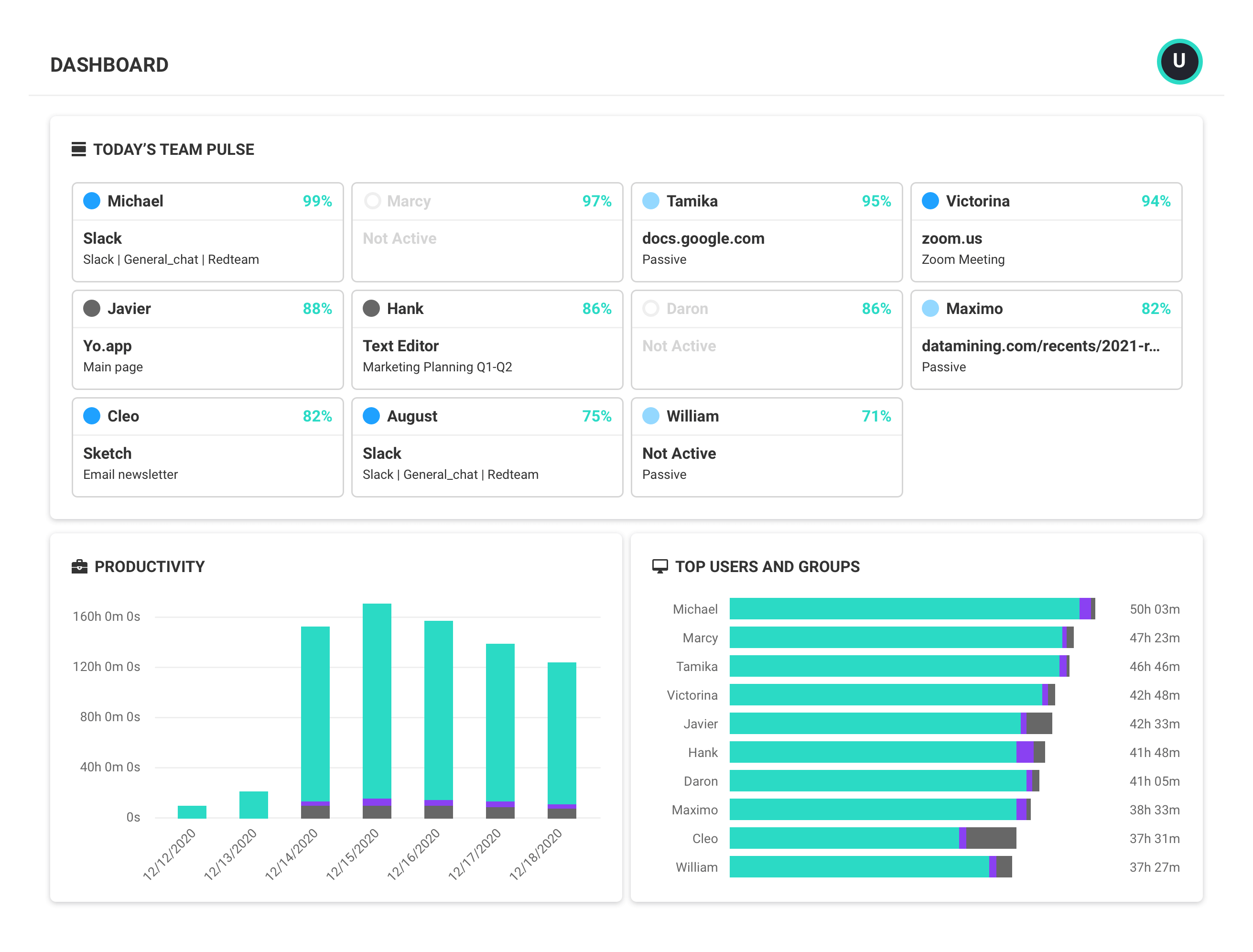
ActivTrak is an employee monitoring and productivity analytics tool that gives teams visibility into how work is being done. It tracks activity across apps and websites to help identify patterns and inefficiencies.
Managers can use this data to understand where time is going and where improvements can be made. The platform focuses on insights rather than just raw tracking.
How ActivTrak helps improve employee productivity:
- Track how time is spent across apps and tasks
- Identify productivity trends and bottlenecks
- Provide visibility into team performance
- Support data-driven workflow improvements
3. Insightful
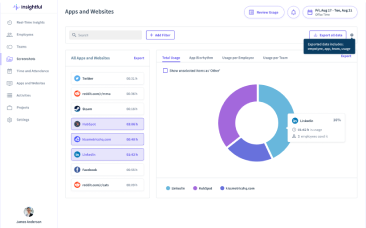
Insightful (formerly Workpuls) combines employee monitoring with deeper productivity analytics to help teams understand performance over time. It tracks activity, attendance, and workload distribution across teams.
This makes it easier to spot inefficiencies and balance workloads more effectively. The platform is often used by remote and distributed teams that need more visibility into operations.
How Insightful helps improve employee productivity:
- Monitor employee activity and attendance
- Analyze productivity trends over time
- Identify underutilized or overworked team members
- Improve workforce planning and efficiency
4. Hubstaff
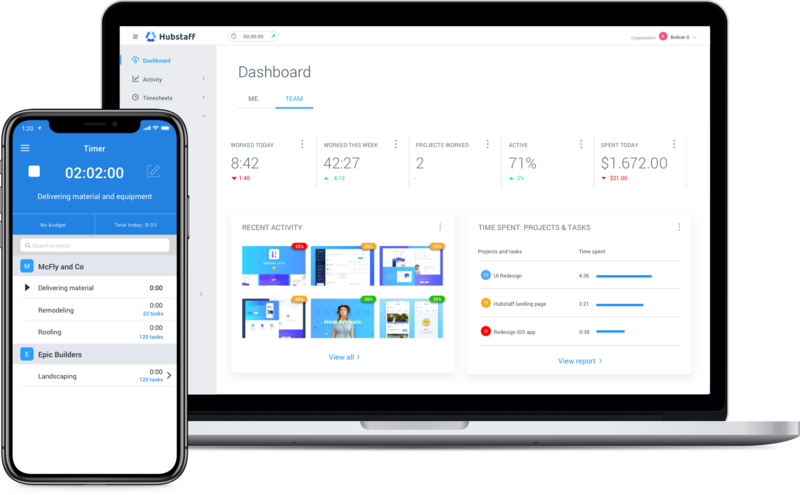
Hubstaff is a time tracking and employee tracking tool designed for teams that need better visibility into how time is spent. It tracks hours, activity levels, and project progress in one place.
This helps managers understand workload distribution and identify inefficiencies. Hubstaff is especially useful for remote teams and project-based work.
How Hubstaff helps improve employee productivity:
- Track time spent on tasks and projects
- Monitor activity levels during work hours
- Generate reports on team performance
- Improve accountability and time management
5. Slack
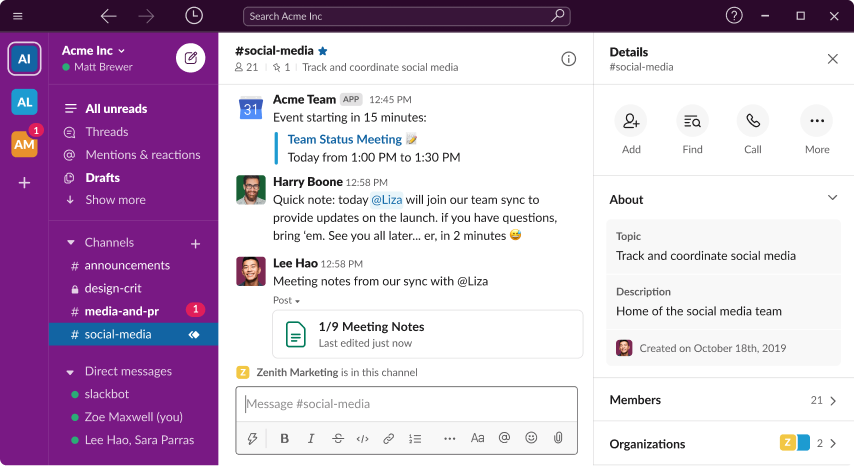
Slack is a communication tool that helps teams stay connected and aligned throughout the workday. It organizes conversations into channels, which reduces scattered communication and long email threads.
Teams can share updates, ask questions, and collaborate in real time. Slack also integrates with other tools to reduce context switching.
How Slack helps improve employee productivity:
- Centralize team communication in one place
- Reduce time spent on email and scattered messages
- Enable faster collaboration and decision-making
- Integrate with tools to streamline workflows
Want to streamline your team's communication & workflows?
Join over 800,000+ others who are using Text Blaze templates.
How to Use AI to Boost Employee Productivity
AI helps employees work faster by reducing manual effort and speeding up common tasks. It is especially useful for writing, summarizing information, and organizing work.
One of the most practical uses of AI tools for productivity is in everyday communication. Teams can generate email responses, summarize long threads, and standardize how messages are written. This reduces time spent on repetitive writing and helps maintain consistency across the team.
To get the most value from AI, it should be combined with clear workflows and templates. AI works best when it supports structured processes rather than replacing them. When used correctly, it helps employees spend less time on routine tasks and more time on work that requires focus and judgment.
What Is the Best Way to Increase Employee Productivity?
The most effective way to increase employee productivity is to focus on how work gets done, not just how much work is assigned. Start by identifying areas where time is being wasted, such as repetitive tasks, unclear processes, or unnecessary communication.
From there, simplify workflows, set clear expectations, and remove friction wherever possible.
Implementation matters just as much as strategy. Changes should be introduced gradually, with clear guidance and support for employees.
Teams are more likely to adopt new processes when they understand the benefits and have practical examples to follow. It also helps to measure results over time so you can adjust and improve what is not working.
Consistency is key. Productivity improves when teams follow the same processes, use the same systems, and communicate in a clear and structured way. Tools can support this by making it easier to standardize tasks and reduce manual work. For example, Text Blaze can help automate repetitive writing and keep communication consistent without adding extra complexity.