Text Blaze vs Espanso: Which is Best?
Compare Text Blaze and Espanso across features, setup, pricing, and use cases to find the best text expander for your workflow.

Typing the same messages, emails, or notes over and over can slow you down more than you realize. If you’re looking into text expanders, you’ve probably come across Text Blaze and Espanso.
Both tools help you save time by turning short shortcuts into full pieces of text. But they work very differently depending on how you like to set things up and use them day to day.
In this guide, we’ll compare Text Blaze vs Espanso across features, setup, pricing, and real use cases so you can decide which one fits your workflow.
Text Blaze vs Espanso
Here's a quick comparison of Text Blaze and Espanso regarding some key features and things to consider:
| Category | Text Blaze | Espanso |
|---|---|---|
| Platform support | Chrome, Edge, Windows, Mac | Windows, Mac, Linux |
| Setup difficulty | Easy, no coding | Moderate to advanced, uses config files |
| Text expansion | Yes | Yes |
| Dynamic fields | Yes, with forms and variables | Yes, through YAML config |
| Automation | Yes, with logic, formulas, and integrations | Limited, mostly script-based |
| Team collaboration | Yes | No built-in support |
| Pricing | Free forever | Free and open source |
| Best for | Individuals and teams who want to automate repetitive typing & workflows | Technical users who want a system-wide open-source tool |
Text Blaze
Overview
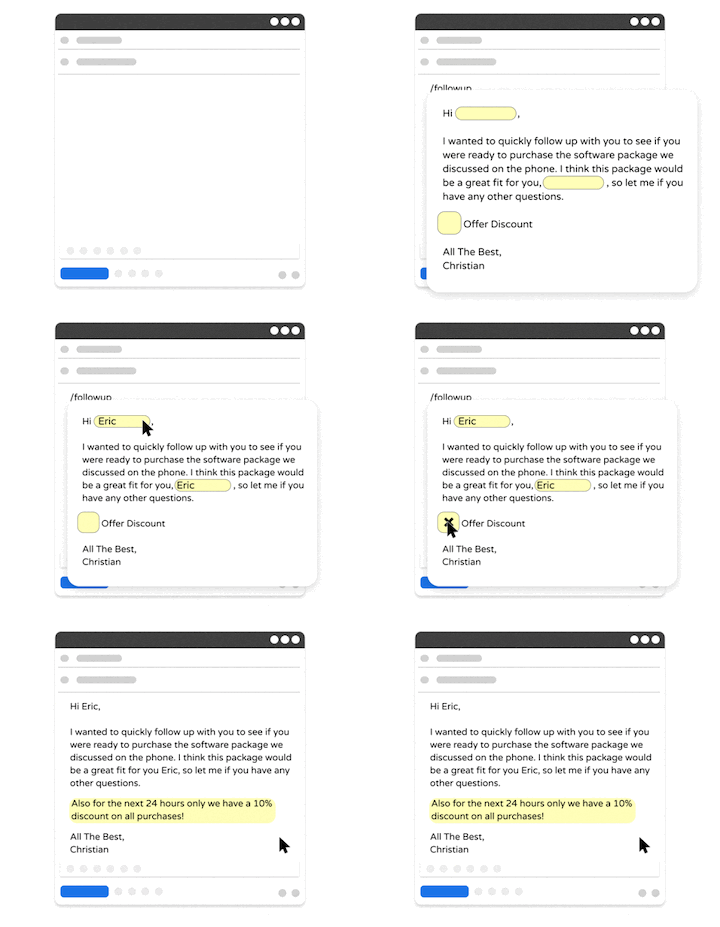
Text Blaze is a text expander that works on any website or app. It lets you create snippets that expand into full messages, emails, or templates using simple shortcuts.
You can also add dynamic fields, forms, and logic to make your snippets more flexible. This makes it useful for both simple text expansion and more structured workflows.
Text Blaze has 700,000+ users and a 4.9 rating on the Chrome Web Store, making it one of the highest rated and most loved productivity tools out there.
Pricing
Text Blaze is free forever. Text Blaze's free plan allows you to create 20 snippets with basic features. You can use these 20 snippets an unlimited amount of times. Plus, on the free plan, you can try out dynamic features like placeholders up to 5 times per day for free.
Text Blaze's Pro plan gives you full access to dynamic features, sharing templates with others, and creating many more snippets.
You can read more about Text Blaze's plans to learn more.
Setup
Getting started with Text Blaze is straightforward. Here's how it works:
Go to your dashboard
Click the plus button
Give your snippet a name & shortcut
Assign the snippet contents
Type the shortcut anywhere to insert it
There’s no need to write code or manage configuration files. Most features are accessible through a visual editor, which makes it easier to learn quickly as a low-code tool.
Advanced Features
Text Blaze goes beyond basic text expansion by adding structure and logic to your snippets:
Placeholders - Collect input directly when inserting a snippet.
Formulas - Perform calculations inside snippets.
Conditional logic - Adjust outputs based on inputs.
Autopilot & workflow automation - Simulate key presses and read data across websites.
These features are helpful if your work involves structured responses or repeated workflows.
Portability
Text Blaze works in your browser on Chrome or Edge, and outside of the browser with desktop apps.
Text Blaze is available on:
Team Collaboration
Text Blaze is perfect for teams. With Text Blaze Business, you can:
Ensure effective communication by sharing templates with your team.
Unify your team's processes with logic and dynamic decision trees.
Make your data available for everyone on the team and interact with it from anywhere in seconds.
Create internal teams & share default folders.
Create user properties that everyone can update & use in snippets.
See analytics to learn how your team is using Text Blaze.
Much more.
You can read more about Text Blaze Business to see if it works for your team.
Want a free text expander that works anywhere?
Join 700,000+ who are using Text Blaze templates.
Espanso
Overview
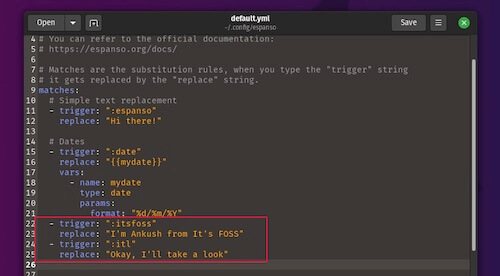
Espanso is an open-source text expander that works across operating systems, including Windows, Mac, and Linux. It runs at the system level, which means it can expand text in most applications.
Instead of using a visual interface, tools like Espanso rely on configuration files to define how snippets behave.
Pricing
Espanso is completely free and open source.
Setup
Setting up Espanso requires editing YAML configuration files. You define triggers and outputs manually inside these files.
This gives you more control, but it also takes time to learn and maintain. Users who are comfortable with code or configuration files may find it easier to work with.
Advanced Features
Espanso supports advanced functionality through its configuration system and extensions.
- Custom scripts - Run scripts when a snippet is triggered.
- Variables - Insert dynamic content into outputs.
- Packages - Extend functionality with community packages.
- System-wide expansion - Works across most apps.
These features can be powerful, but they depend on how comfortable you are with configuration.
Portability
Espanso runs at the system level, so it works across both web and desktop applications. This makes it more flexible in terms of where snippets can be used.
It also supports multiple operating systems, including Linux, which is not always supported by other tools.
Team collaboration
Espanso does not include built-in collaboration features. Sharing snippets typically involves manually sharing configuration files.
This can work for individuals or small setups, but it may not scale well for teams.
Which is Best? Text Blaze or Espanso?
The better option depends on how you prefer to work.
If you want something easy to set up, with a visual editor and built-in features for forms, automation, and sharing, Text Blaze is the more practical choice. It works well for everyday workflows, especially if you rely on browser-based tools.
If you prefer a fully customizable, system-wide solution and are comfortable working with configuration files, Espanso gives you more control. It can be a good fit for technical users who want flexibility across different environments.
For most people focused on saving time and reducing repetitive typing without dealing with setup complexity, Text Blaze is usually the easier tool to start using right away.