20 Workflow Automation Examples in 2026
Discover 10 common workflow automation examples for marketing, business processes, tasks, AI, and more in 2026.

If you feel like your day is filled with repetitive tasks, small manual steps, and constant context switching, you’re not alone. Many people spend more time managing work than actually doing meaningful work.
Automation helps reduce that friction by handling repeatable processes for you.
In fact, over over 50% of work today can be automated, research shows.
In this article, we’ll walk through 20 workflow automation examples you can use to simplify processes and get some time back in 2026. Let's dive in!
What is Automation?
Automation Definition: Automation refers to using software, systems, or tools to complete tasks with minimal human involvement. Instead of manually performing the same actions repeatedly, you set up processes that run on their own. These processes follow predefined logic so work happens consistently every time, which leads to less mistakes.
Automation Meaning: At its core, automation means offloading routine or predictable work to tools so people can focus on higher-value tasks. It reduces manual effort, lowers the chance of mistakes, and helps work move faster.
In 2026, automation is typically used across everyday workflows rather than limited to technical teams. People automate things like task routing, approvals, data syncing, reporting, and AI-assisted tasks.
Many workflows now combine rule-based automation with AI to handle both structured steps and flexible tasks like summarizing information or drafting responses.
Is Automation Worth Investing In?
Automation is worth investing in when manual work starts to slow you down or create avoidable errors. For most people and teams, the value comes from small improvements across everyday workflows rather than one big change.
Here are a few key benefits of automating tasks or workflows:
Less repetitive work - Automation handles routine tasks like data entry, task routing, and follow-ups so you spend less time on busywork.
Fewer mistakes - Automated steps run the same way every time, which helps reduce errors in approvals, reporting, and compliance tasks.
Faster turnaround times - Work moves automatically between steps instead of waiting in inboxes or shared folders.
Better consistency - Processes like onboarding, marketing campaigns, and policy tracking follow the same structure every time.
Easier scaling - Automation allows you to handle more requests or tasks without needing to add more manual effort.
Investing in automation is a great way to use tools to increase productivity without too much initial setup.
For most use cases, automation pays off when it saves time on tasks you repeat weekly or daily. Even for small businesses, starting with a few high-impact workflows makes it easier to see results and decide where to automate next.
20 Automation Examples
Automation shows up in many different ways depending on the kind of work you’re responsible for. It's a great way to hack your productivity and really save time.
Here are our categories for 20 automation examples:
Workflow Automation Examples
Workflow automation is often the first place people start because it targets the handoffs and follow-ups that slow work down. These examples move from general coordination to more concrete, everyday scenarios.
Task assignment routing
Task assignment routing helps ensure work lands with the right person without you needing to think about it every time. Instead of manually reviewing and delegating tasks, rules handle distribution in the background.
For example, support tickets can be routed by issue type or urgency. Project tasks might be assigned based on role or workload. This makes it easier to keep work moving when things get busy.
Approval workflows
Approval workflows take the guesswork out of who needs to review what. When you submit a request, it’s automatically sent to the right approver based on predefined rules.
Once a decision is made, the workflow continues without follow-ups. A common example is routing purchase approvals based on dollar amount. This helps you avoid long email threads and delays.
Automated notifications
Automated notifications keep everyone in the loop without constant check-ins. Updates are sent when something changes or needs attention.
For example, you might get notified when an approval has been sitting too long. Teams also use notifications for upcoming deadlines. This reduces the mental load of remembering to follow up.
This works especially well when your team is automating work in your browser, as it keeps everything localized and in one place.
File organization workflows
File organization workflows quietly keep your documents in order. Files can be renamed, tagged, or moved automatically as they come in.
For instance, form submissions can be sorted by project or date. This keeps shared drives usable over time. It also saves you from periodic cleanup sessions.
Workflow status tracking
Workflow status tracking gives you visibility without manual updates. As each step is completed, statuses update automatically across business automation tools.
For example, a request can move from submitted to approved without anyone changing it manually. This makes it easier to see progress at a glance. It also helps you catch delays early.
Want to save hours by automating repetitive typing & workflows?
Join over 800,000+ others who are automating workflows with Text Blaze.
Business Process Automation Examples
Business process automation focuses on repeatable tasks that keep operations running. These examples are common in teams that want consistency without micromanagement.
Employee onboarding
Employee onboarding automation helps you avoid scrambling when someone new starts. Once a new hire is added, accounts, documents, and tasks are triggered automatically.
For example, IT access and training tasks can be scheduled on day one. This creates a smoother experience for new employees. It also reduces missed steps.
Invoice processing
Invoice processing automation reduces the manual work tied to payments. Invoice details are captured and routed for review automatically. Approval rules determine what happens next.
Once approved, invoices move toward payment without extra steps. This makes payment cycles easier to manage.
Expense approvals
Expense approval workflows help keep reimbursements moving. Submissions are routed based on department or amount. This is useful for HR automation and teams who want to invest in it.
Smaller expenses might auto-approve, while larger ones require review. Employees get quicker answers. Finance teams still maintain control.
Inventory updates
Inventory updates happen in the background as sales or shipments occur. Stock levels sync automatically across systems.
For example, completing a sale can immediately reduce available inventory. This helps prevent surprises. You can trust the numbers you’re seeing.
Internal request handling
Internal request automation keeps requests from getting lost. Requests submitted through forms follow a clear path to resolution.
For example, IT requests can automatically create tickets and assign owners. This makes response times more predictable. Teams feel more supported.
Marketing Automation Examples
Marketing automation helps reduce manual coordination across campaigns and channels. These examples focus on staying consistent without adding more work.
Email follow-ups
Email follow-ups are triggered by specific actions people take. For example, downloading a guide can trigger a follow-up email the next day.
This keeps communication timely without constant monitoring. You can plan sequences ahead of time. Messaging stays consistent.
Lead scoring
Lead scoring automation helps you focus your attention where it matters. Engagement actions like page visits or form fills increase scores automatically.
For example, a demo request can raise a lead’s priority instantly. This gives sales clearer signals. It reduces guesswork.
Campaign reporting
Campaign reporting automation saves time during reviews. Data from multiple platforms is pulled into a single report.
Reports update on a schedule, like weekly or monthly. This removes manual exports. You can spend more time analyzing results.
Content publishing schedules
Content publishing automation helps you stay ahead. Posts and emails can be scheduled days or weeks in advance.
For example, an entire campaign can be planned ahead of launch. This reduces daily pressure. It also helps maintain consistency.
Lead routing
Lead routing automation ensures faster follow-up. Leads are assigned based on criteria like location or company size.
For example, enterprise leads may go directly to senior reps. This removes manual sorting. Everyone knows what they’re responsible for.
AI Task Automation Examples
AI task automation is often used to support work that involves writing, reading, or decision-making. These examples show how AI assists without taking full control.
Email drafting
AI email drafting helps you get started faster. Draft replies are generated based on context from previous messages.
For example, support replies can be drafted using ticket history. You review and edit before sending. This saves time on repetitive responses.
Meeting summaries
Meeting summaries help reduce note-taking fatigue. After a meeting ends, key points and action items are summarized automatically.
These summaries can be shared with the team. This helps everyone stay aligned. It’s especially useful if someone couldn’t attend.
Document summarization
Document summarization helps you get to the point faster. Long reports or policies are condensed into key takeaways.
Summarizing documents makes reviews easier. You spend less time reading. Decisions can happen sooner.
Data cleanup
AI data cleanup helps improve data quality over time. Duplicates and inconsistencies are flagged automatically.
For example, similar CRM records can be identified for review. Cleanup can run on a schedule. This makes reporting more reliable.
Task recommendations
AI task recommendations help with prioritization. Suggestions are based on past activity and patterns.
For example, follow-ups may be suggested after meetings. Recommendations adapt as work changes. You always decide what to act on.
Want to save hours by automating repetitive typing & workflows?
Join over 800,000+ others who are automating workflows with Text Blaze.
Compliance Automation Examples
Compliance automation reduces the stress of keeping up with rules and deadlines. These examples focus on consistency and visibility.
Audit logging
Audit logging automatically records actions taken in systems. Each change is timestamped and stored.
For example, access changes are logged without manual effort. This creates a clear audit trail. Reviews become easier.
Policy acknowledgments
Policy acknowledgment automation helps track who has reviewed updates. Policy changes are sent automatically and responses are recorded.
For example, security policy acknowledgments can be stored centrally. This reduces follow-ups. Compliance is easier to demonstrate.
Access reviews
Access reviews help you stay ahead of security issues. Permissions are reviewed on a schedule. Outdated access is flagged automatically.
For example, former contractors can be identified quickly. This reduces risk over time.
Regulatory reporting
Regulatory reporting automation helps you avoid last-minute scrambles. Required data is collected automatically. Reports are generated on a set schedule.
For example, quarterly compliance reports can be prepared in advance. Deadlines feel more manageable.
Compliance reminders
Compliance reminders help prevent missed requirements. Alerts are sent ahead of important deadlines.
For example, certification renewals can trigger reminders weeks in advance. This reduces manual tracking. Teams stay prepared.
This is also useful within healthcare automation, as clinics need to verify insurance for notes.
Best Workflow Automation Tool
People often look for workflow automation tools when manual work starts piling up across apps and teams. A good tool helps connect systems, automate steps, and keep work moving without constant oversight.
If you need a tool to help you get started with automating workflows, look no further than Text Blaze.
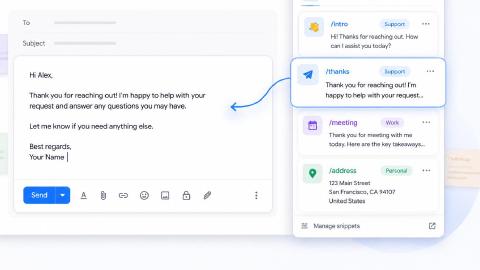
With Text Blaze, you can automate form-filling and data transfer on any website with dynamic templates!
Text Blaze allows you to create smart text templates and insert them anywhere you work to automatically fill out forms, transfer data, automate repetitive typing, and much more.

With Text Blaze, you can:
Automate repetitive typing anywhere you work! Text Blaze works on Chrome, Windows, and Mac.
Streamline workflows like transferring data, filling out forms, sending an email, or any other repetitive workflow.
Create dynamic templates that you can customize for any situation. Use placeholders and advanced commands to create powerful templates.
Save time for free! Text Blaze is free forever, no licenses or upgrades necessary.
Want to save hours by automating repetitive typing & workflows?
Join over 800,000+ others who are automating workflows with Text Blaze.
How to Get Started With Workflow Automation
Getting started with workflow automation doesn’t have to be overwhelming. A good first step is to pay attention to where your time goes during a typical week and note which tasks feel repetitive or draining.
Many people are surprised to realize that close to half of their work follows predictable patterns and could be automated in some way.
Start small by choosing one workflow that happens often and causes friction, such as approvals, handoffs, or data entry. Write out the steps as they exist today so you understand what should stay manual and what can run automatically.
Tip: Focus on removing unnecessary steps rather than trying to automate everything at once.
As you get more comfortable, you can gradually expand automation to other parts of your work. Each small improvement adds up, and over time you’ll notice you’re spending more energy on meaningful tasks instead of maintenance work.
To recap, our suggestion for the best workflow automation tool is Text Blaze. Text Blaze helps you automate repetitive typing. data transfer, form-filling, and workflows on any website. Plus, Text Blaze is free forever!
Give Text Blaze a try today!