How Spooner’s Coordinator of Performance & Personal Training Uses Text Blaze to Speed Up Client Documentation
See how a personal trainer in an outpatient PT and sports performance setting uses snippets for client status, workouts, and session feedback.

“To complete my documentation more efficiently, I use Text Blaze.”
My name is Brian Schulte, and I am the Coordinator of Performance & Personal Training for Spooner.
I function as a personal trainer/strength and conditioning specialist working with clients in an outpatient physical therapy and sports performance setting in Scottsdale, Arizona.
I also manage a team of nine other personal trainers/strength coaches as part of my role at Spooner, so I am always looking for ways to help our team perform at their best, become more efficient, and reduce barriers to success.
Just like any other movement professional, documentation is an essential part of my job. While it can already be bothersome at times, the uniqueness of working in a medical setting raises the bar for our documentation standards, and this is where I (and many others on my team) use Text Blaze Pro on a daily basis.
Four snippet categories that cover client sessions
“Text Blaze improves my note quality while saving me time.”
I use Text Blaze mainly for our client management software Exercise.com as part of my documentation of client sessions, where I report how the client presented to the session, what objective assessments, measures, interventions, or exercises were prescribed, along with their response to said intervention.
I have four “categories” of snippets I use to help me execute my documentation:
Client Arrival/Departure: When a client arrives to a session, I use a particular snippet I created to establish the framework language to report their status and any updates they may have to share. I use {formtext}, which helps ensure I note considerations of clinical significance, or even personal significance such as:
Feedback from previous workout, their energy level for the day, upcoming competition or vacation, etc.
A change of status such as a medication change, recent injury/surgery, subjective findings from imaging, or their summary of a recent visit to their doctor, etc.
form
{formtoggle: name=Status 1; default=yes}Client reports no relative contraindications to exercise and reports no new injuries, symptoms, medical concerns, or functional limitations affecting participation in session.{endformtoggle}
{formtoggle: name=Status 2; default=yes}Client reported feedback: {formtext}{endformtoggle}
{formtoggle: name=Status 3; default=yes}Client reports change in status (procedure, hospitalization, change in medication) since previous visit: {formtext}{endformtoggle}
Objective: {cursor}
Client completed prescribed exercise/intervention as directed and reported no adverse symptoms, limitations, or setbacks during the session.
{time: MMMM Do YYYY hh:mm a} {formtext: name=Name; default=Brian Schulte, CSCS, FAFS}
Objective: {cursor}
Client completed prescribed exercise/intervention as directed and reported no adverse symptoms, limitations, or setbacks during the session.
{time: MMMM Do YYYY hh:mm a} {formtext: name=Name; default=Brian Schulte, CSCS, FAFS}
_
At the end of a session with a client, I will also note how they responded to what we did during the session using my “/finish” snippet, which I’ve programmed into a {formmenu} of options that provide me the framework for that feedback.
finish
{formmenu: default=Client completed prescribed exercise/intervention as directed and reported no adverse symptoms, limitations, or setbacks during the session.; Client completed prescribed exercise/intervention however experienced: ; Client was unable to complete session: }
{time: MMMM Do YYYY hh:mm a} {formtext: name=Name; default=Brian Schulte, CSCS, FAFS}
{time: MMMM Do YYYY hh:mm a} {formtext: name=Name; default=Brian Schulte, CSCS, FAFS}
_
Commonly prescribed exercises/interventions: While my goal is always to provide an individualized plan for each client, there are some exercise flows or sequences that I utilize on a more frequent basis than others. This could be a sport-specific dynamic warmup, a specific test protocol, or sequence of exercises specific to a movement goal. To save me from having to re-type or copy-paste, setting a snippet for more common things helps me when plugging them into a visit note if it’s not already part of the client’s snippet.
vipr100
{formtext: default=4kg} ViPR
-Anterior step with correlating anterior ViPR tilt (vertical stand on ground) in contralateral hand, return, alternate side x 10 reps each
-Same Side Lateral step/shuffle with correlating lateral ViPR tilt (vertical stand on ground) in contralateral hand, return, alternate side x 10 reps each
-ViPR squat to overhead press ("thruster") x 20
-Same Side Lateral step with correlating ViPR rotational punch (L foot step, R hand punches cross body left), return, alternate side x 10 reps each
-ViPR @ L hip, R foot anterior step, ViPR swing up to R shoulder in horizontal position ("Bazooka") x 10 reps, alternate side x 10 reps
_
Assessments: When I am performing an initial consultation with a client, or taking them through an assessment, it can be helpful to have a set list of questions or measures that I know I will want to record, with plug-and-play solutions to reporting the findings.
tablehip
Table Hip Mobility Assessment (Supine)
Hip Flexion (R) - {formtext} Hip Flexion (R - w/distraction decompression) - {formtext} Hip Flexion (L) - {formtext} Hip Flexion (L - w/distraction decompression) - {formtext} Hip Abduction 90* (R) - {formtext} Hip Adduction 90* (R) - {formtext} Hip Abduction 90* (L) - {formtext} Hip Adduction 90* (L) - {formtext} Hip ER 90* (R) - {formtext} Hip IR 90* (R) - {formtext} Hip ER 90* (L) - {formtext} Hip IR 90* (L) - {formtext} Hip IR (Hip neutral, knee extended) "log roll" (R) - {formtext} Hip IR (Hip neutral, knee extended) "log roll" (L) - {formtext} Thomas Test (R - observed) - {formtext} Thomas Test (L - observed) - {formtext}
Hip Flexion (R) - {formtext} Hip Flexion (R - w/distraction decompression) - {formtext} Hip Flexion (L) - {formtext} Hip Flexion (L - w/distraction decompression) - {formtext} Hip Abduction 90* (R) - {formtext} Hip Adduction 90* (R) - {formtext} Hip Abduction 90* (L) - {formtext} Hip Adduction 90* (L) - {formtext} Hip ER 90* (R) - {formtext} Hip IR 90* (R) - {formtext} Hip ER 90* (L) - {formtext} Hip IR 90* (L) - {formtext} Hip IR (Hip neutral, knee extended) "log roll" (R) - {formtext} Hip IR (Hip neutral, knee extended) "log roll" (L) - {formtext} Thomas Test (R - observed) - {formtext} Thomas Test (L - observed) - {formtext}
_
Client Workouts: Each client I work with on a regular basis has a dedicated snippet in Text Blaze. This way I can save their most recent workout and have easy access to insert it into their next session note using a simple command. Each session note is still saved in our client management software, so if I need to reference past notes, those are stored there.
brian
Cage
-Self-selected stretches
Dowel Locomotive -Anterior Step with reach down to foot, swing to return, switch legs x 50ft -Anterior-Lateral Step with OH posterior press, switch legs x 50ft -Anterior-Lateral Step with SSR Reach, switch legs x 50ft -Anterior-Lateral Step with OSL Frontal Plane T-Spine Tilt, dowel ground anchor, switch legs x 50ft
Circuit 1.1 - Lead foot in cage (inverted), 25lb DB in hand, posterior lunge x 15 BL 1.2 - Keiser 3D Strap @ shoulder golf posture 270* assist-resist reaches 15lbs x 15 BL 1.3 - TRX Pushup with Frontal plane t spine at TZ x 15 1.4 - Speed Stick heavy swings x 10, alignment stick swings x 10
Dowel Locomotive -Anterior Step with reach down to foot, swing to return, switch legs x 50ft -Anterior-Lateral Step with OH posterior press, switch legs x 50ft -Anterior-Lateral Step with SSR Reach, switch legs x 50ft -Anterior-Lateral Step with OSL Frontal Plane T-Spine Tilt, dowel ground anchor, switch legs x 50ft
Circuit 1.1 - Lead foot in cage (inverted), 25lb DB in hand, posterior lunge x 15 BL 1.2 - Keiser 3D Strap @ shoulder golf posture 270* assist-resist reaches 15lbs x 15 BL 1.3 - TRX Pushup with Frontal plane t spine at TZ x 15 1.4 - Speed Stick heavy swings x 10, alignment stick swings x 10
_
Putting it together
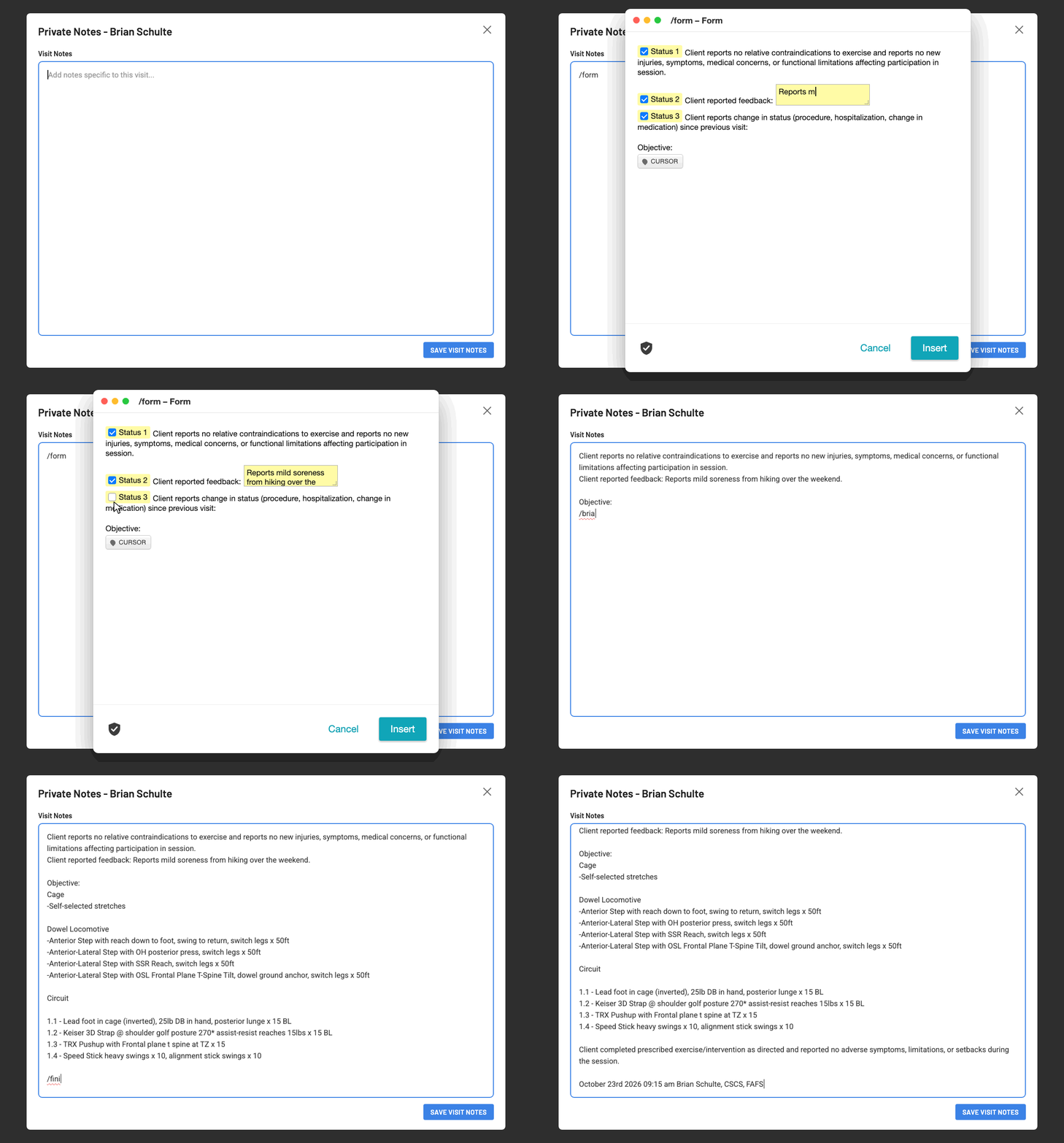
In the GIF above there is an example of what all of this looks like in action. I use my “/form” snippet to import my status check-in outline into their visit note, with whatever subjective information they have reported to me before we begin.
From there, I then click below the “Objective” section and enter my client-specific snippet, which in this case is “/brian”.
Upon completion of the visit with my client, I will input my “/finish” snippet to report how they responded to the workout, and save the visit note from there.
Worth the cost for the time and mental energy it saves
“Text Blaze allows me to efficiently document client status, exercise flowsheets, and common assessments or interventions.”
Text Blaze allows me to efficiently plug in some of the text I use most often, helping me move through documentation faster without sacrificing quality or detail.
For clients who are fairly stable in their workouts and conditions, having their program already saved makes the process much easier, but also allows me to track progress from session to session. For clients I am just starting with, having snippets to aid in collecting information during an initial consultation allows me to document at a higher level, without the associated time penalty that traditionally may come with it.
For what it saves me in time and mental energy, Text Blaze offers an excellent value for the demands of my job.