


Biopsychosocial Assessment Template

Eliminate repetitive typing and mistakes. Insert a Biopsychosocial Assessment in any text box in seconds.

Free forever. Works in any EHR or app. No integration required.

Kalen Sanders
“Text Blaze saves me countless hours of work, which is very important when you're running a small group practice.”
Kalen Sanders, Reclaim Psychological Services. Read the story

4.9 · 1,800+ Chrome Web Store reviews · 800,000+ people use Text Blaze

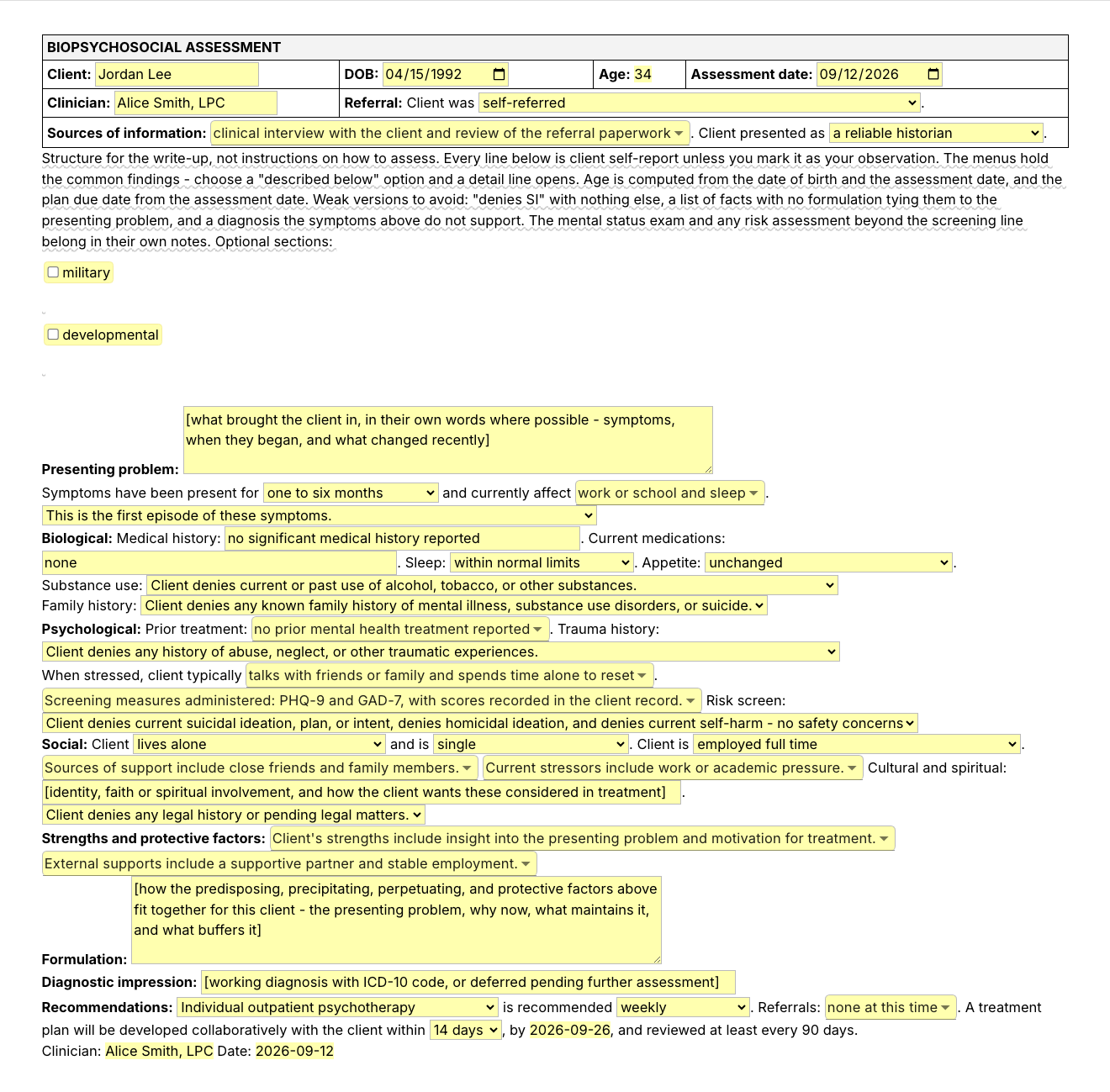
Typing /bps opens the Text Blaze pop-up, changing the referral menu updates the referral line, and Insert places the finished biopsychosocial assessment in the page

Type /bps. Fill in the form fields. Insert.

  1. Add the packThe button opens the pack's page on the Text Blaze marketplace. Add the pack in one click (sign up for a free account if you do not have one) and the templates are yours, ready to edit and use anywhere.
  2. Type /bps where you writeIn your EHR's assessment or note field, in a Google Doc, in a report you are drafting. A pop-up opens with every domain and its fields.
  3. Fill in, insert, editPick the common findings from the menus, write the presenting problem and the formulation, insert. It lands as text you can still edit.
  4. Then make one of your ownCreate a snippet of sentences or paragraphs you type often. Give it a keyboard shortcut. Type the shortcut anywhere and the text appears. Congratulations! You just saved yourself a few seconds.

What is Text Blaze?

Text Blaze is a free Chrome extension, with Windows and Mac apps, that turns the text you type again and again into templates you insert with a shortcut. Type /bps and the whole write-up appears where your cursor is, in any app you type in.

Templates can hold text fields, drop-down menus, dates and toggles, and fields that compute from other fields, so each assessment comes out complete and specific to this client.

Works everywhere you type

SimplePractice, TherapyNotes, client portals, Google Docs, Gmail. No integration to set up.

Fill-in fields, not blanks

Text fields, menus, dates and toggles. The age and the treatment plan due date are computed from the dates you enter.

Your words, saved once

Change the defaults once, your name and credential, the menu options you use most, and every assessment starts that way. In a group practice or agency, one person sets the template and shares the folder, and each clinician keeps their own words. Sharing limits are on the plans page.

Free forever

The free plan holds up to 20 snippets, so all 14 in this pack fit, and the eight plain-text snippets are yours to use without limit. The six with form fields need Pro for day-to-day use. "Is the pack free?" below has the details.

Works in SimplePracticeTherapyNotesTheraNestHeadwayAlmaGmailOutlook on the webGoogle Docs

Template insertion is done locally. PHI and other sensitive information never leaves your computer.

What is a biopsychosocial assessment?

A biopsychosocial assessment is the write-up a clinician completes at intake to describe a client across three domains: biological (health, medications, sleep, substance use, family history), psychological (symptoms, prior treatment, trauma, coping, risk) and social (home, relationships, work, supports, culture). It ends with a formulation, a diagnostic impression and recommendations for treatment.

Whatever the setting, a reader expects the same parts in roughly the same order:

  • Identifying information and sources: who the client is, who referred them, where the information came from and how reliable a historian the client was.
  • Presenting problem: what brought the client in, in their own words where possible, how long it has been going on and what it is affecting.
  • Biological: medical history, current medications, sleep, appetite, substance use and family history.
  • Psychological: prior treatment, trauma history, coping, any screening measures and a risk screen.
  • Social: living situation, relationships, work or school, supports, stressors, culture and faith, legal history.
  • Strengths and protective factors: documented with the same care as the problems.
  • Formulation, diagnostic impression and recommendations: how the history explains the presenting problem, a working diagnosis, and what happens next.

What is a biopsychosocial assessment in social work?

In social work it is the standard intake document, in agencies, hospitals, schools and private practice alike, and it is written from the person-in-environment view: housing, income, family, community, culture and access to resources get as much room as symptoms do, and strengths are findings to record. Many social work programs and agencies use a biopsychosocial spiritual assessment, which adds faith, meaning and cultural identity as a domain of its own. Counselors, marriage and family therapists and psychologists write the same document, often under the name intake assessment or BPS.

Where that material goes in this pack:

  • Housing: /bps and /social record the living situation, including a client without stable housing, and /social adds a menu for how stable the housing is.
  • Finances and other stressors: financial strain, housing instability, caregiving, legal matters and discrimination are in the stressors menu, and /social adds a menu for whether finances are a current strain.
  • Practical resources: /strengths lists income, health insurance, transportation, childcare and a primary care provider.
  • Referrals: the /bps referrals menu includes community resources for housing or financial support.
  • What is missing: there is no line for income source, benefits or food security. To add one, open /bps in your Text Blaze dashboard, type "Resources and benefits:" into the Social paragraph and put a text field after it.

What makes a good biopsychosocial assessment template?

A good biopsychosocial assessment template keeps the structure fixed and leaves the content to you. The headings, the order of the domains and the routine negative findings are typed once. What this client said, what you make of it and what you recommend are written fresh each time, with a prompt for every domain so nothing gets skipped.

A thorough assessment can take most of an hour to write up, longer when a supervisor or an agency wants detail in every domain. No template shortens the thinking. A good one takes the retyping out of it.

  • The same domains in the same order. Assessments get read by supervisors, by the next clinician and sometimes by payer reviewers. A fixed order is what makes them easy to follow, and it is how you notice a domain you skipped.
  • Menus for common findings, detail where it matters. Pick the usual answer from a drop-down menu. Choose a "described below" option and a line opens for the specifics.
  • Client report kept apart from your observation. The sentences read "Client reports" and "Client denies", so a reader can tell the history from your impression of it.
  • A formulation field that asks for reasoning. A list of facts is not a formulation. The template gives the paragraph a place and a prompt. How the pieces fit together for this client is the part you write.
  • Details that follow from other details. Enter the date of birth and the assessment date and the age is computed. Pick 14 or 30 days and the treatment plan due date is computed too.
  • Guidance that stays out of the document. A short note on what belongs where, and the weak versions to avoid, shows while you write and is never inserted.
  • Editable output. The assessment lands as text in whatever field you are in, so you can change anything before you sign. The header lands as a small table in rich-text fields and as plain lines in plain-text fields.
  • At your keyboard, not in a PDF. A biopsychosocial assessment PDF or Word form still means retyping the headings into your EHR. A template you insert with a shortcut types them for you.

If your EHR's assessment template works for you, keep it. This pack is for the places it does not reach: a report you draft in Google Docs, a supervision or referral summary, the second system a group practice or agency has you chart in, and the sentences you type inside any template.

If your EHR has one field per section

Many agency EHRs split the assessment into a separate field for each domain, so one document in one field does not fit. Use the pack piece by piece instead: /reliable at the top, /social in the social history field, /strengths in the strengths field, /formulation in the formulation or clinical summary field, /recs in recommendations, /attest at the end, and the /denies and /hx sentences in whichever field they belong to. There is no standalone Biological or Psychological section snippet. You can make one by copying /bps in your dashboard and deleting the sections you do not need. Each snippet stands alone: what you enter in one pop-up does not carry into the next, and your name is a default you set in /bps and again in /attest.

If you use an AI scribe, the two work together. The scribe drafts from the session. The template is the structure that draft goes into, and the formulation and the routine sentences are the parts you still write yourself.

How this template helps

The /bps snippet is that template as a Text Blaze pop-up: an identifying block with the age computed, then the presenting problem and the biological, psychological and social domains as menus and text fields, then strengths, formulation, diagnostic impression and recommendations. Three more templates cover single sections, and ten shorter snippets cover the sentences most assessments share.

Inside the pop-up

  • Header: client, date of birth, the computed age, the assessment date, and your name and credential, saved once. A referral menu (self-referred, or referred by a primary care provider, a prescriber, a school or employer, family, or a court, agency or case manager), a sources-of-information menu you can pick several from, and a menu for how reliable a historian the client was.
  • Presenting problem: a paragraph field for the client's account, then menus for duration, the areas it affects and whether this is a first episode.
  • Biological: text fields for medical history and current medications, and menus for sleep, appetite, substance use and family history. Choose a "described below" option and a detail line opens.
  • Psychological: prior treatment, a trauma history menu with a choice for a client who declined to discuss it, coping under stress, the screening measures you gave (PHQ-9, GAD-7, PCL-5, AUDIT, C-SSRS screener) and a risk screen.
    • Scores: the template has no score field. The sentence it inserts names the measures and says the scores are recorded in the client record. If your supervisor or a reviewer looks for the score in the assessment, type it into that sentence after you insert, or edit the snippet so it asks for it.
    • Risk screen: one menu with two choices. The client denies current suicidal ideation, plan, intent, homicidal ideation and self-harm, or concerns were identified and are documented in a separate risk assessment and safety plan.
    • History: a prior psychiatric hospitalization is an option in the prior-treatment menu. Past suicide attempts and past self-harm have no line in /bps. /denies.risk is the sentence for a client with no such history. For a client with one, type it after the risk screen, or add a "History of attempts or self-harm:" label with a text field to the snippet.
    • Mental status exam: many settings put it inside the intake assessment. This template leaves it out, and its guidance note suggests a separate note. If yours belongs in the assessment, insert your mental status exam after the Psychological section.
  • Social: menus for living situation, relationship and work, menus you can pick several supports and stressors from, a text field for cultural and spiritual identity and how the client wants it considered, and a legal history menu. Two toggles add a military service line and a developmental history line.
  • Strengths: two menus, personal strengths and external supports.
  • Formulation: a four-line paragraph field. Its prompt asks how the predisposing, precipitating, perpetuating and protective factors fit together, and nothing is written in for you.
  • Diagnostic impression and recommendations: a field for a working diagnosis with its ICD-10 code (or "deferred"), menus for modality, frequency and referrals, and the treatment plan due date. The closing sentence says the plan is reviewed at least every 90 days. Edit it if your agency or payer sets a different interval.

The sentences are written with an adult client in mind. For a child or adolescent you can turn on the developmental history line, pick collateral information from a family member as a source, choose a school referral and "a full-time student", and use /hx.dev. There are no lines for a guardian, custody, grade or school supports, so add those to your copy before you rely on it for minors.

A biopsychosocial assessment example

Here is an example of a biopsychosocial assessment written with /bps. The client and the clinician are fictional, and the content is there to show the structure, not to model an assessment.

BIOPSYCHOSOCIAL ASSESSMENT
Client: Sam Rivera · DOB: 1988-06-21 · Age: 38 · Assessment date: 2026-09-14
Clinician: Maya Chen, LCSW · Referral: Client was referred by their primary care provider.
Sources of information: clinical interview with the client, review of the referral paperwork, and standardized screening measures. Client presented as a reliable historian.

Presenting problem: Client reports feeling "flat and exhausted" since the spring, with little interest in activities they used to enjoy, trouble concentrating at work, and irritability at home. Client's partner encouraged them to seek help after an argument last month.
Symptoms have been present for six months to two years and currently affect work or school, sleep, relationships, and concentration. This is the first episode of these symptoms.

Biological: Medical history: hypothyroidism, managed with medication. Current medications: levothyroxine 75 mcg daily. Sleep: early morning waking. Appetite: decreased, with recent weight loss.
Substance use: Client reports occasional alcohol use without reported consequences and denies other substance use.
Family history: Client reports a family history described below.
Detail: mother treated for depression in her forties, maternal uncle with alcohol use disorder.

Psychological: Prior treatment: no prior mental health treatment reported. Trauma history: Client denies any history of abuse, neglect, or other traumatic experiences.
When stressed, client typically spends time alone to reset and works longer hours. Screening measures administered: PHQ-9 and GAD-7, with scores recorded in the client record. Risk screen: Client denies current suicidal ideation, plan, or intent, denies homicidal ideation, and denies current self-harm - no safety concerns were identified at this assessment.

Social: Client lives with a partner and is in a committed relationship. Client is employed full time. Sources of support include close friends and a partner. Current stressors include work or academic pressure and grief or loss. Cultural and spiritual: identifies as Mexican American and describes family as central, attends Mass occasionally and would like faith respected in treatment. Client denies any legal history or pending legal matters.

Strengths and protective factors: Client's strengths include insight into the presenting problem, motivation for treatment, and a strong work ethic. External supports include a supportive partner and stable employment.

Formulation: Client's depressive symptoms follow the death of their father in March and a heavier workload since a promotion. A family history of depression and a long-standing habit of coping by working harder and withdrawing appear to have left client vulnerable, and early waking, isolation, and self-criticism now maintain the low mood. The loss of interest, the self-criticism and the trouble at work six months on go beyond what grief alone would explain. Hypothyroidism may be contributing to the low energy, and current thyroid labs will be requested from the referring primary care provider to rule that out. A supportive partner, insight, and motivation for treatment are the main assets to build on.
Diagnostic impression: major depressive disorder, single episode, moderate (F32.1)

Recommendations: Individual outpatient psychotherapy is recommended weekly. Referrals: primary care provider for a medical evaluation. A treatment plan will be developed collaboratively with the client within 30 days, by 2026-10-14, and reviewed at least every 90 days.

Clinician: Maya Chen, LCSW · Date: 2026-09-14

The headings, the sentence frames, the age and the plan due date were already typed or computed. The presenting problem, the detail lines, the cultural line and the formulation were written by the clinician. Dates come out as YYYY-MM-DD. The format is one edit in the snippet if your charts use MM/DD/YYYY.

The other three templates

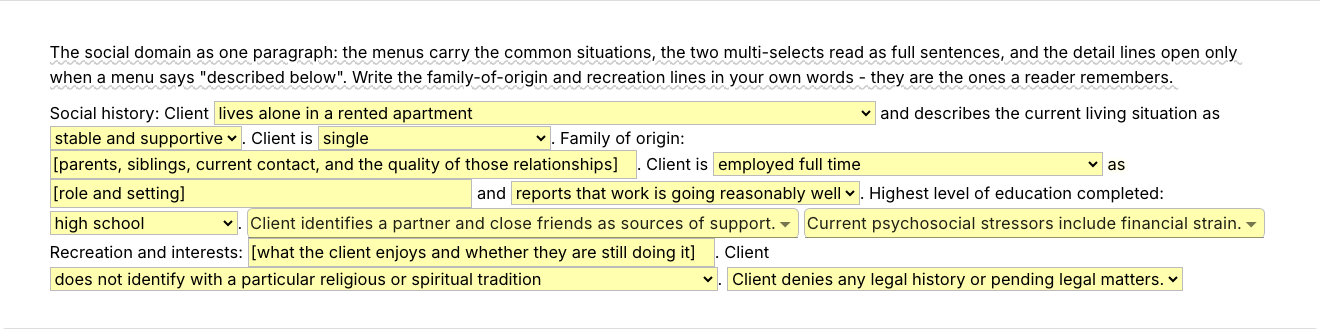
  • /social, the social history as one fuller paragraph, for when the social lines in /bps are not enough: living situation and how stable it feels, relationship and its quality, family of origin, work and role, education, supports, stressors, recreation, faith and culture, and legal history.
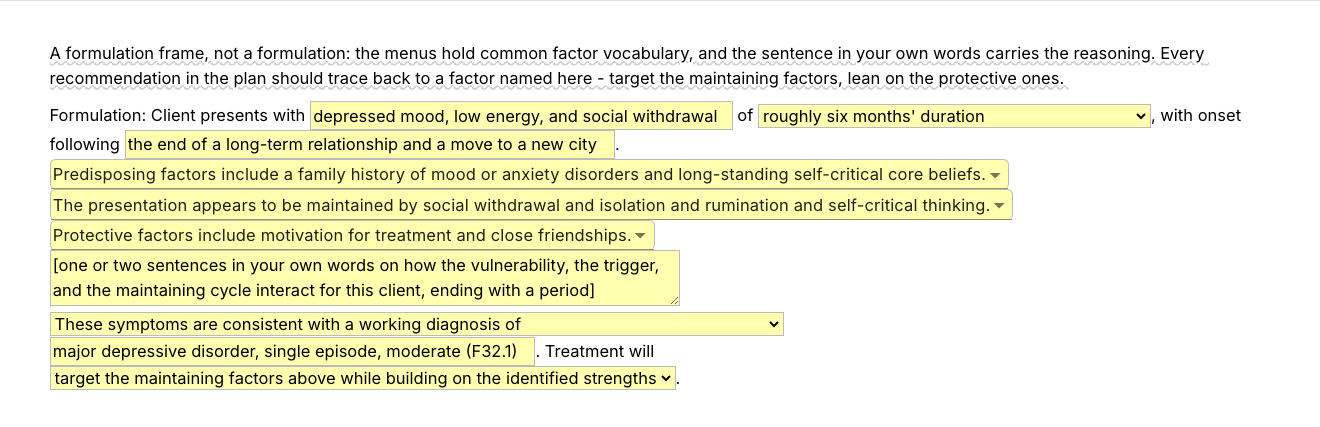
  • /formulation, a frame for the formulation paragraph. Text fields take the presenting symptoms and what set them off. Menus offer common vocabulary for predisposing, maintaining and protective factors. Then a paragraph field asks for one or two sentences from you on how they interact for this client. That sentence is the formulation. The template gives the paragraph its structure and leaves the reasoning to you.
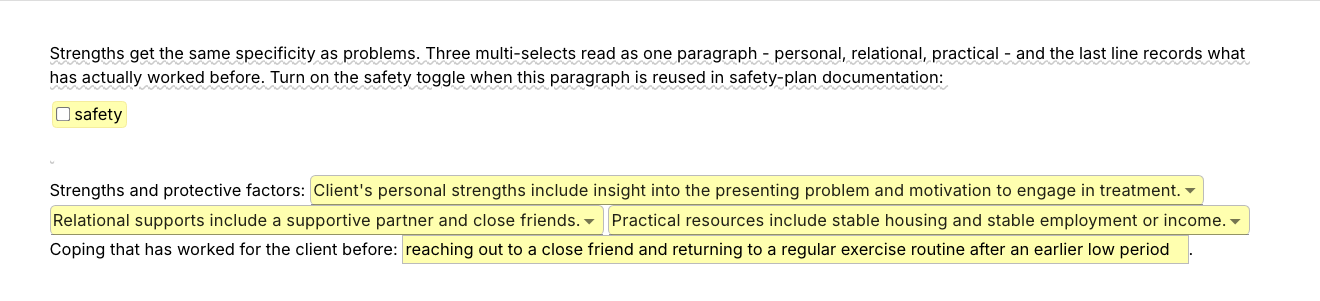
  • /strengths, strengths and protective factors as a paragraph: personal strengths, relational supports, practical resources and the coping that has worked before. A toggle adds two lines for reuse in safety-plan documentation: the client's reasons for living and the first step they would take.

Shorter snippets for the sentences most assessments share

Each one is a complete sentence or paragraph for the unremarkable case. You can insert it when it matches what the client told you, and edit it when it does not.

  • /reliable, the opener. It reads: Information for this assessment was obtained through a clinical interview with the client and a review of the referral paperwork. Client presented as a reliable historian, and the history below reflects client self-report unless noted as clinician observation.
  • /denies.sub, no current or past substance use.
  • /denies.risk, no safety concerns identified at this assessment.
  • /denies.trauma, no trauma history reported.
  • /denies.famhx, no known family history of mental illness, substance use or suicide.
  • /denies.legal, no legal history or pending matters.
  • /hx.med, an unremarkable medical history.
  • /hx.dev, an unremarkable developmental history.
  • /recs, the recommendations paragraph, with a menu for session frequency.
  • /attest, the closing attestation with your name and the date. It has no supervisor co-signature line. If you are pre-licensed, add "Reviewed and co-signed by:" and a text field to your copy.

“The value of Text Blaze is much larger than the time saved because it maintains my focus on the actual work I'm doing, as opposed to every single character in every single document and email.”

Adam BrooksCo-Founder and Director of Operations, Good Therapy San DiegoRead the story

Add the pack to a free Text Blaze account and type /bps when your next intake interview is done.

Copy the template for free

Free forever. Works in any EHR or app. No integration required.

Questions therapists and social workers ask

Do I need Text Blaze to use this template?

Yes. The templates are Text Blaze snippets, and a free account is enough to add the pack. "Is the pack free?" below says which snippets need Pro. Text Blaze is a free Chrome extension, with Windows and Mac apps as well.

Does it work in my EHR?

Yes. Text Blaze works in your EHR, your email and any other app: SimplePractice, TherapyNotes, TheraNest, Headway and Alma among others, plus Gmail, Outlook, client portals and Google Docs. It also works in any browser-based EHR your agency uses, and in desktop systems through the Windows and Mac apps. There is nothing to integrate. You type the shortcut in the field where you would have typed the assessment.

My EHR already has templates. Why this pack?

Keep your EHR's assessment template if it works for you. This pack goes where that template cannot follow: into a document you write outside the EHR, or into another system when you work in more than one. It also comes with you when you change platforms, and the shorter snippets work inside any template, your EHR's included. The section "If your EHR has one field per section" above shows which snippet goes in which field.

How to write a biopsychosocial assessment

Write it in the order a reader expects: who the client is and where the information came from, the presenting problem in the client's words, then the biological, psychological and social history, strengths, your formulation, a diagnostic impression and recommendations. Keep what the client reports apart from what you observe, and let the formulation tie the history back to the presenting problem so it reads as reasoning. The /bps template follows that order and prompts each part. What goes into each part is your assessment.

Will my notes look cloned?

Not if you fill in the fields. The fixed text is the headings and the sentence frames. The presenting problem, every detail line, the cultural line and the formulation are written fresh for this client, and the menu options are yours to change. The shorter denial snippets are for the unremarkable case only: insert one when it matches what the client told you, and edit it when it does not.

Is my client's information stored anywhere?

Text Blaze snippets hold your template and your defaults, not your client records. Template insertion is done locally: what you type into the pop-up's fields goes into the page you are on and is not saved, synced or logged by Text Blaze after you insert.

BAA is available upon request. Read our HIPAA guide.

Is the pack free?

The pack is free to add, and its 14 snippets fit the free plan's 20. The eight plain-text snippets, /reliable and the denial and history lines, stay fully usable on Free. The six with form fields (/bps, /social, /formulation, /strengths, /recs and /attest) you can test on the free plan to see how they work. Using them day to day needs Pro, $2.99 a month billed yearly ($3.49 billed monthly). The plans page has the details.

Can I change the template?

Yes. Everything is editable: the headings, the menu options, the defaults, the 90-day review sentence and the wording of every line. Add a domain your agency requires, such as a separate spiritual section, delete one you never use, or replace a menu's options with your own vocabulary, and the date format too. Your changes stay.

Can I use it on Windows or Mac?

Yes. Text Blaze runs as a Chrome extension and as Windows and Mac apps, so the shortcuts work in browser-based EHRs and in desktop apps alike, with the same snippets on every computer you sign in on. There is no iPad or phone app, so an assessment written on a tablet stays hand-typed.

Write the client, not the headings.

Add the free biopsychosocial assessment template pack, change the defaults once, and the time you spent retyping headings and routine sentences goes back to the part only you can write.

Copy the template for free

Free forever. Works in any EHR or app. No integration required.