

Clinical Swallow Evaluation Templates

Eliminate repetitive typing and mistakes. Insert a clinical swallow evaluation or a dysphagia treatment note in any text box in seconds.

Free forever. Works in any EMR or app. No integration required.

4.9 · 1,900+ Chrome Web Store reviews · 800,000+ people use Text Blaze

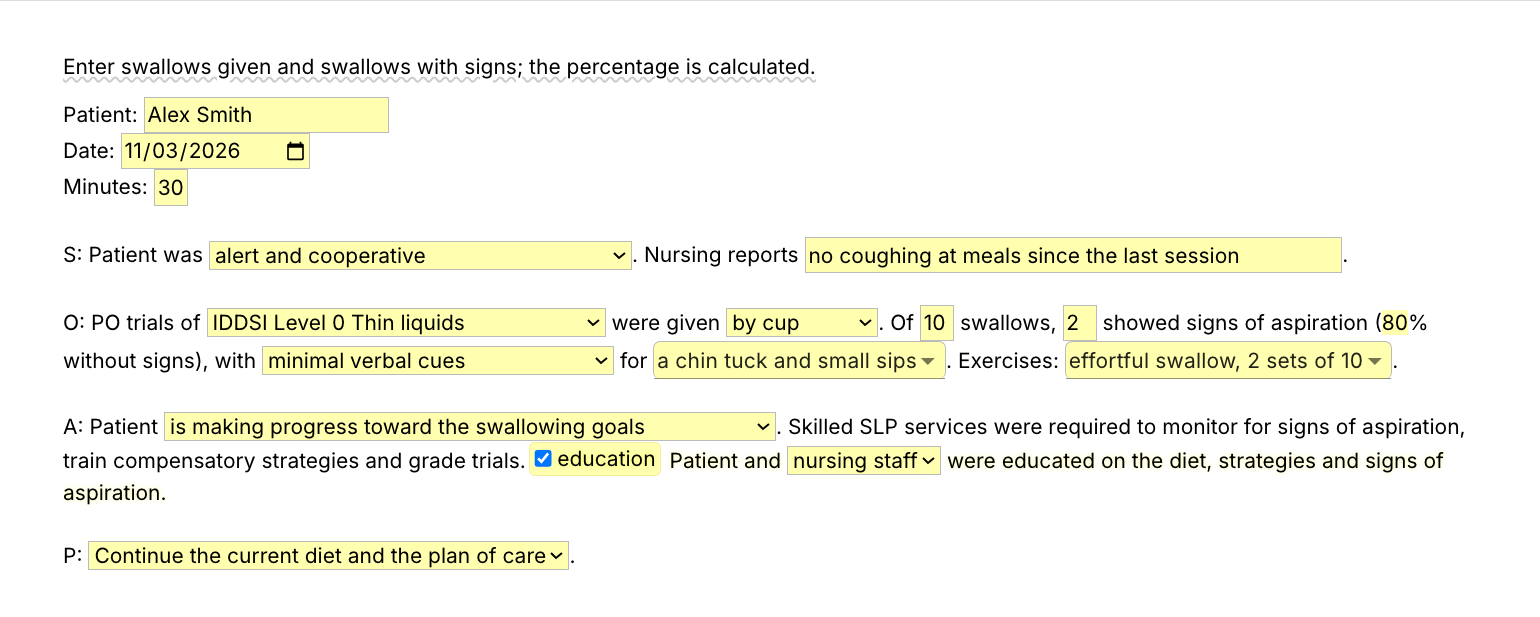
Typing /dysnote opens the Text Blaze pop-up already filled in for a fictional patient's dysphagia session, the cue level changes to minimal verbal cues, and Insert places the finished treatment note with 75% of swallows without signs in the EMR note field

Type /dysnote. Fill in the form fields. Insert.

  1. Add the packThe button opens the pack's page on the Text Blaze marketplace. Add the pack in one click (sign up for a free account if you do not have one) and the templates are yours, ready to edit and use anywhere.
  2. Type /dysnote where you write notesIn your EMR's daily note, in a Word document, in an email to the team. A pop-up opens with the patient header and the four SOAP sections.
  3. Fill in, insert, editPick the consistency, type the swallows given and the swallows with signs, choose the cues and the exercises, insert. The percentage is worked out, and the note lands as text you can still edit.
  4. Then make one of your ownCreate a snippet of sentences or paragraphs you type often. Give it a keyboard shortcut. Type the shortcut anywhere and the text appears. Congratulations! You just saved yourself a few seconds.

What is Text Blaze?

Text Blaze is a free Chrome extension, with Windows and Mac apps, that turns the text you type again and again into templates you insert with a shortcut. Type /cse and the whole swallow evaluation appears where your cursor is, in any program you type in.

Templates can hold text fields, drop-down menus, dates and checkboxes, and values that compute from other fields, so the re-assessment date and the percentage of swallows without signs fill themselves in.

Works everywhere you type

Browser EMRs like Net Health and WebPT through the Chrome extension. Word and other installed programs through the desktop app.

Fill-in fields, not blanks

Tick the consistencies you gave and pick what you saw. The re-assessment date and the percentages fill themselves in.

Your wording, saved once

Change any line once and every note starts there. Change the IDDSI names to your facility's diet names if they differ.

Free forever

The whole pack fits the free plan, and /asprec and /oralcare work without limit. On Free you can test the snippets with form fields. Using them day to day needs Pro, $2.99 a month billed yearly.

Works in Net HealthWebPTGoogle DocsMicrosoft WordOutlookGmail

Template insertion is done locally. PHI and other sensitive information never leaves your computer.

What is a clinical swallow evaluation?

A clinical swallow evaluation, also called a bedside swallow evaluation, is the SLP's first look at how a patient swallows. It covers the reason for referral, the history, an oral mechanism and cranial nerve screen, trials of different consistencies, impressions and recommendations for the diet, strategies and any instrumental study.

A bedside evaluation cannot rule out silent aspiration. That is why the recommendations often include an MBSS or FEES, and why the diet stays your clinical decision, not the template's.

What makes a good clinical swallow evaluation template?

A good clinical swallow evaluation template writes the sections and the standard sentences for you and asks for what you saw. The trials, the signs, the findings and the diet are form fields and menus you fill in at the bedside, so the note is done when the evaluation is.

  • Trials you switch on. Tick the consistencies you gave and only those lines go in the note.
  • IDDSI levels, your call. The diet menus use IDDSI names. The template never picks a diet for you.
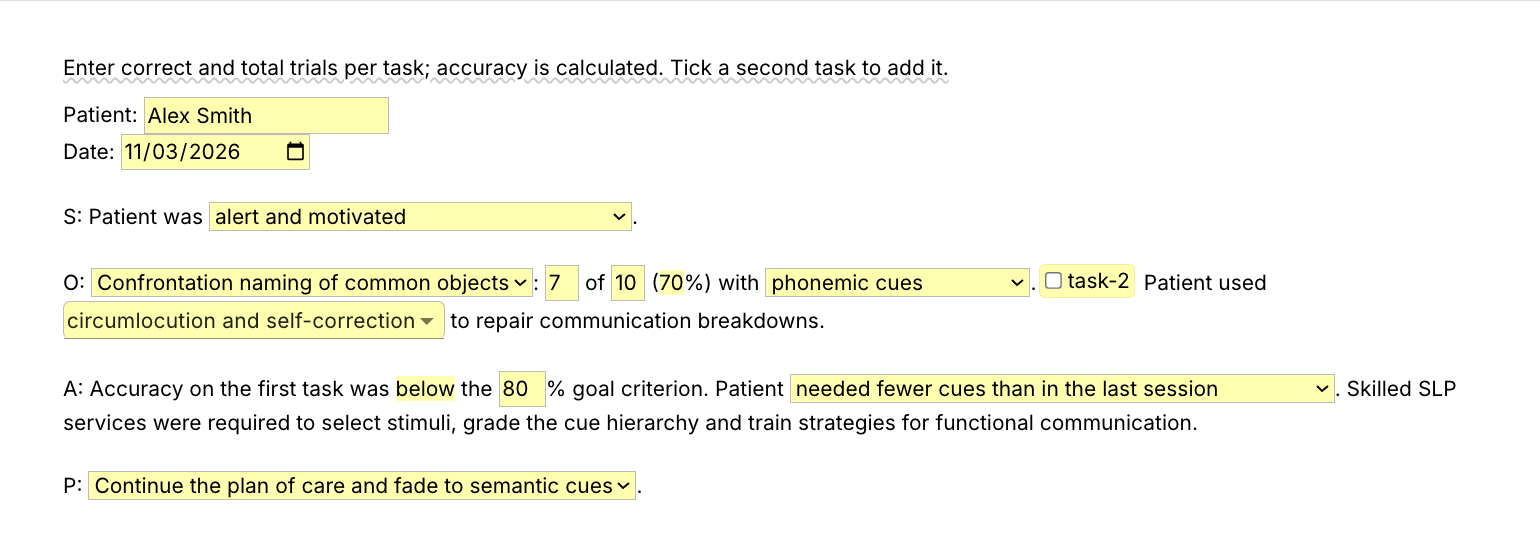
  • Math done for you, checked by you. The re-assessment date comes from the number of days, /dysnote works out the swallows without signs, and /aphnote checks accuracy against the goal criterion. Read them before you sign.
  • Guidance that stays out of the note. A short reminder shows while you fill in the form and is never inserted.

If your EMR's templates or smart phrases work for you, keep them. This pack adds the same evaluation in every other place you type, and the short lines drop into any template.

How this template helps

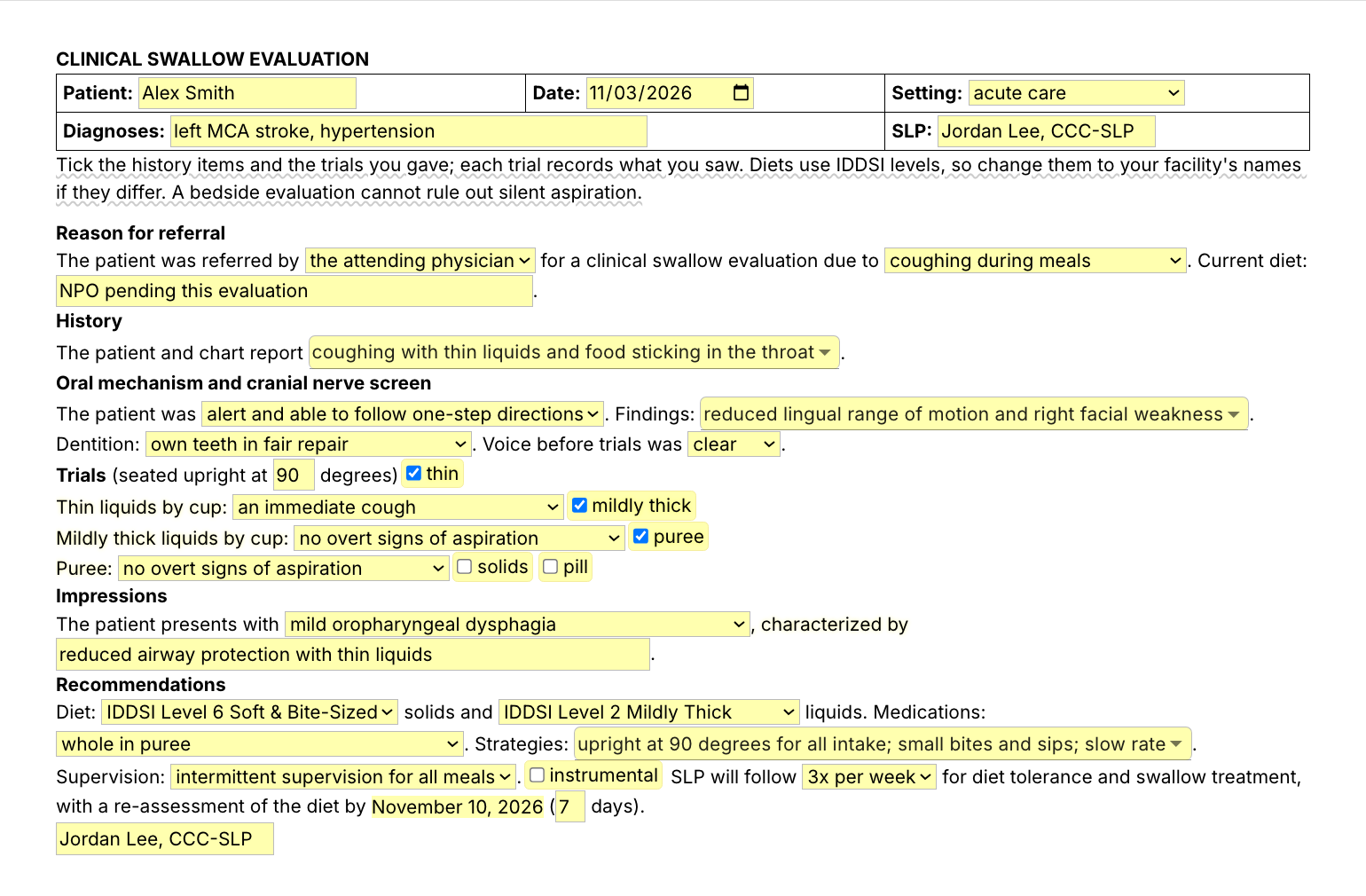
The /cse snippet is that template as a Text Blaze pop-up: a patient header, menus for the referral, history and oral mechanism findings, a checkbox and a result menu for each consistency, impressions, IDDSI diet menus, strategies and supervision, and a follow-up line with the re-assessment date worked out.

Besides /cse, the pack has the treatment notes and the lines medical SLPs type every day:

  • /dysnote and /aphnote: dysphagia and aphasia treatment notes.
  • /asprec, /dietrec and /meds: aspiration precautions, the diet recommendation and how to give medications.
  • /mbsrec, /oralcare, /cuehier and /pted: the MBSS or FEES referral, oral care, the cue hierarchy and patient education.

Here is a clinical swallow evaluation filled in with /cse for a fictional patient:

CLINICAL SWALLOW EVALUATION
Patient: Robert Hayes · Date: November 3, 2026 · Setting: skilled nursing facility
Diagnoses: left MCA stroke, type 2 diabetes · SLP: Jordan Lee, CCC-SLP
Reason for referral
The patient was referred by nursing for a clinical swallow evaluation due to coughing during meals. Current diet: IDDSI Level 6 Soft & Bite-Sized solids and thin liquids.
History
The patient and chart report coughing with thin liquids and prolonged meal times.
Oral mechanism and cranial nerve screen
The patient was alert and able to follow one-step directions. Findings: reduced lingual range of motion and right facial weakness. Dentition: upper and lower dentures in place. Voice before trials was clear.
Trials (seated upright at 90 degrees)
Thin liquids by cup: a delayed cough
Mildly thick liquids by cup: no overt signs of aspiration
Puree: no overt signs of aspiration
Soft and bite-sized solid: prolonged chewing and oral transit
Impressions
The patient presents with mild oropharyngeal dysphagia, characterized by delayed airway protection with thin liquids and slow oral transit with solids.
Recommendations
Diet: IDDSI Level 6 Soft & Bite-Sized solids and IDDSI Level 2 Mildly Thick liquids. Medications: whole in puree. Strategies: upright at 90 degrees for all intake, small bites and sips, alternate solids and liquids. Supervision: intermittent supervision for all meals. An instrumental assessment (MBSS) is recommended to assess pharyngeal function and airway protection. SLP will follow 3x per week for diet tolerance and swallow treatment, with a re-assessment of the diet by November 10, 2026 (7 days).
Jordan Lee, CCC-SLP

The headings, the sentences and the re-assessment date were already there. The rest is what you saw with this patient.

Start with /asprec. It types your aspiration precautions (positioning, rate, oral care and when to call nursing or the SLP) from seven keystrokes, and it works inside any template, your EMR's included.

Text Blaze helps me finish my paperwork while I'm still sitting with a patient.

Stephanie YakobinaCertified Hand Therapist and Occupational Therapist

Keep your EMR templates. Add the pack to a free Text Blaze account, type /asprec in your next note, and /cse for your next swallow evaluation.

Copy the template for free

Free forever. Works in any EMR or app. No integration required.

Questions medical SLPs ask

How should I document a dysphagia treatment session?

Write what you gave, what you saw and why it needed an SLP. In S, the patient's alertness and what nursing reports. In O, the consistency and how it was given, how many swallows showed signs, the cues and the exercises. In A, progress and the skilled need, and in P, what you will trial next. The /dysnote snippet gives you that note with the percentage worked out.

Will my notes look cloned?

Not if the data is this patient's. The headings and standard sentences repeat, and the trials, the signs, the percentages and the plan are fields you fill in each time. Edit any line that was not true today.

Do I need Text Blaze to use this template?

Yes. The templates are Text Blaze snippets, and the free plan is enough to add all of them. Text Blaze is a free Chrome extension, with Windows and Mac apps as well.

Does it work in my EHR?

Yes. Text Blaze works in your EHR, your email and any other app. Browser EMRs like Net Health and WebPT work through the Chrome extension, and installed programs through the Windows or Mac app.

Is my patient's information stored anywhere?

Text Blaze snippets hold your template and your defaults, not your patients' notes. Template insertion is done locally: what you type into the pop-up goes into the note you are writing and is not saved by Text Blaze after you insert.

BAA is available upon request. Read our HIPAA guide.

Is the pack free?

Yes. The pack is free and its 10 snippets fit the free plan. /asprec and /oralcare have no form fields and work without limit on Free. You can test the snippets with form fields on the free plan, and using them day to day needs Pro, $2.99 a month billed yearly.

Can I change the template?

Yes. Everything is editable: the wording, the diet names, the menu options and the defaults. Change it once and it stays changed.

Finish the swallow eval at the bedside.

Add the free swallow pack, set your wording once, and the evaluation is written before you leave the room instead of at the end of the day. Then save /asprec, or a sentence of your own, and get those minutes back with every patient.

Copy the template for free

Free forever. Works in any EMR or app. No integration required.