


Mental Status Exam Template

Eliminate repetitive typing and mistakes. Insert a Mental Status Exam in any text box in seconds.

Free forever. Works in any EHR or app. No integration required.

Adam Brooks
“The biggest benefit is reducing the mental fatigue that comes from typing the same things many times.”
Adam Brooks, Good Therapy San Diego. Read the story

4.9 · 1,800+ Chrome Web Store reviews · 800,000+ people use Text Blaze

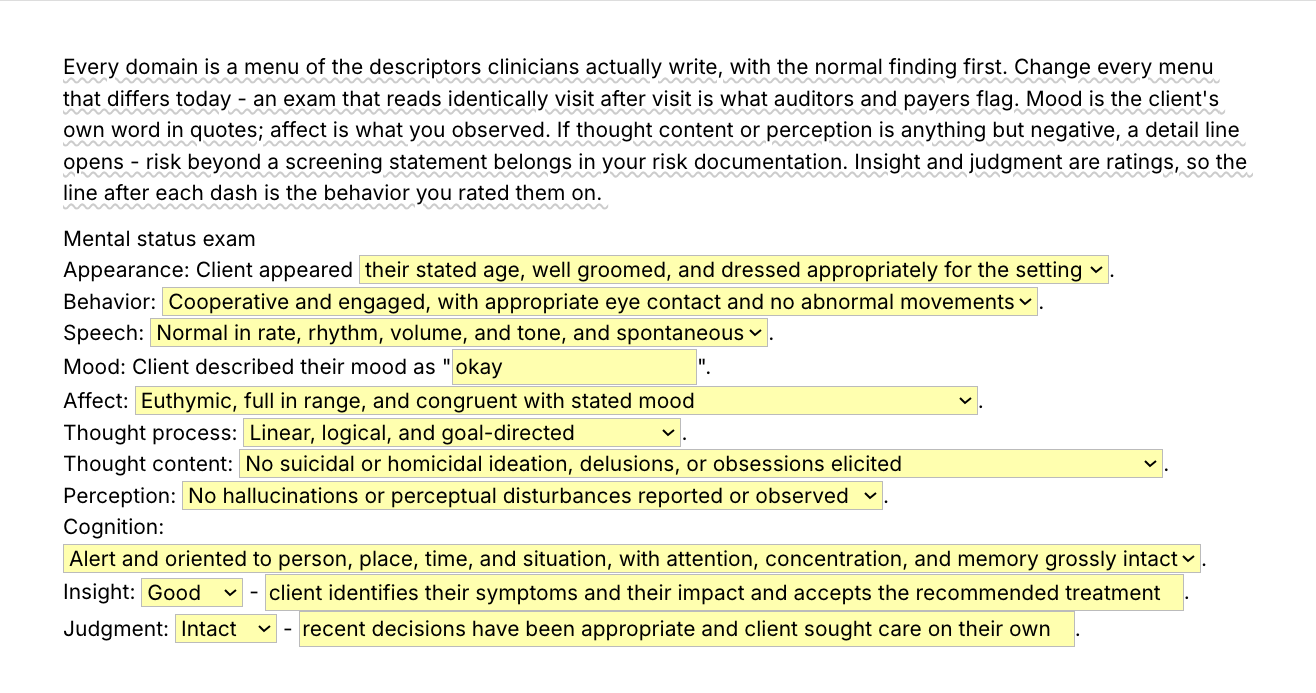
Typing /mse opens the Text Blaze pop-up, changing the speech menu updates the Speech line, and Insert places the finished mental status exam in the note field

Type /mse. Pick today's descriptors. Insert.

  1. Add the packThe button opens the pack's page on the Text Blaze marketplace. Add the pack in one click (sign up for a free account if you do not have one) and the templates are yours, ready to edit and use anywhere.
  2. Type /mse where you writeIn your EHR's note field, in an intake write-up, in a Google Doc. A pop-up opens with the exam and its form fields. If your EHR has a separate field for each part of the exam, use /affect, /cog, /tc and /ij field by field.
  3. Fill in, insert, editPick today's descriptors, type the client's own word for their mood over the default, insert. It lands as text you can still edit.
  4. Then make one of your ownCreate a snippet of sentences or paragraphs you type often. Give it a keyboard shortcut. Type the shortcut anywhere and the text appears. Congratulations! You just saved yourself a few seconds.

What is Text Blaze?

Text Blaze is a free Chrome extension, with Windows and Mac apps, that turns the text you type again and again into templates you insert with a shortcut. Type /mse and the whole exam appears where your cursor is, in any app you type in.

Templates can hold text fields, drop-down menus, dates and toggles, and fields that compute from other fields, so each exam comes out complete and specific to this client and this visit.

Works everywhere you type

SimplePractice, TherapyNotes, client portals, Google Docs, Gmail. No integration to set up.

Today's exam, not last visit's

You look at every domain and pick what you saw, so the exam matches what happened in the room. A normal paragraph pasted into every note is what reviewers notice.

Your words, saved once

Change the menus once to the descriptors you write and every exam starts from your vocabulary. /psycheval, /rb and /stable say "patient" and the rest say "client". Switching is one edit per snippet. In a group practice, one person sets the templates and shares the folder. Sharing limits are on the plans page.

Free forever

The seven ready-made paragraphs, /exam.wnl included, are free forever. The five form-field templates can be tested on the free plan and need Pro, $2.99 a month billed yearly, for day-to-day use. "Is the pack free?" below has the details.

Works in SimplePracticeTherapyNotesTheraNestHeadwayAlmaGmailOutlook on the webGoogle Docs

Template insertion is done locally. PHI and other sensitive information never leaves your computer.

What is a mental status exam?

A mental status exam (MSE) is a clinician's structured description of how a client presented at one visit: appearance, behavior, speech, mood and affect, thought process, thought content, perception, cognition, insight and judgment. It records what you observed and what the client reported, in standard descriptors, so the next reader can compare one visit with another.

The domains, in the order most clinicians write them:

  • Appearance: apparent age, grooming and dress.
  • Behavior: cooperation, eye contact and psychomotor activity.
  • Speech: rate, rhythm, volume, tone, and how readily the client answers.
  • Mood: the client's own word for how they feel, in quotation marks.
  • Affect: what you saw: its quality, range, intensity and stability, and whether it fits the stated mood.
  • Thought process: how the thoughts connect, from linear and goal-directed to circumstantial, tangential or loose.
  • Thought content: what the thoughts are about, including suicidal or homicidal ideation, delusions, obsessions, and themes such as guilt or hopelessness.
  • Perception: hallucinations and other perceptual disturbances, reported or observed.
  • Cognition: alertness, orientation, attention, concentration and memory.
  • Insight and judgment: two ratings, each with the behavior you based it on.

Therapists usually write a full MSE at intake and again when the presentation changes. Psychiatrists and psychiatric nurse practitioners write one in every evaluation and a shorter one at most follow-ups.

If you prescribe

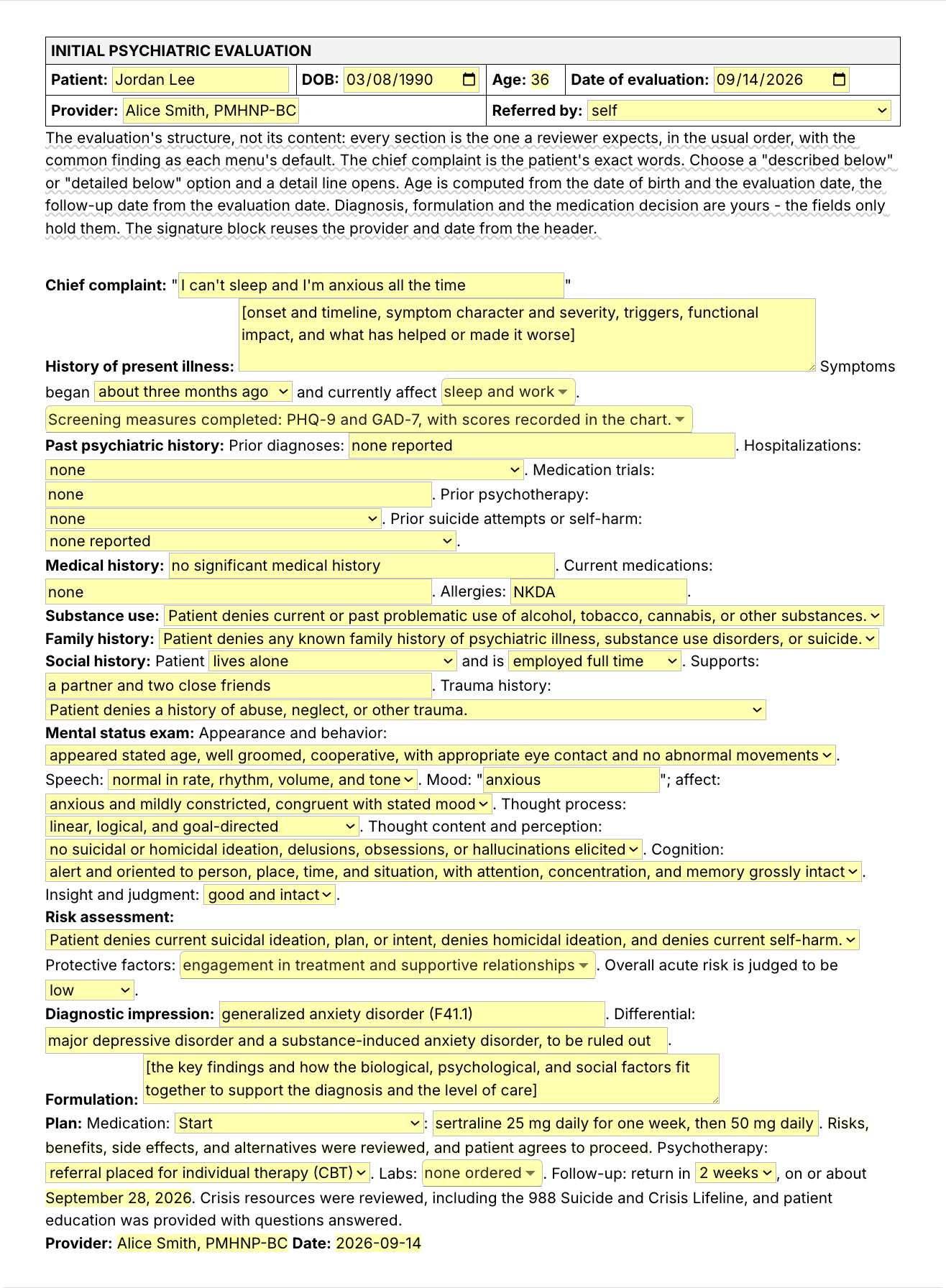
At a med check, /exam.wnl, /exam.anxious and /exam.depressed are the follow-up exams: insert the closest one and edit what differed. /rb is the risks-and-benefits line and /stable the stable-on-current-regimen line. /psycheval is for new evaluations, and the second image at the top of the page shows the full form. The pack has no separate short exam with menus. You can copy the one-paragraph exam out of /psycheval into a snippet of your own. It keeps its menus, so it is a form-field snippet and day-to-day use needs Pro.

The MSE is not the Mini-Mental State Examination (MMSE). The MMSE is a scored, licensed cognitive screening instrument. The MSE is a descriptive exam with no score. Nothing in this pack reproduces MMSE items.

What makes a good mental status exam template?

A good mental status exam template keeps the domains fixed and leaves every finding to you. The headings and their order are typed once. What you observed is chosen at each visit from the descriptors clinicians write, with room for the client's own words and for the behavior behind each rating, so the exam reads as today's.

  • Every domain, in the same order. A supervisor or a reviewer reads your exams next to each other. The same domains in the same order make a change from one visit to the next easy to see.
  • Descriptors you choose. The phrases clinicians write, picked for each domain and still yours to reword after you pick.
  • The client's words where they belong. Mood is a text field inside quotation marks, because mood is what the client told you and affect is what you saw.
  • Ratings with their evidence. "Insight: fair" says little by itself. The insight and judgment lines each carry a text field for the behavior you rated on.
  • Detail only when there is something to detail. Choose a "described below" option under thought content or perception and a detail line opens. Risk beyond a screening statement belongs in your risk documentation, and the template says so.
  • Guidance that stays out of the note. A short note on how to use each domain shows while you write and is never inserted.
  • Editable output. The exam lands as text in whatever field you are in, so you can change anything before you sign.
  • At your keyboard. A mental status exam template PDF sits beside the chart and still gets retyped. This one types the domains for you.

A normal exam, written honestly

The unremarkable exam is the one you write most often, and typing it out each time is the slow part. It is also where exams go wrong: a within-normal-limits paragraph pasted into every note, whatever happened in the room, is a cloned note. The pack covers both cases. /exam.wnl is a full normal exam in one paragraph, for a visit when that is what you observed. Read it and edit anything that differed before you sign. When more than a phrase or two differed, /mse is quicker.

This is /exam.wnl as it ships, with one sentence left out:

Mental status exam: Client appeared their stated age, well groomed, and dressed appropriately for the setting. Behavior was cooperative and engaged, with appropriate eye contact and no abnormal movements. Speech was normal in rate, rhythm, volume, and tone. [...] Thought process was linear, logical, and goal-directed. Thought content was without suicidal or homicidal ideation, delusions, or obsessions. No hallucinations or perceptual disturbances were reported or observed. Client was alert and oriented to person, place, time, and situation, with attention, concentration, and memory grossly intact. Insight and judgment were good.

The sentence left out comes after speech. It gives the mood as "good" and the affect as euthymic, full in range and congruent with the stated mood. The mood word is a placeholder like any other default: replace it with what the client said.

If your EHR's mental status section works for you, keep it. This pack is for the places it does not reach: an intake write-up in a Google Doc, a letter to a referring provider, a supervision summary, a second system at a group practice, or a note where you want the exam as sentences.

If you use an AI scribe, the two work together. A scribe drafts from what was said in the session. Much of a mental status exam is what you saw: grooming, eye contact, psychomotor activity, affect. The template is where you record those, in your own descriptors, next to the scribe's draft.

How this template helps

The /mse snippet is that template as a Text Blaze pop-up: a menu of descriptors per domain with the unremarkable finding first, the mood in quotes, and insight and judgment rated with the behavior behind them. You change what differed today. Three more templates cover mood and affect, the psychiatric evaluation and the HPI, and eight shorter snippets cover common sentences.

Inside the pop-up

The screenshot at the top of the page shows the whole form. Three things are easy to miss in it. Choose a described below option under thought content or perception and a detail line opens. The guidance note at the top shows while you write and is never inserted. And the mood, insight and judgment text fields open on a common default (the mood reads "okay"): overwrite each one with the client's own word and the behavior you observed, because a default you tab past is a quote the client never gave.

Filled in for a fictional client, it reads:

Mental status exam
Appearance: Client appeared older than their stated age, adequately groomed, and casually dressed.
Behavior: Cooperative and engaged, with appropriate eye contact and no abnormal movements.
Speech: Soft and slow, with increased latency of response.
Mood: Client described their mood as "empty".
Affect: Depressed and constricted, with tearfulness at times, congruent with stated mood.
Thought process: Linear, logical, and goal-directed.
Thought content: No suicidal or homicidal ideation, delusions, or obsessions elicited.
Perception: No hallucinations or perceptual disturbances reported or observed.
Cognition: Alert and fully oriented, with concentration reduced by distractibility.
Insight: Fair - client recognizes the depression but attributes it entirely to work stress.
Judgment: Intact - client has kept every appointment and agreed to weekly sessions.

The domain labels and the sentence frames were already typed. Five of the ten menus were changed for this client: appearance, speech, affect, cognition and the insight rating. The other five stayed on their first option because that is what was observed. The mood word and the two evidence lines were typed over the defaults.

The other three templates

  • /psycheval, an initial psychiatric evaluation template written for prescribers, psychiatrists and PMHNPs.
    • Sections: chief complaint, HPI, psychiatric, medical, substance, family and social history, a one-paragraph MSE, risk assessment, diagnostic impression, formulation, and a plan with medication, psychotherapy and labs. Diagnosis, formulation and the medication decision are yours. The fields only hold them.
    • Computed for you: the age, from the date of birth and the evaluation date, and the follow-up date, from the evaluation date and the interval you pick.
    • Left out: review of systems, vitals or weight, and legal or developmental history. Add what your reviewers expect once and it stays. PDMP reviewed and a pregnancy test are options in the labs menu. Its one-paragraph exam rates insight and judgment from a single menu with no evidence field, so add the evidence after you insert, or with /ij. Nothing carries over from /mse: the exam inside the evaluation is filled in there.
    If you want a comprehensive psychiatric evaluation template without the prescribing lines, delete the medication and labs lines once and keep the rest.
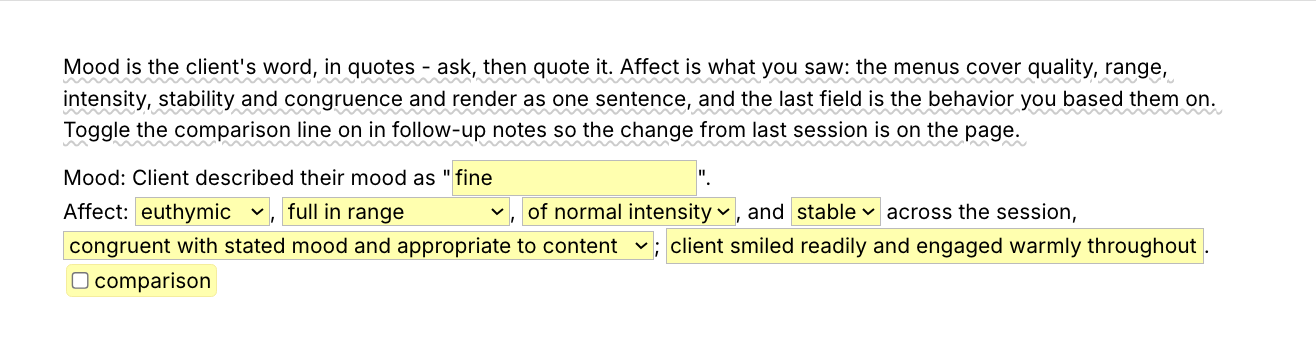
  • /affect, for a progress note that needs mood and affect without a full exam: the mood in quotes, then one sentence built from five menus (quality, range, intensity, stability, congruence), a text field for the behavior you based them on, and a toggle that adds a comparison with the previous session.
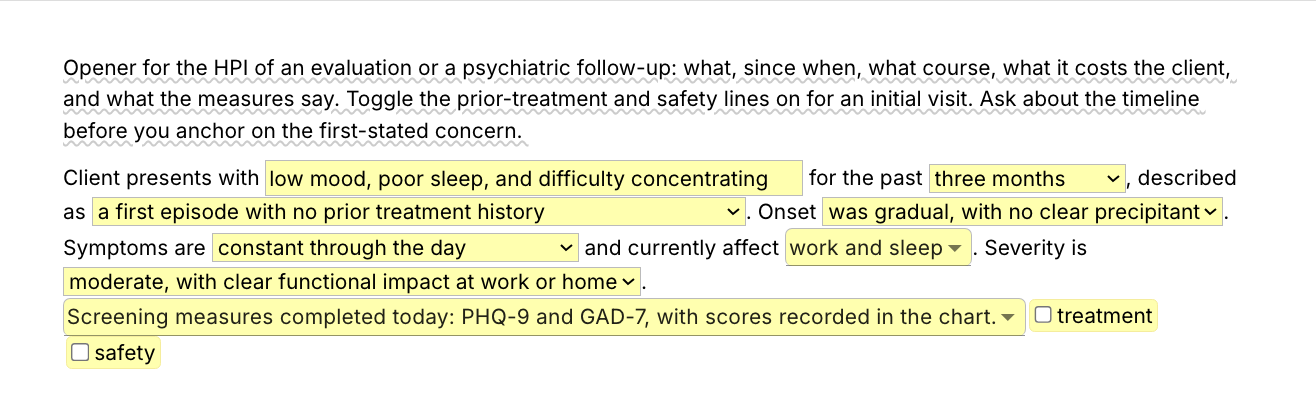
  • /hpi, the HPI opener for evaluations and psychiatric follow-ups: the presenting concern, then duration, course, onset, daily pattern, areas affected, severity and screening measures. Choose followed an identifiable stressor and a field opens for the stressor. Two toggles add a prior-treatment line and a safety line for an initial visit. If you already added the therapy progress note pack, its /hpi is a shorter version of this one. Keep whichever you prefer under that shortcut.

Shorter snippets for the sentences you type most

  • /exam.wnl, a normal exam in one paragraph, for a visit when every domain was unremarkable. Read it before you sign and edit anything that differed.
  • /exam.anxious and /exam.depressed, starting paragraphs for an anxious and a depressed presentation. Treat each as a draft: keep what you observed and change the rest.
  • /cog, the cognition line for when cognition was intact: alertness, orientation, attention, memory and fund of knowledge.
  • /tc, the thought content and perception lines for when nothing was elicited or reported.
  • /ij, the insight and judgment line, with the behavior behind each rating ready to reword.
  • /rb, for prescribers: risks, benefits, side effects and alternatives discussed, with one text field for the medication.
  • /stable, for prescribers: the follow-up line for a patient who is stable on the current regimen, with no medication changes today.

The same domains in the same order, this visit's findings in every one: consistent structure with specific content is what reads well to a supervisor or a payer reviewer.

“Consistent and personalized communication with our clients is one of our top priorities. Text Blaze helps me standardize the language I frequently use in psychological reports while also saving valuable time.”

Kalen SandersClinical psychologist and co-owner of Reclaim Psychological ServicesRead the story

Add the pack to a free Text Blaze account and type /mse at your next intake or evaluation. For a visit when the exam was unremarkable, you can insert it with /exam.wnl and edit from there.

Copy the template for free

Free forever. Works in any EHR or app. No integration required.

Questions clinicians ask

Do I need Text Blaze to use this template?

Yes. The templates are Text Blaze snippets. The free plan is enough to add all 12, to use the seven ready-made paragraphs without limit and to test the form-field templates. Text Blaze is a free Chrome extension, with Windows and Mac apps as well.

Does it work in my EHR?

Yes. Text Blaze works in your EHR, your email and any other app: SimplePractice, TherapyNotes, TheraNest, Headway and Alma among others, plus Gmail, Outlook, client portals and Google Docs. If yours is not on that list, the check takes a minute: add the pack and type /exam.wnl in your note field. If the paragraph appears, the rest will too. There is nothing to integrate: you type the shortcut in the note field where you would have typed the exam.

My EHR already has templates. Why this pack?

Keep it if it works for you. The pack is for the writing you do outside that section. The places are listed under "A normal exam, written honestly" above. It also comes with you when you change platforms, and the shorter snippets work inside any template, including your EHR's.

Will my notes look cloned?

Not if the exam on the page is the exam you did. /mse has you look at every domain and change what differed. The mood is the client's word, typed over the default, and the insight and judgment lines carry this visit's evidence. /exam.wnl and the other ready-made paragraphs are for visits they describe accurately, and you edit anything that differed before you sign. An exam that reads the same visit after visit is the risk, which is why every template here asks you to choose.

Is my client's information stored anywhere?

Text Blaze snippets hold your template and your defaults, not your client records. Template insertion is done locally: what you type into the pop-up's fields goes into the page you are on and is not saved, synced or logged by Text Blaze after you insert.

BAA is available upon request. Read our HIPAA guide.

Is the pack free?

Yes. The pack is free and its 12 snippets fit the free plan's 20. The seven ready-made paragraphs, /exam.wnl among them, are free forever. On the free plan you can test the form-field templates (/mse, /psycheval, /affect, /hpi and /rb) to see how they work. Using them day to day needs Pro, $2.99 a month billed yearly. The plans page lists what each plan includes.

Can I change the template?

Yes. Everything is editable: the domain labels, the menu options, the defaults, the date format and the wording. Replace the descriptors with the ones you write, add a domain your agency requires, write "patient" where the exam says "client", or remove the medication lines from /psycheval if you do not prescribe. If you see clients by video, add "as observed by video" to the appearance and behavior lines once. Change it once and it stays changed.

Can I use it on Windows or Mac?

Yes. Text Blaze runs as a Chrome extension and as Windows and Mac apps, so the shortcuts work in browser-based EHRs and in desktop apps alike, with the same snippets on every computer you sign in on. There is no iPad or phone app, so an exam written on a tablet stays hand-typed.

An exam that matches today's visit, a shortcut away.

Add the free mental status exam template pack and set the menus to your own descriptors once. The exam takes a few picks, and the psychiatric evaluation write-up takes minutes.

Copy the template for free

Free forever. Works in any EHR or app. No integration required.