


Physical Therapy Evaluation & Progress Note Templates

Eliminate repetitive typing and mistakes. Insert a PT Evaluation, Progress Note or Plan of Care in any text box in seconds.

Free forever. Works in any EMR or app. No integration required.

Brian Schulte
“To complete my documentation more efficiently, I use Text Blaze.”
Brian Schulte, Spooner. Read the story

4.9 · 1,900+ Chrome Web Store reviews · 800,000+ people use Text Blaze

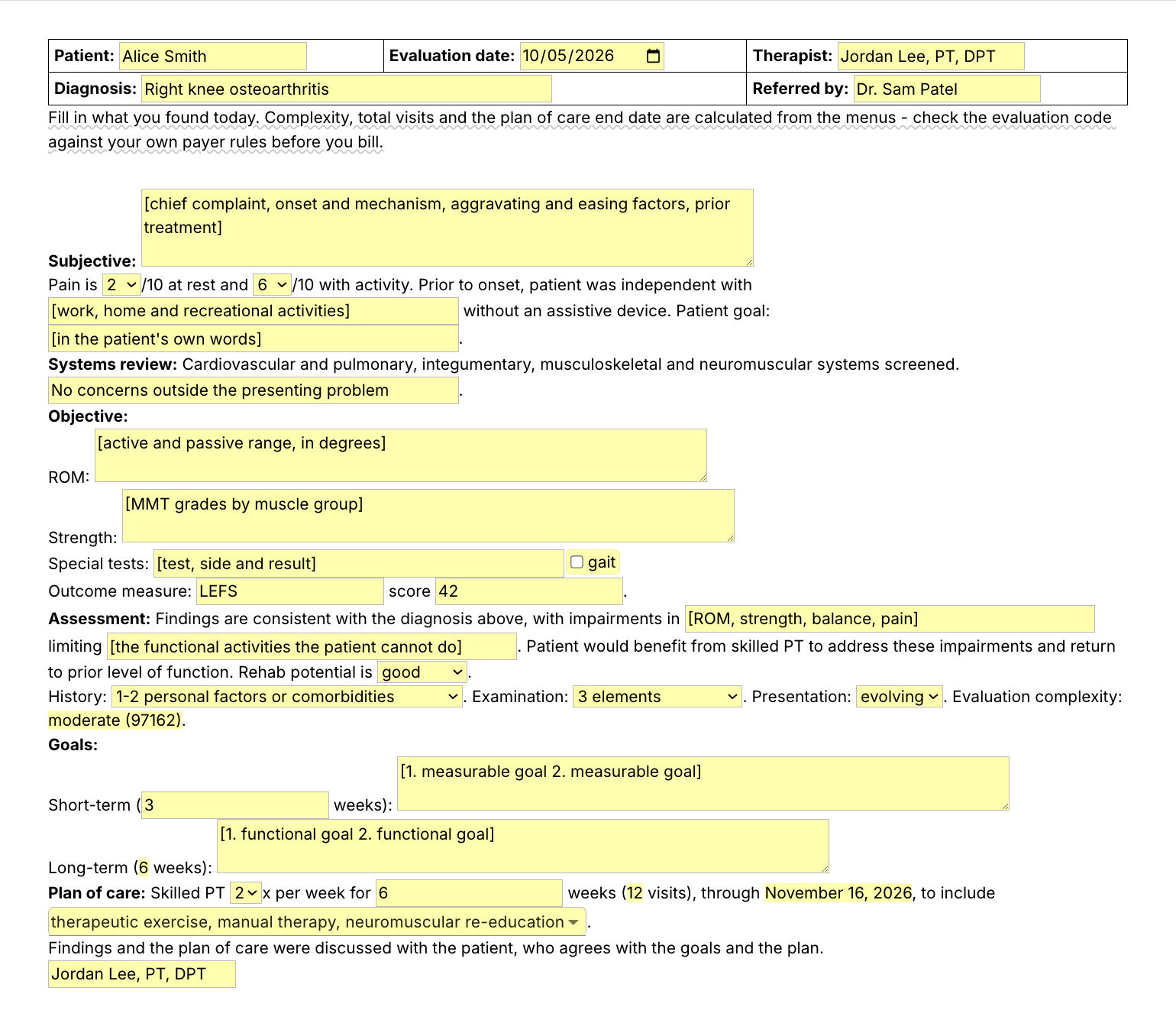
Typing /pteval opens the Text Blaze pop-up already filled in for a knee osteoarthritis evaluation, the presentation menu changes from stable to evolving and the evaluation complexity updates to moderate, and Insert places the finished evaluation in the note field

Type /pteval. Fill in the form fields. Insert.

  1. Add the packThe button opens the pack's page on the Text Blaze marketplace. Add the pack in one click (sign up for a free account if you do not have one) and the templates are yours, ready to edit and use anywhere.
  2. Type /pteval where you write the evalIn your EMR's evaluation note, in a letter to the referring physician, in a Google Doc. A pop-up opens with the patient header, the history, the measures, the goals and the plan of care.
  3. Fill in, insert, editType what you found, pick the history, exam and presentation, set the frequency and weeks, insert. It lands as text you can still edit before you sign.
  4. Then make one of your ownCreate a snippet of sentences or paragraphs you type often. Give it a keyboard shortcut. Type the shortcut anywhere and the text appears. Congratulations! You just saved yourself a few seconds.

What is Text Blaze?

Text Blaze is a free Chrome extension, with Windows and Mac apps, that turns the text you type again and again into templates you insert with a shortcut. Type /pteval and the evaluation appears where your cursor is, in any program you type in.

Templates can hold text fields, drop-down menus, dates and checkboxes, and values that compute from other fields, so the evaluation complexity, the visit total and the plan of care end date fill themselves in.

Works everywhere you type

Any browser EMR, like WebPT, Prompt or Net Health, through the Chrome extension. Installed programs through the desktop app.

The same structure, your own words

Menus hold complete sentences you pick from, and text fields hold what you found and what the patient said or did. You write the details, the template keeps the order.

Your wording, saved once

Change the templates to your clinic's wording and every eval starts there. Share the folder so every PT and PTA in the clinic writes the same way.

Free forever

The whole pack fits the free plan. Snippets without form fields are free forever. The snippets with form fields can be tested on the free plan and need Pro, $2.99 a month billed yearly, for day-to-day use.

Works in WebPTPromptNet HealthSPRYGmailOutlookGoogle Docs

Template insertion is done locally. PHI and other sensitive information never leaves your computer.

What should a physical therapy plan of care include?

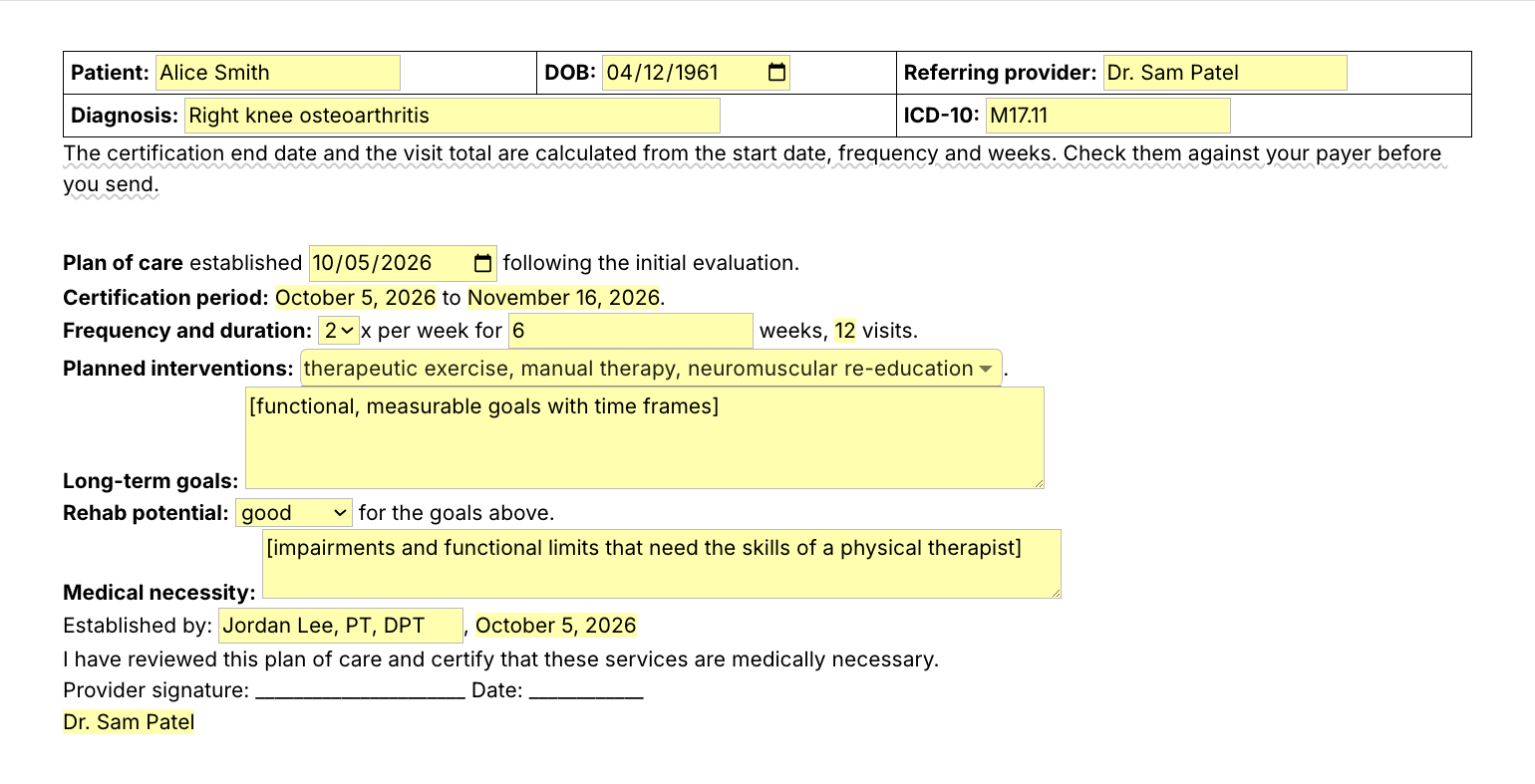
A physical therapy plan of care states the diagnosis, the long-term functional goals, the interventions you plan, and how often and for how long you will treat. Add the certification period and a signature line for the referring provider, the rehab potential, and a short medical necessity statement so a reviewer sees why skilled PT is needed.

  • Diagnosis: the treating diagnosis with its ICD-10 code.
  • Goals: functional, measurable and with a time frame, like reciprocal stairs with one rail in 4 weeks.
  • Interventions, frequency and duration: what you will do, how many times a week and for how many weeks.
  • Certification: the start and end dates, and the provider's signature and date.

Most clinics write the plan of care at the end of the initial evaluation and update it at the re-eval. The /ptpoc slide above is a physical therapy plan of care example: /ptpoc puts that plan on its own page, ready to fax to the physician for signature.

What makes a good physical therapy evaluation template?

A good physical therapy evaluation form template types the structure and the sentences that never change, and asks for what you found today. History, pain, prior level of function, measures, goals and the plan are form fields, so each eval reads as this patient's. The complexity code and the plan dates are worked out from your answers.

  • Fields for your findings. ROM, strength, special tests and the outcome measure are fields you fill in for each patient.
  • Complexity worked out, checked by you. Pick the history, examination and presentation, and the template names the lowest band they meet (97161, 97162 or 97163). Clinical decision-making, the fourth part, stays your call. Check the code against your payer before you bill.
  • Prompts you replace. A bracketed prompt you leave empty lands in brackets, so read the eval once before you sign.
  • Guidance that stays out of the note. A short reminder shows while you write and is never inserted.

If your EMR's evaluation template works for you, keep it. This pack adds the same structure everywhere else you type, and lines like /plof and /ptg you can drop into any template. If you use an AI scribe, the scribe drafts from the visit and the short snippets are the lines you still type yourself.

How this template helps

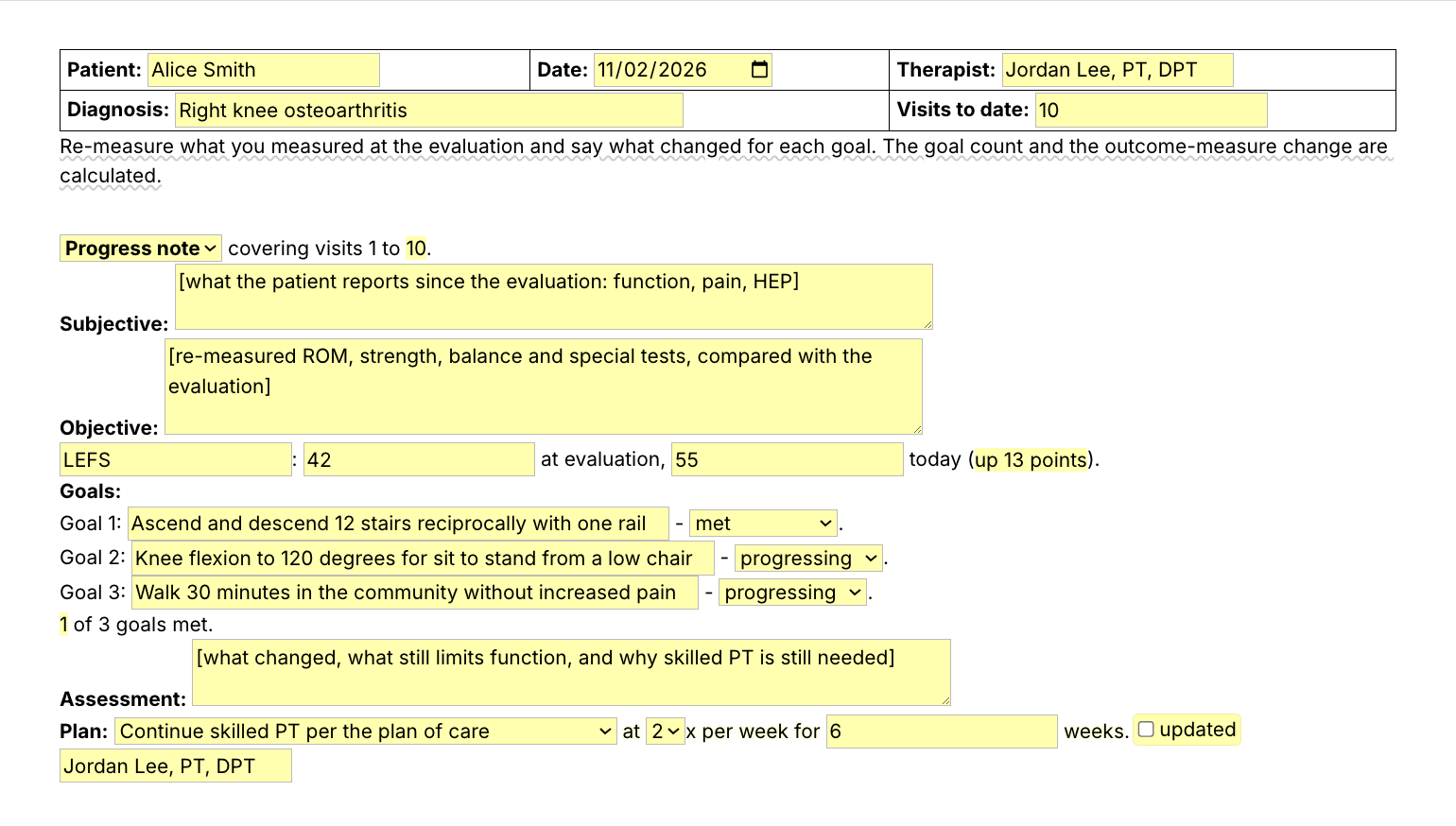
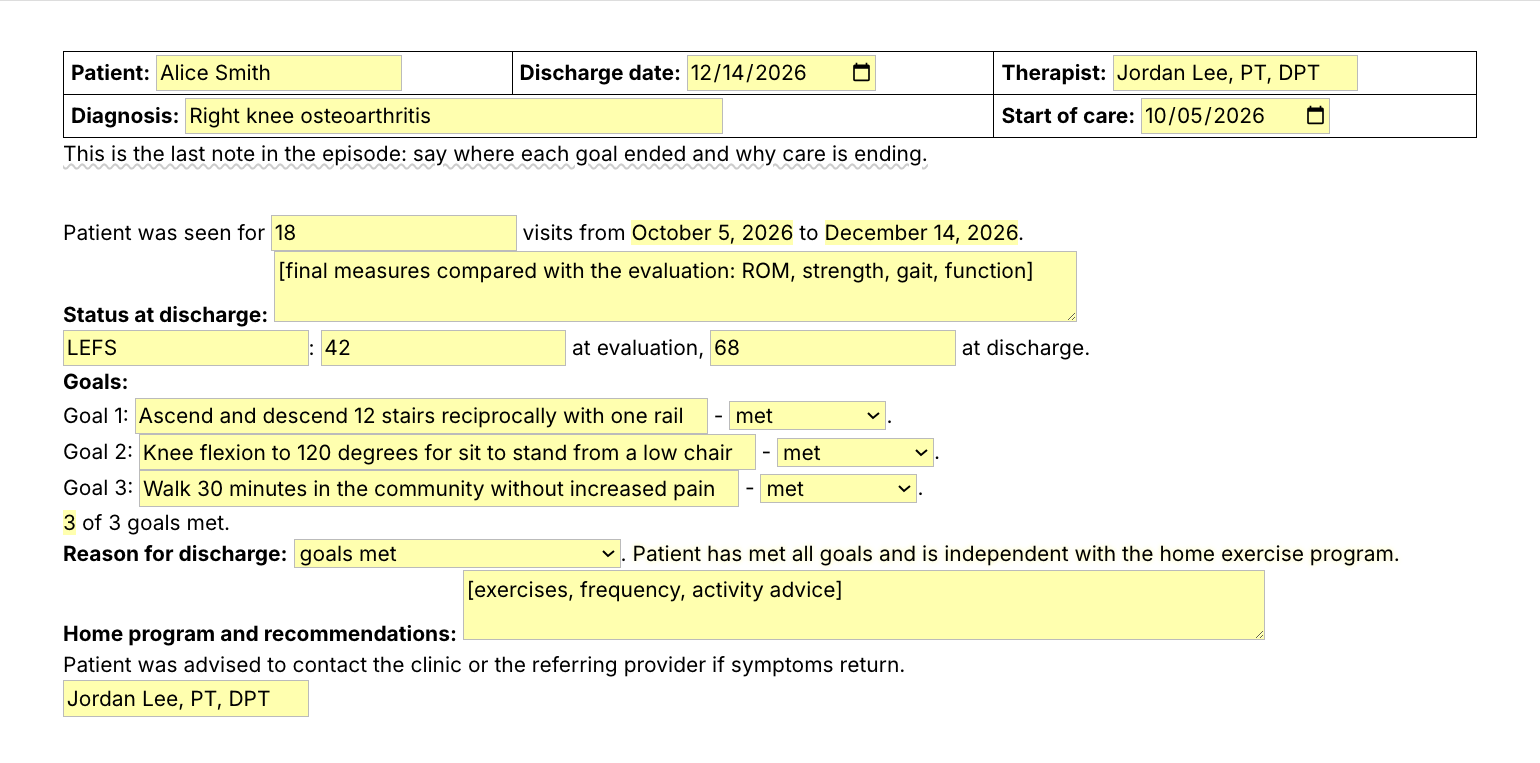
The /pteval snippet is that evaluation as a Text Blaze pop-up. The rest of the pack follows the episode of care: /ptpn, the physical therapy progress note template, at the 10th visit or the re-eval, /ptpoc for the physician's signature, /ptdc at discharge and /lomn when a payer asks for a letter.

Besides the five templates, the pack has the lines PTs type in them most:

  • /ptg, progress toward goals with the measured change.
  • /pdt, progress delayed and why.
  • /plof, the prior level of function.
  • /dcgm and /dcmmi, discharge with goals met or at maximum benefit.
  • /faxpoc, the fax cover that asks the physician to sign the plan of care.

Daily notes have their own pack, the PT SOAP note templates.

Here is a physical therapy progress note example, filled in with /ptpn for a fictional patient:

Patient: Alice Smith · Date: 2026-11-02 · Visits to date: 10
Diagnosis: Right knee osteoarthritis · Therapist: Jordan Lee, PT, DPT
Progress note covering visits 1 to 10.
Subjective: Patient reports stairs are easier and she walked 25 minutes on Sunday with mild soreness afterwards. HEP done most days.
Objective: Right knee flexion 116 degrees (was 105), extension lacks 2 (was 5). Quads 4/5 (was 4-/5). Single leg stance 15 sec right (was 8).
LEFS: 42 at evaluation, 55 today (up 13 points).
Goals:
Goal 1: Ascend and descend 12 stairs reciprocally with one rail - met.
Goal 2: Knee flexion to 120 degrees for sit to stand from a low chair - progressing.
Goal 3: Walk 30 minutes in the community without increased pain - not met.
1 of 3 goals met.
Assessment: Gains in ROM, strength and balance carry over to stairs. Walking tolerance is still limited by end-of-day pain, which needs progressive loading and gait work from a physical therapist.
Plan: Continue skilled PT with an updated plan of care at 2x per week for 4 weeks.
Updated goals: Goal 3 revised: walk 30 minutes on level ground with pain no higher than 3/10 within 4 weeks.
Jordan Lee, PT, DPT

The headings, the score change and the goal count were already there. The rest is what changed for this patient.

Start with /ptg. It types "Progress toward goals is indicated by" and asks for the measured change, and it works inside any template, your EMR's included.

Text Blaze helps me finish my paperwork while I'm still sitting with a patient.

Stephanie Yakobina

Keep your EMR templates and your AI scribe. Add the pack to a free Text Blaze account, type /ptg in your next progress note, and /pteval at your next eval.

Copy the template for free

Free forever. Works in any EMR or app. No integration required.

Questions PTs ask

How do you write a letter of medical necessity for physical therapy?

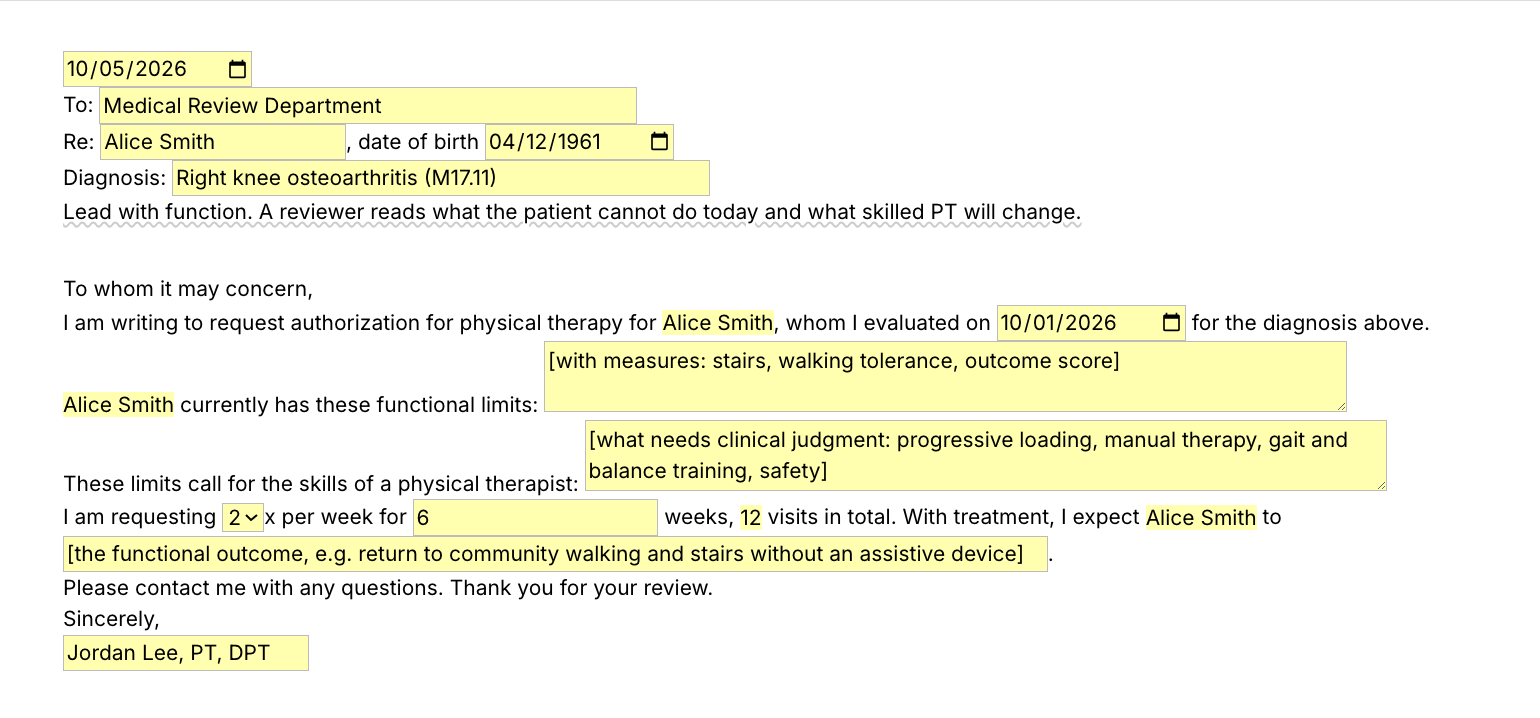
Lead with function: what the patient cannot do today, with a measure, and why that needs the skills of a physical therapist. Then request a number of visits over a time frame and say what you expect the patient to do at the end. The /lomn snippet lays out the letter with a field for each part.

My EHR already has templates. Why this pack?

Keep them if they work for you. The pack adds the same eval and progress note structure everywhere else you type: letters, faxes, emails and a second EMR. Lines like /ptg and /plof drop into any template, your EMR's included, and stay yours if the clinic changes EMR.

Does the template guarantee reimbursement?

No. The template gives you the structure, and payment depends on what the note and the plan of care show for this patient and on each payer's rules. Check the evaluation code, the certification dates and the visit count against your payer before you bill.

Do I need Text Blaze to use this template?

Yes. The templates are Text Blaze snippets, and the free plan is enough to add all of them. Text Blaze is a free Chrome extension, with Windows and Mac apps as well.

Does it work in my EHR?

Yes. Text Blaze works in your EHR, your email and any other app. Browser EMRs like WebPT, Prompt and Net Health work through the Chrome extension, and installed programs through the Windows or Mac app.

Is my client's information stored anywhere?

Text Blaze snippets hold your template and your defaults, not your patient notes. Template insertion is done locally: what you type into the pop-up goes into the note you are writing and is not saved by Text Blaze after you insert.

BAA is available upon request. Read our HIPAA guide.

Is the pack free?

Yes. The pack is free and its 11 snippets fit the free plan. /dcgm and /dcmmi have no form fields and work without limit on Free. You can test the snippets with form fields on the free plan, and using them day to day needs Pro, $2.99 a month billed yearly.

Can I use it on Windows or Mac?

Yes. The Chrome extension covers browser EMRs, and the Windows and Mac apps cover installed programs. Your snippets follow you to every computer you sign in on.

Write the eval in minutes, not after clinic.

Add the free evaluation and progress note pack, set your wording once, and each eval, progress note and discharge starts from your structure instead of a blank box. Then try /ptg, save a line of your own the same way, and get those minutes back every week.

Copy the template for free

Free forever. Works in any EMR or app. No integration required.