


Physical Therapy Goals Examples

Eliminate repetitive typing and mistakes. Insert a short-and-long-term goals section in any text box in seconds.

Free forever. Works in any EMR or app. No integration required.

Brian Schulte
“Text Blaze improves my note quality while saving me time.”
Brian Schulte, Spooner. Read the story

4.9 · 1,900+ Chrome Web Store reviews · 800,000+ people use Text Blaze

Typing /goals opens the Text Blaze pop-up already filled in for a shoulder patient, the lifting goal is switched on, and Insert places the short- and long-term goals in the note field

Type /goals. Fill in the form fields. Insert.

  1. Add the packThe button opens the pack's page on the Text Blaze marketplace. Add the pack in one click (sign up for a free account if you do not have one) and the templates are yours, ready to edit and use anywhere.
  2. Type /goals where you write the evalIn the goals section of your EMR's evaluation, in a progress note, in a Google Doc. A pop-up opens with short-term and long-term goals you switch on and numbers you change.
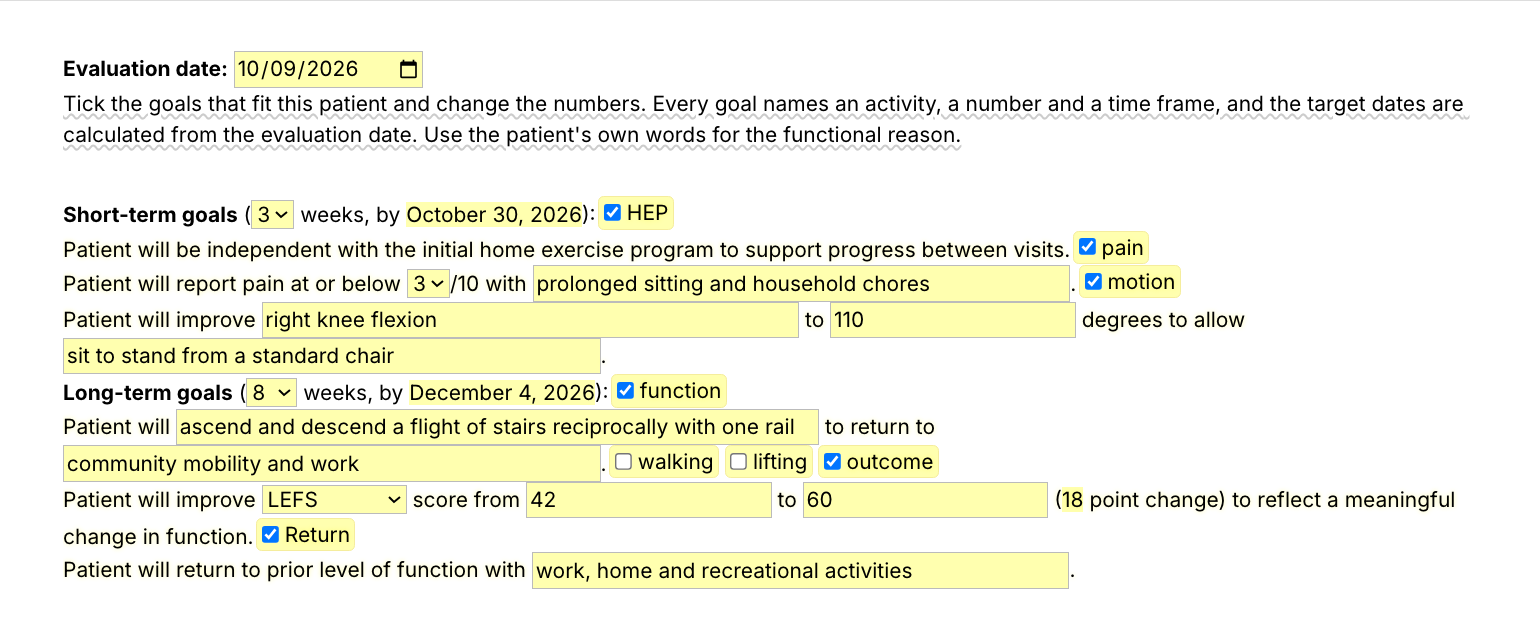
  3. Fill in, insert, editTick the goals that fit this patient, type the numbers and the activity in their words, insert. The target dates come from the eval date, and it all lands as text you can still edit.
  4. Then make one of your ownCreate a snippet of sentences or paragraphs you type often. Give it a keyboard shortcut. Type the shortcut anywhere and the text appears. Congratulations! You just saved yourself a few seconds.

What is Text Blaze?

Text Blaze is a free Chrome extension, with Windows and Mac apps, that turns the text you type again and again into templates you insert with a shortcut. Type /goals and the goals section appears where your cursor is, in any program you type in.

Templates can hold text fields, drop-down menus, dates and checkboxes, and values that compute from other fields, so the target dates and the outcome-measure change fill themselves in.

Works everywhere you type

Any browser EMR, like WebPT, Prompt or Net Health, through the Chrome extension. Installed programs through the desktop app.

Fill-in fields, not blanks

Each goal has fields for the number, the activity and the time frame. Tick the goals that fit and leave the rest out.

Your wording, saved once

Change the goals to your clinic's wording and every eval starts there. Share the folder so every PT in the clinic writes goals the same way.

Free forever

The whole pack fits the free plan. Any snippet you save yourself without form fields is free forever. The snippets with form fields can be tested on the free plan and need Pro, $2.99 a month billed yearly, for day-to-day use.

Works in WebPTPromptNet HealthSPRYGmailOutlookGoogle Docs

Template insertion is done locally. PHI and other sensitive information never leaves your computer.

How do you write goals for a physical therapy evaluation?

Write each goal as who will do what, how much and by when, tied to an activity the patient cares about. Short-term goals cover the first few weeks, like pain, motion and the home program. Long-term goals name the function the patient wants back by discharge, like stairs, lifting at work or running.

  • Measurable: a number you can re-test, like degrees, pounds, minutes, a pain rating or an outcome-measure score.
  • Functional: the activity the number allows, in the patient's own words.
  • Timed: weeks from the eval, with a target date.
  • Re-tested: at the progress note, each goal is met, progressing or not met.

Physical therapy SMART goals examples (specific, measurable, achievable, relevant and timed) come down to the same three things: a number, an activity and a date.

What makes a good physical therapy goals template?

A good PT goals template keeps the goal wording you trust and asks for what is different about this patient. The activity, the number and the time frame are form fields, so no two patients get the same goals. You pick which goals fit and the target dates are worked out from the eval date.

  • Fields for the numbers. Degrees, pounds, minutes and scores are this patient's, every eval.
  • Goals you switch on. Tick the goals that fit and the rest stay out of the note.
  • Scores you set. The outcome-measure goal names the measure and the points. The minimal clinically important difference is your call, so nothing is built in.
  • Prompts you replace. A bracketed prompt you leave empty lands in brackets, so read the goals once before you sign.

If you keep a Google Doc of goals for physical therapy evals, this is that doc with fields where the numbers go. If your EMR has goal templates that work for you, keep them. If it has a box for each goal, use the single goals, one per box.

How this template helps

The /goals snippet is a short- and long-term goals section as a Text Blaze pop-up: the eval date, a weeks menu for each part with its target date, and goals for the home program, pain, motion, function, walking, lifting, an outcome measure and return to prior level of function.

Besides /goals, the pack has single goals you can drop into any goals section:

  • /gpain, /gwalk, /glift and /greach, goals for pain, walking, lifting and reaching.
  • /grun and /gthrow, return to running and throwing.
  • /gknee, /gshld and /glbp, knee, shoulder and low back goals.
  • /gom, an outcome-measure goal for LEFS, ODI, NDI, QuickDASH or PSFS.

Here are sample physical therapy goals, short-term and long-term, filled in with /goals for a fictional patient:

Evaluation date: 2026-10-09
Short-term goals (4 weeks, by November 6, 2026):
Patient will be independent with the initial home exercise program to support progress between visits.
Patient will report pain at or below 2/10 with overhead reaching and dressing.
Patient will improve right shoulder flexion to 140 degrees to allow reaching into a kitchen cabinet.
Long-term goals (12 weeks, by January 1, 2027):
Patient will stock shelves at shoulder height for a full shift without pain to return to her job at a grocery store.
Patient will lift 20 lb from floor to waist with proper body mechanics and no increase in pain to return to work tasks.
Patient will improve QuickDASH score from 52 to 20 (32 point change) to reflect a meaningful change in function.
Patient will return to prior level of function with full-time work, gardening and swimming.

The goal wording and the dates were already there. The activities and numbers are this patient's.

Start with /gpain. It types "Patient will report pain at or below" and asks for the rating and the activity, and it works inside any goals section, your EMR's included.

Text Blaze helps me finish my paperwork while I'm still sitting with a patient.

Stephanie Yakobina

Keep your Google Doc and your EMR templates. Add the goals bank to a free Text Blaze account, type /gpain in your next eval, and /goals for the whole goals section.

Copy the template for free

Free forever. Works in any EMR or app. No integration required.

Questions PTs ask

Will my notes look cloned?

Not if you fill them in. The goal wording repeats, and the activity, the numbers and the time frame are fields you fill in for this patient. Change any goal that does not fit before you sign.

My EHR already has templates. Why this pack?

Keep them if they work for you. The goals bank works everywhere else you type, from a second EMR to a letter or a Google Doc. The single goals like /gpain drop into any template, your EMR's included, and stay yours if the clinic changes EMR.

Do I need Text Blaze to use this template?

Yes. The templates are Text Blaze snippets, and the free plan is enough to add all of them. Text Blaze is a free Chrome extension, with Windows and Mac apps as well.

Does it work in my EHR?

Yes. Text Blaze works in your EHR, your email and any other app. Browser EMRs like WebPT, Prompt and Net Health work through the Chrome extension, and installed programs through the Windows or Mac app.

Is my client's information stored anywhere?

Text Blaze snippets hold your template and your defaults, not your patient notes. Template insertion is done locally: what you type into the pop-up goes into the note you are writing and is not saved by Text Blaze after you insert.

BAA is available upon request. Read our HIPAA guide.

Is the pack free?

Yes. The pack is free and its 11 snippets fit the free plan. Every goal has form fields for its numbers, so you can test them on the free plan, and using them day to day needs Pro, $2.99 a month billed yearly.

Can I change the template?

Yes. Everything is editable: the wording, the goals, the menu options and the defaults. Add the goals you write most and every eval starts with them.

Can I use it on Windows or Mac?

Yes. The Chrome extension covers browser EMRs, and the Windows and Mac apps cover installed programs. Your snippets follow you to every computer you sign in on.

Write the goals in seconds, not from a Google Doc.

Add the free goals bank, swap in the goals you write most, and every eval starts with measurable, functional goals to fill in. Then try /gpain, save a goal of your own the same way, and get those minutes back at every eval.

Copy the template for free

Free forever. Works in any EMR or app. No integration required.