


Physical Therapy Patient Education & HEP Instructions

Eliminate repetitive typing and mistakes. Insert a home exercise program sheet or a patient education line in any text box in seconds.

Free forever. Works in any EMR or app. No integration required.

Brian Schulte
“Text Blaze improves my note quality while saving me time.”
Brian Schulte, Spooner. Read the story

4.9 · 1,900+ Chrome Web Store reviews · 800,000+ people use Text Blaze

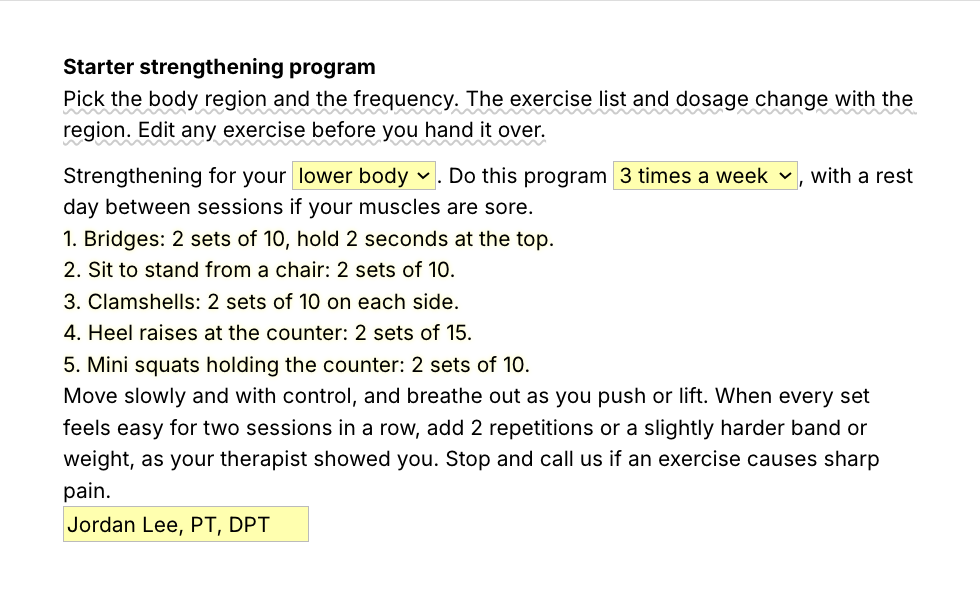
Typing /hepstr opens the Text Blaze pop-up with the lower-body program, the region menu changes to core and the exercise list switches to five core exercises, and Insert places the whole handout in a patient portal message

Type /hepstr. Pick the region. Insert.

  1. Add the packThe button opens the pack's page on the Text Blaze marketplace. Add the pack in one click (sign up for a free account if you do not have one) and the templates are yours, ready to edit and use anywhere.
  2. Type /hepstr where you write to the patientIn a patient portal message, an email or your EMR. A pop-up opens with menus for the body region and how often to do the program.
  3. Pick the region, insert, checkChoose lower body, upper body or core and the exercise list changes to match. Edit any exercise before you hand it over.
  4. Then make one of your ownCreate a snippet of sentences or paragraphs you type often. Give it a keyboard shortcut. Type the shortcut anywhere and the text appears. Congratulations! You just saved yourself a few seconds.

What is Text Blaze?

Text Blaze is a free Chrome extension, with Windows and Mac apps, that turns the text you type again and again into templates you insert with a shortcut. Type /edu and the patient education line appears where your cursor is, in any program you type in.

Templates can hold text fields, drop-down menus, dates and checkboxes, so one home exercise program sheet fits each patient.

Works everywhere you type

Any browser EMR, like WebPT, Prompt or Net Health, through the Chrome extension. Installed programs through the desktop app.

Fill-in fields, not blanks

Each exercise has fields for the name, sets, reps and a cue. Tick the exercises you are giving and leave the rest out.

Your wording, saved once

Change the handouts to your clinic's wording and every HEP starts there. Share the folder so every PT and PTA explains the program the same way.

Free forever

The whole pack fits the free plan. Snippets without form fields are free forever. The snippets with form fields can be tested on the free plan and need Pro, $2.99 a month billed yearly, for day-to-day use.

Works in WebPTPromptNet HealthSPRYGmailOutlookGoogle Docs

Template insertion is done locally. PHI and other sensitive information never leaves your computer.

What should a home exercise program include?

A home exercise program should list each exercise with the sets, reps or hold time, one cue for doing it well, how often to do it, when to stop and call, any precautions, and when the program will be reviewed. Plain words and numbers work better than long paragraphs.

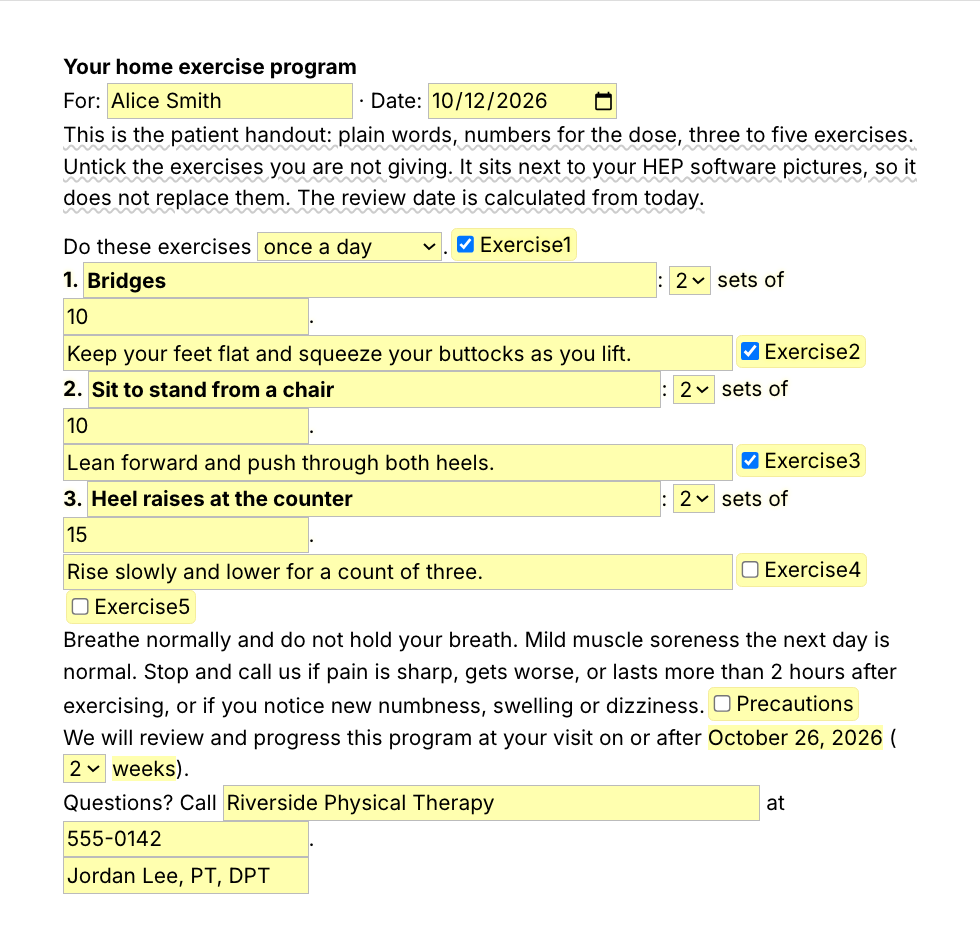
The /hepsheet home exercise program template has a place for each of those: up to five exercises with a cue each, a frequency menu, standard safety advice, optional precautions, your clinic's number and a review date worked out from today. Here is what it inserts for a fictional patient:

Your home exercise program
For: Alice Smith · Date: October 12, 2026
Do these exercises twice a day.
1. Quad sets: 3 sets of 10, hold 5 seconds. Push the back of your knee down into the towel.
2. Heel slides: 2 sets of 15. Slide your heel toward you until you feel a stretch, not pain.
3. Straight leg raises: 2 sets of 10. Tighten your thigh first and keep your knee straight.
Breathe normally and do not hold your breath. Mild muscle soreness the next day is normal. Stop and call us if pain is sharp, gets worse, or lasts more than 2 hours after exercising, or if you notice new numbness, swelling or dizziness.
Your precautions: Use your walker for all walking until your therapist clears you to stop.
We will review and progress this program at your visit on or after October 19, 2026 (1 week).
Questions? Call Riverside Physical Therapy at 555-0142.
Jordan Lee, PT, DPT

Works next to your HEP software

Your HEP app holds the exercise pictures and videos. The pack writes the words around them: the instructions, the safety advice and the review date, in a portal message, an email or the note.

Use it in place of the physical therapy home exercise program handouts (PDF files) you edit and reprint for every patient. /hepstr gives a starter strengthening program for the lower body, upper body or core, and /hepsheet a program you fill in for the patient in front of you. You set the program and edit every exercise and precaution. For a patient who wants paper, insert it in a Google Doc or Word file and print it.

Patient education lines for your daily notes

The patient education lines you write in every note are one shortcut each: the HEP education and self-care teaching you document in physical therapy notes. You still write what you taught this patient and how they did.

  • /edu, patient education provided, with a box for the topic.
  • /exer and /expro, new exercises taught and exercises progressed, with return demonstration.
  • /hepup, HEP reviewed and updated.
  • /painsc, pain self-care: pacing, positions of comfort, heat and ice.
  • /bsc and /postp, bladder habits and postpartum self-care for pelvic health.

Here is what /edu inserts for a fictional patient:

Patient educated on lifting mechanics for her job, a walking schedule and ice after long shifts. Patient verbalized understanding and asked appropriate questions.

Start with /edu. It works inside any note, your EMR's templates included.

Text Blaze helps me finish my paperwork while I'm still sitting with a patient.

Stephanie Yakobina

Keep your HEP software and your EMR templates. Add the pack to a free Text Blaze account, give your next patient their program with /hepsheet and record it with /edu.

Copy the template for free

Free forever. Works in any EMR or app. No integration required.

Questions PTs ask

Do I need Text Blaze to use this template?

Yes. The templates are Text Blaze snippets, and the free plan is enough to add all of them. Text Blaze is a free Chrome extension, with Windows and Mac apps as well.

Does it work in my EHR?

Yes. Text Blaze works in your EMR, your email and any other app. Browser EMRs like WebPT, Prompt and Net Health work through the Chrome extension, and installed programs through the Windows or Mac app.

Is my client's information stored anywhere?

Text Blaze snippets hold your template and your defaults, not your patient notes. Template insertion is done locally: what you type into the pop-up goes into the note you are writing and is not saved by Text Blaze after you insert.

BAA is available upon request. Read our HIPAA guide.

Is the pack free?

Yes. The pack is free and its 9 snippets fit the free plan. You can use the snippets without form fields without limit on the free plan. The snippets with form fields can be tested on the free plan and need Pro, $2.99 a month billed yearly, for day-to-day use.

Can I change the template?

Yes. Everything is editable: the exercises, the cues, the safety advice and the defaults. Put your clinic's name and number in once and every handout starts with them, and add your own exercises or regions to /hepstr.

Can I use it on Windows or Mac?

Yes. The Chrome extension covers browser EMRs, and the Windows and Mac apps cover installed programs. Your snippets follow you to every computer you sign in on.

Hand over the program in seconds, not by retyping it.

Add the free pack, type /hepsheet when you give a new program, and the handout is ready to send. Then try /edu and get those minutes back at every visit.

Copy the template for free

Free forever. Works in any EMR or app. No integration required.