


Physical Therapy SOAP Note Templates

Eliminate repetitive typing and mistakes. Insert a PT SOAP note or a pelvic health daily note in any text box in seconds.

Free forever. Works in any EMR or app. No integration required.

Brian Schulte
“Text Blaze improves my note quality while saving me time.”
Brian Schulte, Spooner. Read the story

4.9 · 1,900+ Chrome Web Store reviews · 800,000+ people use Text Blaze

Typing /ptsoap opens the Text Blaze pop-up already filled in for a knee replacement visit, the response menu changes from tolerated treatment well to a mild increase in symptoms that settled, and Insert places the finished daily note with 41 timed minutes and 3 units in the note field

Type /ptsoap. Fill in the form fields. Insert.

  1. Add the packThe button opens the pack's page on the Text Blaze marketplace. Add the pack in one click (sign up for a free account if you do not have one) and the templates are yours, ready to edit and use anywhere.
  2. Type /ptsoap where you write notesIn your EMR's daily note, in an email to a referring provider, in a Google Doc. A pop-up opens with the patient header, the pain rating, the interventions and the four SOAP sections.
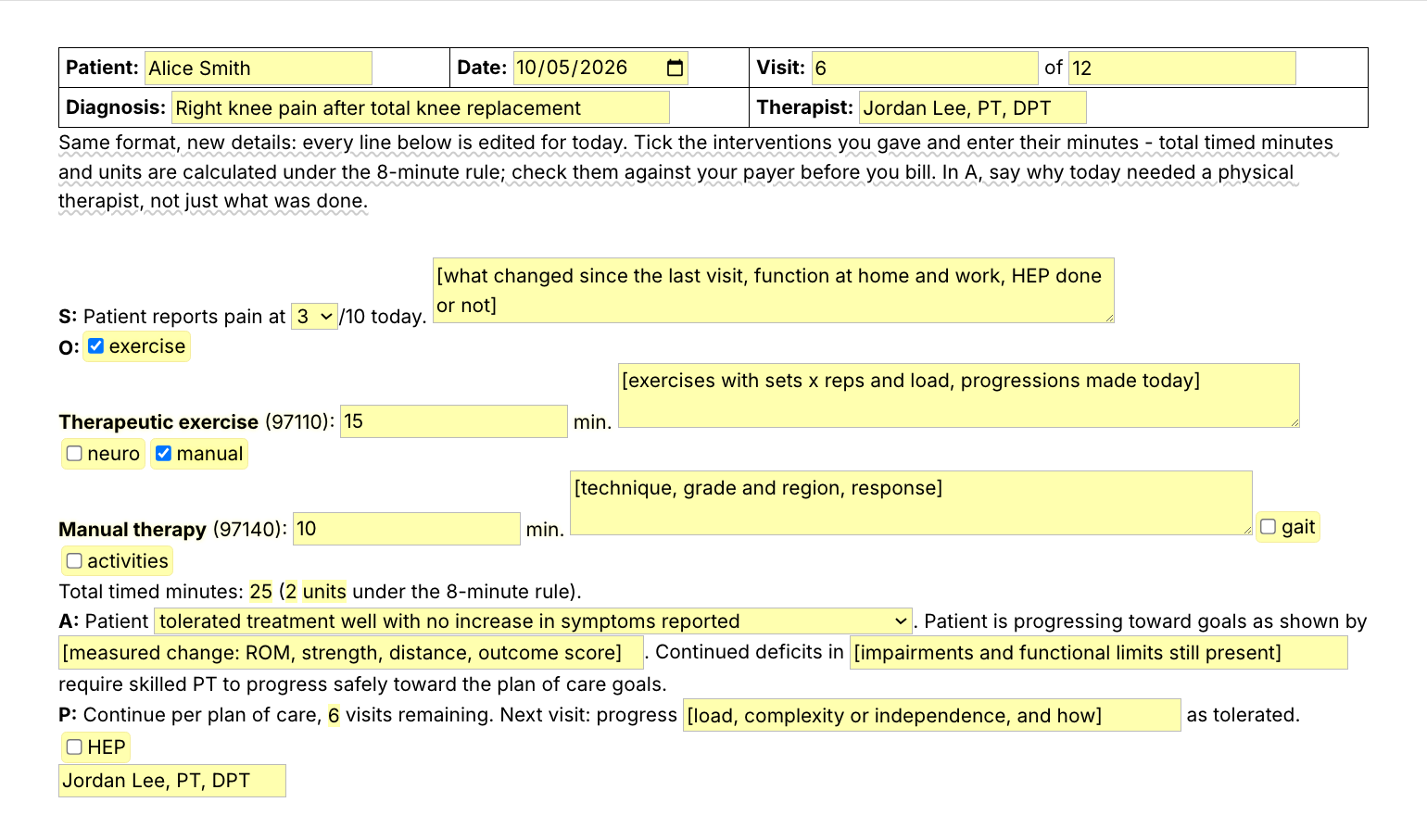
  3. Fill in, insert, editPick the pain rating, tick the interventions you gave and type their minutes, write what changed today, insert. It lands as text you can still edit before you sign.
  4. Then make one of your ownCreate a snippet of sentences or paragraphs you type often. Give it a keyboard shortcut. Type the shortcut anywhere and the text appears. Congratulations! You just saved yourself a few seconds.

What is Text Blaze?

Text Blaze is a free Chrome extension, with Windows and Mac apps, that turns the text you type again and again into templates you insert with a shortcut. Type /ptsoap and the daily note appears where your cursor is, in any program you type in.

Templates can hold text fields, drop-down menus, dates and checkboxes, and values that compute from other fields, so the total timed minutes and the units fill themselves in.

Works everywhere you type

Any browser EMR, like WebPT, Prompt or Net Health, through the Chrome extension. Installed programs through the desktop app.

Fill-in fields, not blanks

Text fields for pain, minutes and progress, and checkboxes for the interventions you gave. The units under the 8-minute rule are worked out from your minutes.

Your wording, saved once

Change any line once and every note starts there. Share the folder so every PT and PTA writes the same way.

Free forever

The whole pack fits the free plan, and /tol works without limit. On Free you can test the snippets with form fields. Using them day to day needs Pro, $2.99 a month billed yearly.

Works in WebPTPromptNet HealthSPRYGmailOutlookGoogle Docs

Template insertion is done locally. PHI and other sensitive information never leaves your computer.

What should a PT daily note include?

A PT daily note records one visit in SOAP order. S is what the patient reports, with a pain rating and what changed since the last visit. O is what you did and measured, with minutes for each timed intervention. A says how the patient responded and why skilled PT is still needed. P says what the next visit will progress.

  • Subjective: pain at rest or with activity, function at home and work, and whether the home program was done.
  • Objective: each intervention with its minutes, exercises with sets, reps and load, and any cues or assistance you gave.
  • Assessment: the response to treatment, the measured change toward goals, and the deficits that still need a physical therapist.
  • Plan: what you will progress next visit and any home program change.

The format is the same every visit. The details are that day's, and that is what makes each note the patient's own.

What makes a good physical therapy SOAP note template?

A good PT SOAP note template types the parts that never change and asks for the parts that do. The headings, your name and the standard sentences are already written. Pain, minutes, exercises, response and progress are form fields you fill in for this visit, so no two notes read the same.

  • Fields for what changes. The pain rating, the minutes, the exercises and the measured change are this patient's, every visit.
  • Math done for you, checked by you. Type the minutes and the total timed minutes and units appear, counted the Medicare 8-minute rule way (total timed minutes). The note shows the total, not the units for each code, and payers that count per code differ, so check before you bill.
  • Prompts you replace. A bracketed prompt you leave empty lands in brackets, so read the note once before you sign.
  • Guidance that stays out of the note. A short reminder to say why today needed a physical therapist shows while you write and is never inserted.

If your EMR splits S, O, A and P into separate boxes, use the short snippets box by box: /dsub in S, /aprog in A, /pfnv or /skprog in P, and /tol and /cues wherever they fit. If your EMR's templates work for you, keep them. This pack adds the same note everywhere else you type, and the sentences you can drop into any template. If you use an AI scribe, the two work together: the scribe drafts from the conversation, and the short snippets are the lines you still type yourself.

How this template helps

The /ptsoap snippet is that template as a Text Blaze pop-up: a patient header, a pain menu and a Subjective field, a checkbox and a minutes field for each timed intervention, the total minutes and units computed, a response menu, Assessment fields and a Plan line that counts the visits remaining.

Besides /ptsoap, the pack has the sentences PTs type most, which double as skilled physical therapy documentation examples you can edit:

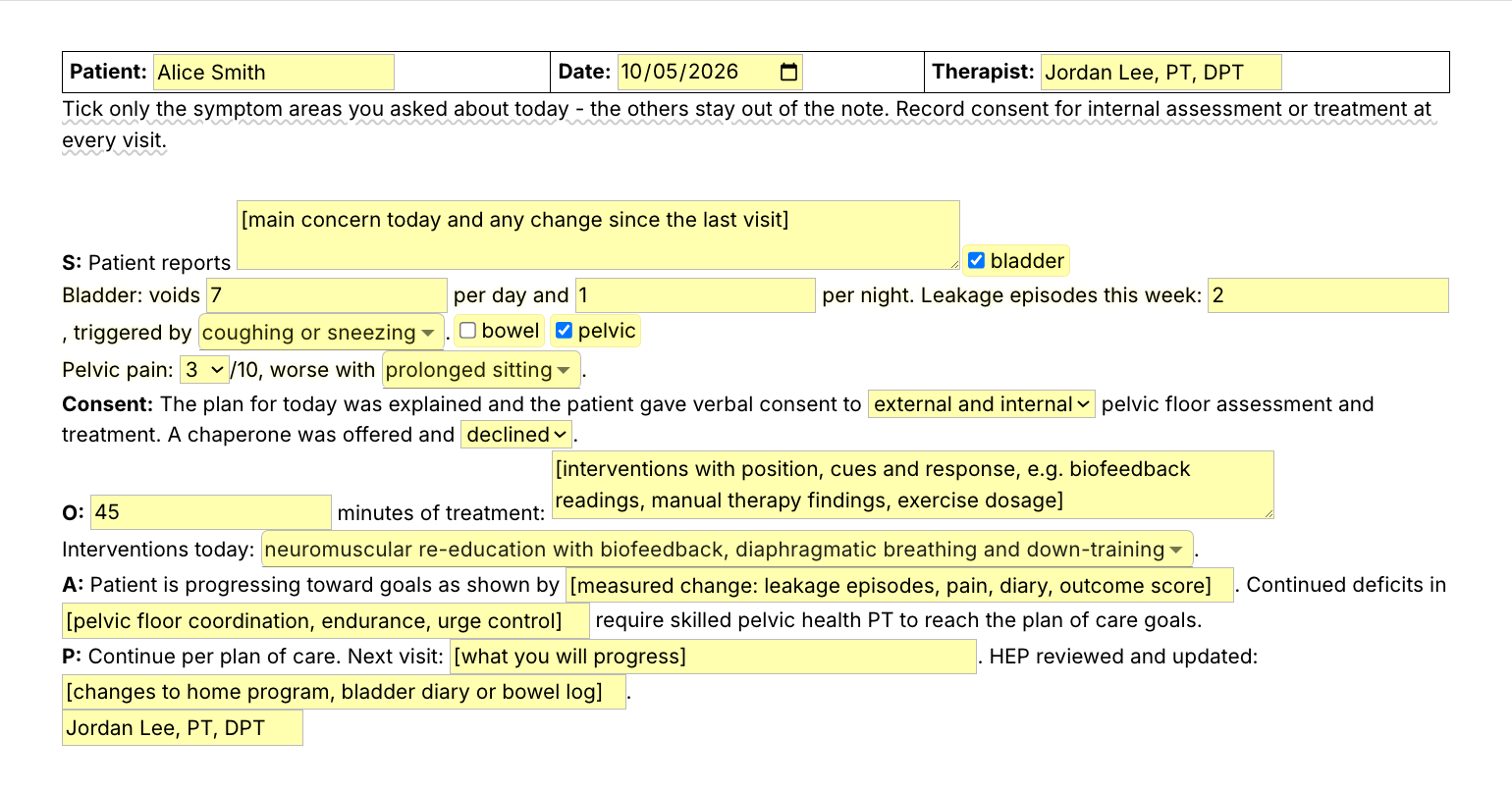
  • /pfdn, a pelvic health daily note with bladder, bowel and pelvic pain sections you switch on, and a consent line.
  • /tol, tolerated treatment well with no increase in symptoms.
  • /dsub, the subjective opener with a pain rating.
  • /aprog, progressing toward goals with the measured change.
  • /pfnv and /skprog, the plan for next visit and the skilled progression line.
  • /ncpt, needs continued skilled PT.
  • /cues and /exnp, verbal and tactile cues, and an exercise not performed today.

Here is a physical therapy SOAP note example, filled in with /ptsoap for a fictional patient:

Patient: Alice Smith · Date: 2026-10-05 · Visit: 8 of 12
Diagnosis: Right knee pain after total knee replacement · Therapist: Jordan Lee, PT, DPT
S: Patient reports pain at 2/10 today. Walking to the mailbox and back without the cane this week. Stairs at home are still one step at a time going down. HEP done 5 of 7 days.
O:
Therapeutic exercise (97110): 23 min. Recumbent bike 6 min for warm up, mini squats 3x12, step ups on a 6 inch step 3x10, terminal knee extension with green band 3x15. Progressed step height from 4 to 6 inches today.
Neuromuscular re-education (97112): 10 min. Single leg stance on foam 3x20 sec each side with contact guard, tandem walking 4 laps with verbal cues for hip and knee alignment.
Manual therapy (97140): 8 min. Grade III tibiofemoral mobilization into flexion and patellar glides, followed by an improved knee bend of 5 degrees.
Total timed minutes: 41 (3 units under the 8-minute rule).
A: Patient reported a mild increase in symptoms that settled by the end of the session. Patient is progressing toward goals as shown by knee flexion improving from 98 to 112 degrees and the 30 second chair stand from 8 to 11. Continued deficits in eccentric quad control and reciprocal stair descent require skilled PT to progress safely toward the plan of care goals.
P: Continue per plan of care, 4 visits remaining. Next visit: progress eccentric step downs from 4 inches and stair descent with one rail as tolerated.
Jordan Lee, PT, DPT

The headings, the sentences, the units and the visit count were already there. The rest is what happened at this visit.

Start with /tol. It types "Patient tolerated treatment well with no increase in symptoms reported and no adverse reactions during or after the session." from four keystrokes, and it works inside any template, your EMR's included.

Text Blaze helps me finish my paperwork while I'm still sitting with a patient.

Stephanie Yakobina

Keep your EMR templates and your AI scribe. Add the pack to a free Text Blaze account, type /tol in your next note, and /ptsoap for the full daily note.

Copy the template for free

Free forever. Works in any EMR or app. No integration required.

Questions PTs ask

How do you write the assessment in a PT daily note?

Lead with how the patient responded, then the measured change toward a goal, then the deficits that still need skilled PT. Two or three sentences is usually enough. The /aprog snippet gives you that sentence with fields for the change and the deficits.

Can physical therapists use templates for daily notes without it being cloned documentation?

Yes. Templates are allowed, and what matters is that each note says what happened at that visit. In this pack the headings and standard sentences repeat, and the pain, minutes, exercises, response and progress are fields you fill in each time. Fill them in and edit any line that was not true today.

How can a PTA write daily notes faster?

By typing only what is new at this visit. Save the sentences you write in every note as snippets (the tolerance line, the cues line, the plan for next visit) and fill in the numbers. Many PTAs find a short typed note quicker than editing a long draft.

Do I need Text Blaze to use this template?

Yes. The templates are Text Blaze snippets, and the free plan is enough to add all of them. Text Blaze is a free Chrome extension, with Windows and Mac apps as well.

Does it work in my EHR?

Yes. Text Blaze works in your EHR, your email and any other app. Browser EMRs like WebPT, Prompt and Net Health work through the Chrome extension, and installed programs through the Windows or Mac app.

Is my client's information stored anywhere?

Text Blaze snippets hold your template and your defaults, not your patient notes. Template insertion is done locally: what you type into the pop-up goes into the note you are writing and is not saved by Text Blaze after you insert.

BAA is available upon request. Read our HIPAA guide.

Is the pack free?

Yes. The pack is free and its 10 snippets fit the free plan. /tol has no form fields and works without limit on Free. You can test the snippets with form fields on the free plan, and using them day to day needs Pro, $2.99 a month billed yearly.

Can I change the template?

Yes. Everything is editable: the wording, the interventions, the menu options and the defaults. Change it once and it stays changed.

Can I use it on Windows or Mac?

Yes. The Chrome extension covers browser EMRs, and the Windows and Mac apps cover installed programs. Your snippets follow you to every computer you sign in on.

Finish the daily note before the next patient.

Add the free PT SOAP note pack, set your wording once, and each daily note starts in seconds instead of from a blank box. Then save /tol, or a sentence of your own, and get those seconds back at every visit.

Copy the template for free

Free forever. Works in any EMR or app. No integration required.