


Safety Plan & Risk Documentation Templates

Eliminate repetitive typing and mistakes. Insert a Safety Plan or Risk Documentation in any text box in seconds.

Free forever. Works in any EHR or app. No integration required.

Kalen Sanders
“Text Blaze has given me the time and energy to focus on my clients and grow my practice.”
Kalen Sanders, Reclaim Psychological Services. Read the story

4.9 · 1,800+ Chrome Web Store reviews · 800,000+ people use Text Blaze

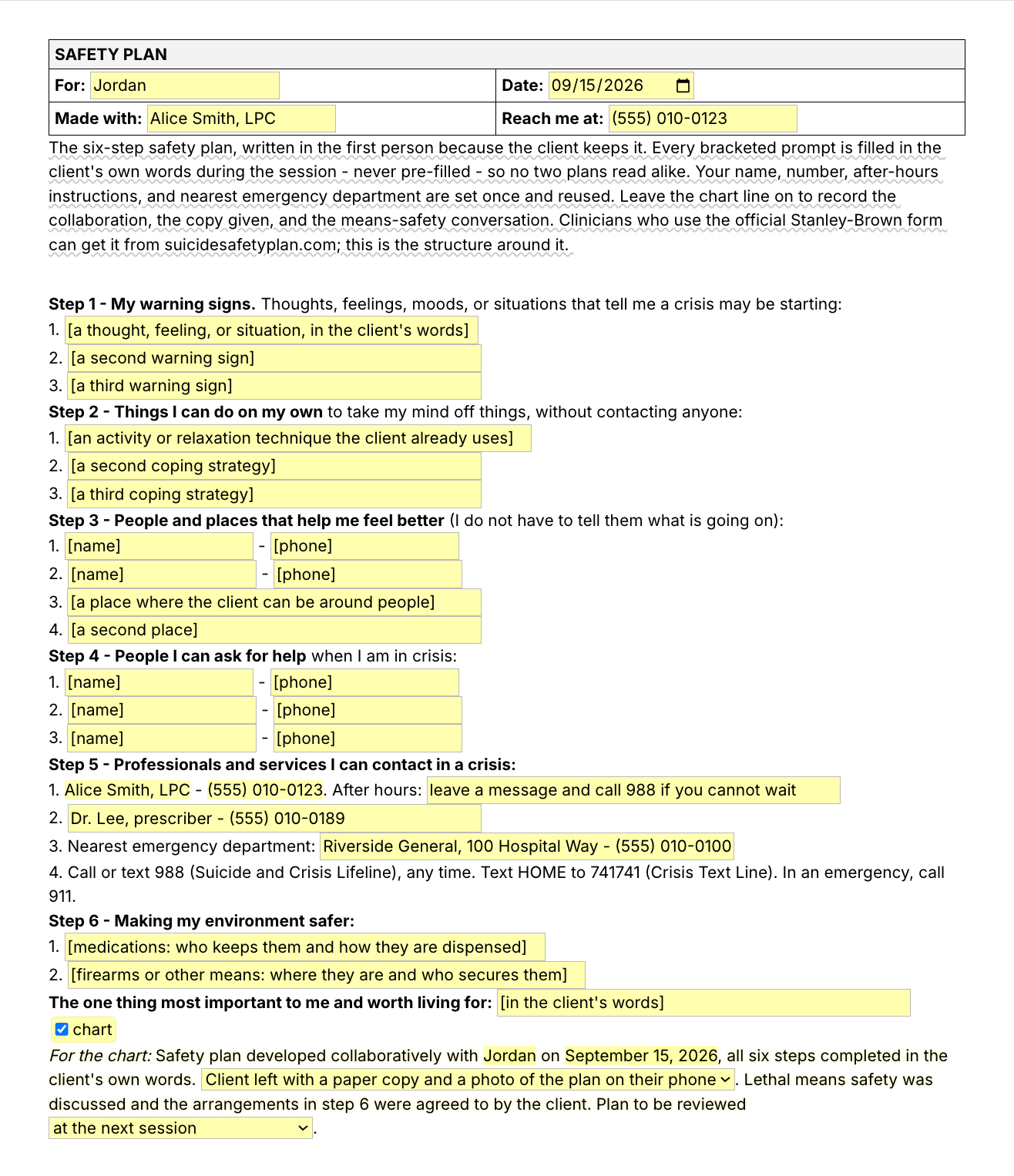
Typing /safetyplan opens the Text Blaze pop-up with the six steps as bracketed prompts. One coping strategy is typed into step 2 in a fictional client's words. Insert places the safety plan in the page

Type /safetyplan. Fill in the form fields. Insert.

  1. Add the packThe button opens the pack's page on the Text Blaze marketplace. Add the pack in one click (sign up for a free account if you do not have one) and the templates are yours, ready to edit and use anywhere.
  2. Type /safetyplan where you writeIn your EHR's note field, or in a document you will print for the client. A pop-up opens with the six steps and a text field under each.
  3. Fill in, insert, editType each step in the client's own words, in the session, with the client. Insert, and it lands as text you can still edit, print and save to the chart. The structure is typed for you, so your attention stays on the client.
  4. Then make one of your ownCreate a snippet of sentences or paragraphs you type often. Give it a keyboard shortcut. Type the shortcut anywhere and the text appears. That is a few seconds saved, every time.

What is Text Blaze?

Text Blaze is a free Chrome extension, with Windows and Mac apps, that turns the text you type again and again into templates you insert with a shortcut. Type /safetyplan and the six-step structure appears where your cursor is, in any app you type in.

This pack covers the parts an EHR template often does not: the risk line in every note, the safety plan you print, and the paragraph for a records request. Templates can hold text fields, drop-down menus, dates and toggles, so each document comes out complete and specific to this client and this date.

Works everywhere you type

SimplePractice, TherapyNotes, client portals, Google Docs, Gmail. No integration to set up.

Forms that prompt you

Text fields, menus, dates and toggles. Pick an option that reports ideation, and the plan, means and intent lines open. A short note on what belongs in each part shows while you write and is never inserted.

Your details, saved in each template

Each template holds its own saved details, and nothing carries over from one to another. Set your name and number in /safetyplan, /risk, /screenfu, /recordsummary and /crisisline, and your after-hours instruction and nearest emergency department in /safetyplan. After that, each one starts with them. In a group practice one person can set the structure and share the folder. Sharing limits are on the plans page.

Free forever

The six plain-text snippets, /nosi included, stay fully usable on Free, with no limit. On the free plan you can test the form-field templates (the six templates, /means and /outreach) to see how they work. Using them day to day needs Pro, $2.99 a month billed yearly. All 14 fit within the free plan's 20 snippets. The plans page has the details.

Works in SimplePracticeTherapyNotesTheraNestHeadwayAlmaGmailOutlook on the webGoogle Docs

Template insertion is done locally. PHI and other sensitive information never leaves your computer.

What is a suicide risk assessment?

A suicide risk assessment is a clinician's structured inquiry into a client's suicidal thoughts, plan, intent, access to means and history, weighed together with risk factors and protective factors, and ending in a clinical judgment of risk and a plan of action. The documentation records what you asked, what you found, what you concluded and why.

Who this page is for. Clinicians who already do this work and have to write it down: therapists, counselors, social workers, psychologists and prescribers. What follows is documentation structure, not clinical guidance. Nothing in this pack assesses risk, works out a risk level, or stands in for a validated instrument, your training or your clinical judgment.

If you are here because you or someone close to you is in crisis, call or text 988 (the US Suicide and Crisis Lifeline) at any time, or call 911.

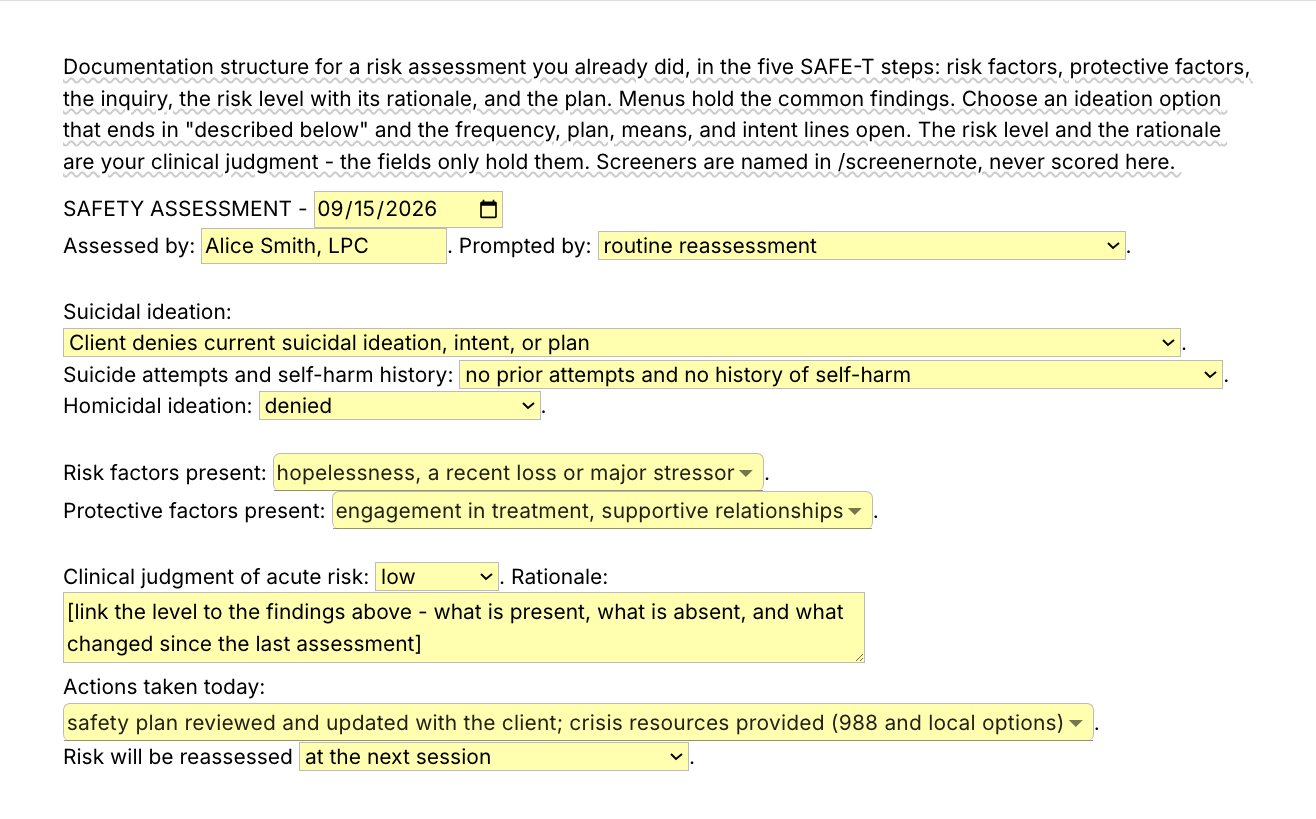
The /risk template covers the elements clinicians know from SAMHSA's SAFE-T, in this order: the suicide inquiry, risk factors and protective factors, the risk level with its rationale, then the actions taken and the reassessment.

The instruments stay with their owners. A validated suicide risk assessment tool such as the ASQ or the C-SSRS (Columbia Lighthouse Project, cssrs.columbia.edu) structures the screening, and the suicide risk assessment questions you ask come from it and from your own interview. This pack names screeners and records that you used them. It does not reproduce them. The safety plan follows the same six-step outline clinicians know from Stanley-Brown safety planning. It is not the official Stanley-Brown form, which is at suicidesafetyplan.com, and it is no substitute where your agency requires that form.

What makes a good safety plan and risk assessment template?

A good risk documentation template fixes the structure and leaves every finding to you. It prompts each part of the assessment so nothing you did goes unrecorded, keeps the client's words out of the template, and words a denial as something you asked about. Anything left unfinished stays visible in the text.

  • Risk factors and protective factors, both. Write down what raises risk and what holds it down. A later reader who needs to follow your decision then sees both sides of what you weighed.
  • The reasoning, in your words. Inside /risk the rationale is an empty field whose prompt asks you to tie the level to the findings: what is present, what is absent, and what changed since the last assessment.
  • The client's words, never filled in ahead of time. In /safetyplan every client field opens as an empty prompt in brackets and is typed in the client's own words during the session, so no two plans read alike.
  • Defaults you can see, and have to check. Several menus open already set to the snippet's shipped defaults, which is the state the pictures on this page show.
    • /risk opens on routine reassessment, denies ideation, no prior attempts or self-harm, and homicidal ideation denied. Two risk factors are selected (hopelessness, a recent loss or major stressor) and two protective factors are selected (engagement in treatment, supportive relationships). The level is set to low. Two actions taken today are selected (safety plan reviewed and updated with the client, crisis resources provided), and reassessment is set to the next session.
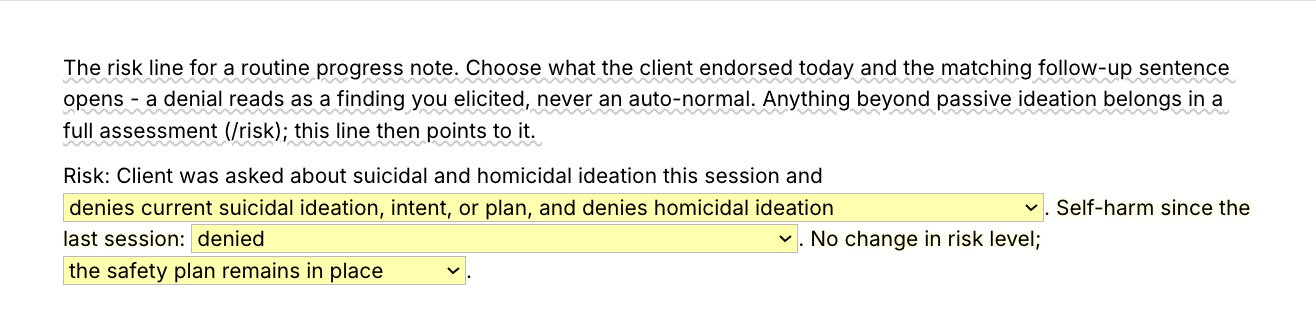
    • /sinote opens on the denial, self-harm denied, and "the safety plan remains in place". For a client who has no safety plan, switch that menu to its other option, "no safety plan is indicated at this time".
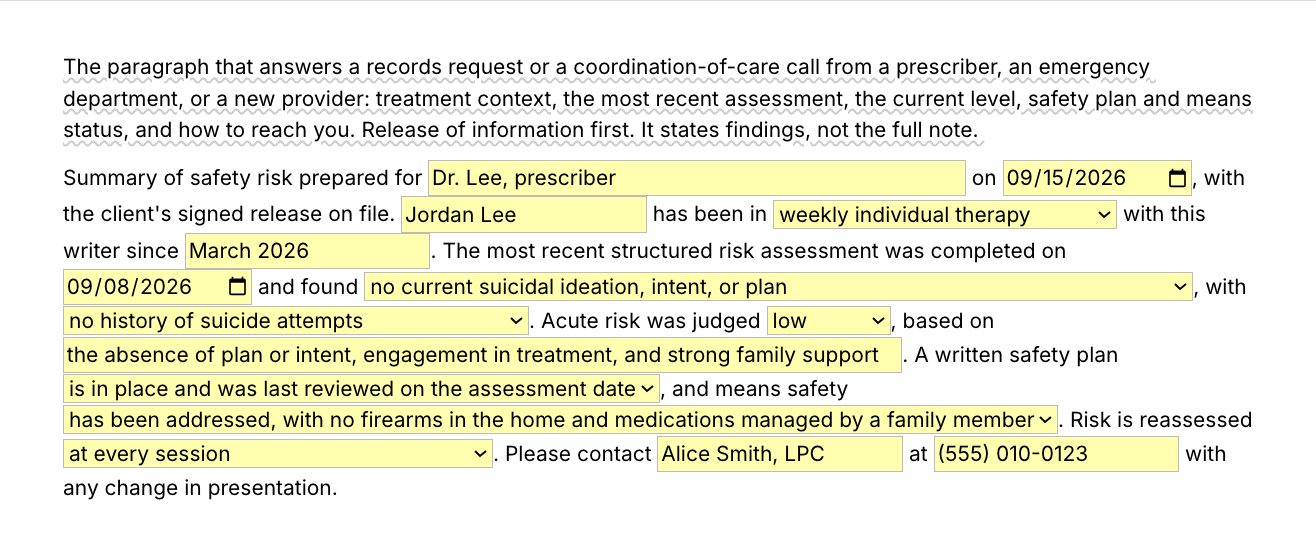
    • /recordsummary opens on no current ideation, no history of attempts, low, a safety plan in place, and two items that arrive already worded: the "based on" field, and a means-safety option stating there are no firearms in the home.
    Every one of these is yours to set to what you asked, heard and did. A default you did not check is a false record, and so is a pre-selected action you did not take. Read every line before you insert.
  • A denial worded as something you asked about. "Client was asked about suicidal and homicidal ideation this session and denies" says what happened in the room. A bare "No SI" does not.
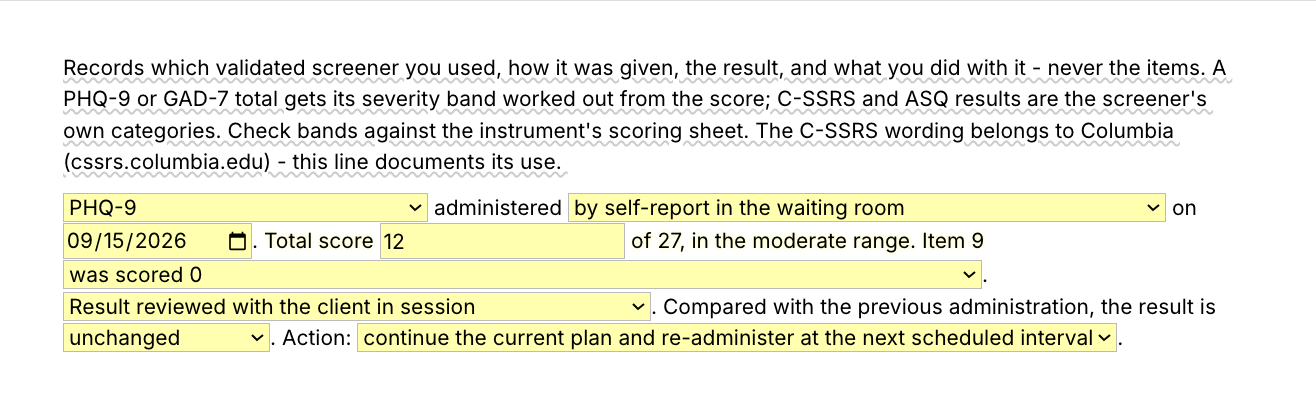
  • Screeners named, never reproduced. The screener note records which instrument you gave, how, the result and what you did with it. A PHQ-9 or GAD-7 total is placed in the instrument's published severity range, which you check against the scoring sheet. C-SSRS and ASQ results are recorded in the screener's own categories.
  • Editable output, with unfinished lines flagged. Everything lands as text in whatever field you are in, so you can change any word before you sign. No field is required. A prompt you leave unfilled lands in its brackets, which marks the line as unfinished. Look for brackets before you sign or print.
  • Where you type, not on paper. A suicide safety plan PDF gives you the steps on a page. A template you insert with a shortcut puts the same structure in your EHR or a document, and what you insert can be edited, printed for the client and saved to the chart.

If your EHR has a suicide risk assessment form or a safety plan that works for you, keep it. This pack is for the places it does not reach: a second system at a group practice, a document you print for the client, a records request, a portal message, and the risk line inside any progress note template, including your EHR's.

If your EHR's form has one field per section, use the shorter snippets field by field: /protective in the protective factors field, /means under means safety, /safetyreviewed where the plan review is recorded, and /nosi or /sinote in the progress note's risk line. Use /risk whole where you have one free-text field.

If you use an AI scribe, the two work together. The scribe drafts the session narrative. The risk line, the rationale and the safety plan are parts most clinicians word themselves, and the template gives those words the same place in every note.

How this template helps

The /safetyplan snippet is a suicide safety plan template as a Text Blaze pop-up: your name and number at the top, an empty text field under each of six steps for the client's words, and a chart paragraph recording that you built it together. /risk holds the assessment you did. Four more templates and eight shorter snippets cover the rest.

Inside the /safetyplan pop-up

  • Header: client, date, your name and your phone number, with your details saved in the template.
  • Steps 1 and 2: warning signs, and things the client can do on their own. Three lines each.
  • Steps 3 and 4: people and places that help the client feel better (two names with numbers, two places), and people they can ask for help in a crisis (three names with numbers).
  • Step 5: professionals and services. Your name and number fill in from the header, followed by your after-hours instruction, a second professional, the nearest emergency department, and a fixed line with 988, the Crisis Text Line and 911.
  • Step 6: making the environment safer, with one line for medications and one for firearms or other means. A last field holds the one thing the client names as most important to them.
  • For the chart (a toggle, on when the pop-up opens): a paragraph recording that the plan was developed together, the date, which copy the client left with, that means safety was discussed, and when the plan will be reviewed. Apart from two menus, its sentences are fixed text: edit "all six steps completed" when a step was left open, and the means-safety sentence when step 6 did not apply.

Every client field opens as an empty prompt in brackets, such as "[a second coping strategy]". When step 6 has nothing to secure, type that in the step, for example "No firearms in the home, confirmed with client", and change the chart sentence to say that means safety was discussed and no means of concern were identified. A guidance note shows while you write and is not inserted. On a video session, share your screen with the document open and fill the plan in together.

Where your agency requires the official Stanley-Brown form, use that. The chart paragraph and the shorter snippets below still apply.

Filled in for a fictional client, one step and the chart paragraph read:

Step 2 - Things I can do on my own to take my mind off things, without contacting anyone:
1. Walk the dog around the block with music on
2. Cold shower, then the 4-7-8 breathing from session
3. Work on the model plane in the garage

For the chart: Safety plan developed collaboratively with Jordan on September 15, 2026, all six steps completed in the client's own words. Client left with a paper copy and a photo of the plan on their phone. Lethal means safety was discussed and the arrangements in step 6 were agreed to by the client. Plan to be reviewed at every session until risk is low.

The step headings, your contact lines, the crisis-line block and the chart paragraph were already typed. The three coping strategies are Jordan's words, typed during the session with Jordan.

Inside the /risk pop-up

  • Header: date, your name, and a menu for what prompted the assessment (routine reassessment, intake, a positive screener result, a disclosure in session and others).
  • The inquiry: an ideation menu. Pick an option that reports ideation and the detail lines open: frequency and intensity, how long, worst ever, plan, access to means, intent and preparatory behavior. The attempts and self-harm menu opens a detail field when there is a history to describe. The homicidal ideation menu does the same when ideation is present.
  • Risk factors and protective factors: two menus you can pick several from.
  • Level and rationale: Clinical judgment of acute risk is a menu of low, moderate and high that you set. Nothing in the snippet scores it or changes it. The rationale is an empty paragraph field.
  • Actions and follow-up: a menu of actions taken today that you can pick several from, and a menu for when risk will be reassessed.

The pop-up opens on the shipped defaults listed above, the actions and the reassessment included. Set every menu before you insert.

Here is most of the inserted text for a fictional client who reports ideation, with the detail lines open:

SAFETY ASSESSMENT - September 15, 2026
Assessed by: Alice Smith, LPC. Prompted by: a positive screener result.

Suicidal ideation: Client reports active ideation without a plan or intent, described below.
Plan: no specific plan. Access to means: no access to the means considered. Intent: client denies any intent to act and names reasons for living. Preparatory behavior or rehearsal: none.
Suicide attempts and self-harm history: prior self-harm without suicidal intent, most recently more than a year ago.
Homicidal ideation: denied.

Risk factors present: hopelessness, a recent loss or major stressor, history of self-harm, alcohol or substance use, insomnia.
Protective factors present: engagement in treatment, supportive relationships, responsibility to children or pets.

Clinical judgment of acute risk: moderate. Rationale: Active ideation daily for about ten days, new since the separation, alongside poor sleep, increased drinking and a history of self-harm. No plan, no intent, no preparatory behavior, no prior attempts and no firearm in the home. Client took an active part in safety planning, named reasons for living and agreed to a phone check-in tomorrow. Outpatient care with closer follow-up is judged appropriate. A higher level of care was discussed in consultation and will be revisited if a plan or intent emerges.
Risk will be reassessed within 24 hours by phone.

Two lines are left out of the text above. The frequency and intensity line recorded daily thoughts of moderate intensity, present for about ten days, with the worst ever comparable to the current episode. The actions taken today line listed four actions: crisis resources provided (988 and local options), safety plan created with the client, session frequency increased, and consultation with a supervisor or colleague.

The labels, the menu wording and the factor names came from the template. The level and the rationale are a fictional clinician's wording for a fictional client. They show where your reasoning goes. They are not a model rationale.

The other four templates

Nothing carries over between templates: the client's name, the level and your own details are typed or set in each one.

  • /sinote, the risk line for a routine progress note. Pick what the client endorsed today and the matching follow-up sentence opens. On the denial, a last menu says whether a safety plan remains in place or none is indicated. Anything beyond passive ideation points to a full assessment instead of summarizing one.
  • /screenernote, the screener administration note: instrument (PHQ-9, GAD-7, C-SSRS Screener, ASQ), how it was given, the result, whether it was reviewed with the client, how it compares with last time, and the action taken.
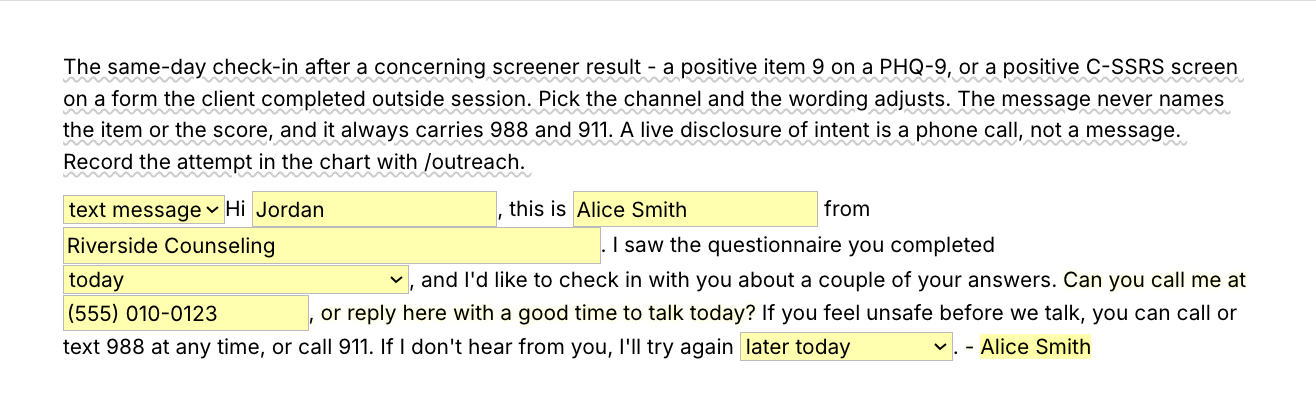
  • /screenfu, a same-day check-in message after a concerning screener result, worded for a text message, a voicemail or an email. It never names the item or the score, and it always carries 988 and 911. A live disclosure of intent is a phone call, not a message. Use only a channel the client has consented to, and choose the voicemail wording with whoever else may hear it in mind.
  • /recordsummary, a risk summary paragraph for a records request or a coordination-of-care call, written after the release is on file: treatment context, the most recent assessment, the level you judged, safety plan and means status, and how to reach you. The "signed release on file" clause is fixed text. Edit or delete it when you are disclosing on another basis, such as an emergency call from an emergency department. Replace the pre-worded "based on" and means-safety wording with this client's facts.

Shorter snippets for sentences you type often

  • /nosi, the No SI line. It inserts exactly this: "Client was asked about suicidal and homicidal ideation this session and denies current suicidal ideation, intent, or plan, and denies homicidal ideation. No self-harm reported since the last session. No change in risk level, and no additional safety measures are indicated at this time." It is the right line only when you asked and that was the answer, with no self-harm reported. For anything else, use /sinote or /risk.
  • /reassessed, the follow-up risk line for the session after an assessment.
  • /protective, a protective factors sentence. It ships with example factors. Replace them with this client's.
  • /rationale, a separate, optional starter paragraph for a low-risk judgment. It ships with wording already in it, so rewrite it to this client's findings or do not use it. It is not connected to the empty rationale field inside /risk.
  • /means, the means safety line, with two menus for what was arranged.
  • /safetyreviewed, the line recording that the safety plan was reviewed in session.
  • /outreach, the chart line for an outreach attempt after a positive screener.
  • /crisisline, crisis resources for a message to a client: 988, the Crisis Text Line, 911 and your own number.

The plain-text lines describe a typical session. Edit them whenever this session was not typical. A line that does not match what happened is worse than no line. The same structure each time, with this client's findings in every field, is what lets a supervisor, a covering clinician or a later reader follow what you did.

“The value of Text Blaze is much larger than the time saved because it maintains my focus on the actual work I'm doing, as opposed to every single character in every single document and email.”

Adam BrooksCo-Founder and Director of Operations, Good Therapy San DiegoRead the story

Add the pack to a free Text Blaze account and type /nosi in your next routine note when it applies. It is free every day. /safetyplan and /risk are form-field templates: test them on Free, and use them day to day on Pro.

Copy the template for free

Free forever. Works in any EHR or app. No integration required.

Questions clinicians ask

Do I need Text Blaze to use this template?

Yes. The templates are Text Blaze snippets, and the free plan is enough to add all 14 and to use the six plain-text snippets without limit. Text Blaze is a free Chrome extension, with Windows and Mac apps as well.

Does it work in my EHR?

Yes. Text Blaze works in your EHR, your email and any other app: SimplePractice, TherapyNotes, TheraNest, Headway and Alma among others, plus Gmail, Outlook, client portals and Google Docs. There is nothing to integrate. You type the shortcut in the note field where you would have typed the text.

How do I document a suicide risk assessment defensibly?

Document the assessment you actually did: what you asked, what the client said, the risk factors and the protective factors you weighed, your judgment of acute risk with the reasoning behind it, what you did that day, and when you will reassess. Write it the same day, in your own words. No template makes a note defensible. It only makes it less likely that a step you did goes unrecorded. For what your license and setting require, ask your board, your supervisor or your malpractice carrier's risk-management line.

My EHR already has templates. Why this pack?

Keep your EHR's risk assessment and safety plan templates if they work for you. This pack goes where an EHR template cannot follow: a printed plan for the client, a records request, a portal message, or the second system a group practice makes you chart in. The shorter snippets also work inside any template, including your EHR's.

Will my notes look cloned?

Not if you fill in the fields and check the rest. The fixed text is the structure: headings, labels and your contact details. The safety plan steps are typed in the client's words, and the rationale field inside /risk is empty. Menus that open on a default, and plain-text lines such as /nosi, have to match what happened. The full list of defaults is in the section above.

How do I send the document to my client?

Most clinicians hand over the safety plan in the session: insert it into a document, print it, and have the client photograph it. On a video session, share your screen with the document open, fill the plan in together, and send it as a secure message in your client portal. Either way it lands as text you can edit first, and the chart paragraph records which copy the client left with.

Is my client's information stored anywhere?

Text Blaze snippets hold your template and your defaults, not your client records. Template insertion is done locally: what you type into the pop-up's fields goes into the page you are on and is not saved, synced or logged by Text Blaze after you insert.

BAA is available upon request. Read our HIPAA guide.

Is the pack free?

Yes, the pack is free, and its 14 snippets fit the free plan's 20. The six plain-text snippets, /nosi included, stay fully usable on Free with no limit. On the free plan you can test the form-field templates (/safetyplan, /risk and the other four, plus /means and /outreach) to see how they work. Using them day to day needs Pro, $2.99 a month billed yearly. Try the form-field templates on your own, before using one with a client, so you know how they behave on your plan. The plans page has the details.

Can I change the template?

Yes. Everything is editable: the labels, the menu options and which option a menu opens on, the factor lists, the date format and the wording. If you would rather a menu open on a blank "choose" option, add that option and make it the default. Add what your agency or supervisor requires, remove what you never use, and replace the fictional contact details with your own. Change it once and it stays changed.

Can I use it on Windows or Mac?

Yes. Text Blaze runs as a Chrome extension and as Windows and Mac apps, so the shortcuts work in browser-based EHRs and in desktop apps alike, with the same snippets on every computer you sign in on. There is no iPad or phone app, so a plan written on a tablet stays hand-typed.

Minutes on the documentation. Your attention on the client.

Add the free pack, set your details in the templates that carry them, and the structure is a shortcut away. Start with /nosi in a routine note, when it applies.

Copy the template for free

Free forever. Works in any EHR or app. No integration required.