
Skilled Nursing Visit Note Templates for Home Health

Eliminate repetitive typing and mistakes. Insert a skilled nursing visit note in any text box in seconds.

Free forever. Works in any web-based EHR or app. No integration required.

4.9 · 1,900+ Chrome Web Store reviews · 800,000+ people use Text Blaze

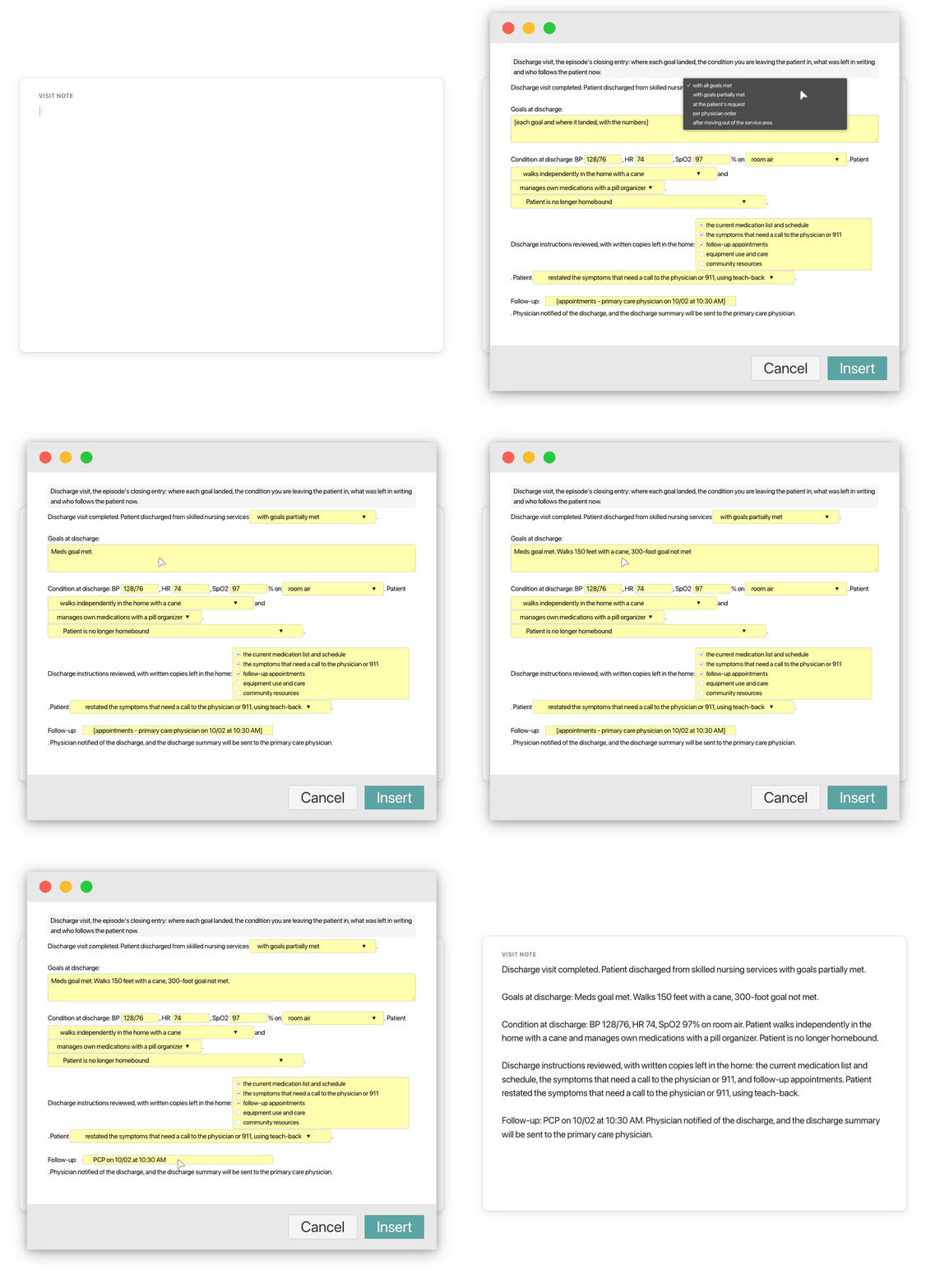
Typing /dc in a visit note opens the Text Blaze pop-up with the whole discharge note, the discharge reason changes to with goals partially met, the goals and the follow-up appointment are typed, and Insert places the finished discharge note in the visit note

Type /dc. Pick the outcome. Insert.

  1. Add the packThe button opens the pack's page on the Text Blaze marketplace. Add the pack in one click (sign up for a free account if you do not have one) and the templates are yours, ready to edit and use anywhere.
  2. Type /dc where you chartWith Text Blaze installed (the Chrome extension, or the Windows or Mac app), type /dc in your EHR's visit note field, or in a Google Doc you draft in. The animation shows the discharge visit note. A pop-up opens with how the episode ended, the goals, condition at discharge, the instructions left in the home and the follow-up. /svn and the other templates work the same way.
  3. Fill in, insert, editPick how the episode ended (all goals met, goals partly met, at the patient's request), type the goals and the follow-up appointments, insert. The sentence frames stay the same and the details are this patient's. It lands as text you can still edit.
  4. Then make one of your ownCreate a snippet of sentences or paragraphs you type often. Give it a keyboard shortcut. Type the shortcut anywhere and the text appears. Congratulations! You just saved yourself a few seconds.

What is Text Blaze?

Text Blaze is a free Chrome extension, with Windows and Mac apps, that turns the text you type again and again into templates you insert with a shortcut. Type /svn and a whole skilled nursing visit note appears where your cursor is, in any app you type in on a computer.

Home health nurses describe hours of charting each night after a day of skilled visits. Much of it is the same structure and the same teaching paragraphs, typed again for each patient. If you keep example notes in a Word or Google Doc and paste from it, this is that document, one shortcut away inside the chart. Templates can hold text fields, drop-down menus, dates and toggles, so each note comes out complete and specific to this patient and this visit.

Works where you chart on a computer

The web versions of WellSky, Axxess and Alora, Google Docs, Gmail and Outlook. No integration to set up. On an agency laptop, IT may need to approve the extension first. Phone and tablet charting apps are the exception.

Today's findings, next to the last visit's

The follow-up and recheck notes put the last visit's numbers beside today's and calculate the change. Your assessment and plan are always typed fresh for this patient.

Your agency's wording, saved once

Change the menus once to the services, interventions and teaching topics your agency uses and every note starts from them. One person can set the templates and share the folder with the team. Sharing limits are on the plans page.

Free forever

/painteach and any snippet you save yourself without form fields are free forever. The nine snippets with form fields can be tested on the free plan and need Pro, $2.99 a month billed yearly, for day-to-day use. "Is the pack free?" below has the details.

Works in WellSky (web)Axxess (web)Alora (web)GmailOutlook on the webGoogle Docs

Template insertion is done locally. PHI and other sensitive information never leaves your computer.

What is a skilled nursing visit note?

A skilled nursing visit note is the record a home health nurse writes for every visit: the skilled service given under the plan of care, the patient's status and vital signs, the findings, what the nurse did and taught, how the patient responded, homebound status and skilled need, and the plan for the next visit.

What a skilled nursing note usually covers, in the order most agencies chart it:

  • The skilled service: observation and assessment, medication management and teaching, wound care or another service, as ordered on the plan of care.
  • Status since the last visit: falls, ER visits or hospital stays, medication changes, new or worse symptoms.
  • Vital signs and findings: measured today and, where it matters, compared with the last visit.
  • Skilled interventions and teaching: what you did, what you taught and who you taught.
  • The patient's response: what the patient or caregiver did, said or demonstrated.
  • Physician or practitioner notification: when a finding is outside the ordered parameters, who was called and what was ordered.
  • Homebound status and skilled need: why the patient still qualifies and why the visit needed a nurse.
  • Plan for the next visit: the next clinical focus and when you will be back.

The note changes shape with the visit. A routine visit covers the whole list above. A start of care (admission) visit says where the orders came from and what teaching started. A follow-up compares each finding with the last visit. A focused recheck is short and centered on one reading. A discharge visit says where each goal landed. The pack has a template for each of these five visit types. The recertification (60-day) summary is in the OASIS-E Cheat Sheet & Phrase Pack (/recert).

What makes good skilled nursing documentation?

Good skilled nursing documentation shows a service only a nurse could give, to this patient, at this visit: findings you measured and compared with the last visit, the interventions you performed, the patient's response in what they did or said, and a plan that follows from the findings. A reader should see why the visit was needed.

  • A specific response. "Patient restated three symptoms that need a call to the agency, using teach-back" shows teaching worked. "Tolerated well" on its own does not show a skilled service.
  • Change since the last visit. Weight 181 lb, down 3 lb from the last visit, says more than weight 181 lb. A run of follow-up notes should read as progress toward goals, not as copies of one note.
  • Readings checked against the ordered parameters. When a reading is outside the parameters on the plan of care, the note shows the recheck, the call to the physician and the order received and read back.
  • Teaching with teach-back. The topic, the learner (patient, caregiver or both) and how they showed they understood.
  • Homebound status and skilled need, restated. Why the patient still needs a nurse, tied to this visit's findings.
  • A plan that follows from today. The next clinical focus comes from what you found, such as rechecking lung sounds and edema after a diuretic change.

The fixed part and the fresh part

The structure of a visit note and most teaching paragraphs barely change from patient to patient, which is why so many nurses keep example notes in a document and paste them. The findings, the response and the plan change at every visit. The pack splits the two: the structure and the teaching wording are typed for you, and the fields are left for what you saw. /painteach is the simplest example: the whole non-drug pain management teaching entry, no fields at all. To move your own paragraphs over, paste each one into a new snippet and give it a shortcut.

Check the wording against your agency's policies and the orders on each patient's plan of care, and change it once where they differ.

How this template helps

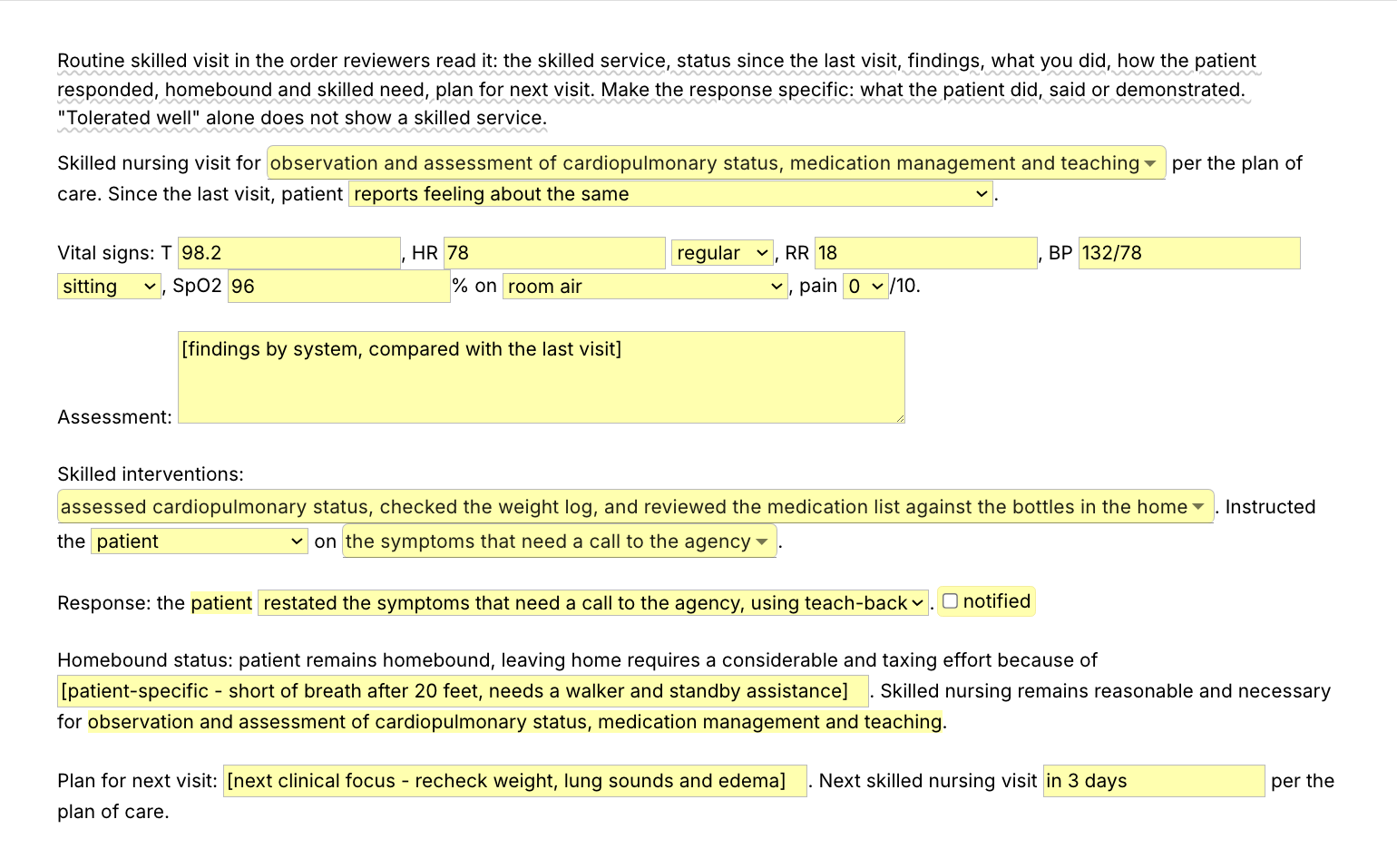
The /svn snippet is a routine skilled nursing visit note as a Text Blaze pop-up: the skilled service, status since the last visit, vital signs, findings, interventions, teaching and the patient's response, homebound status, skilled need and the plan, in the usual order of a visit note. You pick from menus and type what you assessed. Four more templates and five teaching and notification entries cover the rest.

Inside the pop-up

The first screenshot at the top of the page is the whole form. Menus hold the choices you make at most visits. You choose the skilled services, the interventions and the teaching topics (several of each), and the patient's status since the last visit. Smaller menus hold the heart rhythm, position, room air or oxygen and the pain score, who you taught and how they responded. Text fields hold the vital signs, your findings by system, the homebound evidence and the plan. The services you pick are reused in the skilled-need sentence, so you choose them once. A toggle adds the physician notification sentence when you called. The guidance note at the top shows while you write and is never inserted.

Here is a sample skilled nursing visit note from /svn, filled in for a fictional patient (the middle of the note):

Assessment: Crackles in both lung bases, 2+ pitting edema at both ankles, weight 186 lb (183 lb at the last visit). Alert and oriented, skin warm and dry, abdomen soft, last BM yesterday.

Skilled interventions: assessed cardiopulmonary status, checked the weight log, and reviewed the medication list against the bottles in the home. Instructed the patient and caregiver on the symptoms that need a call to the agency and the low-sodium diet.

Response: the patient and caregiver restated the symptoms that need a call to the agency, using teach-back.

Physician notified by phone of the 3 lb weight gain, crackles in both lung bases and ankle edema. New order received for furosemide 40 mg twice daily for 3 days, then back to daily, read back and verified. Patient and caregiver informed of the plan.

For this patient, the status, rhythm, pain and learner menus were changed and the notification toggle switched on. The vital signs, findings, the finding reported and the new order, the homebound evidence and the plan were typed in.

The other four templates

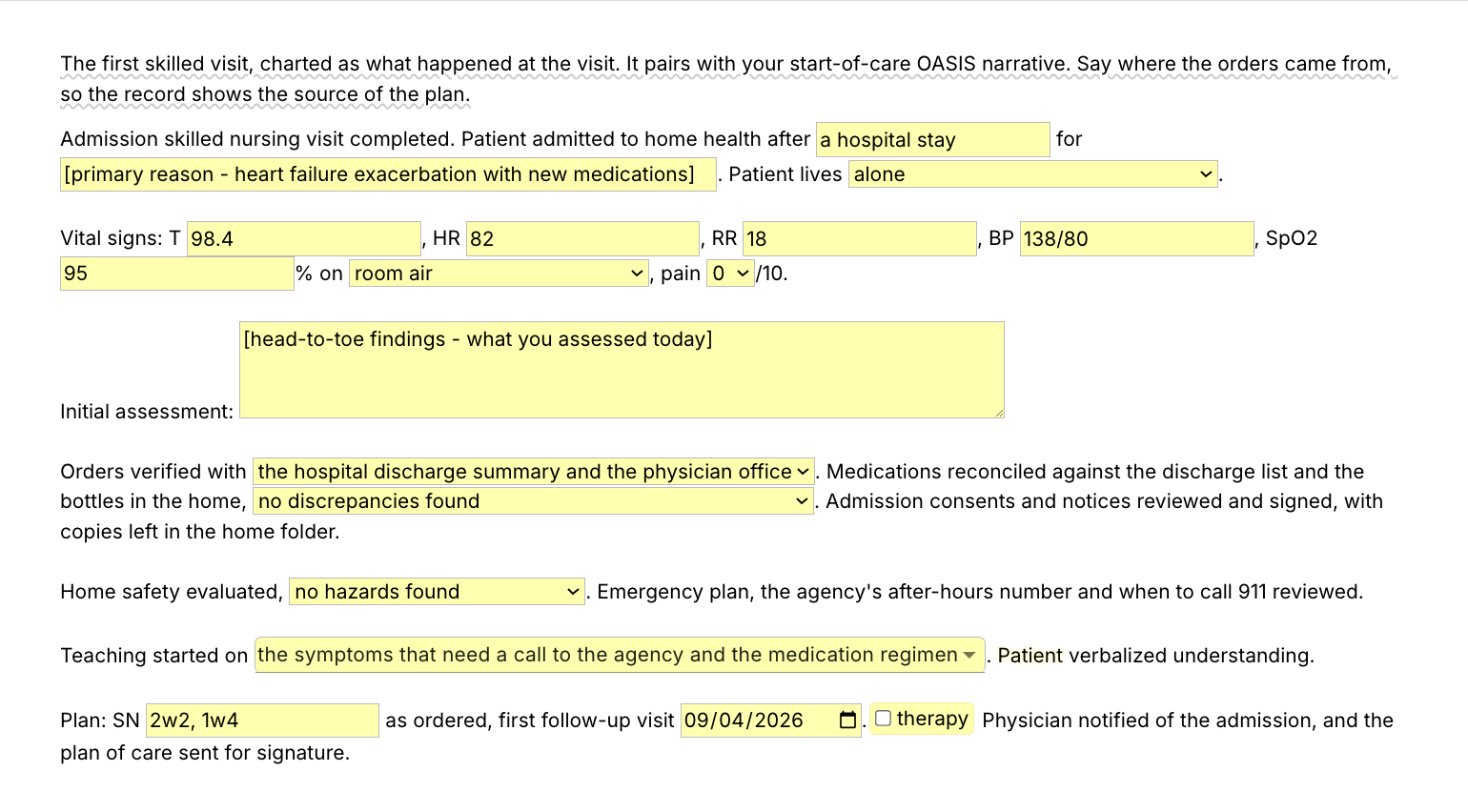
  • /admit, the start of care (admission) visit note. It covers the event and reason that led to home health, who the patient lives with and whether the caregiver can help, and the vital signs and initial assessment. Then where the orders were verified, medication reconciliation, home safety and the teaching started. It ends with the frequency, the first follow-up date and a toggle for therapy referrals. It pairs with your start of care OASIS narrative.
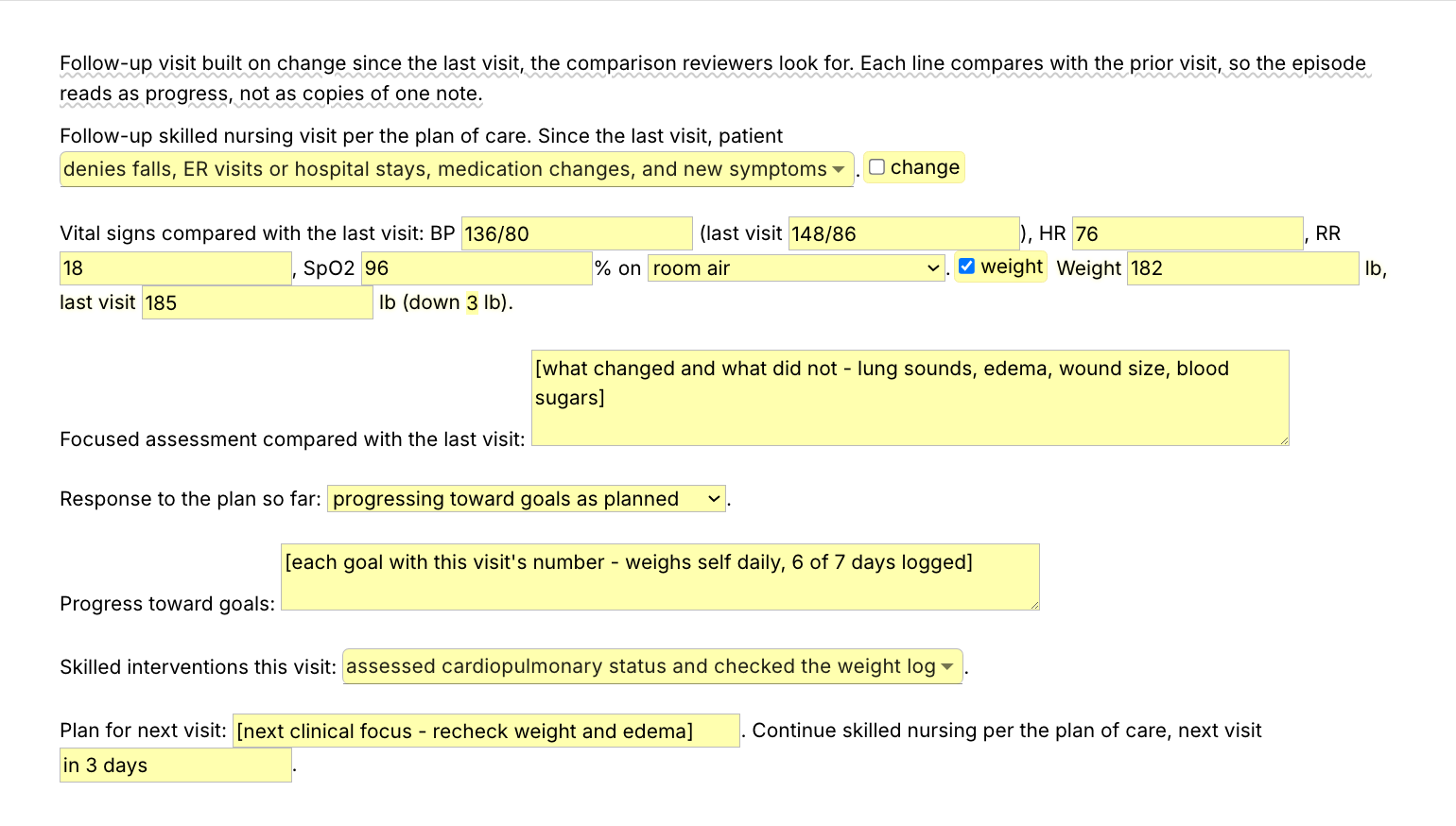
  • /fu, the follow-up visit: what the patient denies since the last visit (choose several), a toggle for a change, blood pressure beside the last visit's reading, a weight toggle that calculates the change in pounds, the focused assessment, response to the plan, progress toward goals and the next focus.
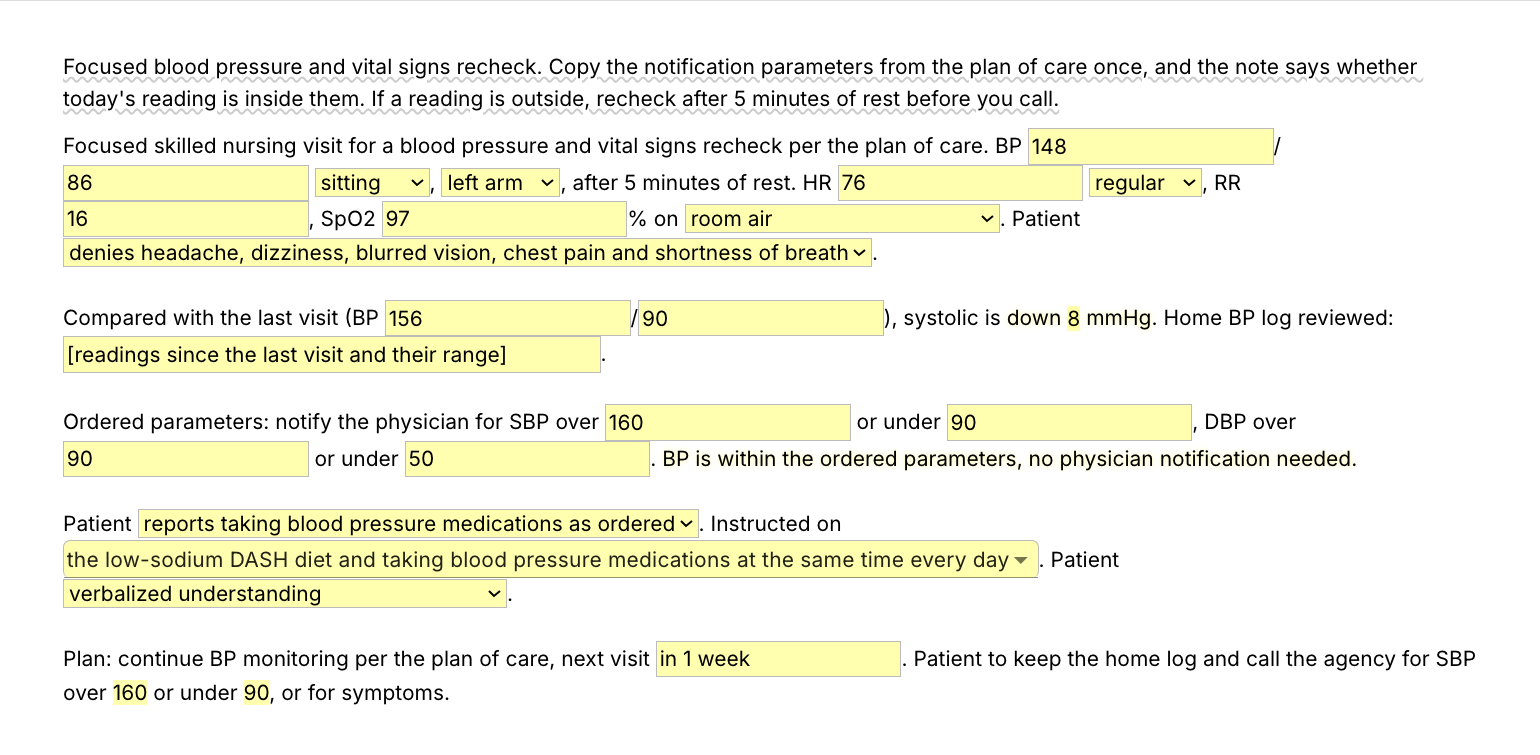
  • /vitals, the focused blood pressure and vital signs recheck: the reading with position and arm, the change since the last visit, the home log, the four notification parameters copied once from the plan of care, and a sentence that says whether today's reading is within them. A reading outside the parameters adds the recheck and the physician call.
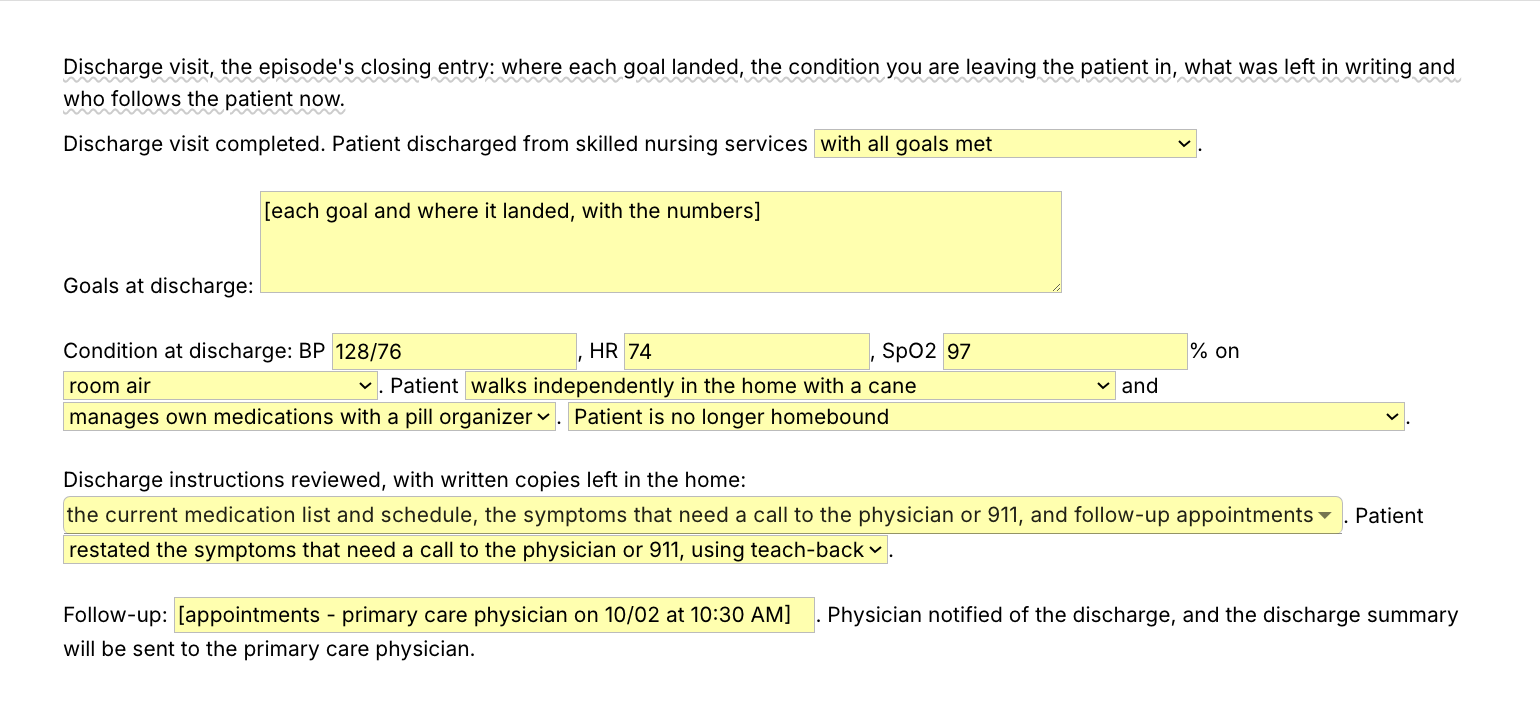
  • /dc, the discharge visit: the reason for discharge, where each goal landed, condition and function at discharge, homebound status, the written instructions left in the home, teach-back and the follow-up appointments. It pairs with your discharge OASIS.

/svn and /dc carry the homebound and skilled-need sentences. /admit, /fu and /vitals leave them out. If your agency wants both in every note, add them to those three once, or insert the homebound line from the OASIS-E pack after the note.

Teaching and notification entries for the paragraphs you type most

  • /painteach, non-drug pain management teaching: positioning and pillows, heat or cold with a barrier, slow breathing, pacing with rest, pain medication before activity as ordered, when to report pain, and a teach-back line. It has no fields, so it works on the free plan without limit. A good first one to change into your own words.
  • /fallteach, fall prevention teaching, with a menu for the walker, cane or wheelchair.
  • /medteach, medication teaching, with one field for the medications you taught.
  • /dashteach, low-sodium DASH diet teaching, with a menu for the ordered sodium limit.
  • /mdnotify, the physician notification line, with one field for the finding and one for the response or new order.

The same structure at every visit, this patient's findings in every section: consistent notes with specific findings are what a QA nurse or a reviewer reads fastest.

It makes it more efficient to write my medical notes. I am thrilled to have found it!

Anna Woolley

Add the pack to a free Text Blaze account and type /svn at your next routine visit. For a teaching entry alone, type /painteach and the whole paragraph is in the note.

Copy the template for free

Free forever. Works in any web-based EHR or app. No integration required.

Questions home health nurses ask

Do I need Text Blaze to use this template?

Yes. The templates are Text Blaze snippets. The free plan is enough to add all 10, to use the pain management teaching entry and any snippet you make that has no form fields as often as you like, and to test the templates with form fields. Text Blaze is a free Chrome extension, with Windows and Mac apps as well.

Does it work in my EHR?

Yes. Text Blaze works in your EHR, your email and any other app you use on a computer: the web versions of WellSky, Axxess and Alora among others, Gmail, Outlook and Google Docs. If your EHR opens in Chrome or Microsoft Edge, or runs as a Windows or Mac program, Text Blaze works there. There is nothing to integrate: you type the shortcut in the visit's narrative or comment box, where you would have typed the note. The checkboxes in your EHR's visit form stay as they are. It does not run inside phone or tablet charting apps, so a visit charted on a tablet stays hand-typed there. That includes the Homecare Homebase field app, which runs on Android phones and tablets.

To check yours, add the pack and type /painteach in a note field on your computer. If the paragraph appears, the rest will too. On an agency computer, IT may need to approve the Chrome extension or the Windows app before you can install it.

My EHR already has templates. Why this pack?

Keep them if they work for you. The pack is for the writing those templates leave to you: the narrative, the teaching paragraphs, the physician call, the document of example notes you copy from. It works the same in a second system or a Google Doc, and it comes with you if your agency changes EHRs.

Will my notes look cloned?

Not if the findings are this visit's. The structure repeats because every visit has the same parts, and the teaching wording repeats because the teaching does. A note reads as cloned when the findings and the plan are carried forward unchanged. Every template leaves the findings, the response and the plan for you to type, and /fu and /vitals compare today's numbers with the last visit's. Read what you inserted before you sign and change anything that differed.

Is my patient's information stored anywhere?

Text Blaze snippets hold your template and your defaults, not your patient records. Template insertion is done locally: what you type into the pop-up's fields goes into the page you are on and is not saved, synced or logged by Text Blaze after you insert.

BAA is available upon request. Read our HIPAA guide.

Is the pack free?

The pack is free to add, and all 10 snippets can be added on the free plan. /painteach, the pain management teaching entry, is free to use forever, and so is any snippet you save yourself without form fields. On the free plan you can test the nine snippets with form fields (the five templates, /fallteach, /medteach, /dashteach and /mdnotify) to see how they work. Using them day to day needs Pro, $2.99 a month billed yearly ($3.49 billed monthly). The plans page lists what each plan includes.

Can I change the template?

Yes. Everything is editable: the menu options, the defaults, the sentence frames and the order. Add the interventions and teaching topics your agency uses to the /svn menus, set the /vitals parameters to the ones your physicians usually order, change "physician" to "practitioner" where your plans of care are signed by nurse practitioners, or save a copy of /svn for wound care or diabetic visits. Change it once and it stays changed.

Does the template guarantee reimbursement?

No. Coverage depends on the patient meeting the criteria and on the record showing it. The pack gives you the structure in the usual order and leaves room for the findings. It cannot supply the findings, and the wording should be checked against your agency's policies.

Can I use it on Windows or Mac?

Yes. Text Blaze runs as a Chrome extension (it installs in Microsoft Edge too) and as Windows and Mac apps, so the shortcuts work in web-based EHRs and in desktop apps alike, with the same snippets on every computer you sign in on. There is no iPad or phone app, so a note written in a phone or tablet charting app stays hand-typed.

Your visit notes done before dinner, not at midnight.

Add the free visit note pack and set the menus to your agency's wording once. Each visit note takes minutes, and /painteach puts the whole pain management teaching entry into any note with one shortcut.

Copy the template for free

Free forever. Works in any web-based EHR or app. No integration required.