

Speech-Language Evaluation Report Templates

Eliminate repetitive typing and mistakes. Insert a speech-language evaluation report or a re-evaluation in any text box in seconds.

Free forever. Works in any IEP system or app. No integration required.

4.9 · 1,900+ Chrome Web Store reviews · 800,000+ people use Text Blaze

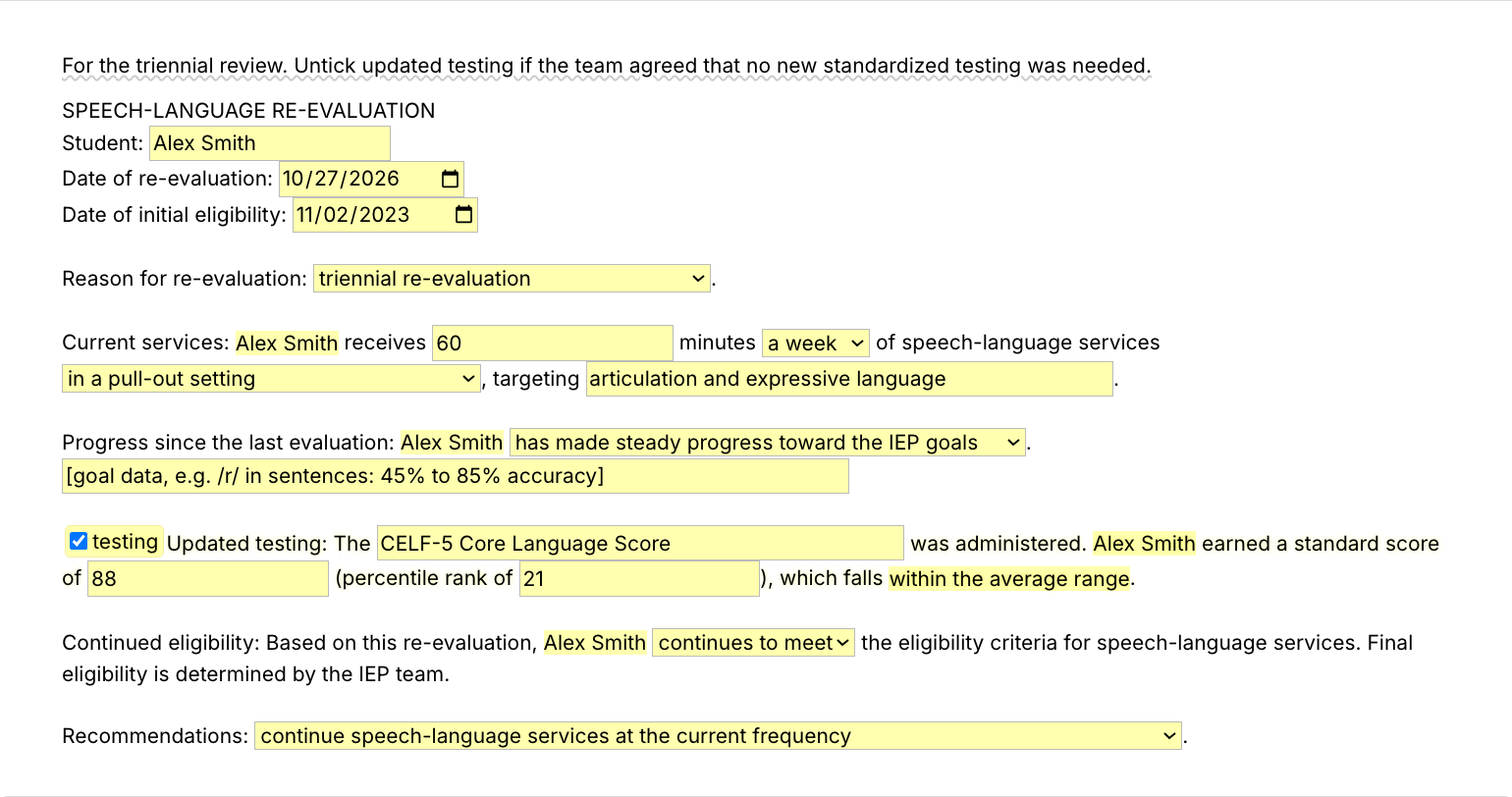
Typing /reeval opens the Text Blaze pop-up already filled in for a fictional student's triennial re-evaluation, the recommendations menu changes to continue services at a reduced frequency, and Insert places the finished re-evaluation report in the document

Type /reeval. Fill in the form fields. Insert.

  1. Add the packThe button opens the pack's page on the Text Blaze marketplace. Add the pack in one click (sign up for a free account if you do not have one) and the templates are yours, ready to edit and use anywhere.
  2. Type /reeval where you write reportsIn Word, in a Google Doc, in your IEP system. A pop-up opens with the student header and a field or menu for each part of the re-evaluation.
  3. Fill in, insert, editPick the reason, type the services and the progress data, enter the new scores, choose the recommendation, insert. The report lands as text you can still edit.
  4. Then make one of your ownCreate a snippet of sentences or paragraphs you type often. Give it a keyboard shortcut. Type the shortcut anywhere and the text appears. Congratulations! You just saved yourself a few seconds.

What is Text Blaze?

Text Blaze is a free Chrome extension, with Windows and Mac apps, that turns the text you type again and again into templates you insert with a shortcut. Type /slpreport and the whole evaluation report appears where your cursor is, in any program you type in.

Templates can hold text fields, drop-down menus, dates and checkboxes, and values that compute from other fields, so the student's age and the range for each standard score fill themselves in.

Works everywhere you type

Web IEP systems and Google Docs through the Chrome extension. Word and other installed programs through the desktop app.

Fill-in fields, not blanks

Type the student's name, the tests and the scores. The template works out the age and whether each score is in the average range.

Your wording, saved once

Change any paragraph once and every report starts there. Share the folder so every SLP on the team writes reports the same way.

Free forever

The whole pack fits the free plan, and /avg works without limit. On Free you can test the snippets with form fields. Using them day to day needs Pro, $2.99 a month billed yearly.

Works in Microsoft WordGoogle DocsGoogle SheetsSLP ToolkitGmailOutlook

Template insertion is done locally. PHI and other sensitive information never leaves your computer.

What goes in a speech-language evaluation report?

A speech-language evaluation report says why the student was referred, what you did, what you found and what you recommend. It covers the background, the tests and other procedures, the results for each area with standard scores and percentile ranks, clinical impressions, eligibility and recommendations. Most readers go straight to the summary and recommendations.

The structure is the same after every speech and language evaluation, and so are many of the paragraphs: how each test works, what a score in the average range means, how the recommendations open. What changes is the student's history, scores and needs.

What makes a good speech-language evaluation report template?

A good evaluation report template is a Swiss cheese template: the paragraphs are written and the holes are form fields. You fill in the student's name, the dates, the test names and the scores, and the sentences around them are already there.

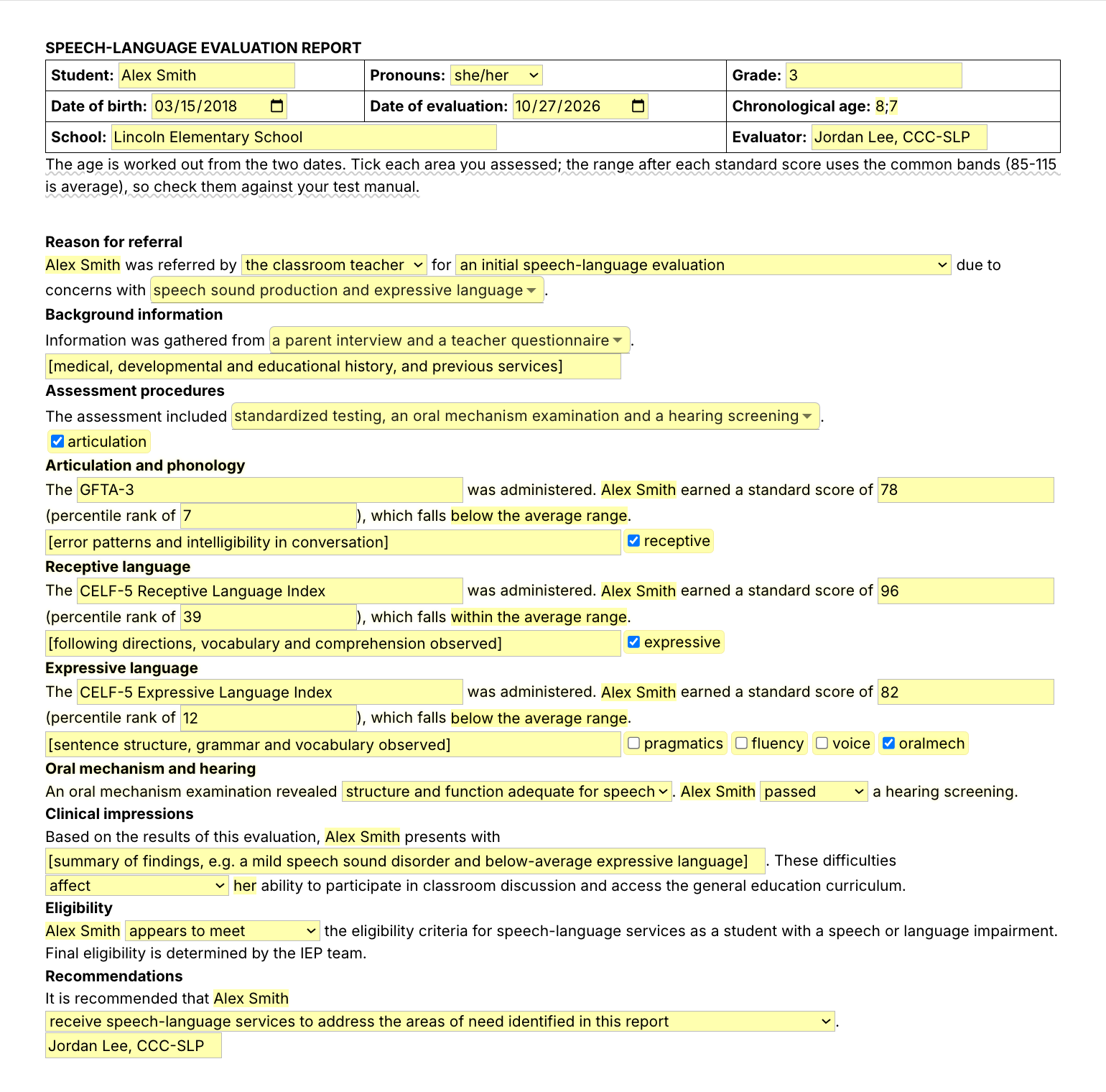
  • Pronouns picked once. Choose the student's pronouns at the top and every sentence uses them, so you do not keep a boy version and a girl version.
  • Math done for you, checked by you. The age is worked out from the two dates, and each standard score gets its range from the common bands (85 to 115 is average). Check both against your test manual.
  • Sections you switch on. Tick the areas you assessed and only those sections go in the report.
  • Test descriptions, not test items. The pack describes tests like the CELF-5 and the GFTA-3 in your words. It holds no test items, norms or scoring rules.

How this template helps

The /slpreport snippet is that template as a Text Blaze pop-up: a header with the age computed, menus for the referral and background, a section for each area you tick with the score range computed, then clinical impressions, eligibility and recommendations.

Besides /slpreport, the pack has the other reports and the paragraphs you type in every one:

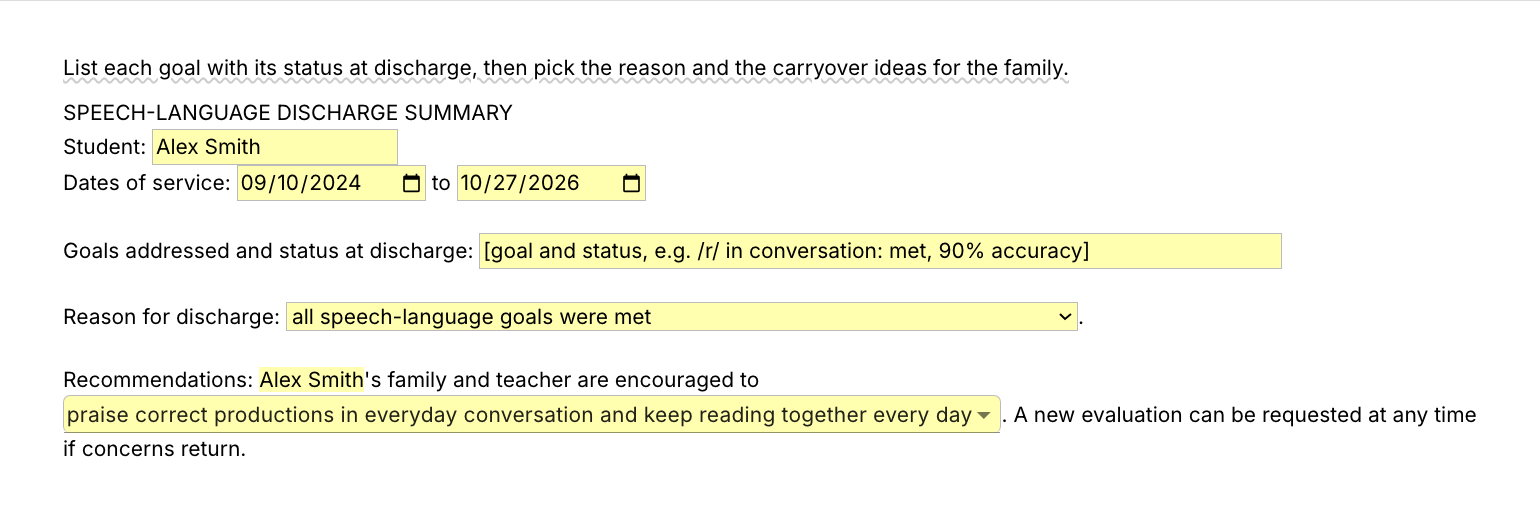
  • /reeval and /slpdc: the re-evaluation report and the dismissal or discharge summary.
  • /tdlang and /tdart: test description paragraphs for a language test and an articulation test.
  • /avg and /below: the average range and below average sentences.
  • /bghist, /lsamp and /recs: the background, the language sample lead-in and the recommendations opener.

Here is a speech-language evaluation report example, filled in with /slpreport for a fictional student:

SPEECH-LANGUAGE EVALUATION REPORT
Student: Ava Lopez · Pronouns: she/her · Grade: 2
Date of birth: 2018-09-04 · Date of evaluation: 2026-10-20 · Chronological age: 8 years, 1 month
School: Riverside Elementary School · Evaluator: Jordan Lee, CCC-SLP

Reason for referral
Ava Lopez was referred by the classroom teacher for an initial speech-language evaluation due to concerns with speech sound production and expressive language.
Background information
Information was gathered from a parent interview, a teacher questionnaire and a review of school records. Ava lives with her parents and younger brother, and English is the only language spoken at home. Hearing and vision are reported as normal, and she has not received speech services before.
Assessment procedures
The assessment included standardized testing, an oral mechanism examination, a hearing screening and a language sample.

Articulation and phonology
The GFTA-3 was administered. Ava Lopez earned a standard score of 74 (percentile rank of 4), which falls below the average range. Ava substituted /w/ for /r/ and /f/ for /θ/. She was about 80% intelligible to an unfamiliar listener in conversation.
Receptive language
The CELF-5 Receptive Language Index was administered. Ava Lopez earned a standard score of 98 (percentile rank of 45), which falls within the average range. She followed multi-step directions and answered questions about a short story.
Expressive language
The CELF-5 Expressive Language Index was administered. Ava Lopez earned a standard score of 83 (percentile rank of 13), which falls below the average range. She omitted past tense -ed and plural -s in about half of her sentences.
Oral mechanism and hearing
An oral mechanism examination revealed structure and function adequate for speech. Ava Lopez passed a hearing screening.
Clinical impressions
Based on the results of this evaluation, Ava Lopez presents with a moderate speech sound disorder and below-average expressive language. These difficulties affect her ability to participate in classroom discussion and access the general education curriculum.
Eligibility
Ava Lopez appears to meet the eligibility criteria for speech-language services as a student with a speech or language impairment. Final eligibility is determined by the IEP team.
Recommendations
It is recommended that Ava Lopez receive speech-language services to address the areas of need identified in this report.
Jordan Lee, CCC-SLP

The headings, the sentences, the age, the score ranges and the pronouns were already there. The rest is what you found with this student.

Start with /avg. It types "Scores fell within the average range when compared with same-age peers, indicating age-appropriate skills in this area." from four keystrokes, and it works inside any report template, your own included.

Text Blaze helps me finish my paperwork while I'm still sitting with a patient.

Stephanie YakobinaCertified Hand Therapist and Occupational Therapist

Keep your own report template if you have one. Add the pack to a free Text Blaze account, type /avg in your next report, and /slpreport for the whole report.

Copy the template for free

Free forever. Works in any IEP system or app. No integration required.

Questions SLPs ask

How long should it take to write a school-based speech evaluation report?

It depends on the student and the report. SLPs describe anything from under an hour for a straightforward articulation report to a few hours for a complex one. Much of that time goes into paragraphs that are the same every time, like test descriptions, score sentences and the recommendations opener. With those saved as templates, your time goes into what is new about this student.

How do SLPs write evaluation reports faster without starting from scratch?

They keep a report template with the student's details left open and fill in only what is new. In this pack, /slpreport gives you the whole report with fields for the scores, /tdlang and /tdart add the test descriptions, and /avg and /below write the score sentences.

Do I need Text Blaze to use this template?

Yes. The templates are Text Blaze snippets, and the free plan is enough to add all of them. Text Blaze is a free Chrome extension, with Windows and Mac apps as well.

Does it work in my EHR?

Yes. Text Blaze works in your EHR, your email and any other app. Web IEP systems and Google Docs work through the Chrome extension, and Word and other installed programs through the Windows or Mac app.

Is my client's information stored anywhere?

Text Blaze snippets hold your template and your defaults, not your students' reports. Template insertion is done locally: what you type into the pop-up goes into the document you are writing and is not saved by Text Blaze after you insert.

BAA is available upon request. Read our HIPAA guide.

Is the pack free?

Yes. The pack is free and its 10 snippets fit the free plan. /avg and /lsamp have no form fields and work without limit on Free. You can test the snippets with form fields on the free plan, and using them day to day needs Pro, $2.99 a month billed yearly.

Can I change the template?

Yes. Everything is editable: the paragraphs, the tests you describe, the menu options and the defaults. You can add descriptions for other tests and change the score bands for a test that uses different ones. Change it once and it stays changed.

Write the report in the hour you have.

Add the free report pack, set your paragraphs once, and the report takes an hour instead of an evening. Then save /avg, or a sentence of your own, and get those minutes back in every report.

Copy the template for free

Free forever. Works in any IEP system or app. No integration required.