



Speech Therapy SOAP Note Templates

Eliminate repetitive typing and mistakes. Insert a SOAP note or a school Medicaid note in any text box in seconds.

Free forever. Works in any EMR, billing portal or app. No integration required.

4.9 · 1,900+ Chrome Web Store reviews · 800,000+ people use Text Blaze

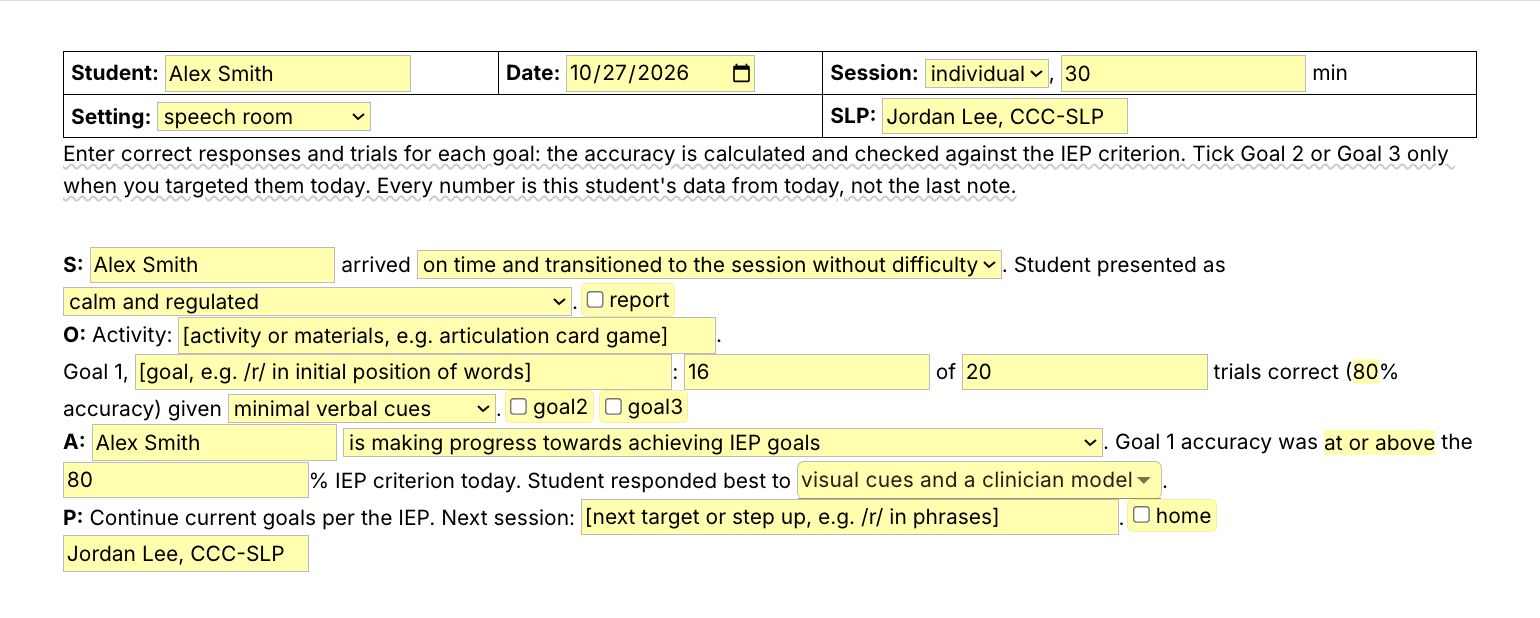
Typing /stsoap opens the Text Blaze pop-up already filled in for a fictional student's group session, the Goal 1 cue level changes from minimal to moderate verbal cues, and Insert places the finished SOAP note with 70% and 80% accuracy for two goals in the note field

Type /stsoap. Fill in the form fields. Insert.

  1. Add the packThe button opens the pack's page on the Text Blaze marketplace. Add the pack in one click (sign up for a free account if you do not have one) and the templates are yours, ready to edit and use anywhere.
  2. Type /stsoap where you write notesIn your EMR, in the district's billing portal, in a Google Sheet of session notes. A pop-up opens with the student header, the four SOAP sections and fields for each goal.
  3. Fill in, insert, editPick how the student arrived, type correct responses and trials for each goal, choose the cue level, insert. The accuracy is worked out for you, and the note lands as text you can still edit.
  4. Then make one of your ownCreate a snippet of sentences or paragraphs you type often. Give it a keyboard shortcut. Type the shortcut anywhere and the text appears. Congratulations! You just saved yourself a few seconds.

What is Text Blaze?

Text Blaze is a free Chrome extension, with Windows and Mac apps, that turns the text you type again and again into templates you insert with a shortcut. Type /stsoap and the session note appears where your cursor is, in any program you type in.

Templates can hold text fields, drop-down menus, dates and checkboxes, and values that compute from other fields, so the accuracy fills itself in from correct responses and trials.

Works everywhere you type

Web EMRs, the district's Medicaid billing portal and Google Sheets through the Chrome extension. Word and other installed programs through the desktop app.

Fill-in fields, not blanks

Type the student's name, the goal and the correct responses and trials, and pick the cue level from a menu. The accuracy appears, checked against the IEP criterion.

Your wording, saved once

Change any line once and every note starts there. Share the folder so every SLP and SLPA on the team writes the same way.

Free forever

The whole pack fits the free plan, and /prog works without limit. On Free you can test the snippets with form fields. Using them day to day needs Pro, $2.99 a month billed yearly.

Works in Google SheetsGoogle DocsSimplePracticeFusionWebPTNet HealthSLP ToolkitGmail

Template insertion is done locally. PHI and other sensitive information never leaves your computer.

What goes in a speech therapy SOAP note?

A speech therapy SOAP note records one session in four parts. S is how the student arrived and what a teacher or caregiver reported. O is the activity and the data for each goal: correct responses, trials, accuracy and cue level. A says how the student is progressing toward IEP goals. P says what comes next session.

School SLPs who bill Medicaid often write one for every student they see, and many of those notes are only a few sentences long. Short is fine when the note holds that student's own data: the name, the goal, the accuracy and the cue level.

What makes a good SOAP note template for speech therapy?

A good SOAP note template for speech therapy types the parts that never change and asks for the parts that do. The headings, your name and the standard sentences are already written. The student's name, goals, trials, accuracy and cue level are form fields you fill in for this session, so no two notes read the same.

  • The student's name in every note. The name is a field, so every note is that student's own.
  • Math done for you, checked by you. Type correct responses and trials and the accuracy appears, with a line saying whether it met the IEP criterion. Read it before you sign.
  • Prompts you replace. A bracketed prompt you leave empty lands in brackets as it is.
  • Guidance that stays out of the note. A short reminder shows while you fill in the form and is never inserted.

If your EMR's templates or smart phrases work for you, keep them. This pack adds the same note in the billing portal, the session notes spreadsheet and everywhere else you type, and the short sentences drop into any template.

How this template helps

The /stsoap snippet is that template as a Text Blaze pop-up: a student header, arrival and mood menus, an activity line, correct responses, trials and a cue-level menu for up to three goals with the accuracy computed, a progress menu, and a Plan line with an optional home practice note.

Besides /stsoap, the pack has the one-sentence Medicaid note, an SLPA supervision comment and the lines school SLPs type most:

  • /mednote, the school Medicaid session note in one sentence, with name, minutes, goal area, accuracy and cue level.
  • /supv, the supervising SLP's comment on an SLPA session.
  • /prog and /subj, making progress towards IEP goals and the subjective opener.
  • /acc and /gnt, accuracy with a cue level and goals not targeted this session.
  • /skill, /distr, /plan and /pcx, the skilled service line, distracted and redirected, continue current goals, and provider cancelled.

Here is a speech therapy SOAP note example, filled in with /stsoap for a fictional student:

Student: Maya Torres · Date: 2026-10-27 · Session: group, 30 min
Setting: speech room · SLP: Jordan Lee, CCC-SLP
S: Maya Torres arrived late from class and transitioned with one reminder. Student presented as calm and regulated. Teacher or caregiver report: her teacher says she is raising her hand to answer more often in reading group.
O: Activity: Go Fish with /s/ blend picture cards.
Goal 1, /s/ blends at the beginning of words: 14 of 20 trials correct (70% accuracy) given moderate verbal cues.
Goal 2, answering who and where questions about a short story: 8 of 10 trials correct (80% accuracy) given visual cues and a model.
A: Maya Torres is making progress towards achieving IEP goals. Goal 1 accuracy was below the 80% IEP criterion today. Student responded best to a clinician model and a preferred activity as a reinforcer.
P: Continue current goals per the IEP. Next session: /s/ blends in two-word phrases.
Home practice sent: /s/ blend word list for 5 minutes a night.
Jordan Lee, CCC-SLP

The headings, the sentences, the accuracy and the signature were already there. The rest is what happened in this session.

Start with /prog. It types "Student is making progress towards achieving IEP goals." from five keystrokes, and it works inside any template, your EMR's included.

Text Blaze helps me finish my paperwork while I'm still sitting with a patient.

Stephanie YakobinaCertified Hand Therapist and Occupational Therapist

Keep your EMR templates. Add the pack to a free Text Blaze account, type /prog in your next note, and /stsoap or /mednote for the whole note.

Copy the template for free

Free forever. Works in any EMR, billing portal or app. No integration required.

Questions SLPs ask

What should a school speech therapy Medicaid billing note include, and can it be one sentence?

Usually the student's name, the minutes, individual or group, the goal area, the accuracy and the cue level, and a progress statement. Many districts accept that in one or two sentences, but your state's Medicaid program and your district set the rules, so check them. The /mednote snippet gives you that sentence with a field for each part. In a group, run it once for each student.

What is a good SOAP note template for speech therapy?

One that writes the headings and the standard sentences for you and leaves form fields for the student's name, goals, trials, accuracy and cue level. The /stsoap snippet in this pack does that and works out the accuracy. Edit any line to match how you write.

How do you keep the same note frame but each student's own data?

Keep the sentences that repeat in the template and make everything that belongs to the student a form field: the name, the goal, the trials, the accuracy and the cue level. The frame stays the same and the data changes every time. Change any line that was not true today.

Do I need Text Blaze to use this template?

Yes. The templates are Text Blaze snippets, and the free plan is enough to add all of them. Text Blaze is a free Chrome extension, with Windows and Mac apps as well.

Does it work in my EHR?

Yes. Text Blaze works in your EHR, your email and any other app. Web EMRs, district billing portals and Google Sheets work through the Chrome extension, and installed programs like Word through the Windows or Mac app.

Is my client's information stored anywhere?

Text Blaze snippets hold your template and your defaults, not your students' notes. Template insertion is done locally: what you type into the pop-up goes into the note you are writing and is not saved by Text Blaze after you insert.

BAA is available upon request. Read our HIPAA guide.

Is the pack free?

Yes. The pack is free and its 11 snippets fit the free plan. /prog and the other one-line snippets with no form fields work without limit on Free. You can test the snippets with form fields on the free plan, and using them day to day needs Pro, $2.99 a month billed yearly.

Does the template guarantee reimbursement?

No. The template helps you write each note completely and the same way every time, but what Medicaid or an insurer pays for depends on its rules and on what you document. Check your state's requirements before you bill.

Can I change the template?

Yes. Everything is editable: the wording, the goal areas, the menu options and the defaults. Change it once and it stays changed.

Finish the note before the next group.

Add the free speech therapy SOAP note pack, set your wording once, and each note starts in seconds instead of from a blank box, so the notes get done at school, not after dinner. Then save /prog, or a sentence of your own, and get those seconds back in every note.

Copy the template for free

Free forever. Works in any EMR, billing portal or app. No integration required.