


Superbill Template for Therapy

Eliminate repetitive typing and mistakes. Insert a Superbill in any text box in seconds.

Free forever. Works in any EHR or app. No integration required.

Kalen Sanders
“Text Blaze saves me countless hours of work, which is very important when you're running a small group practice.”
Kalen Sanders, Reclaim Psychological Services. Read the story

4.9 · 1,800+ Chrome Web Store reviews · 800,000+ people use Text Blaze

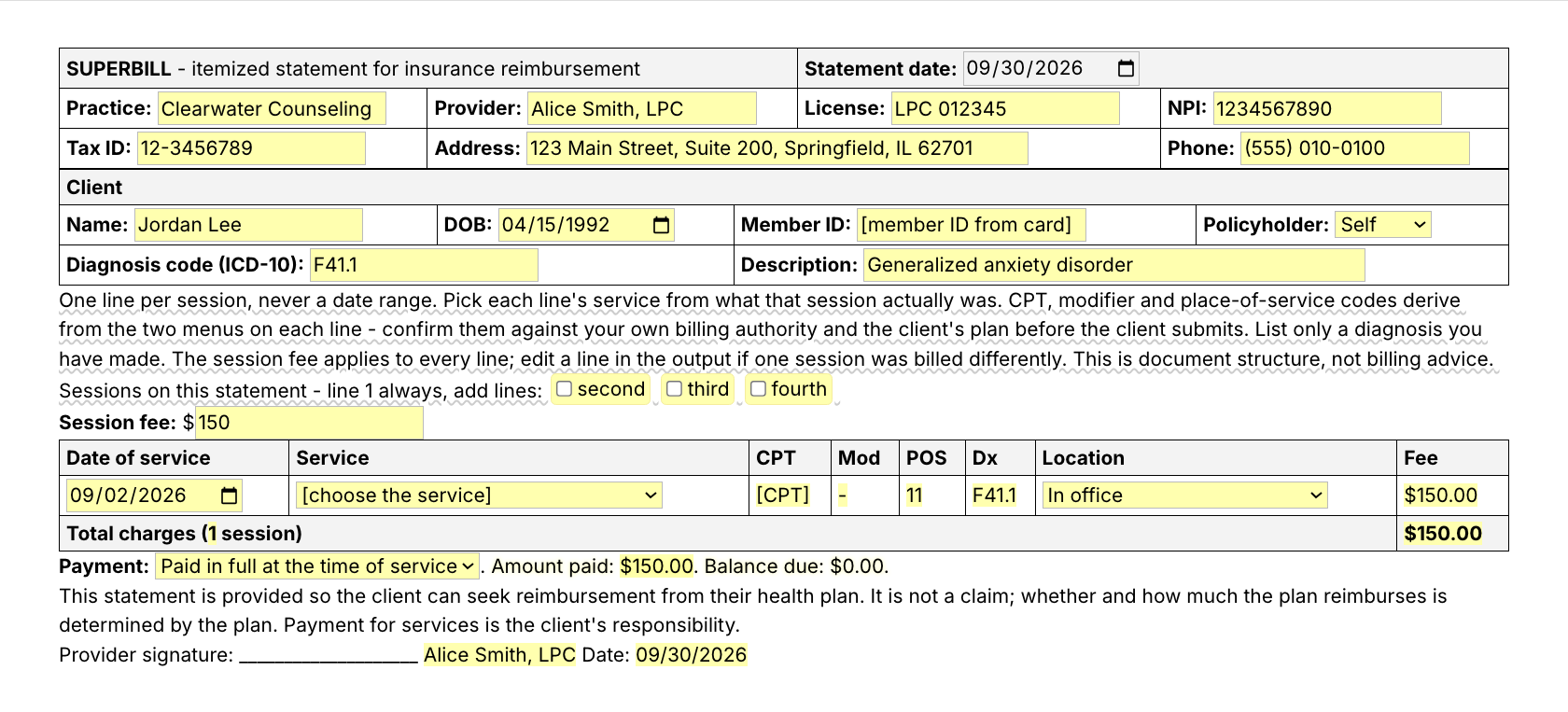
Typing /superbill opens the Text Blaze pop-up, picking the service fills in the CPT code, and Insert places the finished superbill in the page

Type /superbill. Fill in the form fields. Insert.

  1. Add the packThe button opens the pack's page on the Text Blaze marketplace. Add the pack in one click (sign up for a free account if you do not have one) and the templates are yours, ready to edit and use anywhere.
  2. Type /superbill where you writeIn your EHR, in Gmail, in the client portal. A pop-up opens with the superbill and its fields.
  3. Fill in, insert, editPick each session's service and location, tick the extra lines, insert. It lands as text you can still edit.
  4. Then make one of your ownCreate a snippet of sentences or paragraphs you type often. Give it a keyboard shortcut. Type the shortcut anywhere and the text appears. Congratulations! You just saved yourself a few seconds.

What is Text Blaze?

Text Blaze is a free Chrome extension, with Windows and Mac apps, that turns the text you type again and again into templates you insert with a shortcut. Type /superbill and the whole document appears where your cursor is, in any app you type in.

Templates can hold text fields, drop-down menus, dates and toggles, and fields that compute from other fields, so each document comes out complete and specific to this client and this month.

Works everywhere you type

SimplePractice, TherapyNotes, Gmail, client portals, Google Docs. No integration to set up.

Fill-in fields, not blanks

Text fields, menus, dates and toggles. Codes and totals compute from what you pick.

Your words, saved once

Change the defaults once, your name, NPI and fee, and every superbill starts filled in. In a group practice, one person sets the practice block and shares the folder. Each clinician keeps their own provider line.

Free forever

The free plan covers this whole pack. Pro is $2.99 a month if you want more.

Works in SimplePracticeTherapyNotesTheraNestHeadwayAlmaGmailOutlook on the webGoogle Docs

Template insertion is done locally. PHI and other sensitive information never leaves your computer.

What is a superbill for therapy?

A superbill is an itemized statement a therapist gives a client who pays out of pocket, so the client can ask their health plan for out-of-network reimbursement. It is not a claim. It lists who provided the care, who received it, the diagnosis, and one line per session with the date, CPT code and fee.

Plans look for the same details on every superbill:

  • Provider block: practice name, clinician and license, NPI, tax ID, address and phone.
  • Client block: name, date of birth, member ID and policyholder.
  • Diagnosis: the diagnosis you have made, as an ICD-10 code with its description.
  • Service lines: one line per session, never a date range, each with the date, CPT code, any telehealth modifier, place-of-service code and fee.
  • Totals and payment: total charges, amount paid, balance due, and a note that this is not a claim and that reimbursement is the plan's decision.

What makes a good superbill template?

A good superbill template keeps the fixed details filled in, gives you a menu for the things that change, and computes the rest. You should never retype your NPI, and you should never look up a CPT code for a session length you have already chosen.

  • Consistent, statement after statement. Superbills get read by people who compare them with your notes. The same structure every month, one line per session, codes that follow from the service you picked: your records and your statements tell the same story.
  • Your details stay put. Practice, license, NPI and tax ID are typed once and appear on every statement. No more copying last month's document and fixing the dates by hand.
  • Menus for what varies. Session length and location are drop-downs, and the CPT code, modifier and place-of-service code follow from them.
  • One line per session. Add a second, third or fourth line with a checkbox instead of copying a row.
  • Arithmetic done for you. Total charges, amount paid and balance due computed from the lines.
  • Editable output. It lands as a table in rich-text fields (Gmail, Google Docs, most EHR note and message fields) and as plain lines in plain-text fields, so you can change anything before it goes out.
  • Honest wording. A line that says the statement is not a claim and that the plan decides reimbursement.

How this template helps

The /superbill snippet is that template, as a Text Blaze pop-up. It opens with your practice details filled in, asks for the client, diagnosis and fee, and turns each session into a line with the right codes. Three companion templates cover the conversations around it, and /sbnote is the note that goes out with each statement.

Inside the pop-up

Statement date, practice, provider, license, NPI, tax ID, address and phone at the top, with your defaults saved once. There is one NPI field and one tax ID field. A group practice that lists both a billing and a rendering NPI adds the second on the line after insert. Client name, date of birth, member ID and policyholder next. Then the diagnosis you have made, as an ICD-10 code with its description. There is one diagnosis field, so a secondary code goes in the description field or on the line after you insert.

The session lines: each line's Service menu starts on [choose the service], so no session length is picked for you. The line reads [CPT] until you pick what that session actually was:

  • Individual psychotherapy, 16-37 min reads CPT 90832
  • Individual psychotherapy, 38-52 min reads CPT 90834
  • Individual psychotherapy, 53+ min reads CPT 90837
  • Diagnostic evaluation reads CPT 90791
  • Family psychotherapy, client present reads CPT 90847

Pick Telehealth, client at home and the line reads modifier 95 and POS 10 (Telehealth, client elsewhere gives POS 02, and In office gives POS 11 and no modifier). Tick second, third or fourth to add lines, up to four per statement. For a fifth session, insert a second statement or add a row after you insert. The total, amount paid and balance are computed, and the closing note says what a superbill is and is not.

The other three templates

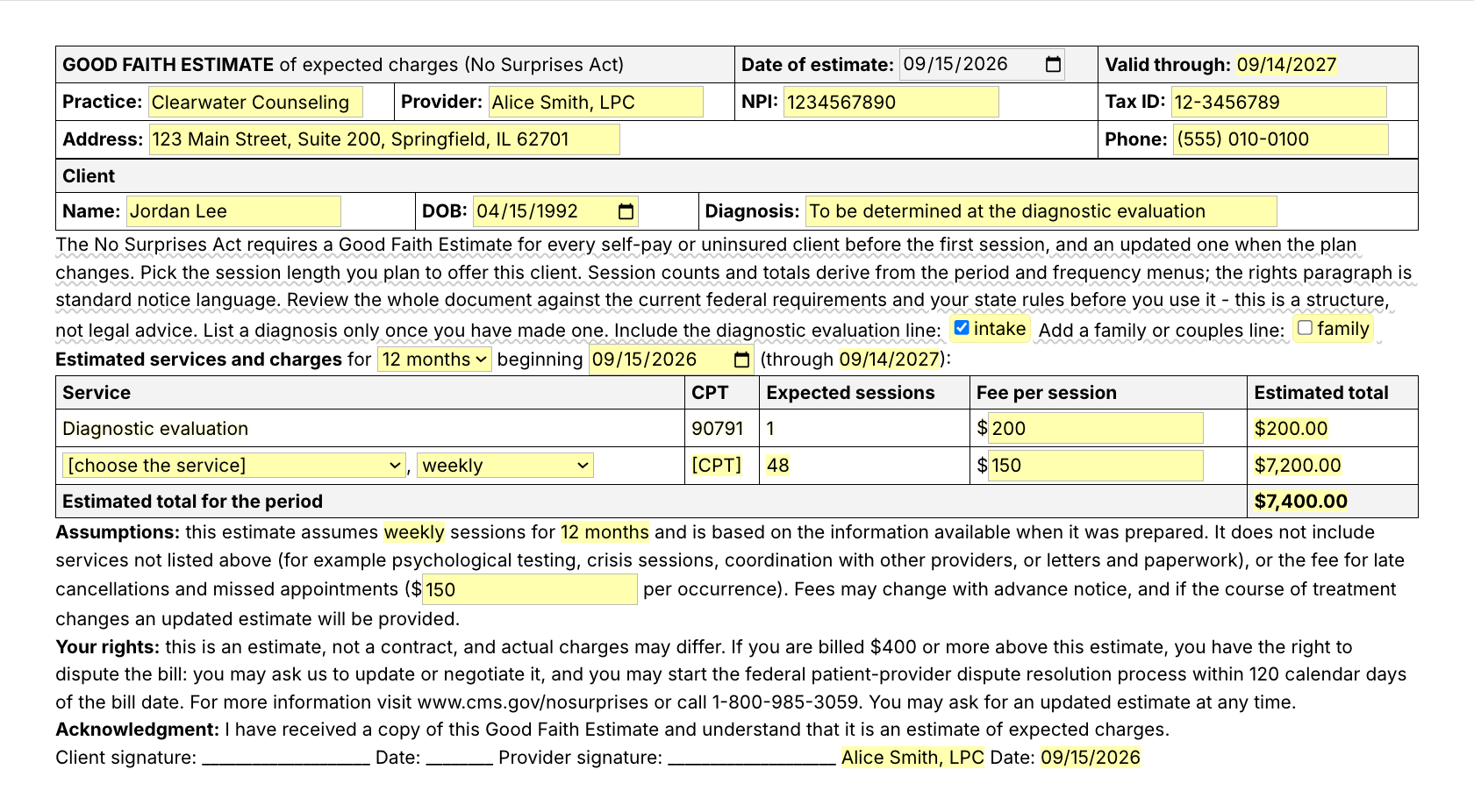
  • /gfe, a good faith estimate under the No Surprises Act that a client can sign: pick the session length you plan to offer (this menu also starts on [choose the service]), then the period, frequency and fee. The expected number of sessions and the total are computed, with the standard notice paragraph. Review it against current requirements before you use it.
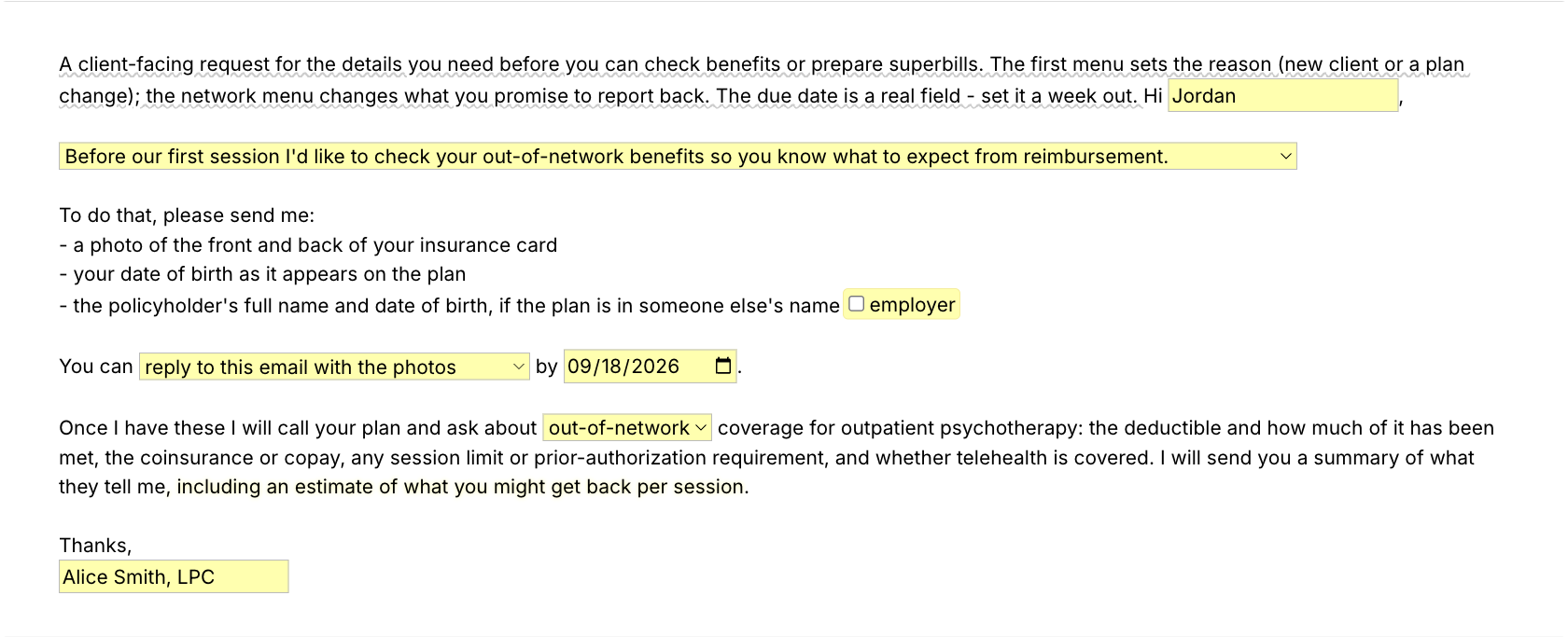
  • /verify, an insurance verification form in email shape: what to send you (card photos, member number, policyholder) and what you will ask the plan.
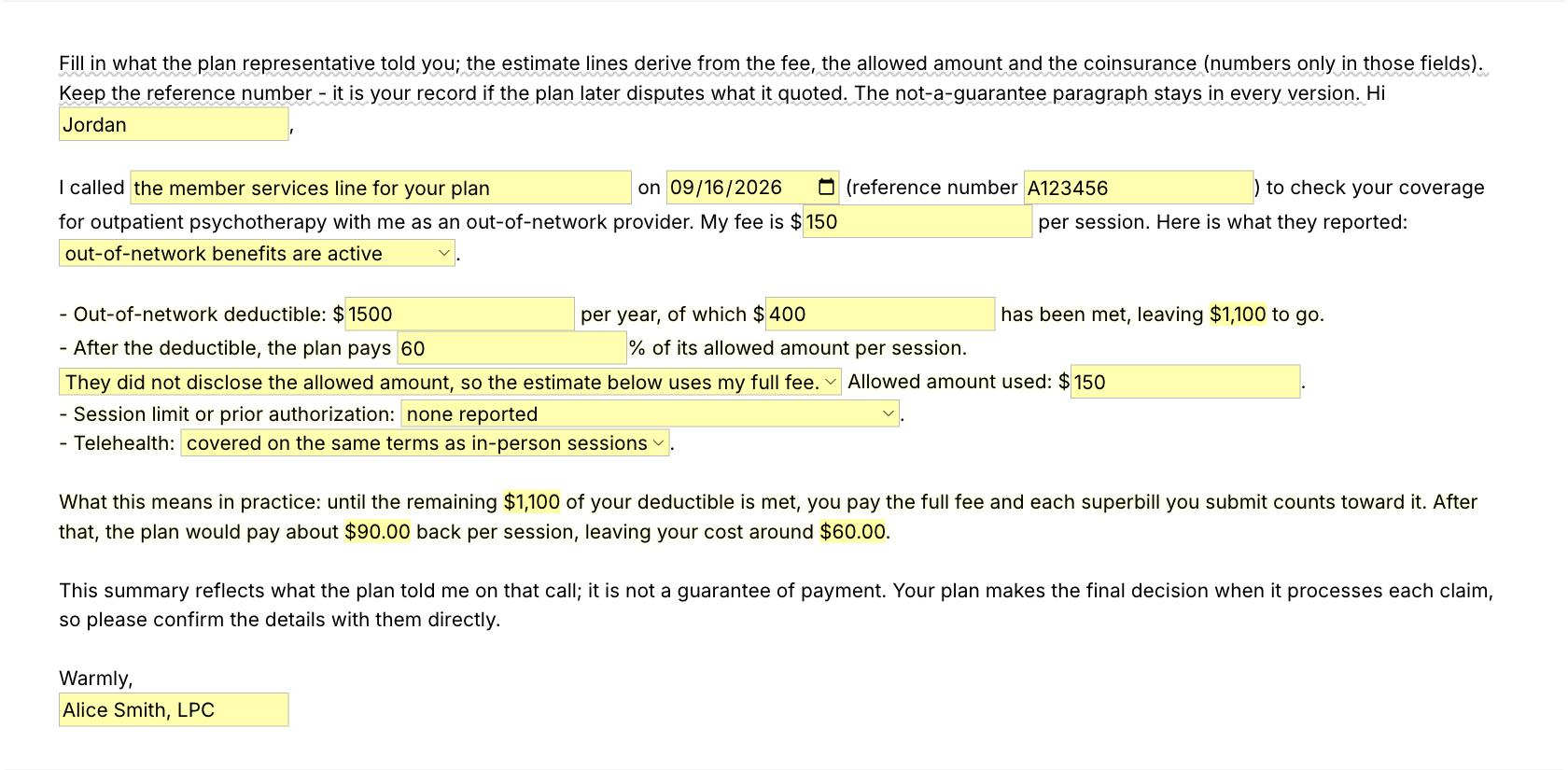
  • /benefits, the benefit check summary: deductible left, coinsurance, an estimated reimbursement per session and a not-a-guarantee close.

Shorter snippets for the replies you send most

  • /cai when you cannot accept insurance, for a prospective client who asks.
  • /oon, the out-of-network explanation: how superbills work, for a client who is deciding.
  • /askplan, the questions a client asks their plan before the first session.
  • /plainterms, deductible and coinsurance in plain words, for a client who is confused by the plan's letter.
  • /noguarantee, the disclaimer, for any message that quotes a reimbursement estimate.
  • /sbnote, the note that goes out with each superbill.
  • /fee.paperwork, /fee.docs and /fee.reminder: paperwork fees, documentation fees and payment reminders.

“The value of Text Blaze is much larger than the time saved because it maintains my focus on the actual work I'm doing, as opposed to every single character in every single document and email.”

Adam BrooksCo-Founder and Director of Operations, Good Therapy San DiegoRead the story

Add the pack to a free Text Blaze account and type /superbill the next time a client asks for one.

Copy the template for free

Free forever. Works in any EHR or app. No integration required.

Questions therapists ask

Do I need Text Blaze to use this template?

Yes. The templates are Text Blaze snippets, and the free plan is enough to add and use all of them. Text Blaze is a free Chrome extension, with Windows and Mac apps as well.

Does it work in my EHR?

Yes. Text Blaze works in your EHR, your email and any other app: SimplePractice, TherapyNotes, TheraNest, Headway and Alma among others, plus Gmail, Outlook, client portals and Google Docs. There is nothing to integrate. You type the shortcut where you would have typed the text.

My EHR already makes superbills. Why this one?

Keep your EHR's superbill if it works for you. This pack is for the paperwork around it: the good faith estimate, the verification request, the benefit check and the replies, plus a superbill you can write for a client whose sessions are not in the EHR ledger, and edit before it goes out.

Is my client's information stored anywhere?

Text Blaze snippets hold your template and your defaults, not your client records. What you type into the pop-up is inserted into the page you are on.

Template insertion is done locally. PHI and other sensitive information never leaves your computer.

BAA is available upon request. Read our HIPAA guide.

How do I send the superbill to my client?

Insert it where you already send documents: a secure message in your client portal, an email, or a Google Doc or Word file you save as a PDF. It lands as a table in rich-text fields and as plain lines in plain-text fields, and you can edit it before it goes out.

Is the pack free?

Yes. The pack is free, and the free Text Blaze plan is enough to use it. Pro is $2.99 a month if you later want more snippets and shared folders.

Can I change the template?

Yes. Everything is editable: the defaults, the field labels, the menu options, the codes and the wording. Change the practice block once and it stays changed. If you bill a service the menu does not list, add it to the menu or edit the line after you insert.

Does the superbill guarantee reimbursement?

No. A superbill lets your client ask their plan for out-of-network reimbursement. Whether and how much the plan pays is the plan's decision. The template says so on every statement, and the /noguarantee snippet says it in an email.

Paperwork in minutes, not an evening.

Add the free superbill template pack, change the defaults once, and the next superbill is a shortcut away.

Copy the template for free

Free forever. Works in any EHR or app. No integration required.