


Therapy Intake & Consent Templates

Eliminate repetitive typing and mistakes. Insert an Intake Note or Consent Form in any text box in seconds.

Free forever. Works in any EHR or app. No integration required.

Adam Brooks
“Text Blaze helps me with client communication while keeping it personalized.”
Adam Brooks, Good Therapy San Diego. Read the story

4.9 · 1,800+ Chrome Web Store reviews · 800,000+ people use Text Blaze

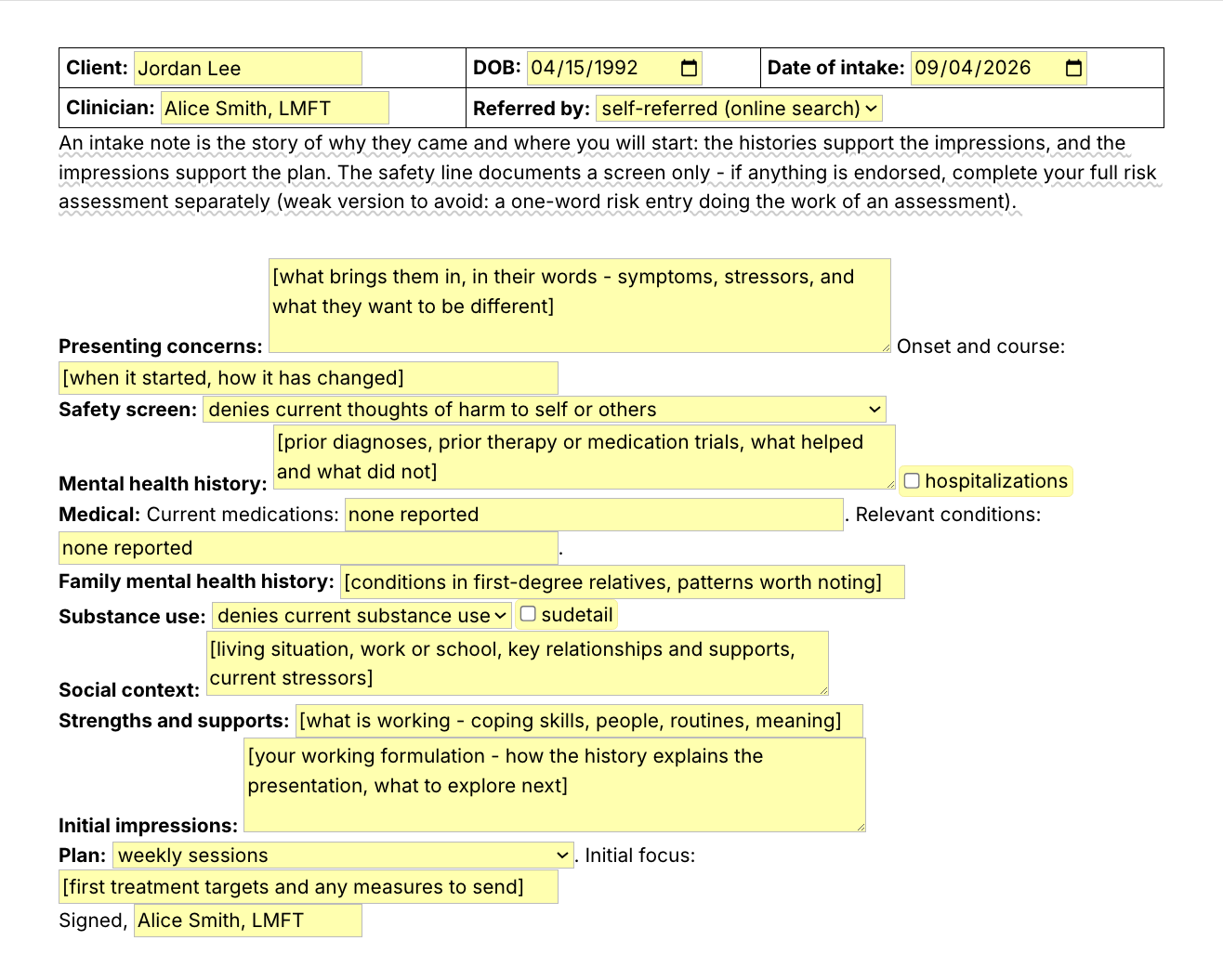
Typing /intake opens the Text Blaze pop-up, changing the Referred by menu updates the header, and Insert places the finished intake note in the note field

Type /intake. Fill in the form fields. Insert.

  1. Add the packThe button opens the pack's page on the Text Blaze marketplace. Add the pack in one click (sign up for a free account if you do not have one) and the templates are yours, ready to edit and use anywhere.
  2. Type /intake where you writeIn your EHR's intake note field, in a client portal, in a Google Doc. A pop-up opens with the intake sections and their form fields.
  3. Fill in, insert, editPick the referral source and the safety screen from menus, type the presenting concerns in the client's words, switch on the substance use detail if you need it, insert. It lands as text you can still edit. /intake and the other five form-field templates can be tested on the free plan and need Pro for everyday use.
  4. Then make one of your ownCreate a snippet of sentences or paragraphs you type often. Give it a keyboard shortcut. Type the shortcut anywhere and the text appears. Congratulations! You just saved yourself a few seconds.

What is Text Blaze?

Text Blaze is a free Chrome extension, with Windows and Mac apps, that turns the text you type again and again into templates you insert with a shortcut. Type /intake and the whole intake note appears where your cursor is, in any app you type in.

Templates can hold text fields, drop-down menus, dates and toggles, and fields that compute from other fields, so each document comes out complete and specific to this client.

Works everywhere you type

SimplePractice, TherapyNotes, client portals, Gmail, Google Docs. No integration to set up.

Fill-in fields and menus

Text fields, menus, dates and toggles. Pick the screeners you send and the time estimate in the message follows.

Your words, saved once

Edit the consent language once, to how you practice, and every new client gets the same version. In a group practice, one person sets the wording and shares the folder. Sharing limits are on the plans page.

Free forever

All 16 snippets fit the free plan's 20. The ten short text snippets, /reviewed among them, are free to use every day. The six form-field templates can be tested on Free and need Pro, $2.99 a month billed yearly, for everyday use. Details are on the plans page.

Works in SimplePracticeTherapyNotesTheraNestHeadwayAlmaGmailOutlook on the webGoogle Docs

Template insertion is done locally. PHI and other sensitive information never leaves your computer.

What makes a good therapy intake form template?

A good therapy intake form template keeps the structure fixed and the content yours. Most of an intake follows the same outline every time, so the sections, your name and your practice's policies are typed once. What this client said and what you make of it are typed fresh, and the consent language is reviewed against your own state's rules.

  • The same sections every time. The intake is one of the first documents a payer reviewer asks for in an audit. The same sections in the same order, intake after intake, make a chart easy to follow.
  • This client's words in every section. Each section is a form field that asks for this client's concerns, history and supports. Nothing clinical is typed for you.
  • Guidance that stays out of the note. A short note on what belongs in a section shows while you write and is never inserted.
  • Consent language that is yours. A template gives you the sections and plain-language wording to edit. You make it yours once and reuse that version with every new client.
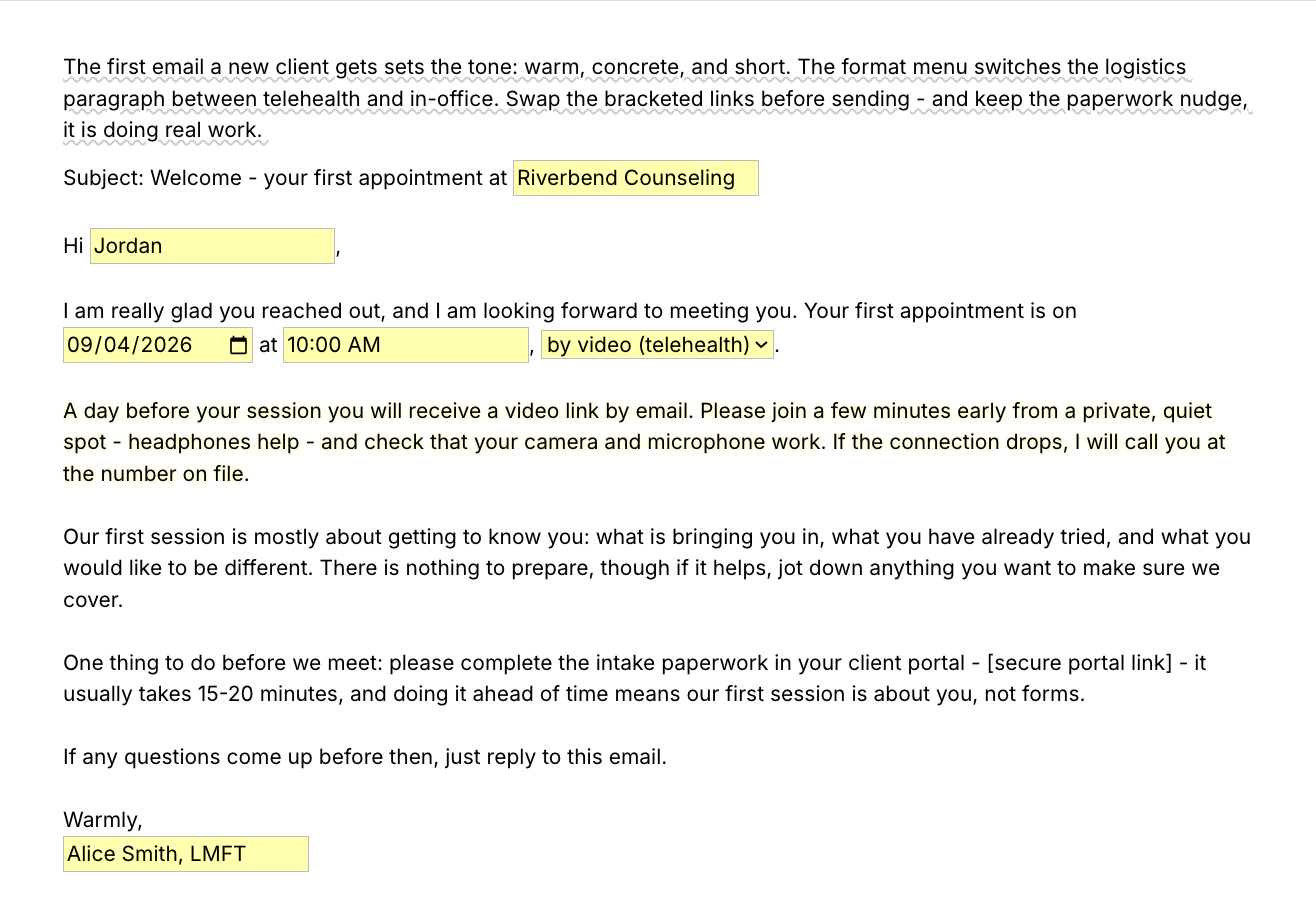
  • The message updates when you change a menu. Pick the screeners you send and the time estimate in the message updates. Pick video or office and the welcome email's logistics paragraph switches.
  • Editable output. Everything lands as text in the field you are in, so you can change anything before you sign or send. The intake header lands as a small table in rich-text fields and as plain lines in plain-text fields.
  • Already in your words. A therapy intake form PDF from another practice carries their policies and still has to be retyped into your system. A template you insert with a shortcut starts from wording you have already edited.

If your EHR's intake forms and e-signatures work for you, keep them. This pack is the wording that goes in and around them.

If you use an AI note-taker, the two work together. /aiconsent is consent language for that tool, with the client's choice recorded, and /aireviewed is the chart line that says you went through it. The intake structure and the consent wording stay yours.

For a couples therapy intake form, a child or family intake, or a group therapy consent form, start from /intake or /consent, edit the sections to fit, and save the result as its own snippet.

How this template helps

The /intake snippet is that template as a Text Blaze pop-up: a header with the client, the dates and the referral source, a form field for each section, and menus for the safety screen, substance use and the plan. Five more templates cover consent, screeners and the welcome email, and ten shorter snippets cover the sentences around them.

One new client, five shortcuts

These are the things you retype for every new client, in the order they come up:

  1. /openings when the inquiry arrives, to offer first-appointment times.
  2. /welcome once the appointment is booked.
  3. /formsreminder when the paperwork is still open a day or two before.
  4. /intake after the first session, for the intake note you write.
  5. /reviewed in the chart, to record the consent conversation.

Inside the pop-up

/intake is the clinical note you write after a first session. It is not a form the client fills in, and nothing here collects a signature. The first image at the top of the page shows every field (click or tap it to enlarge). These are the decisions built into it:

  • Safety screen. A menu: denies current thoughts of harm to self or others, endorsed - full risk assessment completed and documented separately, or declined to answer - follow up next session. It documents a screen only. The risk assessment itself is yours and is written separately.
  • Defaults you type over. Current medications and relevant conditions both start at "none reported". Hospitalizations and substance use detail are toggles, so those lines appear only when you switch them on. The clinician name is a default too: replace Alice Smith, LMFT with your own once in the snippet and it is there every time.
  • Initial impressions. A paragraph field for your working formulation.
  • What /intake leaves out. As it ships there is no separate diagnosis line and no mental status or observations line. A provisional diagnosis can go in Initial impressions, or you can edit the snippet once and add your own line, for example "Provisional diagnosis (ICD-10):" with a text field. A mental status exam is usually its own note, and an observations line can be added the same way. If you bill the first session as a diagnostic evaluation (90791), check that your note covers both.
  • Plan. A menu (weekly sessions, biweekly sessions, second intake session to complete assessment, referral out) with a field for the initial focus, then your signature.

Filled in for a fictional client, it reads:

Client: Maya Chen · DOB: 1990-11-02 · Date of intake: 2026-08-27
Clinician: Alice Smith, LMFT · Referred by: physician referral
Presenting concerns: Persistent low mood and loss of interest for about six months, with trouble concentrating at work. Wants to feel motivated again and stop withdrawing from friends. Onset and course: Gradual onset last winter, worse since a job change in May.
Safety screen: denies current thoughts of harm to self or others
Mental health history: No prior formal diagnosis. Saw a counselor briefly in college for stress and found it moderately helpful. No prior medication trials.
Medical: Current medications: levothyroxine. Relevant conditions: hypothyroidism.
Family mental health history: Mother treated for depression, maternal uncle with alcohol use disorder.
Substance use: endorsed - detail below
Detail: Wine most evenings, two glasses. No prior treatment, interested in cutting back.
Social context: Lives with partner. Project manager on a hybrid schedule. Supportive sister nearby. Main stressors are workload and finances.
Strengths and supports: Steady routine, close friendships, past success with exercise as mood support.
Initial impressions: Presentation consistent with a depressive episode maintained by withdrawal and workload stress. Good insight and motivation. Explore sleep and evening alcohol as maintaining factors. Review screener results next session.
Plan: weekly sessions. Initial focus: Behavioral activation plan. Send PHQ-9 and GAD-7 before next session.
Signed, Alice Smith, LMFT

The header, the section labels, the safety screen wording and the signature were already typed. The rest is what this client told you and what you make of it. The header is a small table in the pop-up and is shown here on two lines, and Onset and course follows Presenting concerns on the same line, as the snippet ships. The pop-up's date pickers show your computer's date style (04/15/1992 on a US computer). The inserted note uses the snippet's format, 2026-08-27, until you edit it.

The other five templates

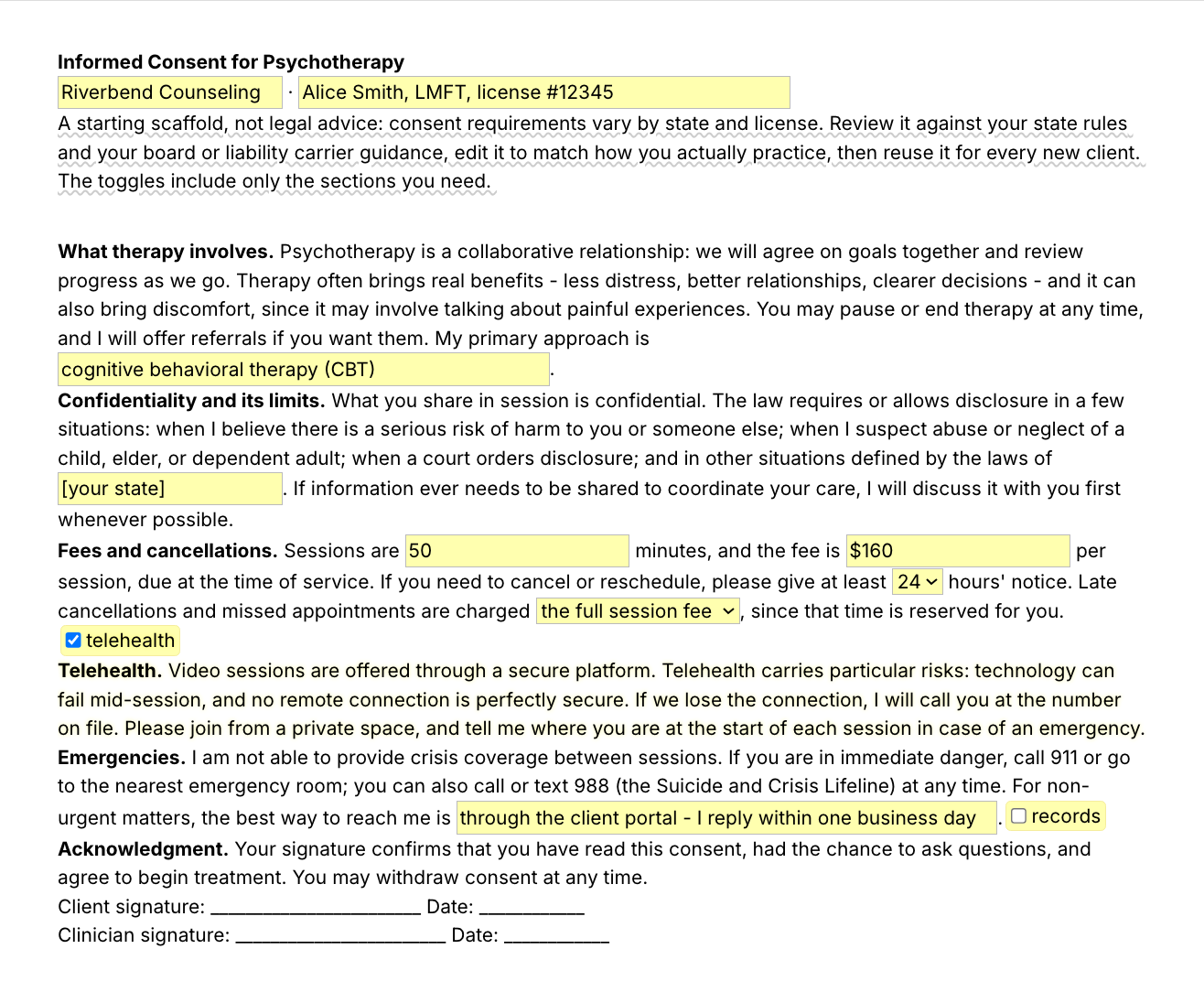
  • /consent, informed consent for therapy as paragraphs, with fields for your approach, state, fee and cancellation terms and toggles for the telehealth and records paragraphs. The second image at the top of the page shows all of it. It is a starting point: review it against your state's rules and your board or liability carrier's guidance, and edit it to how you practice, before you use it.
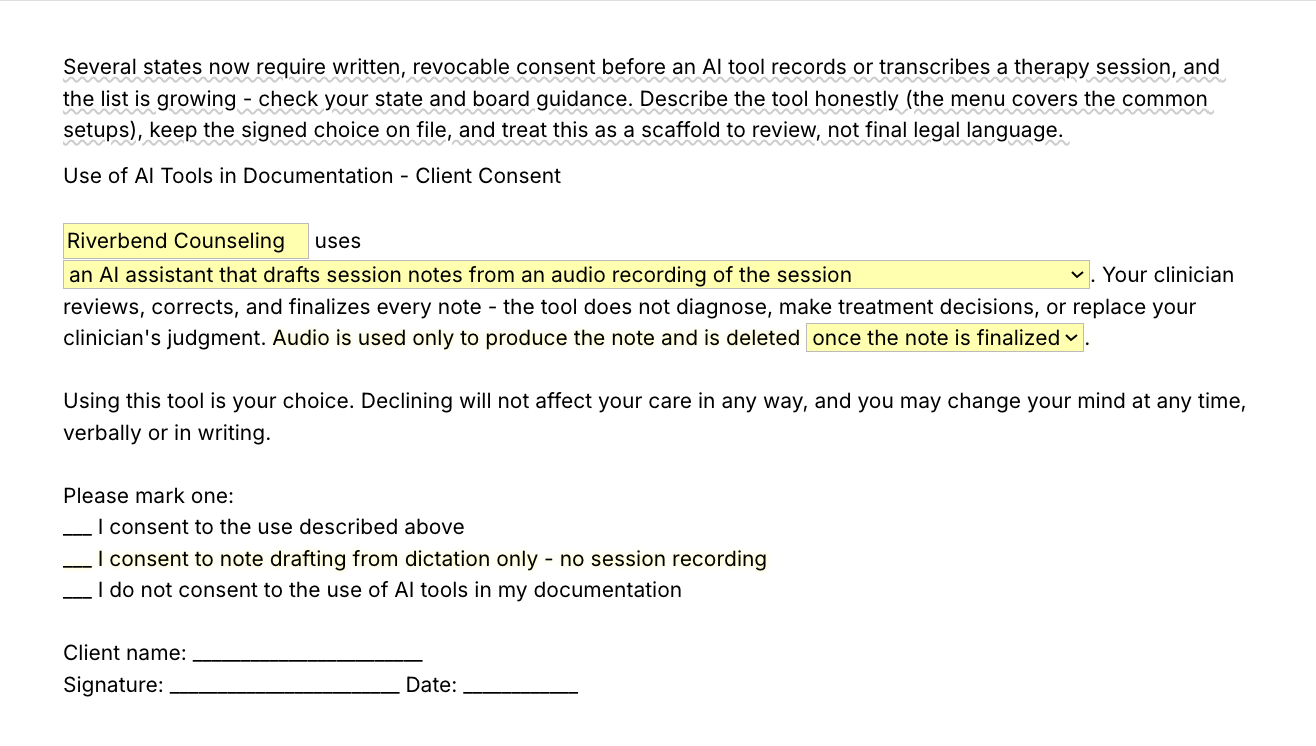
  • /aiconsent, for a practice that uses an AI tool in documentation: a menu describes the tool (drafts notes from a session recording, drafts from your dictation, or organizes written notes), the audio retention sentence appears only when the tool records, and the client marks consent, dictation only, or no consent.
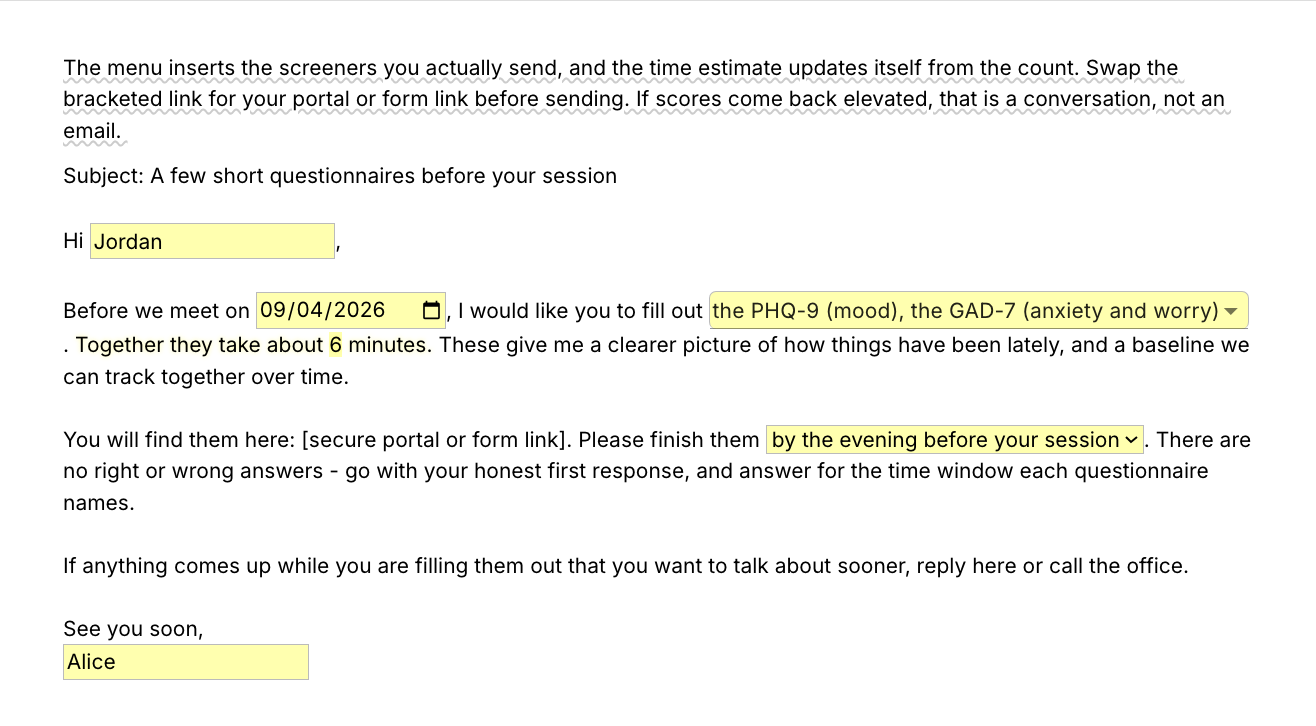
  • /screeners, the client message that asks for questionnaires before a session: pick PHQ-9, GAD-7, PCL-5 or ASRS-v1.1 from a menu, the time estimate follows the count, and a second menu sets when they are due. The message names the screeners and points to your own link. The questionnaires themselves are not part of this pack.
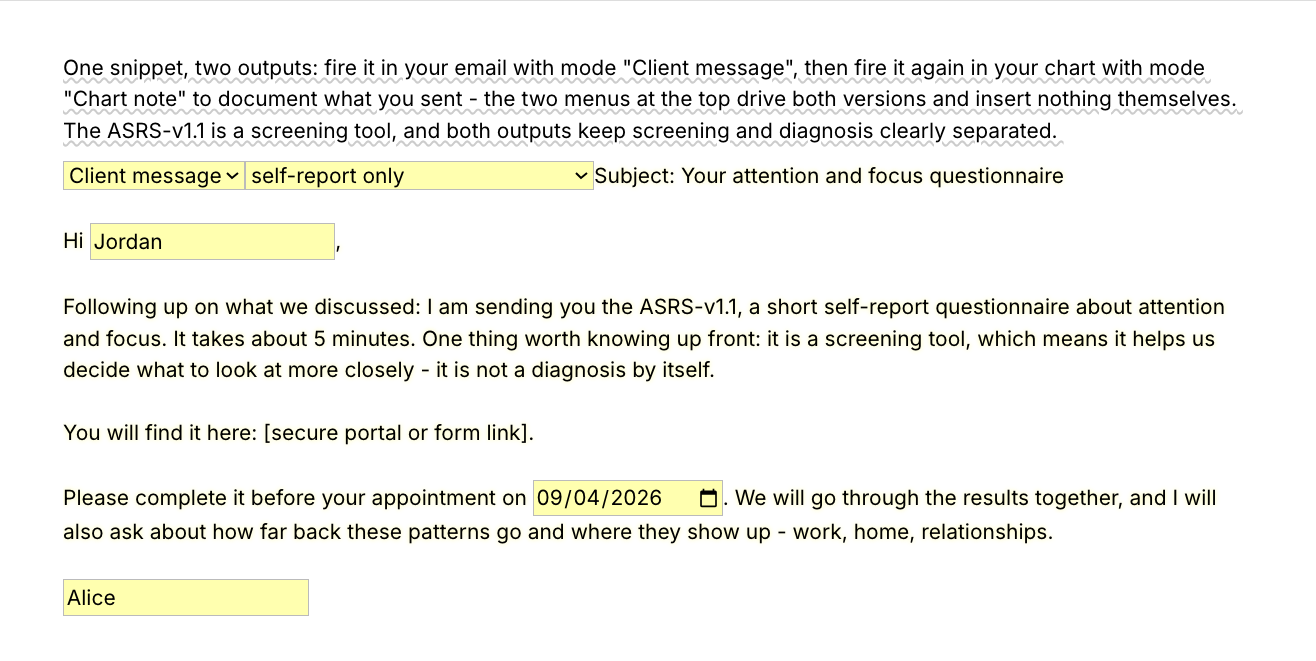
  • /adhdscreen, one snippet with two outputs: the client message that sends the ASRS-v1.1, with or without a collateral form, and the chart line that documents what you sent. Both keep screening and diagnosis separate.
  • /welcome, the first email a new client gets: appointment date and time, a video-or-office menu that switches the logistics paragraph, what the first session is like, and the request to finish the intake paperwork in your portal.

Shorter snippets for the sentences you type most

Ten short finished snippets with no fields, and the part of the pack that stays fully usable on the free plan. They go into a chart or a client message as written, so here is the exact text of three of them. Use one when it is true as written, and edit it when it is not.

/reviewed
Reviewed informed consent with the client, including confidentiality and its limits, fees, and the cancellation policy. Client had the chance to ask questions, stated understanding, and signed the consent form.

/openings
Thank you for reaching out. I have openings for a first appointment this week and next. Reply with a few days and times that work for you, and I will confirm one.

/formsreminder
A quick reminder to complete the intake paperwork in your client portal before we meet. It usually takes 15-20 minutes, and doing it ahead of time means our first session is about you, not forms.

The other seven:

  • /limits, the limits of confidentiality were explained and the client stated understanding.
  • /telehealthok, the telehealth consent line: risks reviewed, the dropped-connection plan, location confirmed.
  • /paperwork, intake paperwork received and reviewed before the first session.
  • /aireviewed, the chart line for the AI-use consent conversation.
  • /baseline, screeners completed and reviewed, scores kept as a baseline.
  • /firstsession, what the first session is like, for a client who asks.
  • /cancelpolicy, the cancellation reminder. Edit the notice window and the fee to your policy.

Every intake gets the same sections with this client's words in every field, and every new client reads the same consent wording because you edited it once.

“Text Blaze saves me countless hours of work, which is very important when you're running a small group practice.”

Kalen SandersClinical psychologist and co-owner of Reclaim Psychological ServicesRead the story

Add the pack to a free Text Blaze account, type /intake after your next first session, and /reviewed when you chart the consent conversation.

Copy the template for free

Free forever. Works in any EHR or app. No integration required.

Questions therapists ask

Do I need Text Blaze to use this template?

Yes. The templates are Text Blaze snippets, and the free plan is enough to add all 16 and to use the ten pure-text snippets day to day. Text Blaze is a free Chrome extension, with Windows and Mac apps as well.

Does it work in my EHR?

Yes. Text Blaze works in your EHR, your email and any other app: SimplePractice, TherapyNotes, TheraNest, Headway and Alma among others, plus Gmail, Outlook, client portals and Google Docs. There is nothing to integrate. You type the shortcut where you would have typed the text, whether that is an intake note field, a portal message or an email.

My EHR already has templates. Why this pack?

Keep your EHR's intake forms and e-signatures if they work for you. Collecting a client's answers and signature is their job. This pack is the wording around them: consent paragraphs you keep in one place and can paste into any system, the intake note you write yourself, the emails before the first session, and the chart lines that record what you reviewed. It also comes with you when you change platforms.

Is my client's information stored anywhere?

Text Blaze snippets hold your template and your defaults, not your client records. Template insertion is done locally: what you type into the pop-up's fields goes into the page you are on and is not saved, synced or logged by Text Blaze after you insert.

BAA is available upon request. Read our HIPAA guide.

How do I send the document to my client?

Insert it where you already send documents. For a consent form that needs a signature, put the text into the form your EHR or portal sends for signing, or into a Google Doc or Word file you save as a PDF. The welcome email and the screener request go out as ordinary messages, and you can edit any of it first. Text Blaze inserts text. It does not collect signatures.

Is the pack free?

Yes. The pack is free and its 16 snippets fit the free plan's 20. The ten pure-text snippets, /reviewed, /openings and /formsreminder among them, stay fully usable on Free. On the free plan you can test the six form-field templates, /intake included, to see how they work. Using them day to day needs Pro, $2.99 a month billed yearly. The plans page has the details.

Can I change the template?

Yes, and for the consent language you should. Everything is editable: the section labels, the menu options, the fees, the date format and the wording, and you can add a line the template does not have, such as a provisional diagnosis. To make the defaults yours, open a snippet in your Text Blaze dashboard and replace Alice Smith, LMFT, Riverbend Counseling, the fee and the session length once. The consent paragraphs are a starting point, not legal advice. Review them against your state's rules, your license board and your liability carrier's guidance, and edit them to how you practice.

Will my notes look cloned?

Not if you fill in the fields. In the intake note the fixed text is the section labels, your name and a few defaults such as "none reported". Every section asks for this client's concerns, history and your impressions, so two intakes share a shape and nothing else. The consent form and the policy reminders are meant to read the same for every client.

Can I use it on Windows or Mac?

Yes. Text Blaze runs as a Chrome extension and as Windows and Mac apps, so the shortcuts work in web-based EHRs and in desktop apps alike, with the same snippets on every computer you sign in on. There is no iPad or phone app, so anything you write on a tablet stays hand-typed.

Stop retyping the same intake emails and chart lines for every new client.

Add the free intake and consent template pack, edit the wording once, and the next new client's emails, intake note and chart lines take minutes. Start with /reviewed the next time you chart a consent conversation.

Copy the template for free

Free forever. Works in any EHR or app. No integration required.