



SOAP, DAP & BIRP Therapy Note Templates

Eliminate repetitive typing and mistakes. Insert a SOAP, DAP or BIRP Note in any text box in seconds.

Free forever. Works in any EHR or app. No integration required.

Adam Brooks
“The biggest benefit is reducing the mental fatigue that comes from typing the same things many times.”
Adam Brooks, Good Therapy San Diego. Read the story

4.9 · 1,800+ Chrome Web Store reviews · 800,000+ people use Text Blaze

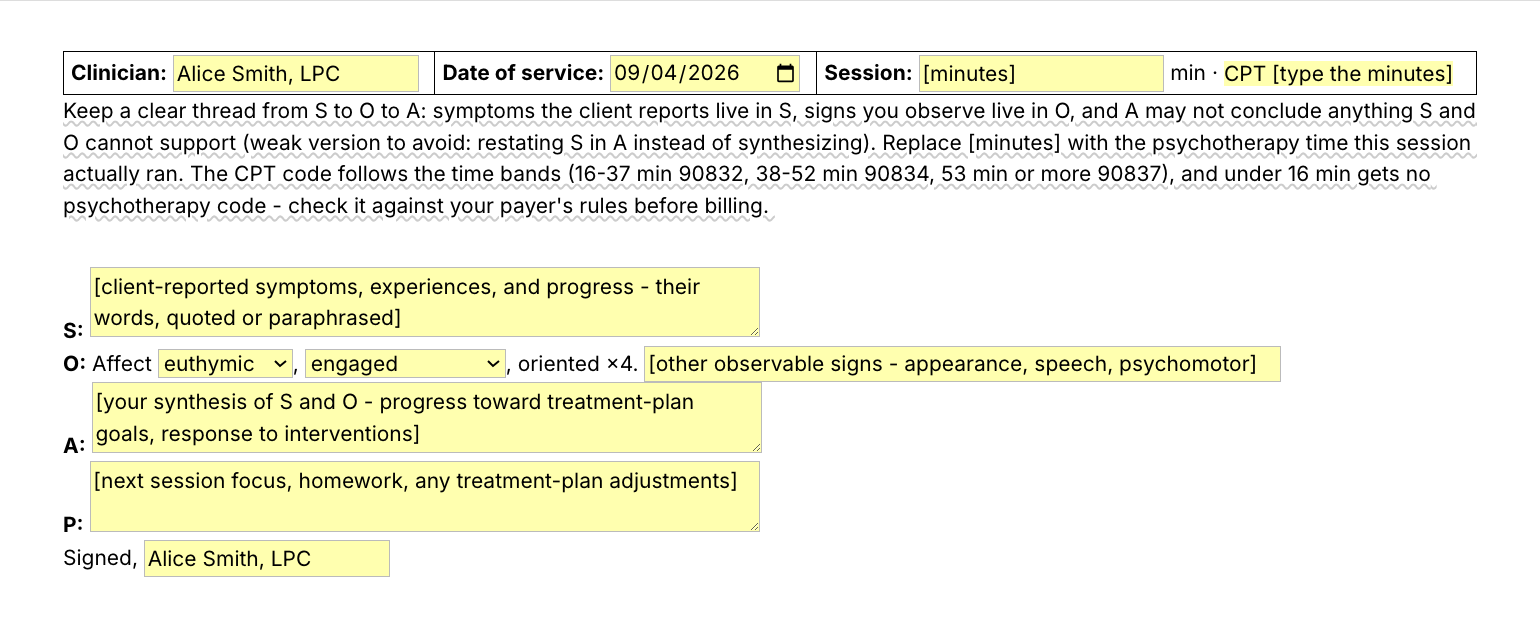
Typing /soap opens the Text Blaze pop-up, changing the affect menu updates the O line, and Insert places the finished SOAP note in the note field

Type /soap. Fill in the form fields. Insert.

  1. Add the packThe button opens the pack's page on the Text Blaze marketplace. Add the pack in one click (sign up for a free account if you do not have one) and the templates are yours, ready to edit and use anywhere.
  2. Type /soap where you writeIn your EHR's note field, in a client portal, in a Google Doc. A pop-up opens with the four sections and their fields.
  3. Fill in, insert, editType the minutes, pick affect and engagement, type what the client reported and what you observed, insert. It lands as text you can still edit.
  4. Then make one of your ownCreate a snippet of sentences or paragraphs you type often. Give it a keyboard shortcut. Type the shortcut anywhere and the text appears. Congratulations! You just saved yourself a few seconds.

What is Text Blaze?

Text Blaze is a free Chrome extension, with Windows and Mac apps, that turns the text you type again and again into templates you insert with a shortcut. Type /soap and the whole note skeleton appears where your cursor is, in any app you type in.

Templates can hold text fields, drop-down menus, dates and toggles, and fields that compute from other fields, so each note comes out complete and specific to this session.

Works everywhere you type

SimplePractice, TherapyNotes, client portals, Google Docs, Gmail. No integration to set up.

Fill-in fields, not blanks

Text fields, menus, dates and toggles. The CPT code follows from the session minutes.

Your words, saved once

Change the defaults once, your name and credential, your usual plan line, and every note starts filled in. In a group practice, one person sets the skeletons and shares the folder (free includes limited sharing, Pro doubles it, and the plans page has the numbers). Each clinician keeps their own words.

Free forever

The free plan holds up to 20 snippets, so the whole pack fits, and the eight one-line snippets work without limit. On the free plan you can test form fields, tables and if/then rules (the SOAP header and the CPT rule use them). Using them day to day needs Pro, $2.99 a month billed yearly.

Works in SimplePracticeTherapyNotesTheraNestHeadwayAlmaGmailOutlook on the webGoogle Docs

Template insertion is done locally. PHI and other sensitive information never leaves your computer.

SOAP vs DAP vs BIRP - which note format should I use?

Use the format your payer, agency or supervisor expects. If nobody expects one, pick the format whose sections match how you think. SOAP separates what the client reported from what you observed. DAP folds both into one Data section. BIRP replaces the assessment with a named intervention and the client's response to it.

What each therapy notes format asks for:

  • SOAP (Subjective, Objective, Assessment, Plan): the client's report in S, your observations in O, your synthesis in A, next steps in P. The most widely recognized format and the one most EHR note templates default to.
  • DAP (Data, Assessment, Plan): a SOAP note with S and O merged into one Data section. Faster to write when the report and the observation are hard to keep apart, and the format many agencies teach first.
  • BIRP (Behavior, Intervention, Response, Plan): the I and R sections name the technique you used and what the client did with it. Agencies that track interventions tend to require it.

Whichever you use, the same two rules apply. Symptoms the client reports and signs you observe stay separate from your interpretation, and the plan says what happens before and at the next session. Every template in this pack is built around those rules.

What makes a good therapy progress note template?

A good therapy notes template keeps the structure fixed and the content yours. The headings, the header and your name are typed once. The session minutes, what this client said, what you observed and what you make of it are typed fresh each session, with the template prompting each section so nothing is forgotten.

  • The same structure every time. Notes get read next to the treatment plan by supervisors and, sometimes, payer reviewers. The same sections in the same order, session after session, is what makes them easy to follow.
  • Specifics every session. Each section is a form field that asks for this session's content: today's report, today's observation, today's plan. That is what keeps a note from reading like last week's.
  • Guidance that stays out of the note. A short note on what belongs in each section, and the weak version to avoid, shows while you write and is never inserted.
  • Details that follow from other details. Type the minutes the session actually ran and the CPT code fills in (90832, 90834 or 90837, and no psychotherapy code under 16 minutes). Check it against your payer's rules before you bill.
  • Editable output. The note lands as text in whatever field you are in, so you can change anything before you sign. The SOAP header lands as a small table in rich-text fields and as plain lines in plain-text fields.
  • In your keyboard, not in a PDF. A cheat sheet you print still means retyping the headings. A template you insert with a shortcut types them for you.

If your EHR's note template works for you, keep it. This pack is for the places it does not reach: the portal message, the supervision summary, the Google Doc, a second EHR at a group practice, and the sentences you type inside any template.

If you use an AI scribe, the two work together. The scribe drafts the narrative. The skeleton is where that draft goes, in the format your payer expects, and the one-line snippets are the parts you type yourself: the screening sentence, the plan closer, the homework line.

How this template helps

The /soap snippet is that template as a Text Blaze pop-up: your name and the date at the top, a form field for each section, menus for affect and engagement, and the CPT code computed from the session minutes. Eight more templates cover the other formats and sections, and eight one-line snippets cover the sentences you type in most notes.

Inside the pop-up

Clinician, date of service and session minutes at the top, with your name saved once. The minutes field starts as a [minutes] prompt, not a number, so you type the time this session actually ran. The CPT code follows from it: 16 to 37 minutes reads 90832, 38 to 52 reads 90834, 53 or more reads 90837, and under 16 minutes gets no psychotherapy code. Until you type a number the line reads CPT [type the minutes], and a note says to check the code against your payer. Then S as a paragraph field for what the client reported, in their words. O opens with an affect menu (euthymic, anxious, depressed, flat, irritable) and an engagement menu (engaged, variably engaged, guarded), then "oriented ×4" and a field for other observable signs. A and P are paragraph fields, and a signature line closes the note. A guidance note about keeping S, O and A distinct shows while you write and never lands in the note.

Filled in for a fictional client, it reads:

Clinician: Alice Smith, LPC · Date: 2026-08-24 · 45 min · CPT 90834
S: Client reports two panic episodes this week, both on workday mornings, and says the breathing practice "actually helped once I remembered it."
O: Affect anxious, engaged, oriented ×4. Restless early, settled.
A: Panic symptoms are down from baseline four episodes weekly to two, and client is applying the interoceptive strategies with partial success, consistent with goal 1 progress.
P: Continue weekly sessions. Homework is one interoceptive exposure with the log. Revisit workplace triggers next session.
Signed, Alice Smith, LPC

Your name, the section labels, "oriented ×4" and the signature were already typed, and the CPT code followed from the 45 minutes. The rest is this session's words.

The other note templates

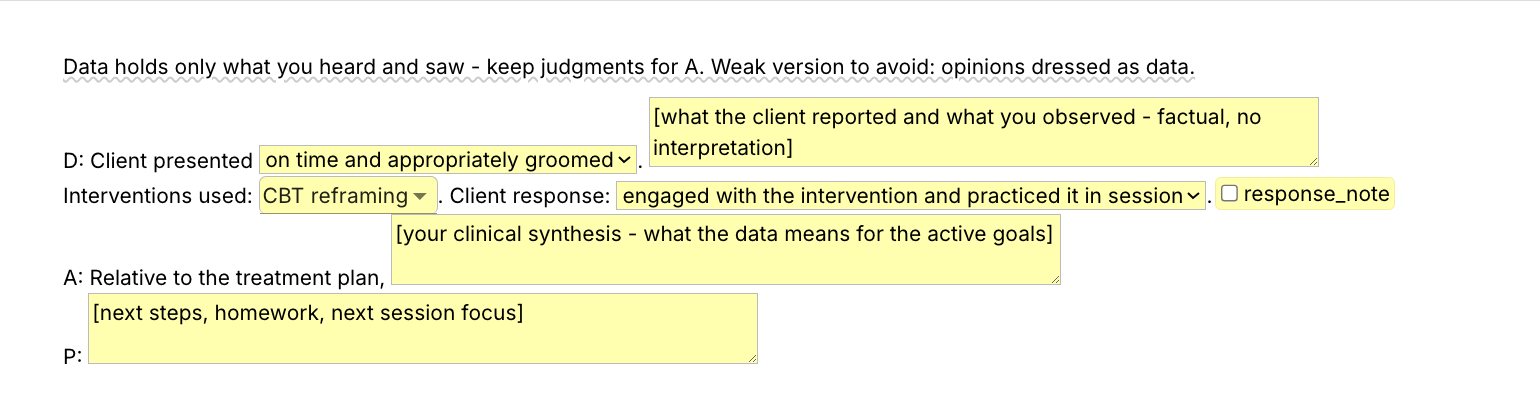
  • /dap: a presentation menu, a Data paragraph, an interventions menu you can pick several from, a client response menu with an optional detail line, then A and P.
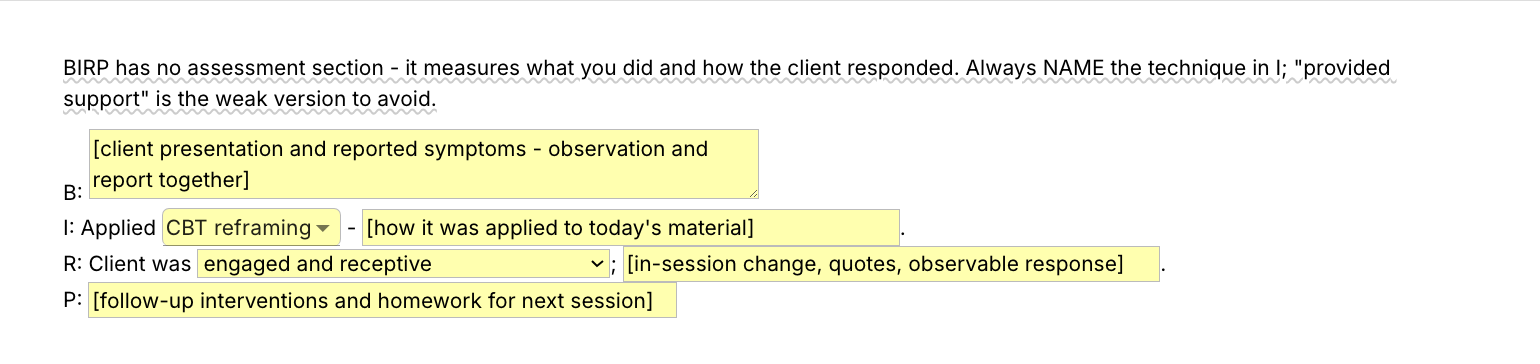
  • /birp: a Behavior paragraph, a techniques menu with a field for how you applied it, a client response menu with a detail field, and a Plan line.
  • /ros, the psych review of systems, for prescribers and intake evaluations: a lead menu, toggles for mood, sleep, appetite and concentration that add a line each, an SI/HI screen menu and an optional risk note.
  • /hpi, the history of present illness opener, for evaluations and psychiatric notes: the presenting concern, course and severity menus, and toggles for prior treatment and current medications.
  • /plan, /sum and /fu: the closing Plan paragraph, a two-sentence session summary, and a follow-up contact note for between-session calls and messages.
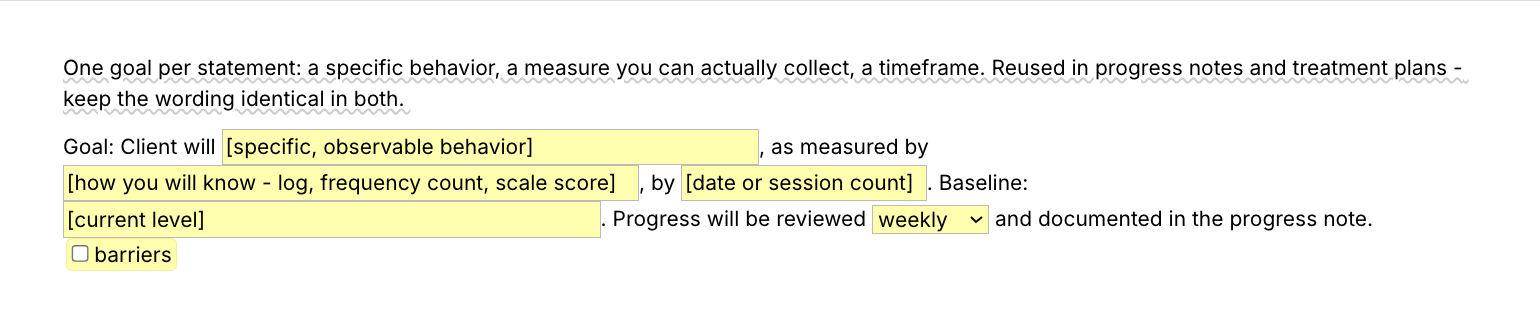
  • /goal, the SMART goal builder: behavior, measure, timeframe and baseline fields, a review-interval menu and a barriers toggle, so the goal reads the same in the note and in the treatment plan.

One-line snippets for the sentences you type most

  • /arrived, the session opener: on time, appropriately groomed, engaged throughout.
  • /o.wnl, the objective line for an unremarkable session: affect, speech, thought process, orientation.
  • /denies.sihi, the SI/HI screening sentence.
  • /technique, an intervention sentence with the technique picked from a menu.
  • /responded, the client response line for an engaged session.
  • /progress, the assessment line that ties the session to the treatment plan.
  • /homework, the homework sentence with one field for the assignment.
  • /nextweek, the plan closer for a routine weekly session.

Same shape every time, this session's words in every field: consistent structure with specific content is what reads well in an audit.

“Text Blaze has given me the time and energy to focus on my clients and grow my practice.”

Kalen SandersClinical psychologist and co-owner of Reclaim Psychological ServicesRead the story

Add the pack to a free Text Blaze account, type /arrived at the top of your next note, and /soap when you write it up.

Copy the template for free

Free forever. Works in any EHR or app. No integration required.

Questions therapists ask

Do I need Text Blaze to use this template?

Yes. The templates are Text Blaze snippets, and the free plan is enough to add all of them and to use the one-line snippets without limit. Text Blaze is a free Chrome extension, with Windows and Mac apps as well.

Does it work in my EHR?

Yes. Text Blaze works in your EHR, your email and any other app: SimplePractice, TherapyNotes, TheraNest, Headway and Alma among others, plus Gmail, Outlook, client portals and Google Docs. There is nothing to integrate. You type the shortcut in the note field where you would have typed the note.

My EHR already has templates. Why this pack?

Keep your EHR's note templates if they work for you. This pack goes where an EHR template cannot follow: into a portal message, a supervision write-up, a shared Google Doc, or the second system a group practice makes you chart in. It also comes with you when you change platforms, and the one-line snippets work inside any template, including your EHR's.

How do therapists write progress notes faster?

By writing the structure once and only the specifics each time. Therapists who stay caught up tend to keep a skeleton for each of their common session types and fill it in while the session is fresh, in the gap before the next client. This pack is those skeletons, plus the sentences that repeat, inserted with a shortcut.

How do I save time on therapy notes?

Stop retyping the headings and the sentences that are the same in most notes. Type /arrived for the opener, /o.wnl for an unremarkable objective line, /nextweek for the plan closer, and use the full skeleton for the sections that need this session's words. Writing the note right after the session, while the details are fresh, saves more than any template does.

SOAP vs DAP vs BIRP - which note format should I use?

The one your payer, agency or supervisor expects. If no one expects a format, SOAP is the most widely recognized, DAP is the fastest to write, and BIRP is the one that makes you name the intervention. The section above walks through all three. All three are in the pack.

Will my notes look cloned?

Not if you fill in the fields. The fixed text is the headings and your name. The minutes and every section field ask for this session's time, report, observation and plan, so two notes share a shape and nothing else.

Is my client's information stored anywhere?

Text Blaze snippets hold your template and your defaults, not your client records. Template insertion is done locally: what you type into the pop-up's fields goes into the page you are on and is not saved, synced or logged by Text Blaze after you insert.

BAA is available upon request. Read our HIPAA guide.

Is the pack free?

Yes. The pack is free and fits the free plan's 20 snippets. The eight one-line snippets work without limit on Free. You can test the nine form-field templates, /soap included, on the free plan. Using them day to day needs Pro, $2.99 a month billed yearly, which also adds more snippets and more folder sharing.

Can I change the template?

Yes. Everything is editable: the section labels, the menu options, the defaults, the CPT bands and the wording. Add a section your agency requires, delete one you never use, or swap the affect menu for your own descriptors. Change it once and it stays changed.

Can I use it on Windows or Mac?

Yes. Text Blaze runs as a Chrome extension and as Windows and Mac apps, so the shortcuts work in browser-based EHRs and in desktop apps alike, with the same snippets on every computer you sign in on. There is no iPad or phone app, so notes written on a tablet between sessions stay hand-typed.

Catch up on notes in the gap before the next client.

Add the free therapy note template pack, change the defaults once, and Sunday night gets its evening back.

Copy the template for free

Free forever. Works in any EHR or app. No integration required.