




Treatment Plan Templates for Therapists

Eliminate repetitive typing and mistakes. Insert a Treatment Plan in any text box in seconds.

Free forever. Works in any EHR or app. No integration required.

Kalen Sanders
“Text Blaze has given me the time and energy to focus on my clients and grow my practice.”
Kalen Sanders, Reclaim Psychological Services. Read the story

4.9 · 1,800+ Chrome Web Store reviews · 800,000+ people use Text Blaze

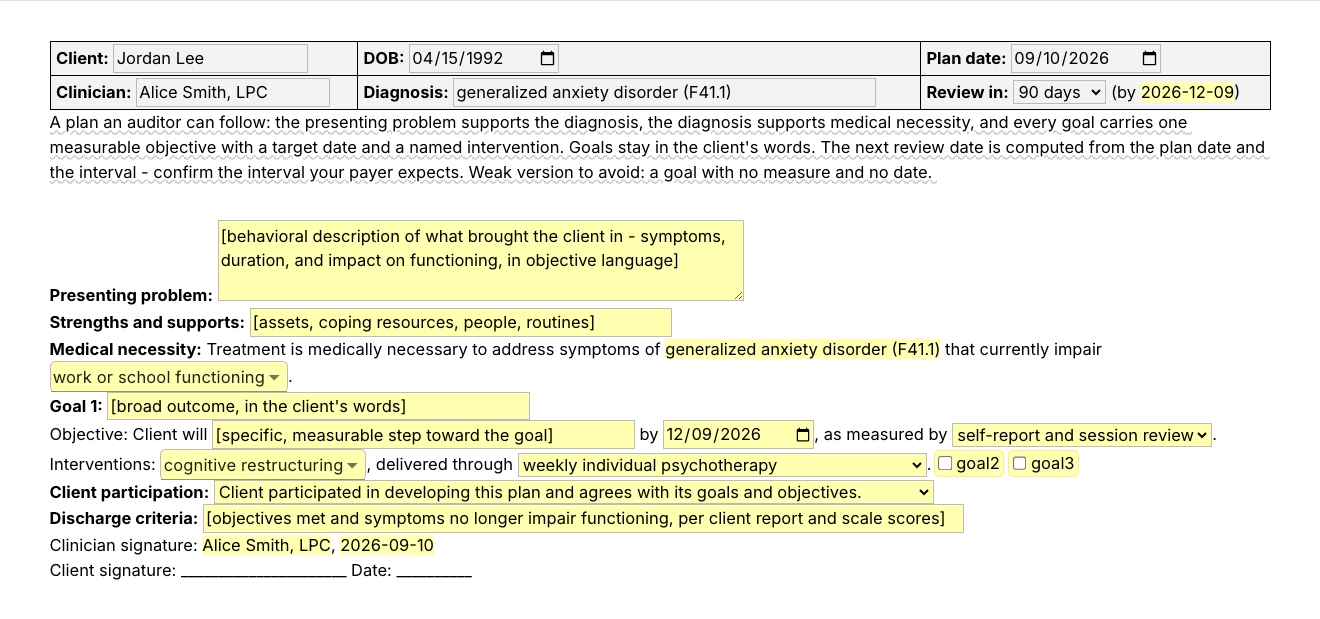
Typing /txplan opens the Text Blaze pop-up. Changing the review interval updates the review date. Insert places the finished treatment plan in the page

Type /txplan. Fill in the form fields. Insert.

  1. Add the packThe button opens the pack's page on the Text Blaze marketplace. Add the pack in one click (sign up for a free account if you do not have one) and the templates are yours, ready to edit and use anywhere.
  2. Type /txplan where you writeIn your EHR's plan form, in a client portal, or in the document where you draft plans. A pop-up opens with the plan's sections and their form fields. If your EHR's plan form has a separate field for each section, go field by field instead: /necessity for medical necessity, /goal in each goal field, /objectives or one of the written-out objectives in each objective field, /interv.cbt for interventions, /dccriteria and /agrees at the end.
  3. Fill in, insert, editType the presenting problem and the goal in the client's words, pick the measure and the interventions from menus, add a second goal if you need it, insert. It lands as text you can still edit. When the review date comes, type /txreview: a status for each goal, this period's data, and what you are changing.
  4. Then make one of your ownCreate a snippet of sentences or paragraphs you type often. Give it a keyboard shortcut. Type the shortcut anywhere and the text appears. Congratulations! You just saved yourself a few seconds.

What is Text Blaze?

Text Blaze is a free Chrome extension, with Windows and Mac apps, that turns the text you type again and again into templates you insert with a shortcut. Type /txplan and the whole plan appears where your cursor is, in any app you type in.

Templates can hold text fields, drop-down menus, dates and toggles, and fields that compute from other fields, so each plan comes out complete and specific to this client.

In this pack: /txplan (the full plan), /txreview (the plan review), /goal (a SMART goal), /objectives (measurable objective stems by domain), and eleven shorter snippets for the sentences most plans share, among them /necessity, /interv.cbt, /dccriteria and /agrees.

Works everywhere you type

SimplePractice, TherapyNotes, client portals, Gmail. No integration to set up.

Fill-in fields, not blanks

Text fields, menus, dates and toggles. The review date follows from the plan date and the interval you pick.

Your words, saved once

Change the defaults once, your name and credential, your usual review interval, your own list of interventions, and every plan starts filled in. In a group practice, one person sets the plan structure and shares the folder, and each clinician keeps their own words. Sharing limits are on the plans page.

Free forever

All 15 snippets fit the free plan's 20, and the ten plain-text ones, /agrees among them, are fully usable on Free. The four templates and /necessity use form fields: Free lets you test them, and day-to-day use needs Pro, $2.99 a month billed yearly. The plans page has the details.

Works in SimplePracticeTherapyNotesTheraNestHeadwayAlmaGmailOutlook on the webGoogle Docs

Template insertion is done locally. PHI and other sensitive information never leaves your computer.

How to write a treatment plan for counseling

Write a counseling treatment plan in the order a reviewer reads it: the presenting problem that supports the diagnosis, the diagnosis that supports medical necessity, then each goal in the client's words with a measurable objective, a target date and a named intervention. Close with client participation, discharge criteria, signatures and a review date.

A treatment plan is the document that says why this client is in treatment, where the two of you are trying to get to, and how you will both know it is working. When a payer asks for records, the plan is usually on the list next to the intake, the diagnosis and the progress notes, so it helps when all of them tell the same story. What a counseling treatment plan usually has:

  • Identifying details: client, date of birth, plan date, clinician and credential.
  • Presenting problem: what brought the client in, described behaviorally: the symptoms, how long they have lasted and what they get in the way of.
  • Diagnosis and medical necessity: the diagnosis you have made, and a sentence that ties treatment to the functioning it impairs.
  • Strengths and supports: the people, routines and resources the plan can lean on.
  • Goals: broad outcomes, in the client's words.
  • Objectives: the measurable steps under each goal: what the client will do, by when, how it is measured and from what baseline.
  • Interventions: the modality and techniques you will use, and how often you meet.
  • Client participation, discharge criteria and signatures.
  • Review date: when the plan is next updated. Ninety days is a common cycle. Confirm the one your payer or agency expects.

Three habits make the plan easier to write and easier to read later. Start from the intake: the presenting problem and the diagnosis are already documented there. Write the goal with the client in the room, in their words, and put the clinical precision into the objective. When the review date comes, update the plan with data: what changed, where each goal stands and what you are revising.

What makes a good treatment plan template?

A good counseling treatment plan template fixes the structure and leaves the content to you. The sections, the header, the medical necessity sentence and the signature lines are typed once. The presenting problem, the goal in the client's words and the measurable objective are typed fresh for each client, with a prompt for each so nothing is skipped.

  • The same sections in the same order. Plans get read next to the progress notes by supervisors and, sometimes, payer reviewers. A plan that always runs problem, diagnosis, necessity, goals, objectives, interventions is easy to follow, and easy for you to check before you sign.
  • This client's specifics in every plan. The goal, the objective and the target date are form fields that ask for this client's content, and the goal builder and the objectives bank ask for a baseline as well. Two plans share a shape and nothing else.
  • Objectives you can measure. Each objective asks for a target date and a measure: self-report, a symptom scale score, an activity or diary log, an attendance record, your own observation.
  • Dates that follow from other dates. Pick the review interval and the review date is worked out from the plan date. Confirm the interval your payer expects.
  • Guidance that stays out of the plan. A short note on what belongs in each section, and the weak version to avoid, shows while you write and is never inserted.
  • A review that takes minutes. A plan is only useful while it is current. The weak version of a review is "continue plan" with no data. When the update asks for a status and a sentence of this period's data for each goal, the stronger version takes about as long to write.
  • Editable output. The plan lands as text in whatever field you are in, so you can change anything before you and the client sign. The header lands as a small table in rich-text fields and as plain lines in plain-text fields.
  • In your keyboard, not in a file. A treatment plan template PDF or Word file gives you the headings and leaves the typing to you. With a template you insert by shortcut, the fixed parts are already typed and you fill in only the rest.

If your EHR's treatment plan builder works for you, keep it. This pack is for the places it does not reach: a plan drafted for supervision, a second system at a group practice, a secure message in your client portal, and the sentences you type inside any plan form, your EHR's included.

If you use an AI scribe, the two work together. The scribe drafts the session note. The plan is the document you write with the client, and its goals and objectives are what each note refers back to.

How this template helps

The /txplan snippet is that template as a pop-up: a header with the review date computed from the plan date, form fields for the presenting problem and up to three goals, and menus for measures and interventions. /txreview is the matching review, /goal and /objectives build a goal and an objective, and eleven shorter snippets are sentences most plans share.

Inside the pop-up

  • Header: client, date of birth, plan date, clinician and diagnosis, with your name saved once. Pick the review interval (30, 60, 90 or 180 days) and the review date appears next to it.
  • Presenting problem and strengths: a paragraph field and a one-line field.
  • Medical necessity: the sentence is already written. It repeats the diagnosis you typed, and you pick what the symptoms impair from a menu that takes more than one choice: work or school functioning, relationships, sleep, self-care and daily routines, concentration and decision-making and physical health. There is one diagnosis field, so a second diagnosis goes in the same field or on the line after you insert.
  • Goals: each goal is three lines. The goal, in the client's words. The objective, "Client will ... by ...", with a target date and a measure menu. The interventions, from a menu that also takes more than one choice and that you can change (cognitive restructuring, behavioral activation, graded exposure, mindfulness and grounding skills and four more), with a menu for how often you meet. Two toggles at the end of the first goal's interventions line, labelled goal2 and goal3, add a second and a third goal.
  • What it does not have: a separate baseline field, or a second objective under a goal. Write the baseline into the objective, as the example below does, or build the objective with /objectives, which asks for one. Add a second objective on the line after you insert.
  • Close: a client participation menu, a discharge criteria field and the signature lines. A guidance note about what a reader looks for shows while you write and never lands in the plan.

Here is a counseling treatment plan example, filled in for a fictional client, with the first goal shown. Highlighting marks what was typed for this client. The rest was already there or picked from a menu. Dates come out year-first as the pack ships, and the date format is yours to change.

Client: Maya Chen · DOB: 1990-11-02 · Plan date: 2026-09-10
Clinician: Alice Smith, LPC · Diagnosis: major depressive disorder, single episode, moderate (F32.1) · Review in: 60 days (by 2026-11-09)

Presenting problem: Six months of low mood, loss of interest, and early-morning waking most nights. Missed four workdays last month and has withdrawn from friends. Wants to feel motivated again.

Strengths and supports: supportive partner, stable job, enjoys hiking, engaged and insightful in session

Medical necessity: Treatment is medically necessary to address symptoms of major depressive disorder, single episode, moderate (F32.1) that currently impair work or school functioning and sleep.

Goal 1: Get through a full workweek without calling in sick or shutting down
Objective: Client will increase scheduled pleasant or mastery activities from a baseline of none to at least three per week by 2026-11-09, as measured by activity or diary log.
Interventions: cognitive restructuring and behavioral activation, delivered through weekly individual psychotherapy.

Client participation: Client participated in developing this plan and agrees with its goals and objectives.

A second goal, the discharge criteria and the signature lines follow in the full plan.

The plan review

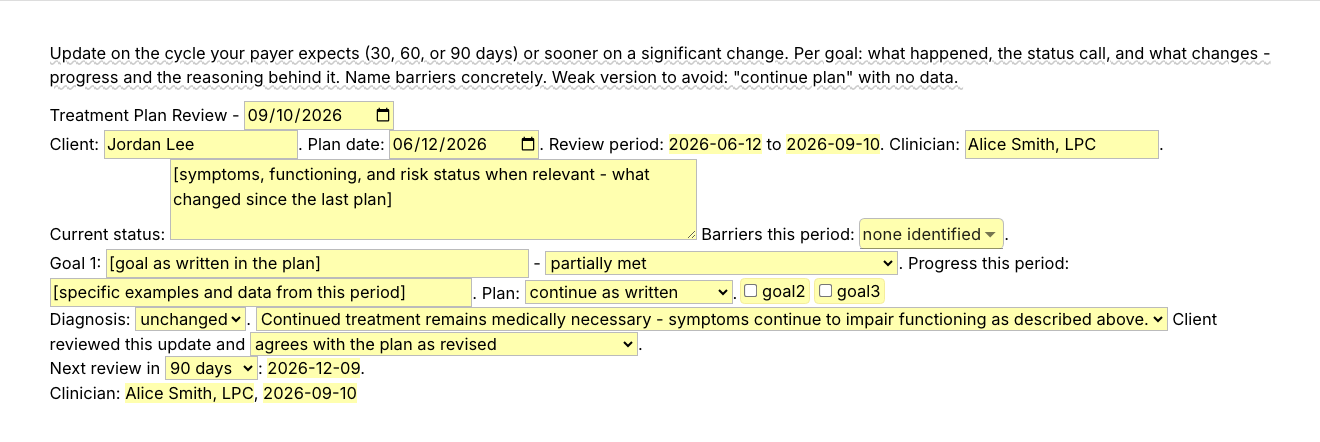
/txreview is the update you write when the review date comes. The review period is filled in from the two dates. Then current status, a barriers menu that takes more than one choice, and for each goal: the goal as written, a status, this period's data and what you will change. /txreview does not read the plan you wrote with /txplan: you type the plan date and paste each goal in as written. The status menu has five options: met, partially met, ongoing, progressing as expected, limited progress and discontinued due to changed clinical need. A diagnosis check, the continued-necessity sentence, the client's agreement and the next review date (30, 60, 90 or 180 days on) close it. The pop-up's guidance note names the weak version to avoid: "continue plan" with no data.

The same fictional client at her first review, one goal shown:

Treatment Plan Review - 2026-11-09
Client: Maya Chen. Plan date: 2026-09-10. Review period: 2026-09-10 to 2026-11-09. Clinician: Alice Smith, LPC.

Current status: Mood low on about half of days, down from most days. Early-morning waking two or three nights a week. No safety concerns this period. Started a new role at work in October, which raised stress for two weeks. Barriers this period: avoidance and life stressors outside treatment.

Goal 1: Get through a full workweek without calling in sick or shutting down - partially met. Progress this period: scheduled activities up from none to two per week per activity log. Missed one workday, down from four in the month before the plan. The weekday activities are the ones skipped, so one moves to the weekend and the target date moves to 2027-01-08. Plan: revise the objective.

Diagnosis: unchanged. Continued treatment remains medically necessary - symptoms continue to impair functioning as described above. Client reviewed this update and agrees with the plan as revised.
Next review in 60 days: 2027-01-08.
Clinician: Alice Smith, LPC, 2026-11-09

Whichever plan option you pick, the line before it says what the data showed and what changes.

The goal and objective builders

  • /goal, the SMART goal builder: one sentence with a field for the behavior, a measure menu, a baseline, a target and a date, then how often you will review it and an optional line for anticipated barriers. Pick symptom scale score and a field appears for the instrument's name. The instrument is named, never scored. The guidance note reminds you to keep the goal's wording identical in the plan and in every progress note that refers to it, so write it once and paste it in both.
  • /objectives, a bank of measurable objective stems: pick one of eight domains (mood, anxiety and worry, coping skills, relationships and communication, trauma-related symptoms, substance use, sleep and self-care, work or school functioning) and a menu of stems for that domain opens. Add the timeframe, the data source and this client's baseline, then the intervention and frequency that support it. The stems are starting points. You finish them for the client in front of you.

Shorter snippets for the sentences most plans share

Ten of these are plain text with no fields. They are complete sentences, so you insert one and then change the numbers, the timeframe and the baseline for this client.

  • /agrees, the two client participation sentences that close a plan. It inserts exactly this: "Client participated in developing this plan and agrees with its goals, objectives, and interventions. The plan was reviewed with the client, who received a copy." The /txplan pop-up has its own participation menu with shorter, one-sentence options, so /agrees is for plans you write elsewhere, such as the last field of an EHR plan form.
  • /necessity, the medical necessity sentence, with one text field for the diagnosis.
  • /interv.cbt, the intervention line for weekly individual CBT.
  • /dccriteria, discharge criteria.
  • /obj.activity, /obj.thoughts, /obj.sleep, /obj.anxiety and /obj.coping: five measurable objectives written out in full, for activity scheduling, thought records, a sleep routine, anxiety skills and coping skills. /obj.activity, for one, inserts: "Objective: Client will identify and engage in at least two pleasurable or mastery-based activities (e.g., walking, reading, socializing) for a minimum of 30 minutes each week over the next 60 days, as measured by self-report and completion of a weekly activity log."
  • /rev.partial, the review paragraph for a goal that is partially met.
  • /txcontinue, the continued-necessity closer for a review.

The same structure in every plan, with this client's goals, objectives and dates typed fresh: that is a plan a supervisor or a reviewer can follow, and one you can bring up to date in minutes when the review date comes.

“Consistent and personalized communication with our clients is one of our top priorities. Text Blaze helps me standardize the language I frequently use in psychological reports while also saving valuable time.”

Kalen SandersClinical psychologist and co-owner of Reclaim Psychological ServicesRead the story

Add the pack to a free Text Blaze account and type /txreview the next time a plan review comes due.

Copy the template for free

Free forever. Works in any EHR or app. No integration required.

Questions therapists ask

Do I need Text Blaze to use this template?

Yes. The templates are Text Blaze snippets. The free plan is enough to add all of them, to use the ten plain-text snippets without limit and to test the form-field templates. Text Blaze is a free Chrome extension, with Windows and Mac apps as well.

Does it work in my EHR?

Yes. Text Blaze works in your EHR, your email and any other app: SimplePractice, TherapyNotes, TheraNest, Headway and Alma among others, plus Gmail, Outlook, client portals and Google Docs. There is nothing to integrate. You type the shortcut in the field where you would have typed the text. If your EHR's plan form has a separate field for each section, use the shorter snippets field by field. The steps near the top of this page say which goes where.

My EHR already has templates. Why this pack?

Keep your EHR's treatment plan builder if it works for you. This pack goes where it cannot follow: a plan drafted for supervision, the second system a group practice makes you chart in, a secure message about the plan in your client portal. It also comes with you when you change platforms, and the shorter snippets work inside any plan form, including your EHR's.

Will my notes look cloned?

Not if you fill in the fields. In a plan, the fixed text is the section labels, the medical necessity sentence and the signature lines. The presenting problem, each goal and each objective are fields that ask for this client's content, and /goal and /objectives ask for this client's baseline too. The shorter objective snippets are complete sentences meant to be edited: change the numbers and the timeframe for this client before you sign.

Is my client's information stored anywhere?

Text Blaze snippets hold your template and your defaults, not your client records. Template insertion is done locally: what you type into the pop-up's fields goes into the page you are on and is not saved, synced or logged by Text Blaze after you insert.

BAA is available upon request. Read our HIPAA guide.

Is the pack free?

Yes. The pack is free and its 15 snippets fit the free plan's 20. The ten plain-text snippets, /agrees included, are fully usable on Free. The four templates and /necessity use form fields: on the free plan you can test them to see how they work, and using them day to day needs Pro, $2.99 a month billed yearly, which also adds more snippets and more folder sharing. The plans page has the details.

Can I change the template?

Yes. Everything is editable: the section labels, the intervention list, the measure menu, the review intervals, the objective stems, the date format and the wording. To change a default, open the snippet in your Text Blaze dashboard, click the field and replace "Alice Smith, LPC" with your name. It takes a minute. Add a section your agency requires or delete one you never use. Change it once and it stays changed.

How do I send the document to my client?

Insert the plan where you already keep and share documents: your EHR's plan form, a secure portal message, or a document you print or save as a PDF. The plan ends with a clinician signature line and a blank client signature line. Text Blaze does not collect signatures, so the client signs the way your practice already handles it.

Does the template guarantee reimbursement?

No. A template gives your plan a structure a reader can follow. What a payer pays for, and how a records review turns out, is the payer's decision and depends on the care and the rest of the record. Check your payer's and your licensing board's requirements for what a plan must include and how often it is reviewed.

Can I use it on Windows or Mac?

Yes. Text Blaze runs as a Chrome extension and as Windows and Mac apps, so the shortcuts work in browser-based EHRs and in desktop apps alike, with the same snippets on every computer you sign in on. There is no iPad or phone app, so a plan written on a tablet stays hand-typed.

A treatment plan in minutes, and a review that gets done on its date.

Add the free mental health treatment plan template pack, change the defaults once, and the next plan or review is a shortcut away.

Copy the template for free

Free forever. Works in any EHR or app. No integration required.