


Veterinary Discharge Instructions Templates

Eliminate repetitive typing and mistakes. Insert a discharge sheet or a post-op sheet in any text box in seconds.

Free forever. Works in any PIMS or app. No integration required.

Genevieve Hoffman
“Text Blaze has saved me over 1,000 hours of typing since becoming a user in November of 2024.”
Genevieve Hoffman, State Road Animal Hospital. Read the story

4.9 · 1,800+ Chrome Web Store reviews · 800,000+ people use Text Blaze

Typing /dcgen opens the Text Blaze pop-up with a filled-in discharge, changing the recheck menu from 2 weeks to 1 week changes the date, and Insert places the finished discharge instructions

Type /dcgen. Fill in the form fields. Insert.

  1. Add the packThe button opens the pack's page on the Text Blaze marketplace. Add the pack in one click (sign up for a free account if you do not have one) and the templates are yours, ready to edit and use anywhere.
  2. Type /dcgen where you write the dischargeIn your PIMS, in the email to the owner, in your texting platform or a Google Doc you print. A pop-up opens with the pet's name, the visit, the medications and the recheck.
  3. Fill in, insert, editType the pet's name once and it fills every line that uses it. Write what you did today and the medications, pick the recheck interval, insert. It lands as text you can still edit before the owner gets it.
  4. Then make one of your ownCreate a snippet of sentences or paragraphs you type often. Give it a keyboard shortcut. Type the shortcut anywhere and the text appears. Congratulations! You just saved yourself a few seconds.

What is Text Blaze?

Text Blaze is a free Chrome extension, with Windows and Mac apps, that turns the text you type again and again into templates you insert with a shortcut. Type /dcgen and a full discharge sheet appears where your cursor is, in any program you type in.

Templates can hold text fields, drop-down menus, dates and checkboxes, and values that compute from other fields, so the recheck date writes itself and the sutures paragraph appears only when you tick it.

Works everywhere you type

Browser-based PIMS like ezyVet, Shepherd and Covetrus Pulse through the Chrome extension. Installed programs like Cornerstone and AVImark through the Windows app. The owner's email, your texting platform and Google Docs too.

Fill-in fields, not blanks

Text fields for the pet's name, the medications and the phone numbers, menus for the procedure, the cone or suit and the recheck, and checkboxes that add the sutures or extractions paragraph only when they apply.

Your clinic's wording, saved once

Set your wording, phone number and ER clinic once. Share the folder and every doctor and tech sends the same instructions.

Free forever

The whole pack fits the free plan. The five plain paragraphs are free without limit. The discharge sheets use form fields: test them free, or use them daily with Pro for $2.99 a month, billed yearly.

Works in ezyVetShepherdCovetrus PulseDigitailCornerstone (Windows app)AVImark (Windows app)ImproMed (Windows app)GmailOutlookGoogle Docs

Template insertion is done locally. PHI and other sensitive information never leaves your computer.

What should veterinary discharge instructions include?

Veterinary discharge instructions tell the owner what happened today and what to do at home. A complete sheet covers the visit or procedure, each medication with dose and timing, feeding and activity, what is normal and what is not, who to call during office hours and after hours, and when to come back.

The parts of a discharge sheet, in the order owners read them:

  • What we did today: the reason for the visit and what was done, in plain words.
  • Medications: each one with how much, how often, for how long and with or without food, plus a reminder to finish the course.
  • Food and activity: what to feed tonight and in the coming days, and how much rest.
  • What to watch for: what is normal after this visit and the signs that mean call now.
  • When to call: your number during office hours and the emergency clinic's name, address and number after hours.
  • Recheck: when to come back, as a date, not only an interval.

After surgery or anesthesia, add incision checks, the cone or recovery suit, the rest period and suture removal. After a dental, add the soft food period when teeth came out and home dental care. Written go-home instructions matter because checkout is busy, and the sheet is what the owner rereads at 10pm.

What makes a good veterinary discharge instructions template?

A good discharge template keeps your clinic's standard wording and asks only for what is different about this pet. The monitoring advice, the phone numbers and the emergency clinic are already written. The pet's name, today's visit, the medications and the recheck are form fields you fill in at checkout.

  • Written to the owner. Plain words, short paragraphs and the pet's name, never the record's abbreviations. The owner should be able to follow it alone at home.
  • The pet's name where it counts. The name sits in the opening line and the closing thank-you. Swap "your pet" for the name in the paragraphs you edit most, and the sheet reads like it was written for this family.
  • Your doctors' instructions. Every medical line is a default your clinic sets once and your doctor changes for this patient. The template holds the wording, never the medical decision.
  • Paragraphs that switch on. The sutures paragraph and the extractions paragraph appear only when you tick them, so no owner reads instructions that do not apply.
  • The recheck as a date. Pick 1 week after a September 23 visit and the sheet says September 30, 2026. Check it against your schedule before the owner leaves.
  • Text you can still edit. The sheet lands as ordinary text in the email, the PIMS or the text message, so you can change anything before you send or print it. In a rich-text field such as Gmail the headings stay bold. In a plain-text field they land as plain lines.

If your PIMS has discharge templates you like, keep them. This pack reaches the places they do not: the email to the owner, the texting platform, the follow-up message two days later, and the paragraphs you add to any discharge, including the ones your PIMS writes.

If you already draft discharges with an AI tool, the templates work next to it. The monitoring paragraphs and your clinic's phone and emergency lines are the parts that should read the same every time, word for word.

How this template helps

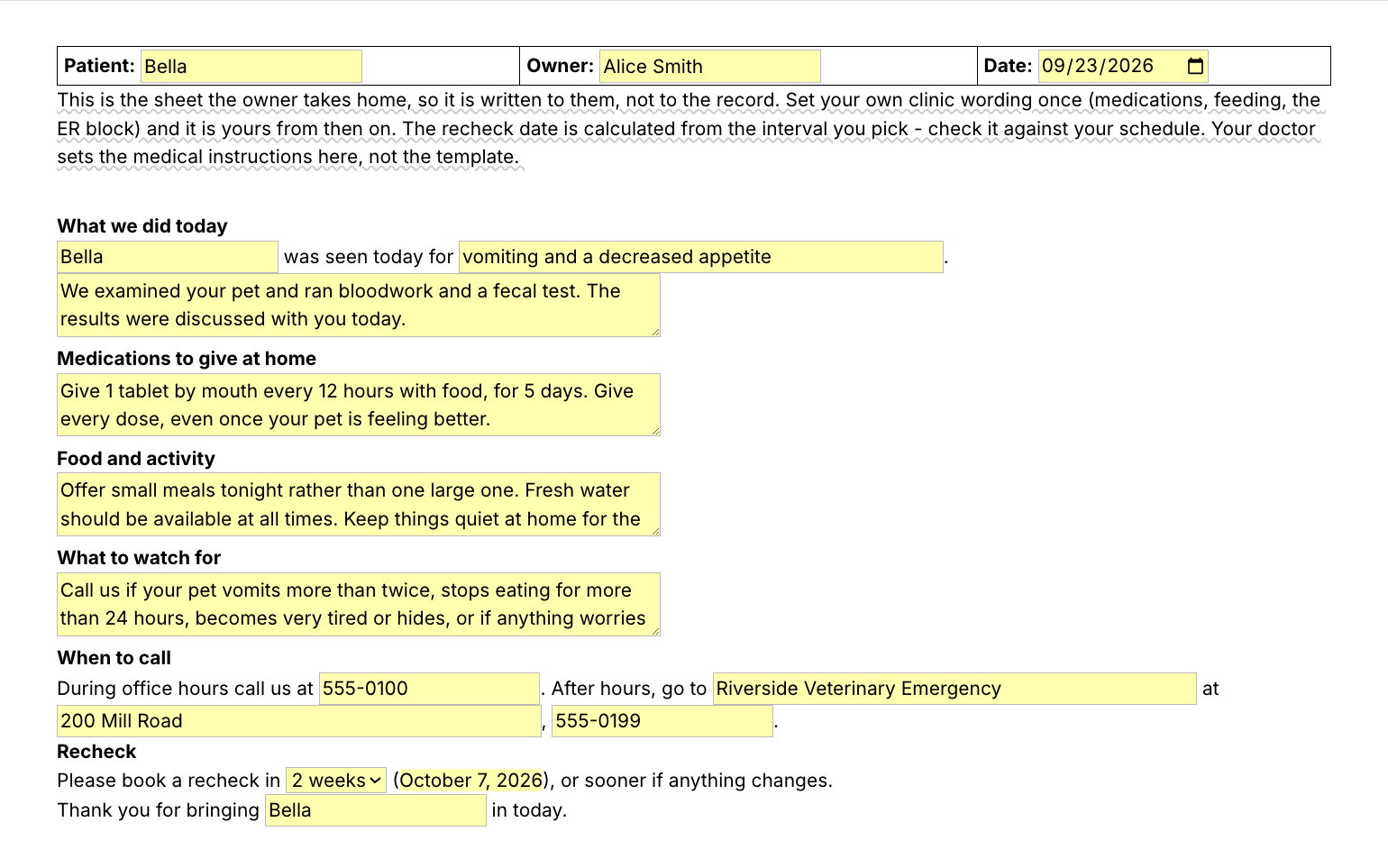
The /dcgen snippet is that template as a Text Blaze pop-up: the pet, the owner and the date at the top, fields for what you did today, the medications, food and activity and what to watch for, your clinic and emergency numbers, and a recheck menu that writes the date. Two more discharge sheets and eight paragraphs cover surgery, dentals and the rest.

Inside the pop-up

Patient, owner and date sit in a small table at the top. The pet's name fills the opening line and the closing thank-you. Paragraph fields hold what we did today, the medications, food and activity, and what to watch for, each starting with your clinic's usual wording. Your number, the emergency clinic's name, address and number are saved once. The recheck menu (3 days, 1 week, 2 weeks, 1 month) writes the date from the visit date.

Filled in for a fictional patient, the sheet reads:

Patient: Bella · Owner: Alice Smith · Date: 2026-09-23
What we did today
Bella was seen today for three days of vomiting and a poor appetite. We examined Bella, ran bloodwork and a fecal test, and gave fluids under the skin to top her up. Her bloodwork was normal and the fecal test was negative.
Medications to give at home
Give the anti-nausea tablet we sent home (the name and strength are on the label) once daily in the morning, with a small amount of food, for 3 days.
Food and activity
Feed the bland diet for the next 3 days, in four small meals rather than two large ones. Fresh water at all times. Quiet at home tonight, no dog park this week.
What to watch for
Call us if Bella vomits more than twice, will not drink, passes blood, or becomes weak or hides away.
When to call
During office hours call us at 555-0100. After hours, go to Riverside Veterinary Emergency at 200 Mill Road, 555-0199.
Recheck
Please book a recheck in 1 week (September 30, 2026), or sooner if anything changes.
Thank you for bringing Bella in today.

The headings, the phone numbers, the emergency clinic, the recheck date and the closing line were already there. The rest is this visit.

The other discharge sheets

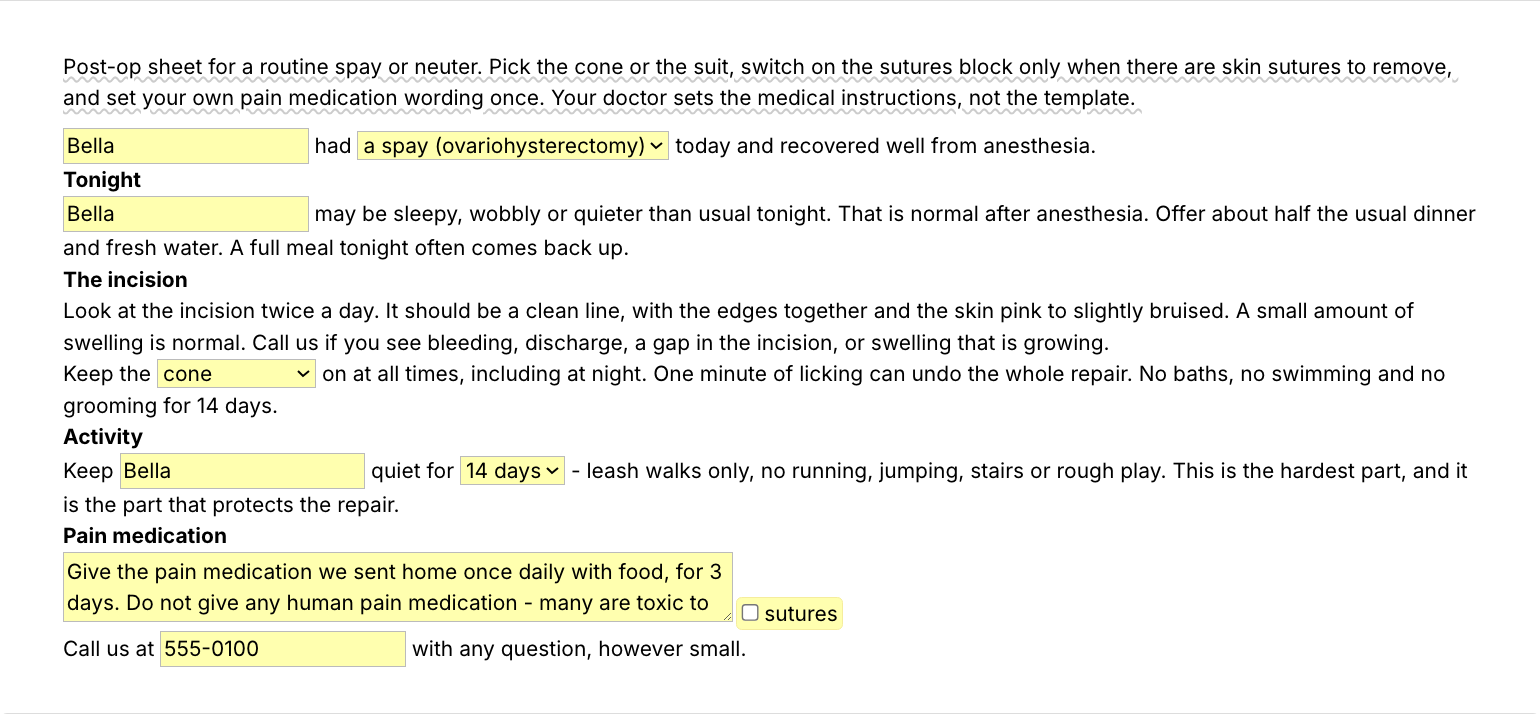
  • /dcspay, the spay or neuter post-op sheet: a procedure menu, tonight's care, incision checks, a cone or recovery suit menu, a 10 or 14 day rest menu, pain medication, and a sutures paragraph that appears only when you tick it.
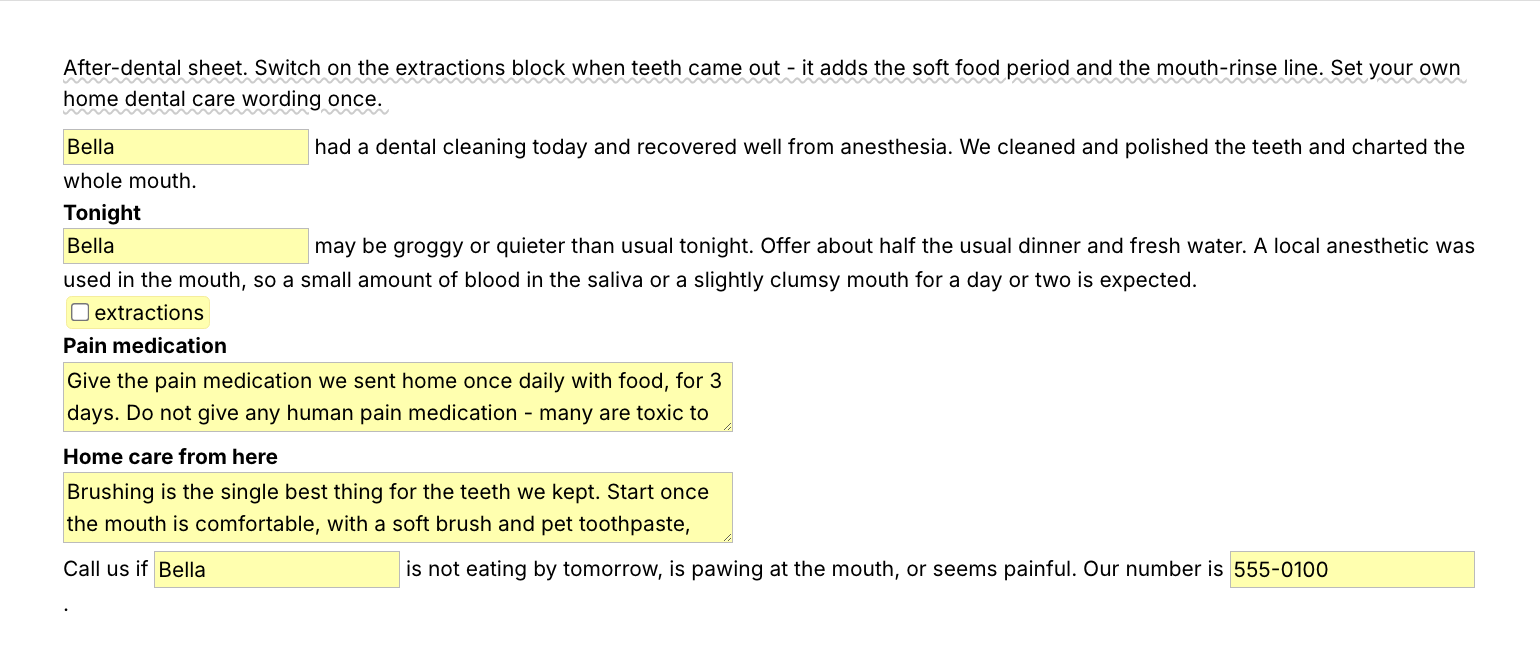
  • /dcdental, the dental cleaning (COHAT) discharge: tonight's care after anesthesia, an extractions paragraph with the number of teeth and a soft food menu, pain medication and home dental care.

Paragraphs you add to any discharge

  • /vaxmon, the vaccine reaction monitoring paragraph for every vaccine visit.
  • /genmon, what to watch at home after any sick visit.
  • /erinfo, your hours and your after-hours emergency clinic in one block.
  • /bland, bland diet instructions with the amount per meal as a field.
  • /vdhome, home care for an uncomplicated vomiting and diarrhea case.
  • /preanes, the night-before instructions with the food cutoff and drop-off time as fields.
  • /cone, the incision and cone reminder for any surgical discharge.
  • /recheck, one recheck sentence with an interval menu.

Put each medication on its own line in the medications field, with the drug name, strength, dose and timing. For a Spanish version, duplicate a sheet, translate it once and give it its own shortcut. With two locations, keep one /erinfo per clinic.

These also make good veterinary client handouts on their own: paste /bland or /vdhome into an email and the owner has the instructions in writing.

“Text Blaze lets me quickly put together detailed discharge notes covering everything from the procedure to medications without starting from scratch.”

Keep your PIMS templates. Share the folder and every doctor and tech sends the same instructions. Add the pack to a free Text Blaze account, type /vaxmon after your next vaccine visit, and /dcgen at your next checkout.

Copy the template for free

Free forever. Works in any PIMS or app. No integration required.

Questions vets and techs ask

How long should it take to write a veterinary discharge?

Written from scratch, a thorough discharge often takes 10 to 15 minutes. With a template it takes as long as the parts that are specific to this pet: the name, what you did, the medications and the recheck. The standard monitoring, phone and emergency paragraphs are already written, so most of a discharge is filled in before you start.

Will my notes look cloned?

Not if you fill in the fields. The pet's name opens and closes the sheet, and what you did today, the medications and the recheck are this visit's. The paragraphs that stay the same are the ones owners need in the same words every time: the monitoring advice and who to call.

How do I send the document to my client?

Type the shortcut wherever the owner will read it. In the email to the owner, in your texting platform, in the PIMS discharge field you print from, or in a Google Doc. The sheet lands as text, so it sends and prints like anything else you type.

Do I need Text Blaze to use this template?

Yes. The templates are Text Blaze snippets, and the free plan is enough to add all of them and to use the paragraphs without form fields without limit. Text Blaze is a free Chrome extension, with Windows and Mac apps as well.

Can I use it on Windows or Mac?

Yes. The Chrome extension covers browser-based PIMS such as ezyVet, Shepherd and Covetrus Pulse, and web email and texting tools. For installed Windows programs such as Cornerstone, AVImark or ImproMed, use the Text Blaze Windows app, which inserts the same snippets there. There is a Mac app too. There is no iPad or phone app.

Is my client's information stored anywhere?

Text Blaze snippets hold your template and your defaults, not your patients' records. Template insertion is done locally: what you type into the pop-up's fields goes into the email or record you are writing and is not saved, synced or logged by Text Blaze after you insert.

Is the pack free?

Yes. The pack is free and its 11 snippets fit the free plan's 20. The five paragraphs without form fields, /vaxmon among them, work without limit on Free. You can test the six form-field snippets, the three discharge sheets included, on the free plan. Using them day to day needs Pro, $2.99 a month billed yearly, which also adds more snippets and more folder sharing.

Can I change the template?

Yes. Everything is editable: the wording of every paragraph, the menu options, the medication defaults, your phone number and your emergency clinic. Rewrite the instructions the way your doctors give them. Change it once and every discharge after that uses your version.

Send every pet home with the full instructions.

Add the free discharge pack, set your clinic's wording and numbers once, and a discharge that took 15 minutes takes the time to fill in a name and the medications. Then save /vaxmon, or a paragraph of your own, and it is one shortcut from then on.

Copy the template for free

Free forever. Works in any PIMS or app. No integration required.