


Pet Quality of Life & Pain Score Calculators

Eliminate repetitive typing and mistakes. Insert a quality of life score or a pain score in any text box in seconds.

Free forever. Works in any PIMS or app. No integration required.

Genevieve Hoffman
“Text Blaze has saved me over 1,000 hours of typing since becoming a user in November of 2024.”
Genevieve Hoffman, State Road Animal Hospital. Read the story

4.9 · 1,800+ Chrome Web Store reviews · 800,000+ people use Text Blaze

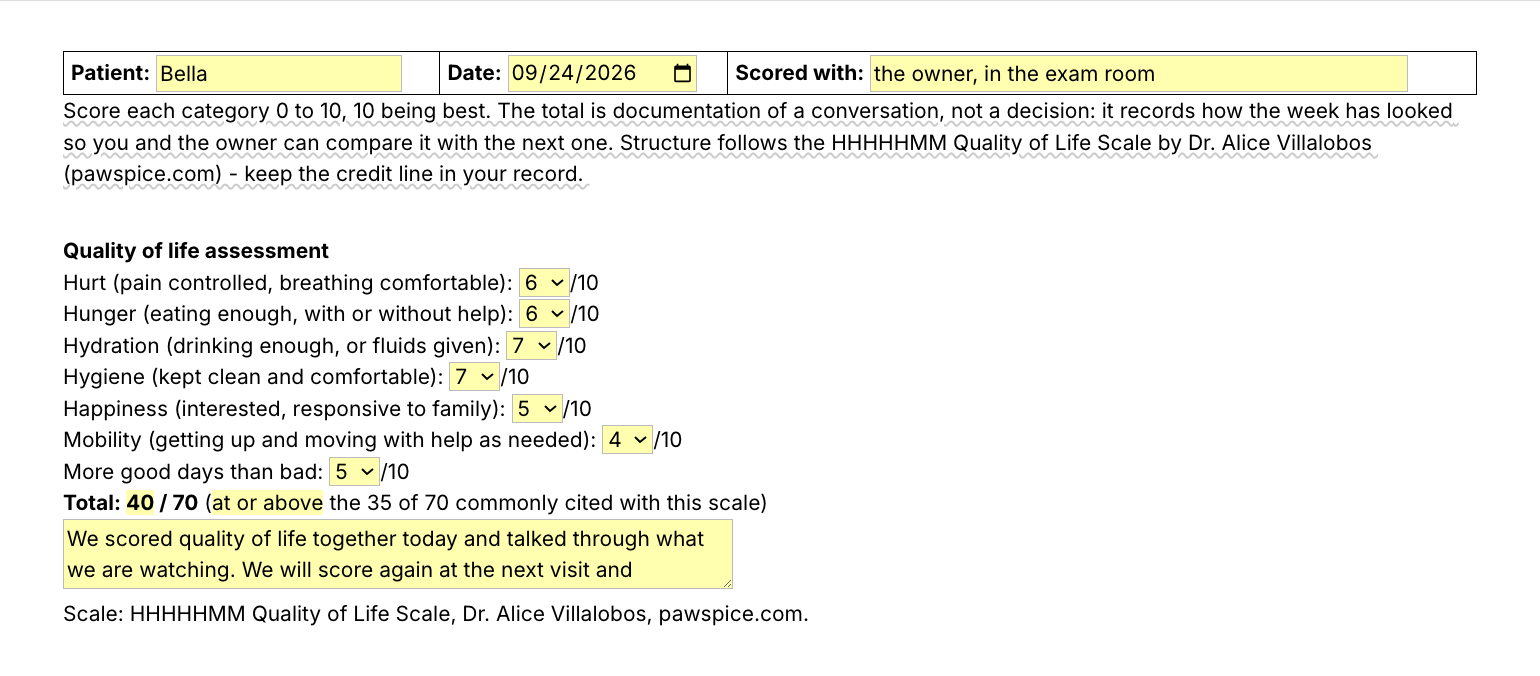
Typing /qol opens the Text Blaze pop-up, changing the mobility score from 4 to 6 changes the total from 40 to 42, and Insert places the assessment in the record

Type /qol. Fill in the form fields. Insert.

  1. Add the packThe button opens the pack's page on the Text Blaze marketplace. Add the pack in one click (sign up for a free account if you do not have one) and the templates are yours, ready to edit and use anywhere.
  2. Type /qol in the recordIn your PIMS, in an email or a Google Doc. A pop-up opens with a 0 to 10 menu for each category.
  3. Score, insert, editPick each score with the owner. The total adds itself up. Insert, and the assessment lands as text you can still edit.
  4. Then make one of your ownCreate a snippet of sentences or paragraphs you type often. Give it a keyboard shortcut. Type the shortcut anywhere and the text appears. Congratulations! You just saved yourself a few seconds.

What is Text Blaze?

Text Blaze is a free Chrome extension, with Windows and Mac apps, that turns the text you type again and again into templates you insert with a shortcut. Type /qol and the whole assessment appears where your cursor is, in any program you type in.

Works everywhere you type

Browser PIMS like ezyVet and Shepherd through the Chrome extension. Cornerstone and AVImark through the Windows app.

The math is done for you

Pick the scores and the total appears. The pain descriptor is written from the number.

Your wording, saved once

Change the prompts and the summary once. Share the folder and every doctor scores the same way.

Free forever

All six snippets fit the free plan and use form fields: test them free, or use them daily with Pro for $2.99 a month, billed yearly.

Works in ezyVetShepherdCovetrus PulseDigitailCornerstone (Windows app)AVImark (Windows app)ImproMed (Windows app)GmailOutlookGoogle Docs

Template insertion is done locally. PHI and other sensitive information never leaves your computer.

How do I score a quality of life scale for a dog or cat?

Score each category from 0 to 10 with the owner, 10 being best, and add them up. On a seven-category pet quality of life scale the total is out of 70. Write down who scored it and when, and score again at the next visit so you can compare.

A practical way to run it in the exam room:

  • Score it with the owner. They see the pet every day, you see it for twenty minutes. Ask about the past week, not just today.
  • Go through the seven categories. Hurt, hunger, hydration, hygiene, happiness, mobility, and whether there are more good days than bad. Give each a whole number from 0 to 10.
  • Add them up. The total is out of 70. Many practices note whether it sits above or below the 35 commonly cited with this scale, as context for the conversation.
  • Write down who scored it and when. An owner's score and a doctor's score of the same pet can differ, so the record should say which one it is.
  • Note what changed. One or two sentences on what dropped or improved since last time, and what you will watch next.

The score records a conversation. It is not a decision, and it is most useful as a trend: the same scale, the same categories, scored again in a week or two. The same approach works as a dog quality of life scale or a cat quality of life scale.

Why record the score the same way every visit?

Because the trend is what matters. When every doctor records the same categories, the same total and who scored it, you and the owner can compare this visit with the last one.

  • The next doctor can compare. Relief vets and colleagues see the same seven categories in the same order, so a drop in mobility or hunger is easy to spot.
  • The owner sees the trend. "Lower than last visit, mostly on mobility" is easier to talk through than a single number.
  • The record is complete. Every assessment has the date, who scored it, each category, the total and the scale's credit line.
  • It sits next to the other trends. /wt, /bcs and /mcs put weight, body condition and muscle condition in the same record, so the whole picture is in one place.

How this template helps

Type /qol and a pop-up asks for a 0 to 10 score in each of seven categories. The total out of 70 adds itself up, and the assessment lands in the record with the scale's credit line.

For example, for a fictional senior patient:

Patient: Bella · Date: 2026-09-24 · Scored with: the owner, in the exam room
Quality of life assessment
Hurt (pain controlled, breathing comfortable): 4/10
Hunger (eating enough, with or without help): 5/10
Hydration (drinking enough, or fluids given): 6/10
Hygiene (kept clean and comfortable): 7/10
Happiness (interested, responsive to family): 4/10
Mobility (getting up and moving with help as needed): 3/10
More good days than bad: 4/10
Total: 33 / 70 (below the 35 of 70 commonly cited with this scale)
We scored quality of life together today and came out lower than at the last visit, mostly on mobility and comfort. We adjusted the pain medication and will score again in two weeks, sooner if the hard days start outnumbering the good ones.
Scale: HHHHHMM Quality of Life Scale, Dr. Alice Villalobos, pawspice.com.

What is in the pack

  • /qol, the quality of life calculator above.
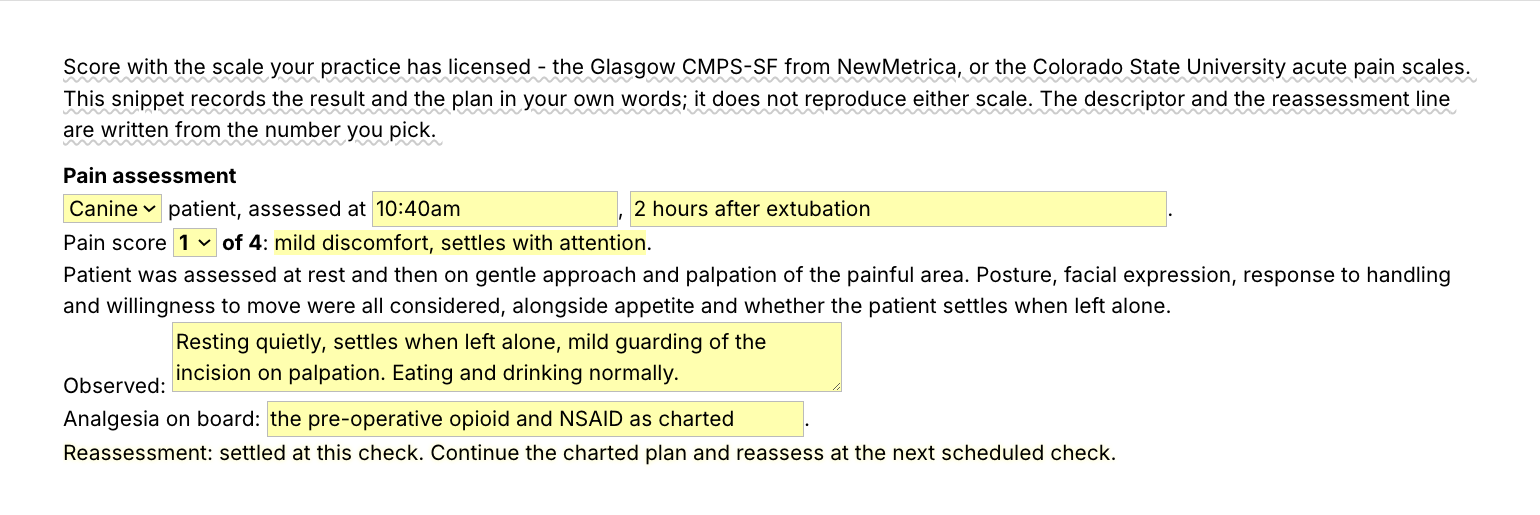
  • /pain, an acute pain score from 0 to 4 for post-op and hospital checks. The descriptor is written from the number, and a score of 2 or more records that the doctor was notified and sets when to reassess.
  • /bcs, the body condition score line out of 9.
  • /mcs, the muscle condition score line, from normal to severe loss.
  • /qsum, the quality of life score in plain words for the owner. It states the score and what you will watch, and never recommends a decision.
  • /wt, today's weight against the last visit, up or down.

About the scales

The /qol structure follows the HHHHHMM Quality of Life Scale by Dr. Alice Villalobos (pawspice.com). /pain records a 0 to 4 score in the style of the Colorado State University acute pain scales and reproduces no published scale.

“I enjoy Text Blaze immensely and can't imagine ever going back to working without it.”

Add the pack to a free Text Blaze account, type /bcs in your next record, and /qol at your next senior visit.

Copy the template for free

Free forever. Works in any PIMS or app. No integration required.

Questions vets ask

Do I need Text Blaze to use this template?

Yes. The calculators run in Text Blaze, a free Chrome extension with Windows and Mac apps.

Can I use it on Windows or Mac?

Yes. The Chrome extension covers browser-based PIMS. For installed Windows programs like Cornerstone or AVImark, use the Windows app. There is a Mac app too, but no phone app.

Is my client's information stored anywhere?

No. Snippets hold your templates, not patient records. What you type into a pop-up goes into your record and is not saved by Text Blaze.

Is the pack free?

Yes. All six snippets fit the free plan's 20 snippets. They use form fields, so you can test them free, and daily use needs Pro, $2.99 a month billed yearly.

Can I change the template?

Yes. Change the prompts, the summary and the reassessment wording once, and every assessment uses your version.

Type it once. Score every visit.

Add the free calculators and the total and summary go straight into the record in seconds. Then save /bcs, or a line of your own, as your first shortcut.

Copy the template for free

Free forever. Works in any PIMS or app. No integration required.