


Veterinary SOAP Note & Physical Exam Templates

Eliminate repetitive typing and mistakes. Insert a SOAP note or a normal physical exam in any text box in seconds.

Free forever. Works in any PIMS or app. No integration required.

Genevieve Hoffman
“Text Blaze has saved me over 1,000 hours of typing since becoming a user in November of 2024.”
Genevieve Hoffman, State Road Animal Hospital. Read the story

4.9 · 1,800+ Chrome Web Store reviews · 800,000+ people use Text Blaze

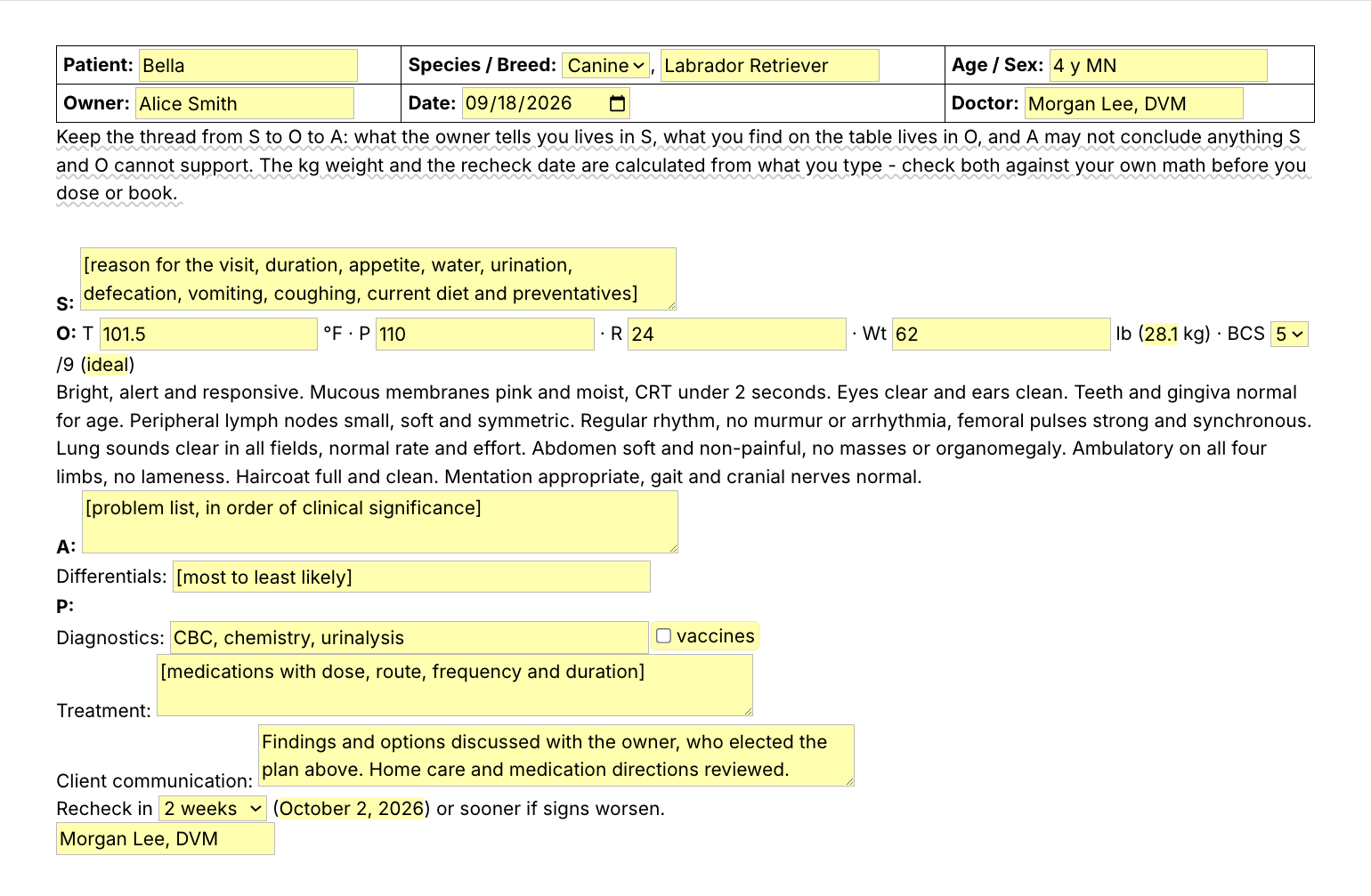
Typing /vsoap opens the Text Blaze pop-up, changing the BCS menu from 5 to 8 changes the band from ideal to obese, and Insert places the finished SOAP record in the note field

Type /vsoap. Fill in the form fields. Insert.

  1. Add the packThe button opens the pack's page on the Text Blaze marketplace. Add the pack in one click (sign up for a free account if you do not have one) and the templates are yours, ready to edit and use anywhere.
  2. Type /vsoap where you write recordsIn your PIMS record, in an email to a referral clinic, in a Google Doc. A pop-up opens with the patient header, the vitals and the four SOAP sections.
  3. Fill in, insert, editType the vitals, pick the body condition score, type what the owner told you and what you found, choose the recheck interval, insert. It lands as text you can still edit before you sign.
  4. Then make one of your ownCreate a snippet of sentences or paragraphs you type often. Give it a keyboard shortcut. Type the shortcut anywhere and the text appears. Congratulations! You just saved yourself a few seconds.

What is Text Blaze?

Text Blaze is a free Chrome extension, with Windows and Mac apps, that turns the text you type again and again into templates you insert with a shortcut. Type /vsoap and the whole record appears where your cursor is, in any program you type in.

Templates can hold text fields, drop-down menus, dates and checkboxes, and values that compute from other fields, so the weight in kilograms and the recheck date fill themselves in.

Works everywhere you type

Browser-based PIMS like ezyVet, Shepherd and Covetrus Pulse through the Chrome extension. Installed programs like Cornerstone and AVImark through the Windows app. Email, client messages and Google Docs too.

Fill-in fields, not blanks

Text fields for the vitals, menus for BCS and the recheck interval, and a checkbox that adds the vaccine line only when you gave vaccines today.

Your normals, saved once

Change the exam wording once to match how your clinic writes it, and every record starts with your normals. A practice manager can set the templates and share the folder so every doctor writes it the same way (free includes limited sharing, and the plans page has the numbers).

Free forever

The free plan holds up to 20 snippets, so the whole pack fits, and the eight snippets without form fields (both normal exams among them) work without limit. On the free plan you can test form fields and computed values (the SOAP header and the kg conversion use them). Using them day to day needs Pro, $2.99 a month billed yearly.

Works in ezyVetShepherdCovetrus PulseInstinctDigitailCornerstone (Windows app)AVImark (Windows app)ImproMed (Windows app)GmailOutlookGoogle Docs

Template insertion is done locally. PHI and other sensitive information never leaves your computer.

What are SOAP notes from a vet?

Vet SOAP notes are the veterinary medical records written for each visit, in four parts. S is what the owner reports, O is what the doctor measures and finds on the exam, A is the problem list and the likely causes, and P is the plan: tests, treatment, what was discussed with the owner and when to recheck.

What each part of a veterinary SOAP note holds:

  • Subjective: the reason for the visit and the history in the owner's account. How long it has been going on, appetite, water intake, urination, defecation, vomiting, coughing, diet and preventatives.
  • Objective: temperature, pulse, respiration, weight and body condition score, then the physical exam system by system. On a healthy patient most of those lines read the same every time.
  • Assessment: the problem list, most significant first, and the differentials for the main problem.
  • Plan: diagnostics, treatment with dose, route, frequency and duration, vaccines given, what the owner was told and chose, and the recheck.

Owners who ask for the SOAP notes vet clinics keep are asking for these records. The format is also how referral clinics, relief vets and the next doctor on shift read a case quickly, which is why it pays to write it the same way every time. The SOAP notes veterinary teams write still differ from clinic to clinic, so every line in this pack is plain text you can edit once and keep.

What makes a good veterinary SOAP note template?

A good vet SOAP template keeps the parts that never change typed out and asks for the parts that do. The headings, your name and the normal exam are already written. The history, the vitals, the abnormal findings, the assessment and the plan are form fields you fill in for this patient.

  • Normals you edit down. The exam arrives as your clinic's normal findings. You change the lines that are abnormal today and leave the rest, so a full exam never takes a full exam's typing.
  • Fields for what changes. Vitals, body condition score, problem list, differentials and treatment are form fields, so each record says what happened with this patient.
  • Math done for you, checked by you. Type the weight in pounds and the kilograms appear. Pick the recheck interval and the date appears. Check both before you dose or book.
  • Guidance that stays out of the record. A short reminder to keep what the owner said, what you found and what you conclude apart shows while you write and is never inserted.
  • Text you can still edit. The record lands as ordinary text in whatever field you are in, so you can change anything before you save it. A default you leave alone lands as it is (the Diagnostics line starts as CBC, chemistry, urinalysis), and a bracketed prompt you leave empty lands in brackets, so read the record once before you save it.

If your PIMS templates work for you, keep them. Built-in templates are often excellent. This pack adds the same record in every other place you type, and the exam lines you can drop into any template, your PIMS's included.

If you use an AI scribe, the two work together. The scribe drafts from the exam-room conversation. The one-line snippets are the sentences you still type yourself when you review and complete the record: the BAR line, the normal heart and lungs, the plan closer.

How this template helps

The /vsoap snippet is that template as a Text Blaze pop-up: a patient header, a Subjective field, vitals fields with the kg weight and the BCS band computed, the normal exam already written, Assessment and Differentials fields, and a Plan that ends with a recheck date. Two normal exam templates and ten one-line snippets cover the rest.

Inside the pop-up

Patient, species and breed, age and sex, owner, date and doctor sit in a small table at the top, with your name saved once. S is a paragraph field for the history. O has fields for temperature, pulse, respiration and weight in pounds, with the kilograms computed beside it, and a BCS menu that names the band (thin, ideal, overweight or obese). Below the vitals is a short normal exam paragraph, one sentence per system group. For the full system-by-system exam, with hydration and urogenital lines, insert /pedog or /pecat in its place. A is a problem list field and a differentials line. P holds diagnostics, a checkbox that adds the vaccines you gave today from a menu, treatment, client communication and a recheck menu that writes the date for you.

Filled in for a fictional patient, the record reads:

Patient: Bella · Species / Breed: Canine, Labrador Retriever · Age / Sex: 7 y FS
Owner: Alice Smith · Date: 2026-09-18 · Doctor: Morgan Lee, DVM
S: Owner reports three days of soft stool, no blood or mucus. Bella is otherwise well, eating and drinking normally. She got into the compost bin over the weekend.
O: T 101.8 °F · P 96 · R 28 · Wt 78 lb (35.4 kg) · BCS 8/9 (obese)
Bright, alert and responsive. Mucous membranes pink and moist, CRT under 2 seconds. Eyes clear and ears clean. Teeth and gingiva normal for age. Peripheral lymph nodes small, soft and symmetric. Regular rhythm, no murmur or arrhythmia, femoral pulses strong and synchronous. Lung sounds clear in all fields, normal rate and effort. Abdomen soft and non-painful, no masses or organomegaly. Ambulatory on all four limbs, no lameness. Haircoat full and clean. Mentation appropriate, gait and cranial nerves normal.
A: 1. Acute soft stool, most likely dietary after the compost. 2. Obese body condition at BCS 8 of 9.
Differentials: dietary indiscretion, intestinal parasites
P: Diagnostics: fecal flotation, CBC and chemistry. Treatment: bland diet for five days, then a gradual return to her normal food. Vaccines deferred until her stool is normal.
Recheck in 1 week (September 25, 2026) or sooner if signs worsen.
Morgan Lee, DVM

The header labels, the normal exam, the kilograms, the BCS band, the recheck date and the signature were already there. The rest is what happened with this patient.

The normal exam templates

  • /pedog: a system-by-system normal canine physical exam, general through neurologic, one line per system so you can edit the abnormal ones.
  • /pecat: the same exam worded for cats, with thyroid palpation, resorptive lesions and kidney size in their places.

One-line snippets for the sentences you type most

  • /bar, the BAR line: bright, alert and responsive, hydration, MM and CRT.
  • /hl, heart and lungs normal in one sentence.
  • /abdn, abdomen normal on palpation.
  • /eent, eyes, ears, gums and teeth, with a dental grade menu.
  • /integ, skin, coat and lymph nodes.
  • /neuron, the neuro exam normal.
  • /hx, the history opener, with a field for how long.
  • /bcoll, a blood collection note with a venipuncture site menu.
  • /ddx, the assessment and differentials opener.
  • /plan, the plan closer with a recheck menu.

/pedog types a 14-line normal exam, about 1,200 characters, from six keystrokes. Start with /bar. It turns a sentence you type for almost every patient into four keystrokes, and it works inside any template, your PIMS's included.

“I enjoy Text Blaze immensely and can't imagine ever going back to working without it.”

Keep your PIMS templates and your AI scribe. Add the pack to a free Text Blaze account, type /bar in your next record, and /vsoap when you write up the visit.

Copy the template for free

Free forever. Works in any PIMS or app. No integration required.

Questions vets ask

Is there a veterinary SOAP note template I can copy?

Yes. This pack is free: a full veterinary SOAP note (/vsoap), normal dog and cat physical exams (/pedog and /pecat) and ten one-line snippets for the exam and plan sentences you type most. Add it to a free Text Blaze account and edit any line to match how your clinic writes.

What is a normal physical exam template for a dog or cat?

It is the full exam written out as normal findings, one line per body system: general, eyes, ears, nose and throat, oral, lymph nodes, heart, lungs, abdomen, urogenital, musculoskeletal, skin and neuro. You insert it and edit only the systems that are abnormal today. The cat version adds thyroid palpation and kidney size.

How do veterinarians finish medical records faster?

By typing only what is new for this patient. Keep the normal exam, the headings and the closing lines as snippets, write the record between appointments while the visit is fresh, and fill in the history, the abnormal findings and the plan. The routine parts of a record take seconds, so the catch up time goes to the cases that need thought.

Do I need Text Blaze to use this template?

Yes. The templates are Text Blaze snippets, and the free plan is enough to add all of them and to use the snippets without form fields without limit. Text Blaze is a free Chrome extension, with Windows and Mac apps as well.

Can I use it on Windows or Mac?

Yes. The Chrome extension covers browser-based PIMS such as ezyVet, Shepherd and Covetrus Pulse. For installed Windows programs such as Cornerstone, AVImark or ImproMed, use the Text Blaze Windows app, which inserts the same snippets there. There is a Mac app too, and your snippets follow you to every computer you sign in on. There is no iPad or phone app, so a record written on a tablet stays hand-typed.

Will my notes look cloned?

Not if you edit the exam and fill in the fields. The fixed text is the headings, your name and the normal findings. The history, vitals, abnormal findings, assessment and plan are this patient's, so two records share the headings and the normal lines and nothing else. Edit every normal line that was not normal today.

Is my client's information stored anywhere?

Text Blaze snippets hold your template and your defaults, not your patient records. Template insertion is done locally: what you type into the pop-up's fields goes into the record you are writing and is not saved, synced or logged by Text Blaze after you insert.

Is the pack free?

Yes. The pack is free and its 13 snippets fit the free plan's 20. The eight snippets without form fields, both normal exams among them, work without limit on Free. You can test the five form-field snippets, /vsoap included, on the free plan. Using them day to day needs Pro, $2.99 a month billed yearly, which also adds more snippets and more folder sharing.

Can I change the template?

Yes. Everything is editable: the exam wording, the menu options, the defaults, the vaccine list and the section labels. Rewrite the normals the way your clinic says them, add a line your practice requires, or delete one you never use. Change it once and it stays changed.

Finish the record before you go home.

Add the free vet SOAP note pack, write your normals once, and the exam you type 20 times a day takes seconds. Then save /bar, or a sentence of your own, and let it give you the minutes back.

Copy the template for free

Free forever. Works in any PIMS or app. No integration required.