

Wound Care Documentation Templates for Home Health

Eliminate repetitive typing and mistakes. Insert a wound assessment or wound care visit note in any text box in seconds.

Free forever. Works in any web-based EHR or app. No integration required.

Jessica Little
“Since September 2024, Text Blaze has saved us 22,320 hours.”
Jessica Little, HOMAHA. Read the story

4.9 · 1,900+ Chrome Web Store reviews · 800,000+ people use Text Blaze

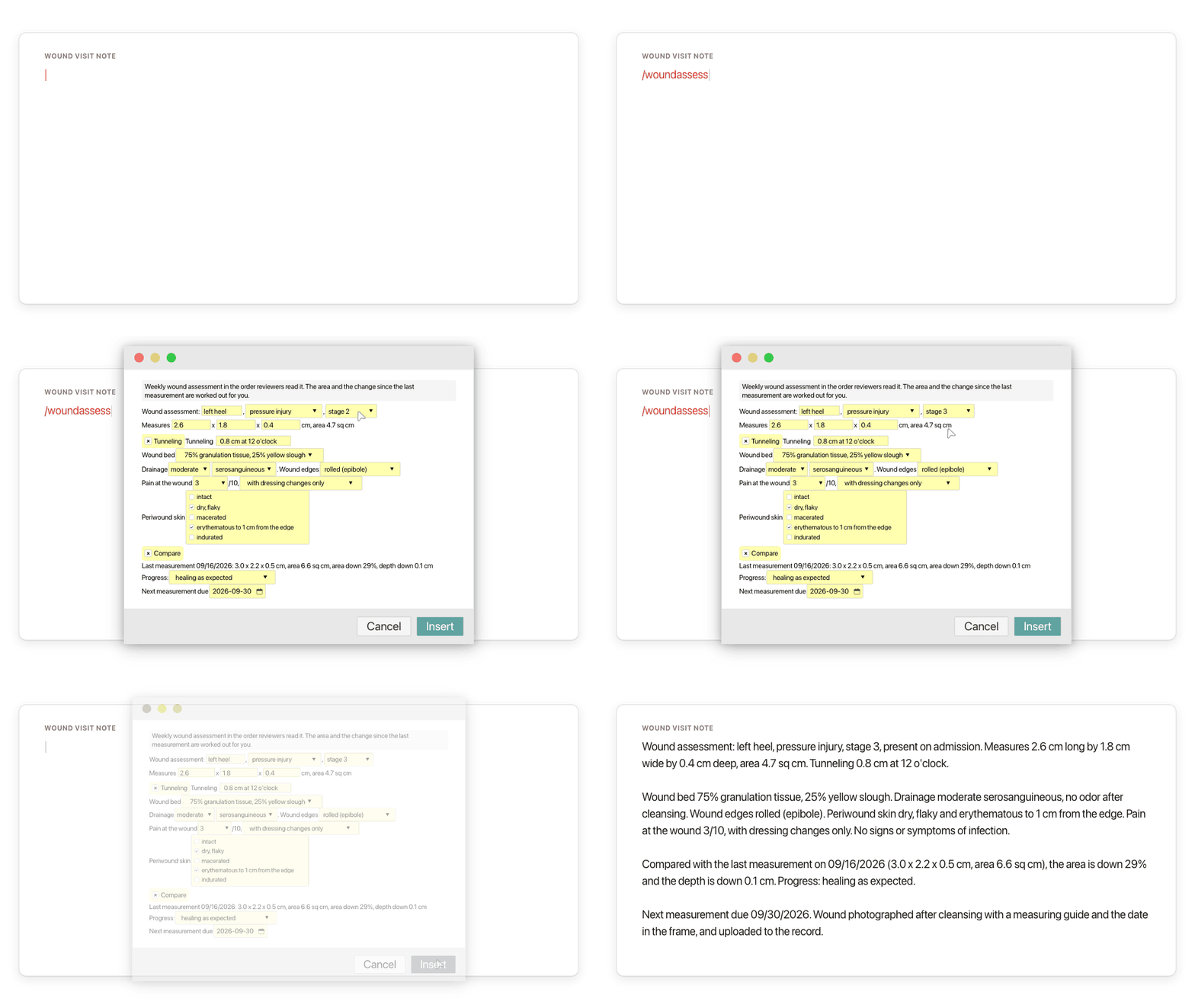
Typing /woundassess opens the Text Blaze pop-up with the location, measurements and findings filled in, the stage menu changes from stage 2 to stage 3, and Insert places the weekly wound assessment in the visit note with the area and the change since the last measurement worked out

Type /woundassess. Pick the stage. Insert.

  1. Add the packThe button opens the pack's page on the Text Blaze marketplace. Add the pack in one click (sign up for a free account if you do not have one) and the templates are yours, ready to edit and use anywhere.
  2. Type /woundassess where you chartWith Text Blaze installed (the Chrome extension, or the Windows or Mac app), type /woundassess in your EHR's wound or narrative field, or in a Google Doc you draft in. A pop-up opens with fields for the measurements and menus for everything you look at. For a dressing change visit, type /woundnote instead.
  3. Fill in, insert, editType the length, width and depth and the area is worked out as you type. Pick the wound bed, drainage and edges from the menus, then insert. It lands as text you can still edit.
  4. Then make one of your ownCreate a snippet of sentences or paragraphs you type often. Give it a keyboard shortcut. Type the shortcut anywhere and the text appears. Congratulations! You just saved yourself a few seconds.

What is Text Blaze?

Text Blaze is a free Chrome extension, with Windows and Mac apps, that turns the text you type again and again into templates you insert with a shortcut. Type /woundassess and a whole wound assessment appears where your cursor is, in any app you type in on a computer.

Many home health nurses finish their charting in the evening, hours after the last visit, and a wound note is one of the longest parts: every measurement, the wound bed, the drainage, the dressing and the teaching. If you keep wound phrases in a Word or Google Doc and paste from it, this is that document, one shortcut away inside the chart. Templates can hold text fields, drop-down menus and toggles, so every wound is charted in the same order and the details are this patient's.

Works where you chart on a computer

The web versions of WellSky, Axxess and Alora, Google Docs, Gmail and Outlook. No integration to set up. On an agency laptop, IT may need to approve the extension first. Phone and tablet charting apps are the exception.

The math done for you

Type the length and width and the area appears. Add last week's numbers and the change in area and depth is calculated too. Check the numbers before you sign, as with anything you chart.

Your agency's dressings, saved once

Change the menus once to the cleansers, dressings and teaching your agency uses and every wound note starts from them. One person can set the templates and share the folder with the team. Sharing limits are on the plans page.

Free forever

/woundteach, /puteach, /noinfect, /photo and any snippet you save yourself without form fields are free forever. The six snippets with form fields can be tested on the free plan and need Pro, $2.99 a month billed yearly, for day-to-day use. "Is the pack free?" below has the details.

Works in WellSky (web)Axxess (web)Alora (web)GmailOutlook on the webGoogle Docs

Template insertion is done locally. PHI and other sensitive information never leaves your computer.

What is wound care documentation?

Wound care documentation is the record of each wound at each visit: where it is, what type it is, its stage if it is a pressure injury, its measurements, how the wound bed, drainage, edges and surrounding skin look, the care you gave and how the patient responded. Read week to week, it shows whether the wound is healing.

In home health, wound care documentation is written at several points in an episode:

  • At the weekly measurement, as a full wound assessment: size, tissue, drainage, skin around the wound, pain, signs of infection, and the change since the last measurement.
  • At every wound care visit, as a focused note: what the patient reports, how the wound looks today, the dressing change done, the teaching and the plan for the next visit.
  • At the start of care and the weekly skin recheck, as a skin integrity and pressure injury risk note, for patients who have no wound yet and the ones who could get another.
  • Whenever you teach, as a teaching entry with the patient's or caregiver's response, and a return demonstration once a caregiver does the dressing changes.

Only pressure injuries are staged. Diabetic foot ulcers, venous and arterial ulcers, surgical wounds and skin tears are described by type and measured the same way, but never given a pressure injury stage. Some have a classification of their own, such as a grade for a diabetic foot ulcer or a type for a skin tear, if your agency uses one.

Wound documentation in the visit note is separate from the OASIS integumentary items (M1311, the count of pressure ulcers and injuries at each stage, among them) at the start of care, resumption of care, recertification and discharge. The pack writes the wound narrative and the visit note. You still answer the OASIS items in the OASIS itself.

How to document a wound

Document a wound in the same order every time: location and type, the stage for a pressure injury, length, width and depth in centimeters, tunneling and undermining, wound bed, drainage, odor, edges, periwound skin, pain and signs of infection. Then compare with the last measurement and record the care, the teaching and the plan.

Most agencies' wound care documentation requirements come down to the same list for wound care assessment and documentation:

  • Numbers, not impressions. "2.6 x 1.8 x 0.4 cm, 75% granulation tissue, 25% yellow slough" is a finding. "Wound looks better" is not.
  • The change since the last measurement. The area and depth then and now, so anyone reading the chart can see the trend without paging back.
  • Drainage by amount and type, and odor checked after cleansing, not before.
  • Signs of infection, present or absent. Charting that none were found is as important as charting the ones that were.
  • The care given, as ordered. The cleanser, the dressings applied, and how the patient tolerated the change.
  • The teaching and the response, as what the patient or caregiver did or said, not only "verbalized understanding".
  • The physician contact when the wound worsens or stops improving: what you reported, the response or new order, read back and verified.
  • Homebound status, skilled need and the plan from today's findings, and when the next measurement is due.

Measurement and photo tips

  • Measure after cleansing, with the patient in the same position each week.
  • Length runs head to toe and width side to side, at right angles to each other. Depth is taken at the deepest point.
  • Record tunneling and undermining by clock position, with 12 o'clock toward the patient's head.
  • Photograph after cleansing with a measuring guide and the date in the frame, from the same distance and angle as the last photo, on the device and with the consent your agency requires.

These are documentation habits, not wound care orders. Follow the patient's orders and your agency's wound care policy where they differ.

What is filled in for you and what you fill in

The order of a wound note and many of its sentences are the same from visit to visit. The measurements and what you see are not. The pack splits the two: the structure and the sentences you repeat are typed for you, and text fields and menus are left for what you measured and saw. /woundteach is the shortest one: the whole wound care teaching entry with no form fields. A good first one to change into your own words.

How this template helps

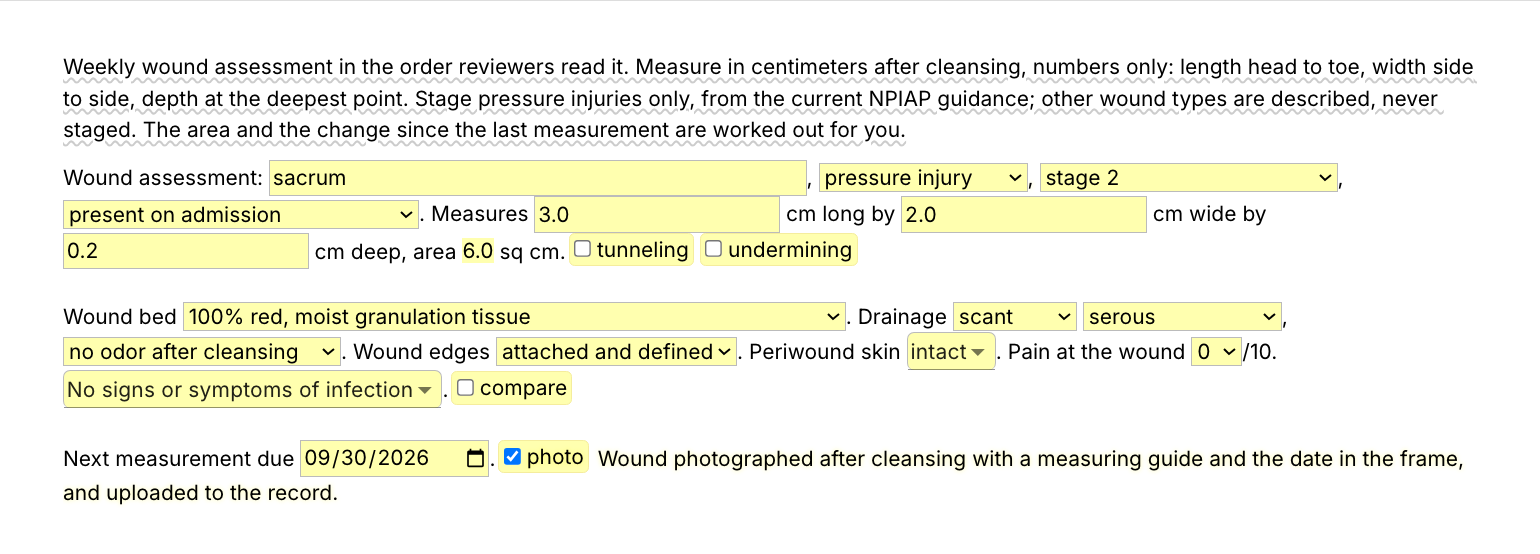
The /woundassess snippet is a weekly wound assessment as a Text Blaze pop-up: location, type and stage, measurements with the area calculated, wound bed, drainage, edges, periwound skin, pain, signs of infection and the change since the last measurement. You type the numbers and pick what you see. Two more templates and seven shorter snippets cover the rest.

Inside the pop-up

The first screenshot at the top of the page is the whole form. A text field holds the location and menus hold the wound type, the stage and when it started. The stage menu (stage 1 to 4, unstageable and deep tissue pressure injury) shows only when the wound type is a pressure injury. Fields hold the length, width and depth, and the area is calculated from them as length times width. Toggles add tunneling and undermining when you find them. Menus hold the wound bed, drainage amount and type, odor, edges, periwound skin (choose several) and pain. The signs of infection menu reads "No signs or symptoms of infection" until you pick one. Switch on the compare toggle, type last week's date and numbers, and the change in area and depth is written out for you. The guidance note at the top shows while you write and is never inserted.

A wound care documentation example

Here is a wound care documentation sample: what /woundassess inserts, filled in for a fictional patient with a pressure injury on the left heel.

Wound assessment: left heel, pressure injury, stage 3, present on admission. Measures 2.6 cm long by 1.8 cm wide by 0.4 cm deep, area 4.7 sq cm. Tunneling 0.8 cm at 12 o'clock.

Wound bed 75% granulation tissue, 25% yellow slough. Drainage moderate serosanguineous, no odor after cleansing. Wound edges rolled (epibole). Periwound skin dry, flaky and erythematous to 1 cm from the edge. Pain at the wound 3/10, with dressing changes only. No signs or symptoms of infection.

Compared with the last measurement on 09/16/2026 (3.0 x 2.2 x 0.5 cm, area 6.6 sq cm), the area is down 29% and the depth is down 0.1 cm. Progress: healing as expected.

Next measurement due 09/30/2026. Wound photographed after cleansing with a measuring guide and the date in the frame, and uploaded to the record.

To write it, you type the location and the measurements, pick from the menus and switch on tunneling and the compare toggle. The area, the 29% and the 0.1 cm come from the template.

The other two templates

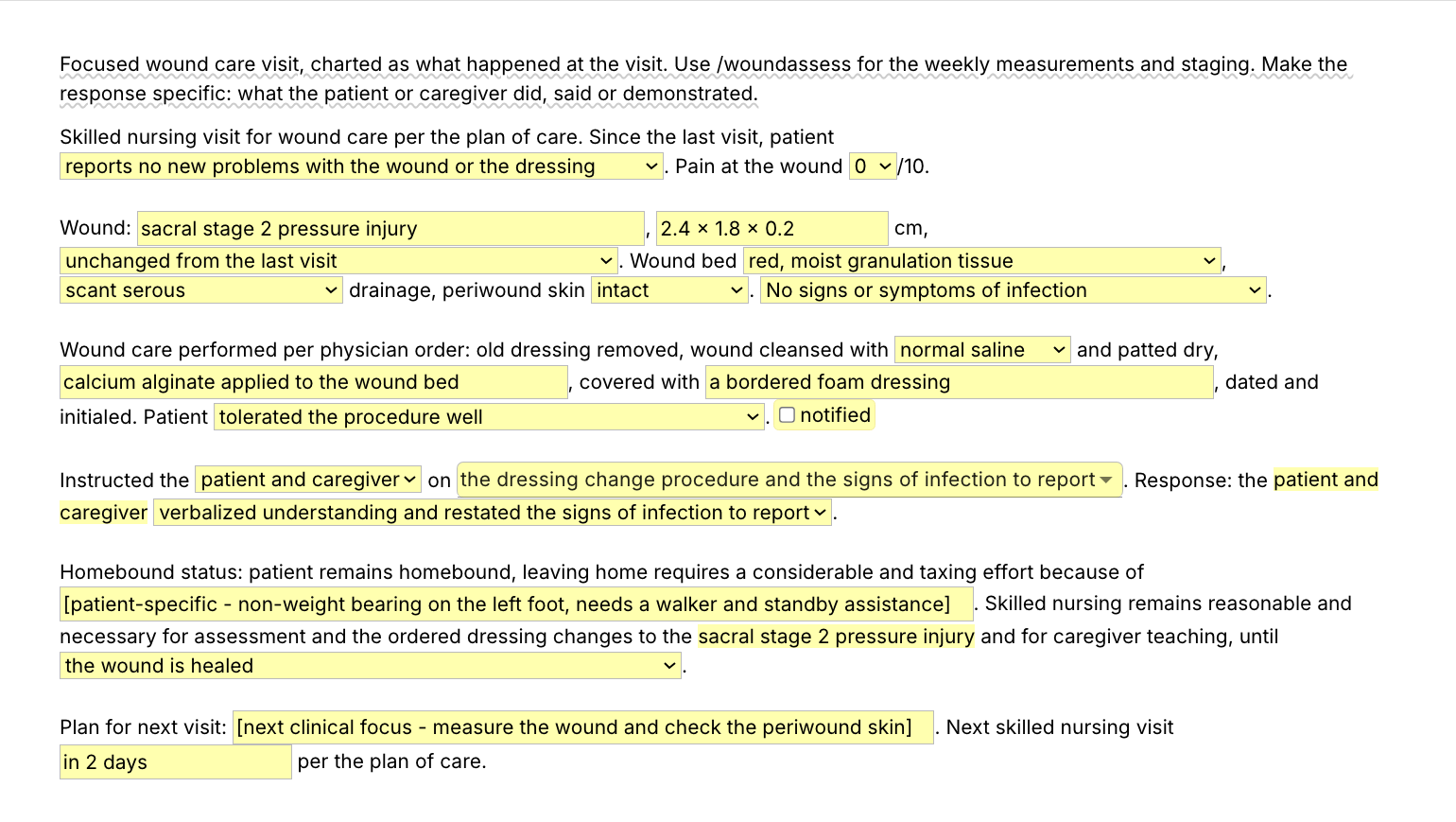
  • /woundnote, the wound care visit note: what the patient reports since the last visit, pain, the wound and its size with how it compares with the last visit, the wound bed, drainage, periwound skin and infection check, the dressing change with the cleanser and the dressings applied, a physician notification toggle, who you taught, the topics (choose several) and their response, homebound and skilled-need lines that reuse the wound you typed, and the plan for next visit.
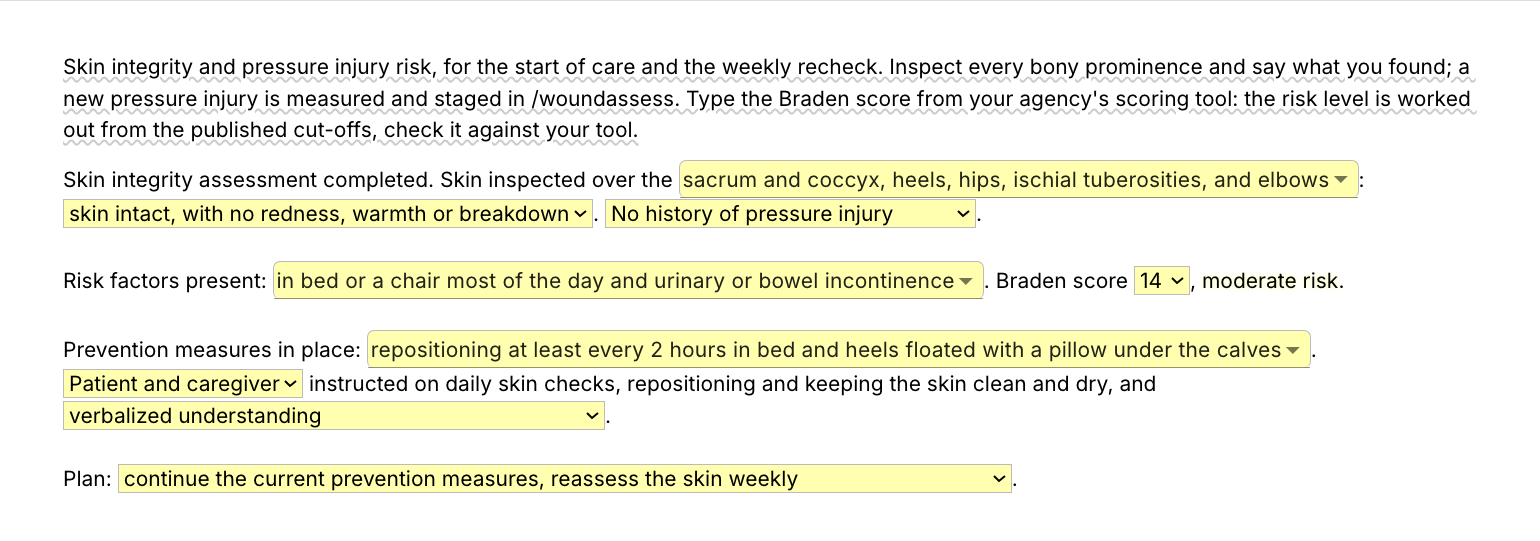
  • /skinrisk, skin integrity and pressure injury risk: the areas you inspected and what you found, history, the risk factors present, the Braden score from your agency's own scoring tool and the risk level that matches it in the published cut-offs, the prevention measures in place, who was taught and how they responded, and the plan. The Braden Scale itself is not part of the pack.

Shorter snippets for the sentences you type most

  • /woundteach, the wound care teaching entry: hand hygiene, keeping the dressing clean and dry, the signs of infection to report, nutrition for healing and a teach-back closer. No fields, so it works on the free plan without limit.
  • /puteach, pressure injury prevention teaching: repositioning, floating the heels, skin checks and when to call. No fields either.
  • /noinfect, the no-signs-of-infection sentence for a wound that is doing well. No fields.
  • /photo, the wound photo line. No fields.
  • /dressing, the dressing change sentence, with fields for what was on the old dressing and the dressing applied.
  • /woundplan, the wound care plan and skilled-need line, with a field for the ordered frequency.
  • /cgdemo, the caregiver return demonstration, with a menu for the cueing needed.

Text Blaze helps me finish my paperwork while I'm still sitting with a patient.

Stephanie Yakobina

Add the pack to a free Text Blaze account and type /woundassess at your next weekly measurement.

Copy the template for free

Free forever. Works in any web-based EHR or app. No integration required.

Questions home health nurses ask

Do I need Text Blaze to use this template?

Yes. The templates are Text Blaze snippets. The free plan is enough to add all 10, to use /woundteach, /puteach, /noinfect, /photo and any snippet you make that has no form fields as often as you like, and to test the templates with form fields. Text Blaze is a free Chrome extension, with Windows and Mac apps as well.

Does it work in my EHR?

Yes. Text Blaze works in your EHR, your email and any other app you use on a computer: the web versions of WellSky, Axxess and Alora among others, Gmail, Outlook and Google Docs. If your EHR opens in Chrome or Microsoft Edge, or runs as a Windows or Mac program, Text Blaze works there. There is nothing to integrate: you type the shortcut in the field where you would have typed the wound note. It does not run inside phone or tablet charting apps, so a visit charted on a tablet stays hand-typed there. That includes the Homecare Homebase field app, which runs on Android phones and tablets.

To check yours, add the pack and type /noinfect in a narrative field on your computer. If the sentence appears, the rest will too. On an agency computer, IT may need to approve the Chrome extension or the Windows app before you can install it.

My EHR already has templates. Why this pack?

Keep them if they work for you. Many EHR wound screens are checkboxes and a free-text box, and the pack is for that box: the sentences you type at every dressing change and the teaching you keep in a document and paste. It works the same in a second system or a Google Doc, and it comes with you if your agency changes EHRs. If you fill in printable wound care documentation forms and retype them later, the pack puts the same order straight into the chart.

Will my notes look cloned?

Not if the findings are this visit's. The order repeats because every wound note needs the same parts. What makes notes read as cloned is last week's measurements, wound bed and response carried forward. In /woundassess the measurements are text fields you type at every assessment, and in /woundnote the wound, its size, the dressings and the homebound reason are fields too. Read what you inserted before you sign and change anything that differed.

Is my patient's information stored anywhere?

Text Blaze snippets hold your template and your defaults, not your patient records. Template insertion is done locally: what you type into the pop-up's fields goes into the page you are on and is not saved, synced or logged by Text Blaze after you insert. Wound photos stay in your agency's system, since the pack only writes the photo line.

BAA is available upon request. Read our HIPAA guide.

Is the pack free?

The pack is free to add, and its 10 snippets fit the free plan. /woundteach, /puteach, /noinfect and /photo are free to use forever, and so is any snippet you save yourself without form fields. On the free plan you can test the six snippets with form fields (the three templates, /dressing, /woundplan and /cgdemo) to see how they work. Using them day to day needs Pro, $2.99 a month billed yearly ($3.49 billed monthly). The plans page lists what each plan includes.

Can I change the template?

Yes. Everything is editable: the menu options, the defaults, the sentence frames and the order. Put the cleansers and dressings your agency stocks in the /woundnote menus, add the wound types you see most to /woundassess, or rewrite /woundteach in the words you use at the bedside. Change it once and it stays changed.

Does the template guarantee reimbursement?

No. Coverage depends on the patient meeting the criteria and on the record showing it. The pack gives you the parts of a wound note in a consistent order and works out the measurements you type. It cannot supply the findings, and the wording should be checked against the patient's orders and your agency's policies.

Can I use it on Windows or Mac?

Yes. Text Blaze runs as a Chrome extension (it installs in Microsoft Edge too) and as Windows and Mac apps, so the shortcuts work in web-based EHRs and in desktop apps alike, with the same snippets on every computer you sign in on. There is no iPad or phone app, so a note written in a phone or tablet charting app stays hand-typed.

Every wound charted in minutes.

Add the free wound care pack and set the dressings and menus to your agency's wording once. Each wound note takes minutes, not an evening, and /woundteach puts the whole wound care teaching entry into any note with one shortcut.

Copy the template for free

Free forever. Works in any web-based EHR or app. No integration required.